
 By
By 
Localization must be a key strategic function, not merely a translation exercise, if you want to use App Store Optimization (ASO) to increase your app’s global reach. It entails modifying the content, graphics, user interface, and ASO metadata of your application to conform to particular cultural and regional norms.
Strategic Steps for ASO Localization
- Prioritize Target Markets: Analyze existing data to identify regions where your app is already getting organic traction or where there is high potential demand but low competition.
- Conduct Localized Keyword Research: Do not just literally translate keywords. Work with native speakers or use ASO tools to research what terms locals actually use to search for apps in your category.
- Adapt Metadata: Translate and tailor your app’s title, subtitle, and description for each locale. Ensure the messaging captures the relevant value proposition and incorporates local keywords naturally within character limits.
- Localize Creative Assets: Adapt screenshots and app preview videos to show the app interface in the local language, using culturally relevant imagery, fashion, and scenarios.
- Avoid using generic visuals that might not resonate or could be offensive in other cultures (e.g., a “thumbs-up” gesture is negative in some regions).
- Prepare the In-App Experience: Ensure that once a user downloads the localized app, the in-app experience (UI, content, date/currency formats, payment methods) is also in their language and aligned with local expectations.
- Test and Iterate: Perform quality assurance with native reviewers to ensure accuracy and cultural appropriateness. Continuously track key performance indicators (KPIs) like downloads by region, conversion rates, and retention to refine your strategy over time.
Key Localization Strategies
- Beyond Translation: Acknowledge that localization addresses cultural nuances, slang, humor, icons, and even color preferences, not just language.
- Technical Readiness (Internationalization): Design your app’s infrastructure to support multiple languages and layouts from the start. Store text strings externally so they can be easily swapped without rewriting code, and design flexible UIs that accommodate text expansion in other languages.
- Leverage Local Expertise: Collaborate with local marketers, influencers, or professional localization services to gain authentic insights into market preferences.
- Monitor Competition: Analyze the localization strategies of competitors in target markets to identify gaps and opportunities for your own app.
- Offer Local Payment Methods: Integrate region-specific payment options (e.g., local mobile wallets) to remove friction from in-app purchases.
The use of mobile apps has spread around the world. Experts estimate that by the end of 2025, mobile app revenue will have increased from $530 billion in 2024 to $585 billion (Statista, 2025).
But money isn’t the only factor.
In 2024, people used mobile apps for an astounding 4.2 trillion hours worldwide (SensorTower, 2025). This demonstrates how much time people are ready to devote to applications that they find entertaining, helpful, and—above all—easy to interact with.
The problem is that an app will lose out on billions of potential consumers if it is only available in English. People who don’t speak English as their first language are much more inclined to download and use apps that “speak their language,” according to studies.
You cannot overlook app localization as a growth strategy. You’re missing out on significant growth if you’re simply supporting or releasing your mobile app in one language. Mobile app localization is more than just a nice-to-have; it’s an essential component of effective ASO and a potent tool for increasing user engagement and acquisition globally.
App store localization is still one of the best—and frequently overlooked—methods for mobile marketers to increase exposure, enhance conversions, and enable expansion in international markets. However, you need a strategy in addition to translations if you want it to become a true competitive edge.
We’ll lead you through every step of the mobile app localization process in this guide, from planning to carrying it out. You’ll find out why ASO localization is crucial for expanding globally, examine tools and best practices that make the process easier, learn how to steer clear of typical pitfalls, and view actual examples of successful apps.
This article is your road map to success, whether you’re getting ready to launch your first app worldwide or want to enhance your existing app store localization efforts.
What is App Localization?
The act of modifying a mobile app’s functionality, design, and content to satisfy the cultural expectations of users in each target area is known as app localization.
Localization of mobile apps involves much more than just translation. It goes beyond simply translating material, such as keywords and app descriptions, into a particular language. The process of tailoring an app’s style and content to the cultural peculiarities of a specific market is known as app store localization.
What is effective in Germany may not be effective in Japan, and vice versa. To make your app more “native” and appropriate for a certain area, you should alter the content, app pictures, calls to action, and perhaps even the symbol.
Localization of mobile apps is essential for growth since it opens up new users.
App localization boosts these key metrics:
- Access to new markets: 80% of top-grossing app markets speak languages other than English.
- More downloads and revenue: A study found that adding a local language led to 128% more downloads and 26% higher revenue per country.
- Better visibility and credibility: Localizing app store listings to users’ native language can increase downloads by 38%.
Why is App Localization Important?
1. Market Expansion & Increased Download Rates:
Localization enables businesses to enter and thrive in new markets by making their apps accessible and relevant to a diverse audience. By adapting language, cultural nuances, and regional preferences, companies can attract more users globally.
This adaptation increases the likelihood of appearing in relevant search results within app stores, thereby boosting visibility and download rates.
2. Enhanced User Experience & Higher User Engagement:
Tailoring content to the linguistic and cultural specifics of different regions significantly enhances user experience, leading to higher satisfaction and retention rates.
Users feel more connected and understood, which not only attracts them but also keeps them engaged. An app that speaks their language and respects their cultural context results in higher daily active users (DAUs) and longer session durations.
3. Revenue Growth:
Localized apps can drive revenue growth through increased in-app purchases, subscriptions, and ad revenue. Users are more inclined to spend money on an app that feels familiar and trustworthy.
Key benefits of app localization:
- Reach new markets — 80% of top-grossing app markets use languages other than English.
- More downloads & revenue — adding a local language produced a 128% lift in downloads and a 26% increase in revenue per country.
- Greater visibility & trust — translating store listings into users’ native language can boost downloads by about 38%.
Localization Trends in App Metadata
Of the top 1000 apps, 77% in the US App Store and 99% on Google Play have made their apps available in other countries last year. Notably, 59% of these apps on the App Store have localized their titles, and 89% have localized their long descriptions, suggesting that many apps prefer to maintain brand-specific titles while adapting descriptions for international markets.
Countries with Most Localization:
- Title Localization: Germany leads in title localization on the App Store, followed by Japan, Spain, Mexico, and France.
- Description Localization: Spain, Mexico, Argentina, and France frequently localize their App Store descriptions.
Examples of App Store Localization
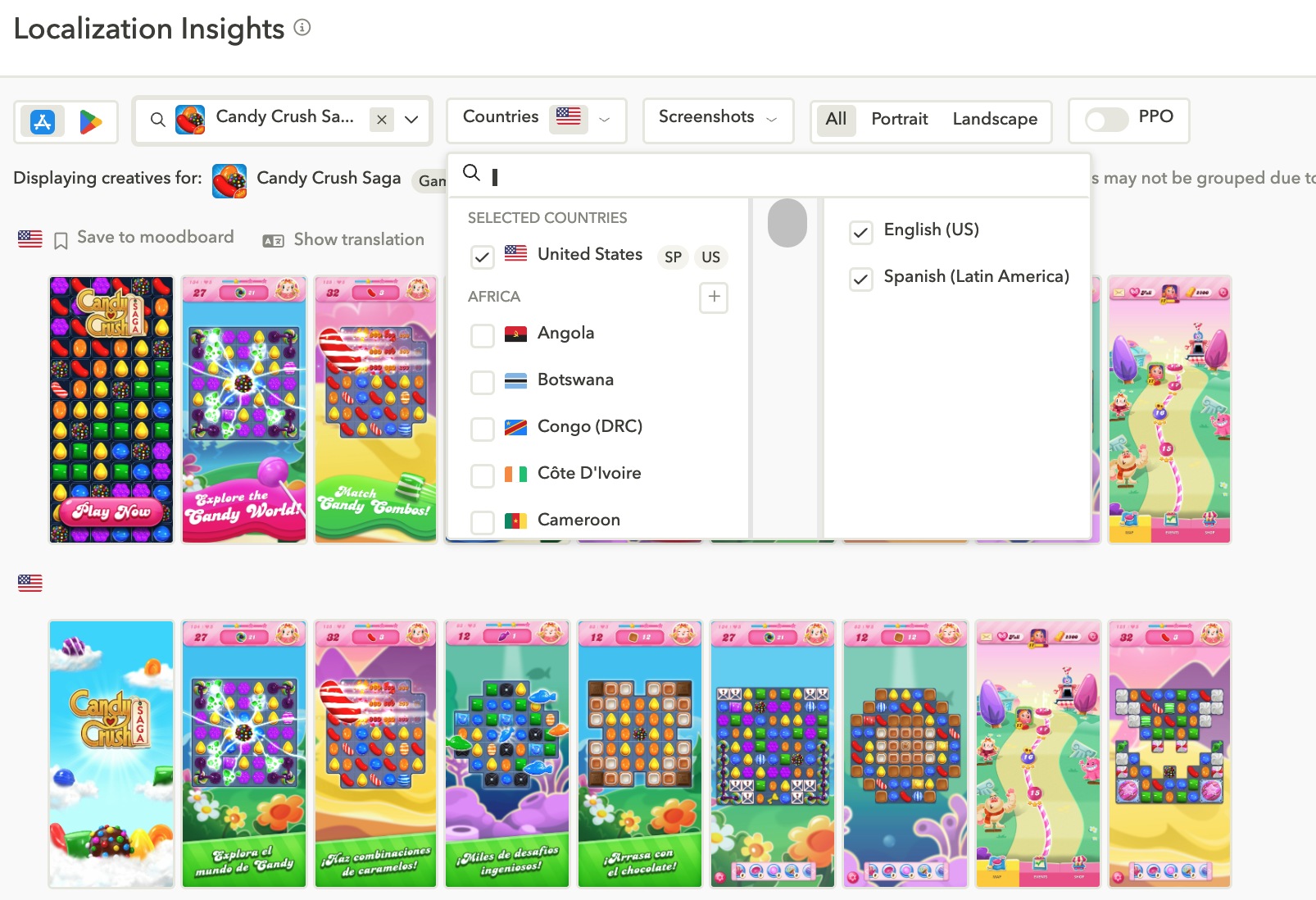
Every country’s app store listings for King’s Candy Crush Saga are fully localized. This contributed to Candy Crush’s over 3 billion downloads globally, demonstrating how tailoring an app to each locality may spur enormous global expansion.
And you know what? King has been an AppTweak client for a long time and uses our ASO analytics to propel growth. Read about King’s achievements.
Here is a snapshot of Candy Crush Saga that has been translated for the Spanish audience from the U.S. App Store.
Another popular mobile game, Ludo King, localized into 15 languages, including multiple Indian regional languages. This focus on mobile app localization helped it become one of the most downloaded mobile games in the world, crossing 1 billion downloads.
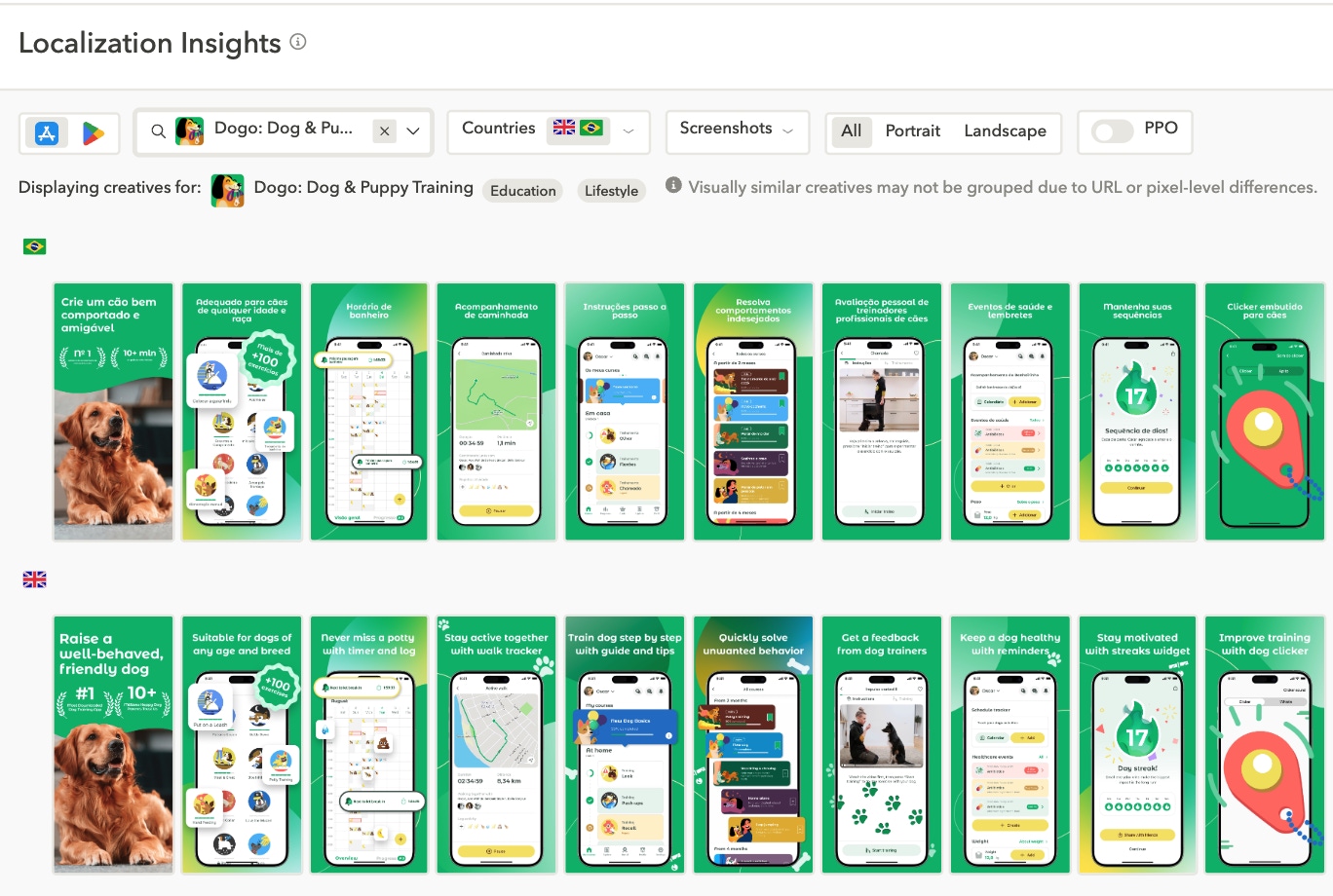
Lithuanian-based Dogo, a wildly popular dog-training app, focused on mobile app localization from day one. By localizing into ten languages, Dogo successfully expanded to 221 countries, significantly growing its global user base.
Read Also: How to Optimize for Google Play vs. Apple App Store
Take a look at how the app appears for Portuguese users on the App Store.
How Does Localization Differ Across Google Play and the App Store?
The App Store and Google Play each have their own localization guidelines, localized fields, and best practices, even if the fundamental objective of mobile app localization is the same for all app stores: modifying your product to better reach and engage people in various target regions.
To assist you in developing a more successful app store localization plan for each platform, we break down these distinctions below.
Metadata fields and submission process
Although localized information is supported by both markets, there are notable differences in the fields’ flexibility and structure.
Developers can localize the app title, short description, and full description for more than 70 languages using Google Play. You can upload localized files via translations or handle this directly in the Google Play Console.
You may translate your app’s title, subtitle, keywords, description, promotional text, and screenshots by configuring App Store localization in App Store Connect.
Google Play allows for simpler listing updates and staggered rollouts, but App Store submissions need to be manually reviewed, which prolongs iteration cycles. Thus, bear this in mind when organizing your app’s ASO localization.
Asset and creative requirements
Screenshots and video samples are examples of visual assets that are crucial to the effectiveness of app localization. However, as we explain in our app screenshot, icon, and video size standards, the requirements differ each store.
Screenshots on the App Store need to be customized according to the language and size of the device. In order to reflect customized UI, language, and regional appeal, each market and device type (such as the iPhone or iPad) may require its own set of images.
With custom store listings that can be targeted by language or country, Google Play provides versatility. Mobile marketers who desire complete creative control will really benefit from this tool, which enables you to generate up to 50 customized listings with entirely separate pictures, videos, and descriptions targeted to each demographic.
Both storefronts offer localized videos, albeit they are handled differently on each platform.
Google Play helps advertisers understand how each video variant affects conversions by supporting both portrait and landscape formats and providing comprehensive performance information.
Up to three preview films per location may be uploaded to the App Store, but they must adhere to stringent format requirements and match the device type (i.e., iPhone or iPad). These movies nonetheless provide a great chance to engage people in a culturally appropriate manner, even though performance data is more scarce.
In-app experience expectations
Consistency between the in-app experience and the app store listing is expected by users. Friction frequently results from app localization that ends at the metadata level.
Complete in-app localization, including UI, onboarding, and support content, is anticipated because consumers are likely to leave both app stores if the app launches in a different language than the store page.
Apple stresses adopting the user’s preferred language order from the iOS settings, whereas Google suggests linking language preferences to the device’s language settings.
In-app messaging, push alerts, and localized assistance can all raise app store ratings and engagement.
Google Play vs. the App Store
| App localization: Google Play vs. the App Store | ||
|---|---|---|
| Category | Google Play | The App Store |
| Metadata fields | Title, short description, long description; localized in 70+ languages | Title, subtitle, keywords, promo text, description |
| Keyword targeting | Keywords pulled from title / description (no dedicated field) | Dedicated keyword field per locale |
| Custom store listings | Yes, up to 50 per language / region | Not supported |
| Submission process | Faster; supports staged rollouts and updates without full review | Manual review for each submission; can slow iteration |
| Screenshot localization | Optional, but highly recommended; customizable per listing | Required per device size and language |
| Video previews | Supports portrait and landscape; localized versions per listing allowed | Max. 3 videos per locale; must match device type and be manually uploaded |
| In-app language handling | Follows device language; fallback to default if not available | Follows user’s preferred language order set in iOS settings |
| Localization tools | Google Play Console, translation service integrations (Google Translate) | App Store Connect, Xcode localization, Apple’s native export / import tools |
| UX expectation | Localized app experience expected; strong impact on retention and reviews | High expectations for full in-app localization; mismatches can affect ratings |
How to localize Your App Store Listings
Planning is the first step in successful app store localization, and a solid approach goes beyond translation. Language, culture, user expectations, and even laws are taken into account. Here’s a methodical way to release localized versions of your software that improve conversion rates in addition to reaching more users.
Step 1: Audit your current metadata, assets, and in-app content
Start by reviewing everything in your app’s store presence: title, subtitle, descriptions, keywords, screenshots, and videos. Analyze what’s working, what’s missing, and what needs app localization. Make sure your in-app experience is aligned with your store listing: a mismatch in language or tone between the two can hurt retention and reviews.
Step 2: Benchmark competitors in target markets
Before localizing, examine how your top competitors present themselves in each region. What tone do they use? Which keywords do they rank for? How do their visuals differ across languages? This step reveals gaps you can exploit and sets a quality bar to exceed.
Step 3: Choose priority languages and markets
Use your analytics to identify where your app already has organic traction, where user interest is growing, and which regions show stronger monetization potential. Prioritize high-opportunity markets where localization could notably boost acquisition or engagement.
Step 4: Conduct keyword research for each market
Local keyword research is foundational to ASO. Don’t rely on translated keywords; instead, use tools like AppTweak to find how users actually search in their native language. Look for high-volume, low-competition keywords that reflect real user intent.
Step 5: Translate and adapt your metadata
Translate your title, subtitle, and description, but go beyond word-for-word translation. Adapt tone, value messaging, and cultural references to connect with local users. Be sure your keyword strategy is seamlessly integrated into the localized copy.
Step 6: Design localized creative assets
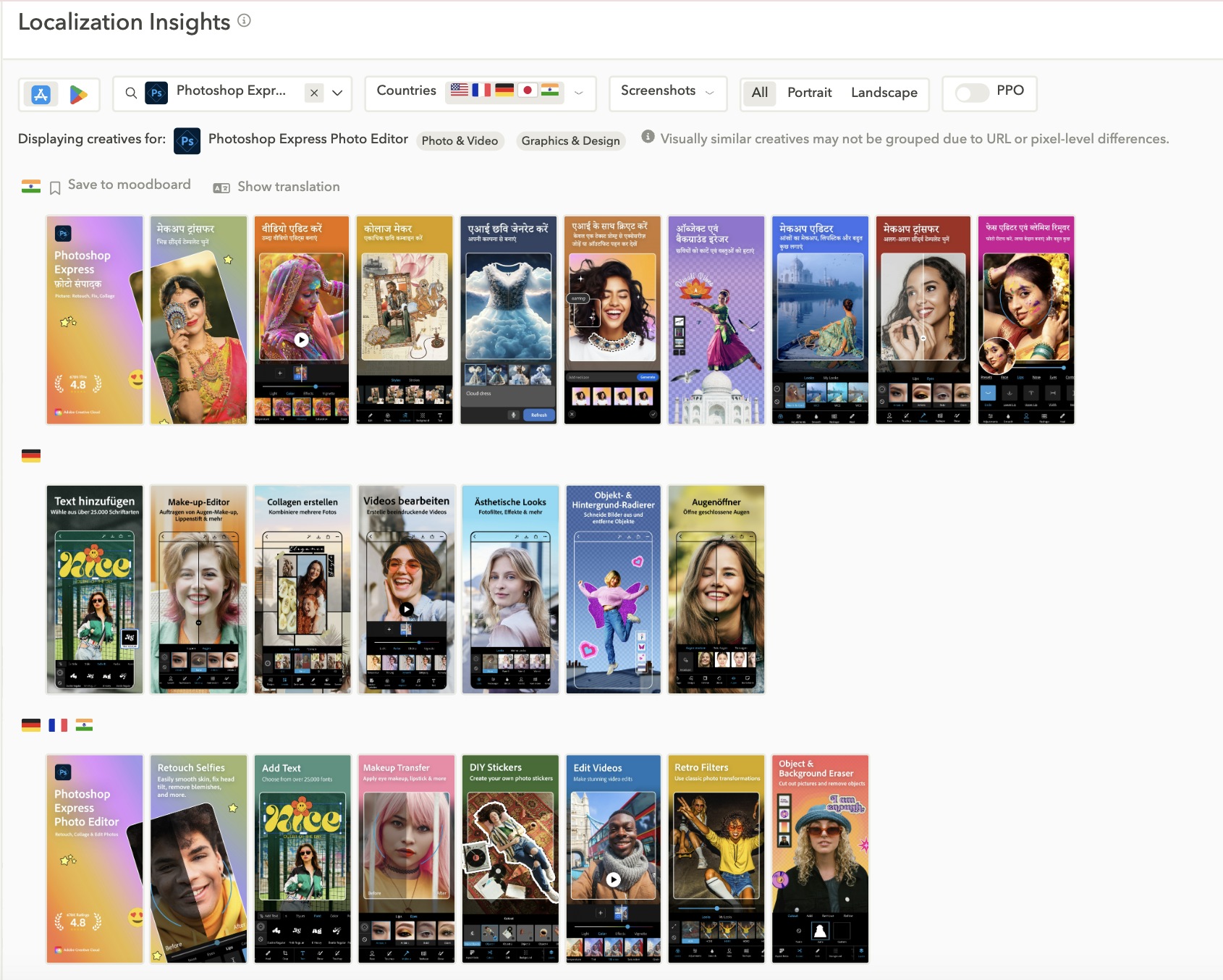
Update your visuals to reflect local expectations, including translated UI, relevant imagery, and culturally appropriate characters. If you’re targeting Japan during Golden Week, show content that reflects that. If you’re launching in Brazil, during the Carnival of Brazil, adjust tone and visuals accordingly if that’s in line with your branding.
For example, in the image below, you can see how the app Photoshop Express Photo Editor included regional elements, including localized photos and texts for its different screenshots in India, Germany, and France.
Step 7: Perform localization quality assurance with native reviewers
Before launching, involve native speakers or professional localization testers to review all localized elements, both in-store and in-app. This ensures content sounds natural, avoids cultural missteps, and aligns with regional norms.
Step 8: Check for legal and regulatory compliance
Certain markets, like the EU, China, or South Korea, have region-specific laws around privacy, content, and advertising claims. Ensure your store listing and in-app messaging comply with local standards to avoid rejections or fines.
Step 9: Implement, test, and optimize
Deploy your localized listings and track how they perform. On Google Play, leverage inbuilt A/B testing to compare different headlines, screenshots, or value propositions. For the App Store, use external A/B testing solutions like AppTweak. Monitor technical performance as well, from loading issues to incorrect language displays.
Step 10: Track performance and iterate
Track metrics and use this data to refine your keywords, update visuals, or prioritize new markets. Treat app localization as an ongoing optimization process.
Focus on these key KPIs for localization:
- Impressions per locale: Are your listings gaining visibility in each market?
- Conversion rate (CVR): Are users in your target regions installing the app after viewing your store page?
- Tap-through rate (TTR): On Apple Ads, are your localized creatives generating interest?
- Ratings and reviews by market Are local users satisfied with the app experience?
- Keyword rankings per locale: Are your localized keywords driving discoverability?
- App store traffic sources: Are users finding your app via search, browse, or paid campaigns?
Key Components of a Successful App Localization Strategy
Planning is the first step towards successful app localization. Understanding your audience and the source of your traffic is the first step. After that, conduct market research to learn more about your target audience in various parts of the world. Only then should you develop a localization strategy that is specific to the cultural and economic circumstances of each area.
Make sure your localization strategy incorporates these necessities.
Market research and prioritization
Start by analyzing where your app is already gaining traction even without localization, and then, look at competitors’ performance in various regions.
When evaluating potential markets, consider:
- Market size and mobile penetration
- Language demand vs. saturation
- Monetization potential (in-app purchases, ad revenue)
- Cultural fit for your app’s concept, content or use case
Prioritize markets that show high growth and monetization potential and align with your app’s strengths. From there, build a phased rollout plan, starting with the most strategic markets first.
Keyword research in target languages
App localization strategy is a cornerstone of ASO. Directly translating your English keywords won’t cut it, since users search differently in every language.
To localize your app for a target language, use local keyword tools, such as AppTweak, to:
- Identify high-volume, low-competition terms in each language
- Spot regional search behavior and trends
- Tailor keywords to how real users describe your app’s value
- Track and analyze competitor keywords in each locale to uncover gaps
In some markets, generic terms work well. In others, cultural nuance or slang may outperform literal keywords.
Adapting metadata and creatives for each market
Beyond keywords, your app title, subtitle, description, and creative assets (screenshots, preview videos, icons) should be localized for both language and cultural context.
- Textual elements should reflect tone, humor, or calls to action that feel native to the audience
- Visual assets may need regional tweaks: showing local currencies, relevant imagery, or culturally appropriate characters
- Consider A/B testing different creatives to see what resonates most in each market.
Calm, a well-known app for meditation and relaxation, uses localized imagery in screenshots to reflect regional preferences for relaxation, such as natural landscapes familiar to each audience.
For example, in Canada, visuals may show some mountains, while in Japan, they feature locally recognizable landscapes.
Final Thoughts
Any app that wants to reach a wider audience, engage with a global audience, and scale successfully has to have app localization. It’s not just about translation; even the most precise wording might be misinterpreted or confusing to consumers in the absence of cultural context.
Therefore, if you’re aiming for international markets, make sure that your text, creatives, and overall app store presence reflect the cultural norms and distinctive characteristics of each area. Recognize that AppTweak can help you expedite every step of the localization process, from competitor analysis and market research to optimizing your creatives and instantly translating the text on your screenshots.








Comments