
 By
By 
Every effective App Store Optimization (ASO) approach starts with app store keyword research. However, it might be challenging to know where to start or how to improve your strategy, regardless of whether you’re a new app or an established brand. Users can find your app, stay competitive, and adjust to trends with the use of efficient ASO keyword research.
We will walk you through the essential procedures for conducting successful app store keyword research in this article. You will investigate sophisticated tactics and discover what app store keyword research is. These include employing competition insights, long-tail keywords, and localization. By the end, you’ll have a simple, doable method to increase the visibility of your app and encourage additional downloads.
What is App Store Keyword Research?
You can learn how customers search for apps by conducting keyword research in the app store. Additionally, it assists you in matching those search terms with the metadata of your app. To uncover apps similar to yours, it entails figuring out the terms and phrases that prospective users enter into the search field. You may make your app appear in relevant search results by carefully placing these keywords in its metadata.
The following steps are included in the iterative process of app keyword research:
- Research: Make a comprehensive list of keywords that potential users might search for to find your app.
- Prioritize: Narrow down your list by focusing on the most valuable keywords. Use metrics like search volume, competition, and relevance to decide which keywords to optimize for.
- Target: Choose the keywords that have the most potential. Place them wisely in your app’s metadata. This includes the title, subtitle, keyword field, and long description.
- Monitor & adjust: Regularly assess your keyword performance and make necessary changes over time to sustain your visibility.
App store keyword research is essential to the success of every app, regardless of its size or reputation. It helps you stay competitive, find fresh development prospects, and comprehend what your audience is looking for. Researching ASO keywords is more than simply a technical endeavor. It is a tactical tool that makes your software stand out in crowded app stores.
This is why researching app keywords is crucial:
1. Increase visibility in the search results
Every week, more than 650 million people browse and download apps from the Apple App Store. More than 65% of downloads occur immediately following a search, making search the main method by which users discover new apps.
Because of this, ranking for pertinent keywords is essential to the success of your app. You must use the appropriate keywords to make your game or app appear in searches. Pay attention to the metadata of your app, including the description, keyword field, title, and subtitle.
For instance, your app might not show up when consumers search for terms like “step counter” or “workout app” if it is a fitness tracker. You may identify and utilize the terms that your target audience is searching for by conducting thorough ASO keyword research. This can improve your app’s visibility and make it easier to discover.
2. Understand user behaviour and preferences
Another effective method for learning about your audience’s preferences and thought processes is ASO keyword research. You can find patterns, problems, and preferences by examining the keywords people use. Your app’s entire marketing efforts and your ASO approach are shaped by this information.
There is a need for specific features if users frequently search for phrases like “guided meditation for stress” or “sleep relaxation app.” These advantages can be emphasized in your app.
It is essential to use this data to optimize your app store creatives. Apps are more likely to stick out in search results if they satisfy users’ demands and expectations. They draw in viewers and promote downloads. Users become more trusting of your software when they realize that it meets their needs. This gives the impression that your software is the answer they are looking for.
You may increase click-through rates by displaying benefits that users desire. Additionally, this increases the likelihood that users will download your software.
For instance, you might want to update your images to emphasize the advantages of sleep relaxation if it is a primary user demand. Add images that highlight calming features like a sleep timer or guided meditations, or words like “Relax and Sleep Better.” By doing this, you ensure that users will instantly understand how your application meets their particular needs.
3. Gain a competitive advantage
In addition to helping you comprehend your target market, keyword research can provide you with information about your rivals. You can identify opportunities to outperform your rivals by examining the terms they utilize. Additionally, you can target terms that they haven’t used.
This strategy makes it possible for your software to stand out. It also attracts consumers who might otherwise use a competitor’s app and secures valuable search prominence.
4. Optimize performance Apple Search Ads and Google App campaigns
For organic visibility, it’s critical to optimize your app’s metadata with the appropriate keywords. Additionally, it is essential to the success of paid initiatives such as Google App initiatives and Apple Search Ads.
Ad algorithms can more easily link your app to pertinent search queries when well-researched, targeted keywords give clear signals about the features and purpose of your app. Algorithms are better able to determine when and where to display your advertisements when your metadata is optimized. This increases the likelihood that users will interact with your adverts. This alignment increases performance, improves ad targeting, and eventually increases the return on investment of your paid advertising campaigns.
Essential Tools for ASO Keyword Research
It’s important to realize that adopting a mobile intelligence tool is critical to successful ASO before you start your keyword research journey. Basic brainstorming is a good place to start, but serious keyword research need data-driven insights that can only be obtained with specialized tools.
A Frequent and Expensive Error: People frequently mistake ASO for SEO and believe that SEO tools can conduct keyword research for app stores. Due to the significant differences between web and app store search queries, this is untrue. Google’s web search algorithm and the algorithms that drive app store search are essentially different, and users search differently for applications than for websites.
Read Also: The Anatomy of a Perfect App Title and Subtitle
To identify real search queries with high search volume in the app stores, these specialist mobile intelligence platforms are essential resources. They provide you with vital information that would be tough to collect manually, such as search traffic, keyword difficulty, competitor rankings, and trending keywords. Without these tools, you would effectively be operating in the dark and relying more on conjecture than on real market data when making decisions.
Crucial Information Regarding Tool Selection: Despite the abundance of mobile intelligence solutions on the market, there is little difference between them in terms of keyword research and discovery capabilities. However, the most important characteristics to consider while choosing a mobile intelligence tool especially for keyword research capabilities are:
- Apple and Google auto-suggestions integration – Tools that can tap into the actual auto-complete suggestions from both app stores
- Apple Search Ads keyword intelligence – Access to keyword data from Apple’s advertising platform, which provides valuable insights into search behavior
What NOT to Use: You cannot do keyword research for App Store Optimization using Google Ads Keyword Planner. It offers information unrelated to app store search behavior and is intended for web search advertising.
Although there are many great mobile intelligence solutions on the market, we especially suggest Mobile Action for the purposes of this article because of its extensive keyword research capabilities and easy-to-use UI.
Conclusion: Although this approach offers a framework for efficient keyword research, access to one of these specialized mobile intelligence tools will be necessary for the specific procedures and data analysis. Think of this expenditure as crucial to the success of ASO.
How to Perform App Store Keyword Research: Step-by-step Process
You’ll need a methodical approach that blends creativity, competitive insights, and data-driven technologies to do app store keyword research successfully. Let’s dissect it step by step, beginning with how to create a solid foundation—your keyword list.
Step 1: Brainstorm Your Core Keywords
The first step is to think about your app from a user’s perspective. What words or phrases would they use to find an app like yours? These are your “top of mind” keywords.
- Start with the obvious: What is your app’s primary function? If your app is for hiking, your core keywords might be “hiking,” “offline maps,” or “trail maps.”
- Think about features: What are the key features of your app? List them out and see if any of them could be used as keywords.
- Consider your target audience: Who are you trying to reach? What kind of language do they use?
At this stage, don’t worry about the competition. The goal is to create a foundational list of high search score keywords that you can build upon.

Step 2: Identify and Analyze Your Competitors
Once you have your list of 4-5 top-of-mind core keywords, it’s time to identify who your real competitors are by using your mobile intelligence tool. Here’s how to do it effectively:
Use Live Rankings to Find Your Competitors: In your mobile intelligence tool, navigate to the “Live Rankings” section (this feature is available in all major ASO tools). Enter each of your core keywords and examine who is ranking in the top 10 positions for these search terms.
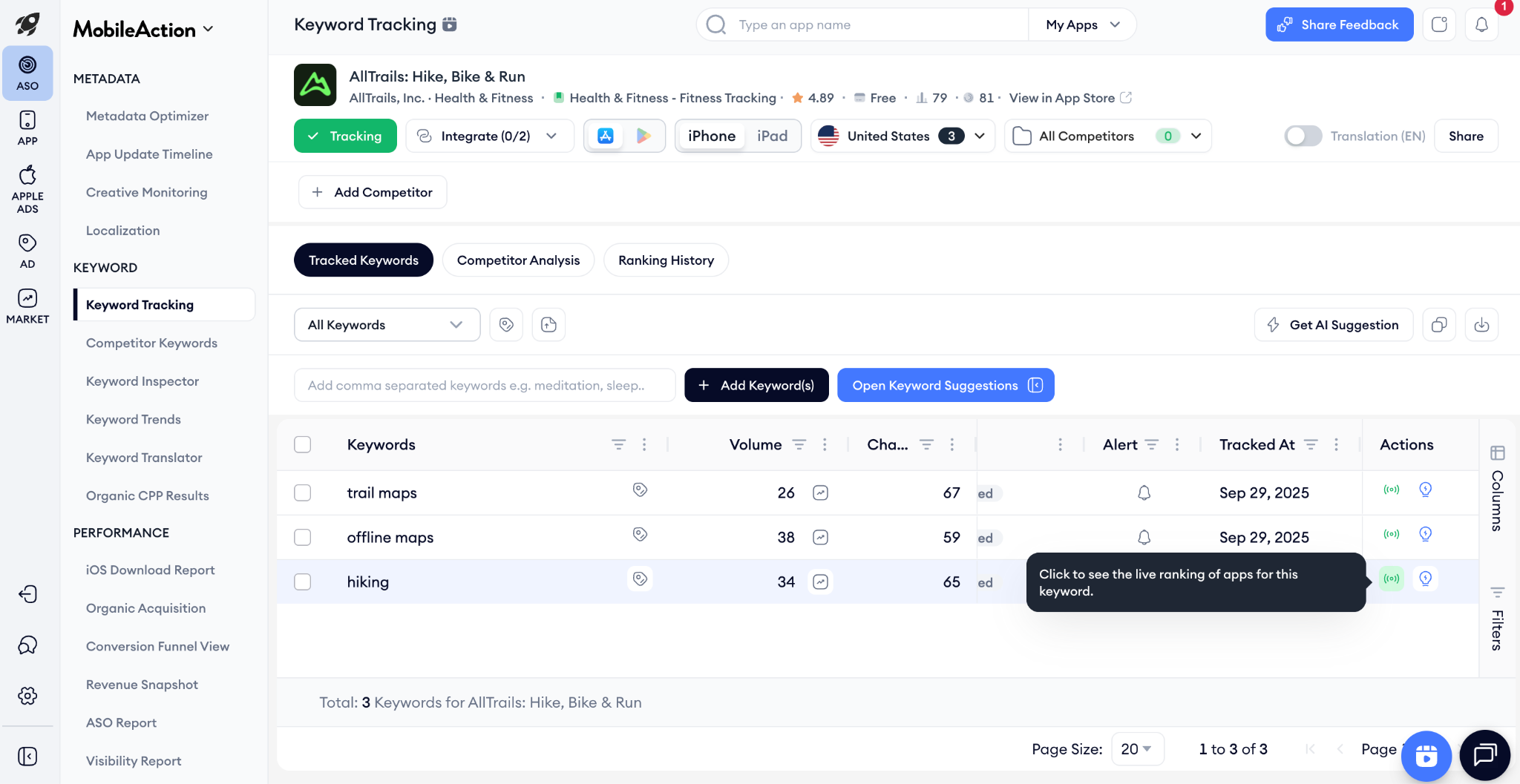
Why This Method Works: Top-of-mind keywords are generally high search volume and high competition keywords since they’re the obvious terms users think of directly. These search terms are naturally competitive, which means the apps ranking in the top 10 for these keywords are your real competitors – the ones who are doing ASO right and securing good positions for valuable terms.

Track Your Competitors: Once you identify these top-ranking apps, add them to your competitor tracking list within your mobile intelligence tool. Most platforms allow you to track competitors, and once you do this, you can easily monitor their keyword rankings and discover new opportunities.
Categorize Your Competitors: As you build your competitor list from the live rankings data, categorize them into three groups:
- Direct Competitors: These apps offer the same features as yours and target the same audience.
- Close Competitors: These apps may have similar features but might also offer additional functionalities or target a slightly different audience.
- Broad Competitors: These apps are in the same category as yours but may not have many overlapping features. They are still important to consider as they are competing for the same user base.
Your Goal: Create a list of at least 10-15 competitors, focusing on direct and close competitors for the most relevant keyword insights. Prioritize apps that consistently appear in the top 10 for multiple core keywords, as these indicate strong ASO performance.
Step 3: Analyze Your App’s Current Rankings
Before you start optimizing, you need to know where you currently stand. Use an ASO tool to check the keywords your app is already ranking for. Pay close attention to keywords where you rank in the top 10 and top 50.
On iOS, rankings respond to how you use the product page fields — title, subtitle, keywords. For Android, review Google’s guidance on surfacing and discovery: Play Store visibility & discovery.
This step is crucial because you don’t want to accidentally remove a valuable keyword that is already driving traffic. By understanding your current rankings, you can make informed decisions about which keywords to prioritize and which to replace.

Step 4: Dive into Your Competitors’ Keywords
Now it’s time to leverage the work your competitors have already done. Analyze the keywords they are ranking for, especially those in the top 10 and top 50. This is a great way to discover new, relevant keywords that you might have missed during your initial brainstorming.
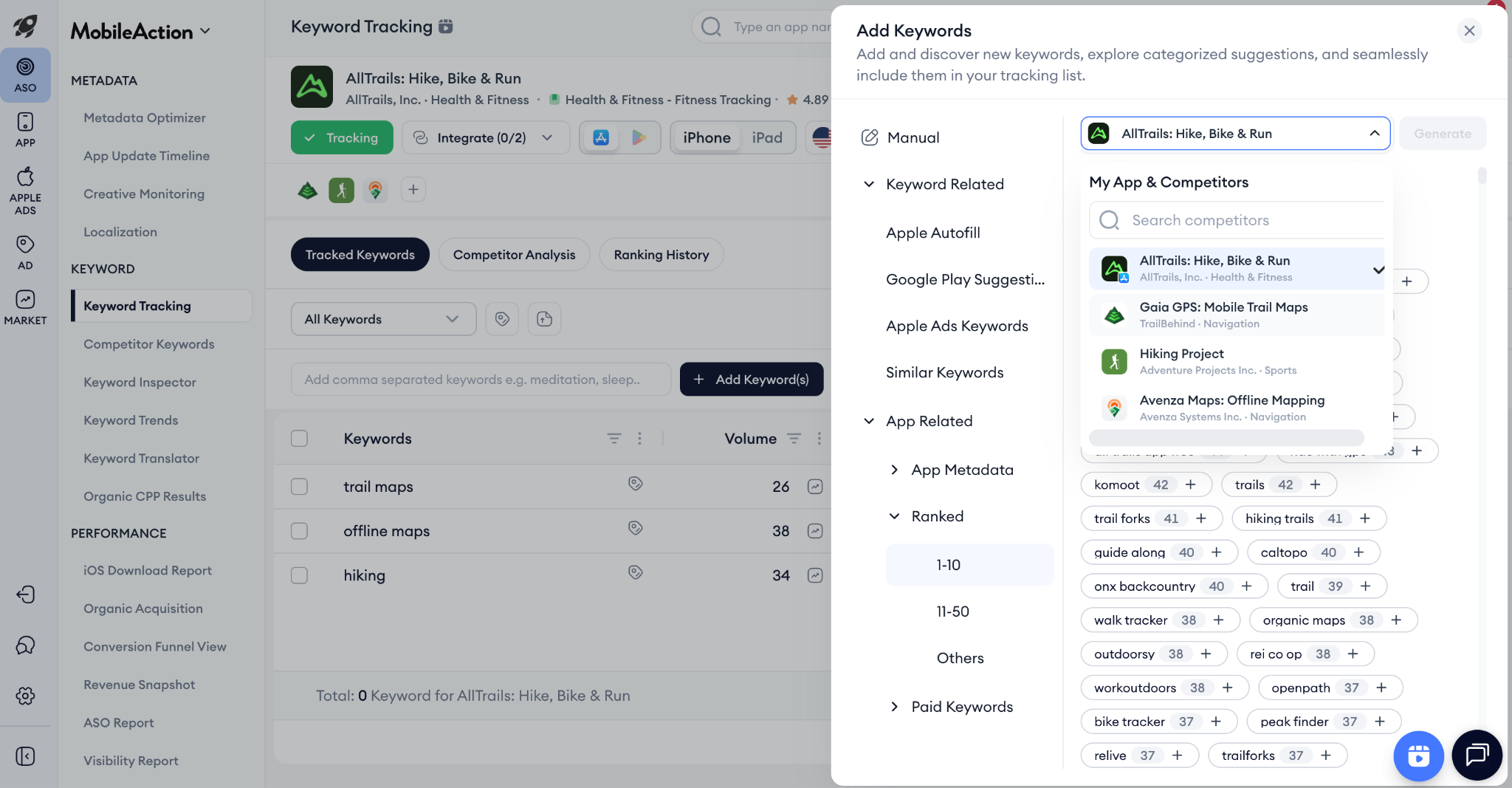
As you go through your competitors’ keywords, add the relevant ones to your keyword pool. Look for keywords with a good balance of search volume and relevance to your app.
Step 5: Build and Refine Your Keyword List
By now, you should have a substantial list of keywords from your brainstorming, competitor analysis, and analysis of your own rankings. The next step is to prioritize and refine this list. Here are some key metrics to consider:
- Relevancy: How relevant is the keyword to your app’s core functionality? Prioritize keywords that are highly relevant to your app and its features.
- Search Volume (or Search Score): This metric indicates how often a keyword is searched for. Higher search volume means more potential traffic, but also more competition.
- Difficulty (or Chance): This metric estimates how difficult it will be to rank in the top 10 for a given keyword.
Your goal is to find a balance between these metrics. While high-volume keywords are attractive, they are often highly competitive. Don’t overlook long-tail keywords (longer, more specific phrases) that may have lower search volume but are less competitive and can bring in highly qualified users.
Be mindful of the number of keywords you tracked that have a 5 search score. When mobile intelligence tools can’t estimate the exact volume of a keyword, if it’s low volume or no volume at all, they show a search score of 5. You can tap into highly niche keywords that drive a low amount of high-intent users, but don’t build your entire optimization strategy on these keywords.
Step 6: Advanced Keyword Research Techniques
To take your keyword research to the next level, consider these advanced techniques:
- Keyword Gap Analysis: Identify keywords that your competitors are ranking for, but you are not. This can reveal valuable opportunities to expand your keyword footprint.
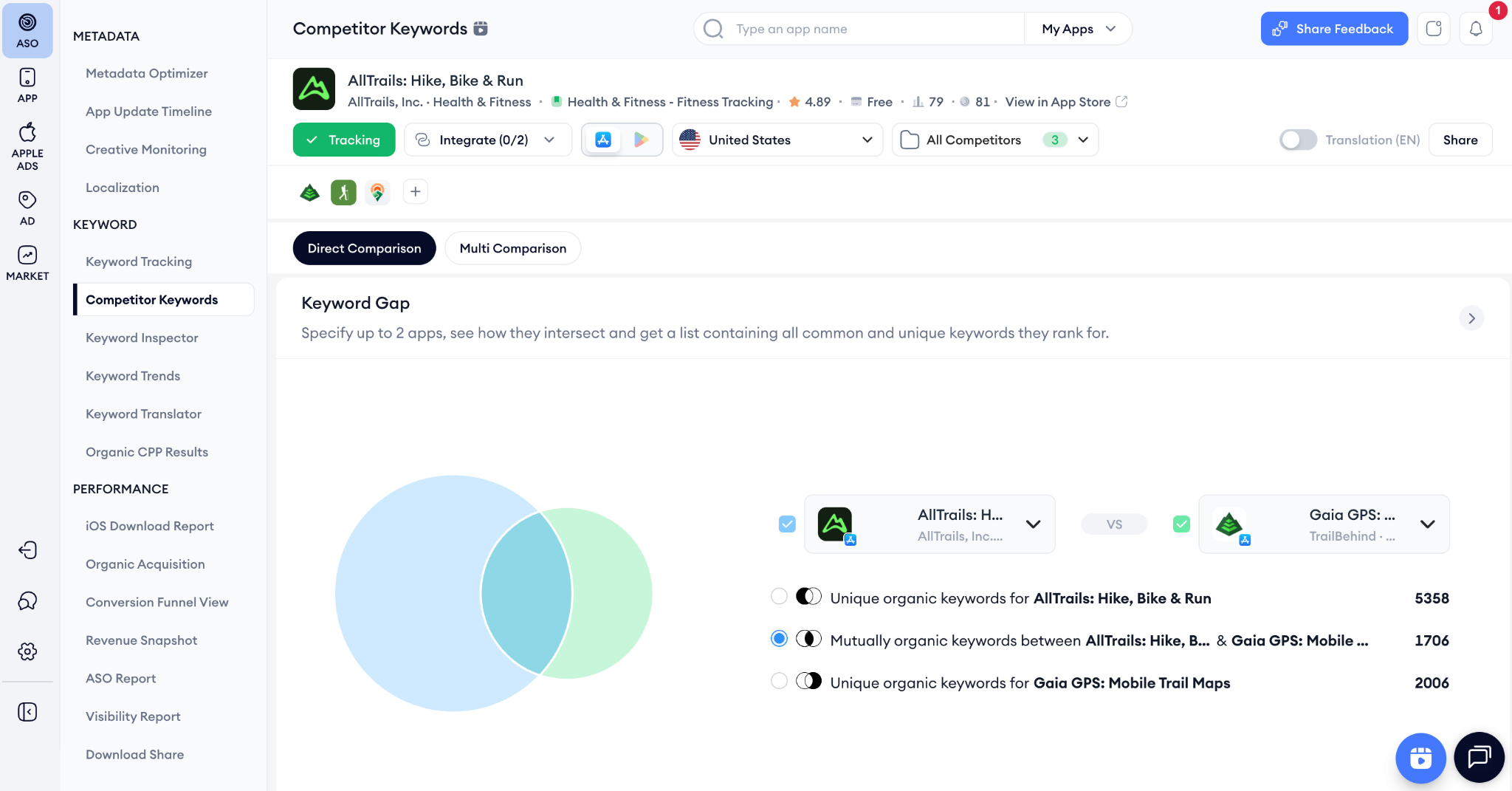
- Apple’s AutoFill Suggestions: When you start typing a keyword into the App Store search bar, Apple suggests related keywords. These suggestions are based on what users are actually searching for, making them a great source of new keyword ideas.

- Keyword Segmentation: Group your keywords into logical segments (e.g., by feature, by user intent). This will help you organize your keyword strategy and track your performance more effectively.
Common Pitfalls to Avoid With ASO Keyword Research
Even with a well-thought-out app store keyword strategy, it’s simple to fall into typical ASO pitfalls that can negatively impact your performance and exposure. Let’s examine the main errors to avoid.
Targeting broad keywords
Due to their huge search numbers, broad keywords may seem attractive, but they frequently have intense competition and ambiguous user intent. Although keywords like “fitness” or “travel” could draw users, they don’t reveal what they are precisely searching for. Instead, concentrate on more focused keywords that are directly related to the main functions of your software, such “budget travel” or “workout planner for beginners.” These more specific terms increase the likelihood that your app will rank highly and draw in users who are actually interested in what it has to offer.
Keyword stuffing
Although adding too many keywords to your metadata may seem like a quick fix, it frequently backfires. Your app’s title, subtitle, or description may appear spammy and unattractive to users if you fill it with keywords. Forced or repetitive keywords can hurt your rankings because both the App Store and Google Play prioritize readability and user experience. Rather, incorporate keywords organically and concentrate on providing concise, interesting information that emphasizes the advantages of your software while being search engine optimized.
Overlooking long-tail keywords
Although they may have lower search numbers, long-tail keywords—specific phrases with three or more words—often result in greater conversion rates. Phrases like “pill reminder app” or “crossword games for beginners” are less competitive and capture specific user intent. These keywords make it easier for you to rank and draw in a highly targeted audience.
Neglecting user intent
Your app’s visibility and downloads will be negatively impacted if your metadata doesn’t match what users are actually searching for. Finding high-performing phrases is not enough; you also need to organically incorporate them into your description, title, and subtitle. Your metadata should be easy to understand, convey the advantages of your app in a clear and concise manner, and not sound robotic or forced. Concentrate on telling a compelling story that demonstrates how your app fulfills user expectations. By providing users with the context they need to click “Download,” this well-rounded strategy not only boosts ranks but also fosters trust and increases conversions.
Neglecting keyword placement
The placement of your keywords is just as important as their selection. In app store algorithms, the app title is the most important factor, followed by the short description or subtitle. To maximize visibility, you can’t just load keywords into the description (on Google Play) or keyword box (for iOS). To increase relevance and discoverability, prioritize your most crucial keywords in the title and subtitle and make sure supporting keywords flow organically in the description and keyword field.
Translating rather than localizing keywords
Direct keyword translation into other languages may result in lost chances or, worse, unrelated outcomes. Every market has its own search habits and cultural background. For instance, if you have a food delivery service, consumers are more likely to search for “takeout” in the UK than in the United States. In a similar vein, a word like “apartment” in the United States would be “flat” in several European nations. Localize your keyword research by learning how users in each country often look for apps similar to yours, rather than depending solely on direct translations.
Updating keywords too often or not often enough
Maintaining visibility requires striking the correct balance when it comes to keyword modifications. If you update your keywords too frequently, the app stores won’t have enough time to register your changes, which could lower your results. Conversely, if you don’t update your keywords, you’ll miss out on user behavior changes or trends. Every three to four weeks, we advise evaluating your keyword performance and making any necessary changes, such as when a keyword’s search volume declines or new trends appear. This guarantees that your app maintains its relevance without continuously upsetting its momentum.









Comments