
 By
By 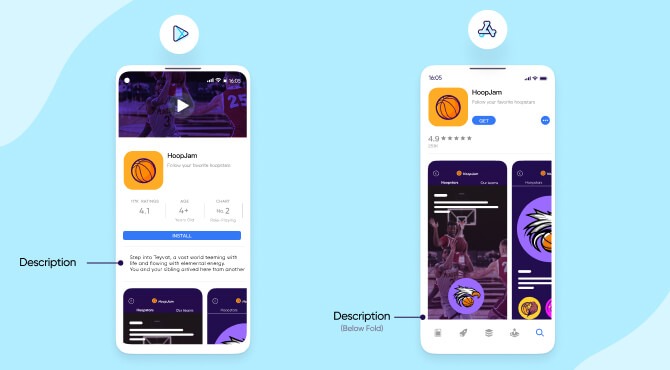
- Start out strong
- Go into some detail
- Optimize for discoverability
- Technical considerations for app descriptions
- Localization
- Social proof
The first handshake with each prospective user is your app description; it’s the fleeting instant when lines of code become a promise of something extraordinary. An app description that is properly formatted has a far higher chance of attracting and holding the user’s attention.
This article will help you through the process of crafting an effective, captivating app description that not only draws readers in but also turns prospective buyers into devoted users.
We’ll break down exactly how to create a description that does more than just explain what your app does; it will tell a story that:
- Speaks directly to your audience’s needs,
- Highlights your app’s unique value, and
- Makes downloading feel like solving a problem to users.
The purpose of an app description is to highlight the main features, functionality, and distinctive qualities of a mobile application. It is more than simply a text; it also functions as a digital sales pitch, distilling the potential of your product into a succinct, compelling story that makes it stand out in app store listings.
This important content serves as a link between app downloads and user curiosity. It takes a sophisticated, multidimensional strategy to create the ideal app description.
Creating a strategic communication tool that connects with your target audience is more important than simply writing words.
To write a compelling app description, follow these steps:
1. Start out strong
Statistics show that less than 2% of users will read the entirety of an app description, so it’s important to optimize it to be as clear and striking as possible.
Here, the aim for app developers is to:
- Instantaneously capture attention
- Spark intellectual and emotional curiosity
- Create an immediate connection
It’s crucial to showcase the core value of your app from the first sentence, letting users know what you bring to the table from the get-go.
- In the first few sentences, highlight the primary problem your app resolves using simple language.
- Address user pain points with precision and empathy.
- Focus on the key features and benefits of using the app, demonstrate the broader appeal it offers.
2. Go into some detail
After a simple but effective introduction, it’s time to provide some detail into the functionality of your app. This is where you get to show what makes your app uniquely valuable and stand out from other similar apps.
At this point, you can start getting into detail by:
- Explaining the features offered by the app in greater detail.
- Helping users quickly understand what makes your app valuable by focusing on its benefits to the user.
- Presenting scenarios and contexts where your app can make a difference for people’s lives.
- Providing social links and contact e-mails so that users can learn more about you and get in touch.
3. Optimize for discoverability
App store optimization is essential for the discoverability of your app. This involves the use of practices such as targeted keywords, metadata, and localization. Well-crafted app descriptions are always centered around the right keywords.
Here are some tips to optimize your app description for discoverability:
- Integrate relevant keywords into the text with subtlety
- Avoid keyword stuffing (unnaturally using the same keywords or phrases repeatedly).
- Maintain an authentic, conversational tone that feels natural
- Balance technical accuracy with emotional engagement
4. Technical considerations for app descriptions
Both the App Store and the Google Play Store include an app description limit of 4.000 characters.
However, some of the most successful apps actually don’t use that many characters for their description.
It’s not about using the full quota of characters here, but rather showcasing your app as effective and strikingly as possible with simple and concise language.
- Use clear, concise language without too many technical terms
- Structure the text so that the user can get the point you are making quickly.
- Implement strategic formatting like bullet points, concise paragraphs and special characters.
- Create visual breathing room through deliberate white space
5. Localization
In order to connect with diverse global audiences, localization is essential. Adapting content to specific cultural and linguistic contexts allows your app to go beyond borders. It can dramatically increase an app’s potential user base and improve user engagement.
Read Also: Keyword Research for ASO: Tools and Techniques
Effective localization goes beyond mere translation, addressing cultural sensitivities, local humor, and communication styles that resonate with specific markets.
Moreover, localized app descriptions can significantly improve app store search rankings and visibility in different regions, potentially increasing download rates and user adoption.
Here are some steps to successfully achieve localization in app descriptions:
- Conduct market research and identify target international markets
- Analyze cultural preferences and communication styles
- Develop a comprehensive translation brief
- Hire native language translators with app industry expertise or refer to professional localization services or translation agencies
- Check content against local advertising norms and address regional content restrictions
6. Social proof
Social proof is a critical psychological mechanism that builds trust and credibility for potential users. By showcasing real-world validation through user testimonials, performance metrics, and notable achievements, app descriptions can significantly reduce user hesitation and increase download likelihood.
Authentic social proof transforms an app description from a mere feature list into a compelling narrative of user success, demonstrating the tangible value and reliability of the application.
Moreover, quantifiable evidence like user ratings, download numbers, or industry awards provides objective validation that can decisively influence a user’s decision to install an app.
Remember, credibility transforms descriptions from informative to persuasive.
You can utilize social proof to make your app description more relatable by following these steps:
- Include short, genuine quotes from real users to display the user experience.
- Show total number of downloads and average user ratings.
- Demonstrate time or money saved by users
- Add quotes from industry professionals and showcase any awards or recognition
- Use real-life scenarios that potential users can relate to
- Compare app performance to industry standards
Best Practices for Writing Great App Store Descriptions
Your description plays a significant role in app store SEO. After all of your effort to entice potential consumers, here is the section that will seal the deal. We’ll give you some best practices on how to create an app store description that encourages more app downloads as you read on.
Do you want to write better descriptions for the app store? You don’t need a degree in copywriting or marketing to figure it out; it’s not that difficult. Anyone can create an app store description that draws the reader in and succinctly explains why they should download your app.
Here are some tips.
1. Start your description with something that really grabs the attention
Check out how much of the app store description is displayed by default on the App Store (before you click “More”). Not much, is it? There are around three lines of text on the Apple App Store. You have that much time to persuade a consumer that your software might be worthwhile.
You will lose potential consumers at the first barrier if the first sentence doesn’t entice you to read on or look at the screenshots. Make it intriguing and succinct.
Therefore, make it the finest pitch you can think of that explains what your app does, who it serves, and why it’s special or superior to others.
Here’s some great advice for what to include, courtesy of Joanna Wiebe of CopyHackers.
- Lead with the most powerful, crisply stated message that your visitor wants to see
- Cut the nonsense or filler – like “Our product is designed in Florida to…” – and just get straight to what the damn thing does and why that’s awesome
- Make the user want to click to learn more (so, in many cases, TEASE!)
2. Be clear about the category of app that you’re selling
Here, clarity is crucial. Don’t leave them in the dark if it’s a game. Inform them.
Describe what makes your app special and why users should pick it above the competition. Verify that it is more than just a long list of features.
3. Include social proof and validation
You can claim that your app is the greatest. However, whether or not that is true, anyone may say that about their software. To persuade the intended consumer that it is worthwhile to download, you must add something in your app store description.
Include any blog reviews, newspaper mentions, or client endorsements. Anything that supports your assertions about the quality of your app.
4. Talk about benefits and features
The features and advantages are the main focus of your app store description.
What is the purpose of the app, and how does it help the user?
Asking yourself why each feature is crucial for your user or customer is the greatest approach to identify features, ensure they are pertinent, and help you “close the sale.” For each of your features, include a “why it’s important” response, either right before or right after the feature.
By using this straightforward method, you may describe your features and the advantages they provide from the viewpoint of your user or customer. It’s not about quantity, so if you find a cool technical feature but can’t think of a reason why it’s important, just ignore it.
5. Remember, this is a sales and marketing document not a tech spec
This is particularly crucial when use bullet points. Don’t focus on your app’s technological prowess, but rather on your consumers.
In sales, you have to persuade and get beyond objections. Some of them could include whether or not the app is totally free, whether an iPad or tablet version is available, or how often the app’s content is updated. To address typical complaints, be sure to include these issues, maybe in the form of a list of bullet points (you’ll find out from user reviews what people are worried about).
6. How about keywords?
You should be very cautious about how and what words you use because on Google Play, descriptions are taken into account in the ranking algorithm, but not on Apple’s App Store. We suggest using your primary keyword once in the title and five times in the description to increase your app’s discoverability.
Your app’s relevance to prospective users and your chances of being listed in the app store will both rise with an excellent description.
Final Thoughts
As previously said, writing an app description involves more than simply checking off ASO boxes. It all comes down to crafting a narrative that appeals to your audience. Therefore, every word—from succinct summaries to persuasive calls to action—should encourage conversions.
You have just a few seconds to persuade a potential user that your app is precisely what they’ve been looking for. Your app description is effectively a digital elevator pitch. Consider it the personal representative of your app, translating your technological breakthrough into a human-centered story that directly addresses the wants and desires of users.
Remember that the first few sentences are the most important, so make sure they immediately capture the reader’s attention and convey the main idea!





Comments