
 By
By 
To reduce your cloud bill while maintaining performance, right-size your resources, eliminate idle or underused resources, and use committed use or spot instances for predictable workloads. In addition, use auto-scaling, reduce storage and data transfer costs, and use a cloud-native architecture when applicable.
Cloud cost optimization guarantees that the most appropriate and cost-effective cloud resources are assigned to each workload or application. It balances performance, cost, compliance, and security requirements to ensure that cloud investments are optimal and fit for corporate needs.
Every workload in a cloud deployment is unique, with changing requirements over time. To reduce cloud expenses, establish performance thresholds for each task based on domain knowledge and actual operational indicators. Optimization seeks to cut expenses while maintaining performance levels.
Cloud cost optimization is dynamic, adapting to changing application requirements and cloud price and service options. Because of the vast complexity of cloud settings, cloud cost optimization necessitates extensive data, analytics, and automation.
The best practices listed below can help you optimize the cost of your cloud infrastructure.
1. Review Pricing and Billing Information
Cloud vendors provide billing details explaining the cost of cloud services. You can leverage this information to identify high-cost areas and generate savings. Prioritize and analyze high-spend services and workflows. Understanding the cost of the cloud allows you to make informed spending decisions and avoid paying for redundant resources.
2. Set Budgets
You can control costs by ensuring all parties know the goals and budgets of each project. Never choose an arbitrary number. Instead, facilitate communication between engineering leaders, product leadership, and executives to understand cost requirements.
Base requirements according to the planned packaging and delivery of products and features. For example, determine if it is a free trial or enterprise plan. Reference these requirements as tradeoffs during planning and development alongside requirements like speed and resiliency.
Set a monthly budget to plan your cloud computing strategy. This budget may differ according to your organization’s needs. An established budget is crucial for planning your overall spending and optimizing costs.
3. Identify Unutilized Resources
You can easily optimize cloud costs by looking for unattached and unused resources. Administrators and developers sometimes provision a temporary server for a certain task and might forget to de-provision it after the job finishes. Alternatively, an administrator might forget to remove the storage attached to terminated instances.
These practices result in inflated AWS or Azure bills that charge for resources the organization purchased but no longer uses. A cloud cost optimization strategy helps identify unused and unattached resources and remove them to eliminate unnecessary expenses.
4. Identify Idle Resources
Like the above practice, you can optimize cloud costs by finding and consolidating idle computing resources.
Cloud providers charge for idle resources, even if you do not use them. You can optimize costs by identifying and merging these resources to reduce costs. For example, if your CPU utilization is 10% but the provider charges for 100%, you are wasting a significant amount of computing resources.
You should find all idle resources and merge them to cut costs. There is no need to save idle resources for events such as busy seasons or traffic spikes. You can leverage cloud features like auto-scaling, load balancing, and on-demand options to scale up capacity as needed.
5. Right-Size the Services
Right-sizing enables you to analyze computing services and modify them to the most efficient size. However, it is difficult to manually size instances as there are many possible combinations, as well as memory, graphics, database, storage capacity, and throughput options.
You can use right-sizing tools to get change recommendations across instance families. It helps reduce cloud costs and optimize cloud usage, helping achieve peak performance from existing resources.
6. Use Reserved Instances
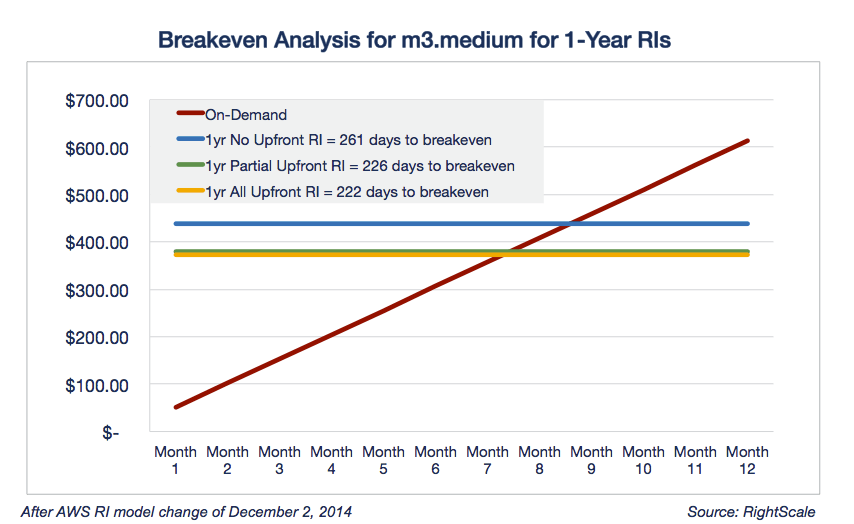
Reserved instances (RIs) are prepaid compute instances that offer significant pricing discounts. When purchasing RIs from a cloud provider, you select an instance type and typically a region or availability zone, and commit to using the instance for a period of 1 or 3 years. In exchange, most cloud providers offer discounts of up to 75%. Because you pay up front, you must do the research and plan based on your historic instance usage. AWS also offers Savings Plans programs that offer similar discounts but allow more flexible usage.
7. Use Savings Plans
The Savings Plans pricing model is flexible and helps you save up to 70% on your AWS usage. This model offers consistently low prices, similar to RIs, based on one-year or three-year commitments.
8. Leverage Spot Instances
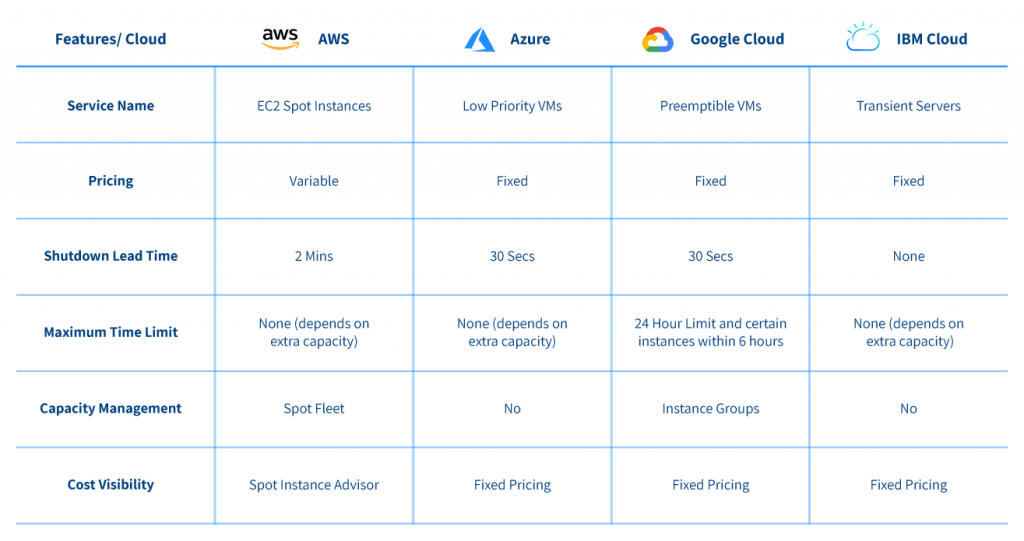
Unlike Reserved Instances, Spot Instances are available for last-minute purchases. AWS auctions its leftover resources at low prices. However, these instances are unreliable because they are not always available and can sell out quickly. Spot Instances are useful for batch jobs or jobs you can terminate immediately, but not critical, time-consuming ones.
The table below shows Spot Instance offerings from the leading cloud providers and key service paramteres, such as the lead time for instance shut down and the maximum time a Spot Instance is allowed to run.
8. Limit Data Transfer Fees
Migrating data to and from a public cloud can be expensive. Cloud vendors often charge data egress fees to shift data from their platforms and sometimes between regions. You can reduce cloud costs by avoiding unnecessary data transfers.
Read Also: DevOps in the Cloud: Tools and Strategies
Assess your cloud vendor’s transfer fees and adjust the cloud architecture to minimize the necessary data transfers. For example, you can reduce unnecessary transfers by shifting on-premises applications that frequently access cloud data to the cloud.
Evaluate the fees of the transfer methods intended to secure and accelerate data transfers between the cloud and private data centers. You can compare the costs of using a dedicated network connection service, like AWS Direct Connect, Google Cloud Interconnect, or Azure ExpressRoute, to the costs of a physical transfer device like AWS Snowball or Azure Data Box.
9. Choose a Single or Multi-Cloud Deployment
Multi-cloud deployments help you avoid vendor lock-in and increase availability, but they can be expensive. With a single vendor, you can leverage discounts with large-volume purchases. Switching between different cloud platforms can be a hassle and require extra training. Evaluate whether a single-vendor or multi-cloud environment meets your organization’s needs.
10. Monitor Cost Anomalies
Use the Cost Management console to set budgets, forecast AWS costs, and optimize your overall cloud costs. The console includes a Cost Anomaly Detection feature that monitors usage and costs with machine learning to identify spending anomalies. You can set alerts to notify you when you approach or exceed expected spending thresholds. Once you analyze an anomaly’s root cause, you can address it to prevent unexpected costs and stick to your planned budget.
11. Use Appropriate Storage Options
Amazon S3 is a widely-used cloud storage option in the cloud. It is user-friendly, easy to integrate with other AWS or external services, and offers almost unlimited storage. However, AWS offers various storage tiers with significantly different costs, so choosing the right tier is important to avoid overspending. You can use S3-Intelligent Tiering to automatically track your usage patterns and select the best storage tier.
12. Optimize Cloud Costs at Each Stage of the SDLC
Costs should not be an afterthought considered after building and launching a product. You should implement cost optimization throughout the software development lifecycle (SDLC).
Here is how to integrate cloud costs optimization into the SDLC:
- Planning – justify the budget and use cost data to inform technical debt-related decisions and the product roadmap. This practice helps reduce unexpected spending and rapidly adjust the budget as needed.
- Deployment and operation – quickly discover unpredicted spending and adjust costs and budgets.
- Design and build – record the data needed to make cost-effective architecture decisions. This data informs reports on planned spending and learn the costs of sold goods (unit costs).
- Monitoring – reassess costs by team, feature, and product to report operational expenditures and return on investment (ROI) according to business initiatives.
Engineering decisions have an associated cost. Shifting cost optimization left turns each stage into an opportunity to maximize cloud ROI as soon as possible.
13. Identify and Minimize Software License Costs
Software licensing is a major component of cloud operating costs. Manual license management is challenging, increasing the risk of paying for unused software licenses. You can find various commercial and public Amazon Machine Instances via the AWS Marketplace. License tracking tools can identify idle or unneeded licenses to help you reduce your spending.
14. Implement a Cloud Native Design
Replace existing cloud systems with more cost-efficient ones to leverage cloud-specific capabilities. For example, you can design a system with auto-scaling to ensure you only pay for the servers you use.
The Well-Architected Tool provides best practice recommendations for cloud architectures. You can also leverage AWS’ extensive documentation and expertise to help design your system and reduce costs using cloud native principles. Cloud native design requires specific skills, so you may need guidance to implement it – typically, organizations modify existing cloud infrastructure rather than designing from scratch.
Your design should balance performance, cost-optimization, and other considerations based on your organization’s priorities and objectives. For example, a fast DevOps pipeline in the cloud might not reduce costs.
15. Track Cost Center Spending
Different teams may individually manage their cloud budgets, so they need a way to track their spending. One way to do this is for each cost center to have a separate AWS account for easy reporting. If multiple teams with different budgets share one account, tying costs to the responsible teams is challenging.
Implement a standard identification method for cloud resource ownership – for example, apply resource tags, not just naming standards. Tags and labels make identifying resources and their owners throughout their lifecycle easier. Align cost centers to the required reporting granularity (i.e., department or individual user).
Large organizations often use configuration management databases to track tagged cloud resources. Metadata also helps you optimize costs and prioritize resources (i.e., lower underutilization thresholds for less critical resources). Resource tags should include contacts for the resource owner to facilitate communication.
Top 10 AWS Cost Optimization Tips to Reduce Your Cloud Bill in 2026
Whether you’re a startup, expanding company, or an enterprise, utilizing tried-and-true AWS cost optimization best practices should be a continuous part of your cloud infrastructure management strategy. In this article, we offer 10 practical ways to reduce costs without compromising performance, which are simple to put into practice and can result in significant savings within the first month. If cloud spending is not actively managed, it can quickly spiral out of control.
1. Right-size your instances
One of the most effective AWS cost optimization tips is right-sizing your instances. Oversized instances are a common cause of unnecessary cloud spending. Correctly matching the size of the instance to the actual load requirements (so-called right-sizing) optimizes both cost and performance.
AWS offers a number of tools to support resource utilization analysis – such as AWS Compute Optimizer – which help select the optimal CPU, RAM and disk configuration. Regular reviews and adjustments are essential to optimize AWS infrastructure efficiently.
Benefits:
- You will avoid overpaying for unused resources.
- You will increase performance depending on your application requirements.
2. Leverage Reserved Instances
Buying Reserved Instances (RIs) can reduce cloud costs by up to 75% when compared to On-Demand instances if your environment is stable and long-term. Standard RIs for optimum savings and Convertible RIs for more flexibility are two of the alternatives that AWS provides. RIs are especially affordable for databases, production apps, or round-the-clock backend servers.
Alternatively, Savings Plans also provide good chances to optimize AWS costs (up to 72% in reductions) in exchange for a 1- or 3-year usage commitment, but with more flexibility than RIs. Compute Savings Plans are perfect for dynamic environments since they work across instance families, regions, and even services like Fargate or Lambda.
EC2 Instance Savings Plans are more similar to RIs, focusing on specific instance families within a region, but still offer automatic application across matching usage. In many cases, Savings Plans provide comparable cost benefits with easier management and broader applicability.
Benefits:
- Significant savings for stable environments.
- Flexible adaptability (e.g. Convertible RI or Compute Savings Plans).
- Easier commitment management and broader use cases with Savings Plans.
3. Utilize Spot Instances
Spot Instances are unused computing resources offered by AWS at up to 90% cheaper than standard instances. They are ideal for tasks that can be interrupted and resumed – such as data processing, automated tests, simulations or background rendering. Thanks to their flexible approach and integration with Auto Scaling and EC2 Fleet, Spot Instances allow you to achieve high computing power while cutting AWS costs.
Benefits:
- Low computing costs.
- Flexibility and scalability with minimal budget.
4. Implement Auto Scaling
AWS Auto Scaling allows you to dynamically adjust the number of instances according to the actual demand of your application – increasing them during traffic spikes and decreasing them when there are fewer users. This ensures your environment runs efficiently, but you don’t overpay for excess resources. Auto Scaling works well for both web applications and data processing systems.
Benefits:
- Cost savings during low traffic hours.
- Increased availability and performance.
5. Delete unused resources
Eliminating unused resources is one of the simplest AWS cost optimization tips. Many AWS users don’t realise how many of these resources generate costs – we’re talking about old snapshots, unconnected EBS volumes, inactive Elastic IP or instances forgotten in test environments. Regular infrastructure audits and automated scripts to clean up the environment can bring immediate savings.
Benefits:
- Elimination of “ghost” costs in the infrastructure.
- Cleaner environment and better management.
6. Monitor and analyze costs
No AWS cost optimization strategy is complete without continuous monitoring. With tools such as AWS Cost Explorer and Cost & Usage Reports, you can analyse where and how funds are being spent. Expenses can be analysed by tag, service, account or project. It is also worth setting up alerts to warn you when you are approaching your planned budget.
Benefits:
- Improved control over costs.
- Ability to detect anomalies and sources of inefficiency.
7. Optimize storage costs
Not all data needs to be stored in the most expensive storage classes. AWS offers a variety of storage options – from the high-performance EBS SSD, to the versatile S3 Standard, to the low-cost and durable S3 Glacier or S3 Intelligent-Tiering. The key to saving money is to match the type of storage to the characteristics of your data – for example, keep frequently used files in S3 Standard and archives in Glacier.
Benefits:
- Reduction in monthly data storage costs.
- Improved data lifecycle management (e.g. automatic archiving).
- Ability to set rules (Lifecycle Policies) that automatically move data to lower cost layers.
8. Use AWS Budgets
Controlling your spending in real time is key, especially in environments that change quickly. AWS Budgets allows you to set cost limits and then automatically sends you alerts when you approach a set threshold – via email or SMS. You can also set different alerts for different projects or teams.
Benefits:
- Proactive approach to budget management.
- Improved visibility of spend across the organisation.
- Ability to integrate with AWS Chatbot for notifications directly to Slack or Teams.
9. Consider serverless computing
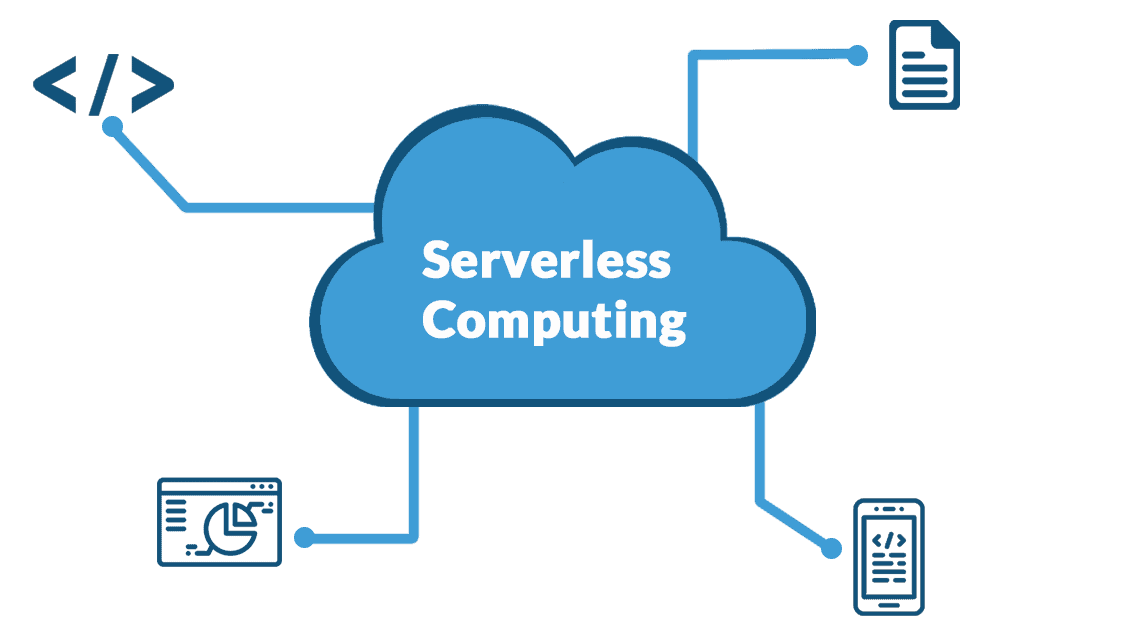
Serverless architecture is a modern way to cut cloud expenses. Traditional server-based models often generate costs even when the application is not actively used. With a serverless architecture such as AWS Lambda, you only pay for code execution – no charges for idle time or infrastructure. This works great for event-driven applications, mobile backends or automation.
Benefits:
- No “waiting time” costs – you only pay for actual use.
- Automatic scaling with no configuration required.
- Ideal for test environments, MVPs and systems with variable traffic.
10. Optimize data transfer costs
Many overlook data transfer as a source of cost, but it’s a crucial part of AWS cost optimization as it can put a significant strain on budgets – especially when communicating between regions or Availability Zones. A well-designed network architecture, such as using Amazon CloudFront, VPC Peering or local endpoints, can reduce these expenses.
Benefits:
- Lower data transfer bills for the same performance.
- Improved application performance through shorter access paths.
- Ability to avoid egress costs by optimizing regions and using edge location.
Summary
Optimizing AWS cloud costs doesn’t have to be difficult. You may drastically lower your monthly AWS payment by implementing these ten tried-and-true AWS cost optimization strategies, which include utilizing Spot and Reserved Instances, optimizing storage, utilizing serverless computing, and appropriately sizing EC2 instances.
These AWS optimization strategies can reduce cloud expenses without compromising security, scalability, or performance, regardless of the size of your business. Take complete control of your cloud spending by optimizing your AWS infrastructure right now.
Optimize resource allocation and usage
- Right-size instances: Match your compute resources to your actual performance needs by analyzing usage data and Downgrading underutilized instances.
- Eliminate idle resources: Turn off or delete resources that are not in use, such as old snapshots, unattached volumes, or idle VMs.
- Implement auto-scaling: Automatically scale resources up or down based on real-time demand to avoid over-provisioning during low-traffic hours.
- Schedule shutdowns: Automate the shutdown of non-production resources during off-hours, like development or testing environments.
Leverage cost-saving pricing models
- Use reserved instances (RIs): Commit to one or three years of usage for predictable workloads to get significant discounts over on-demand pricing.
- Utilize spot instances: Use discounted, excess cloud capacity for fault-tolerant or non-critical workloads.
- Consider serverless: For event-driven applications, serverless architectures can be more cost-effective, as you only pay for actual code execution and not for idle time.
Streamline architecture and data management
- Optimize storage: Use the appropriate storage tier for your data, and move infrequently accessed data to cheaper, colder storage options.
- Reduce data transfer costs: Keep data within the same region when possible, compress data before transferring, and look for services that can help minimize egress fees.
- Adopt a cloud-native design: Use microservices and containerization (like Kubernetes) to allow for granular scaling of individual components, which can improve resource utilization.
Monitor and manage your spending
- Tag resources: Implement a tagging strategy to allocate costs by team, project, or environment, which helps with accountability.
- Set budgets and alerts: Use cloud provider tools to set budgets and receive alerts when spending exceeds a certain threshold.
- Monitor costs regularly: Regularly review billing and usage reports to identify cost anomalies, and establish a culture of cost ownership across your organization.







Comments