
 By
By 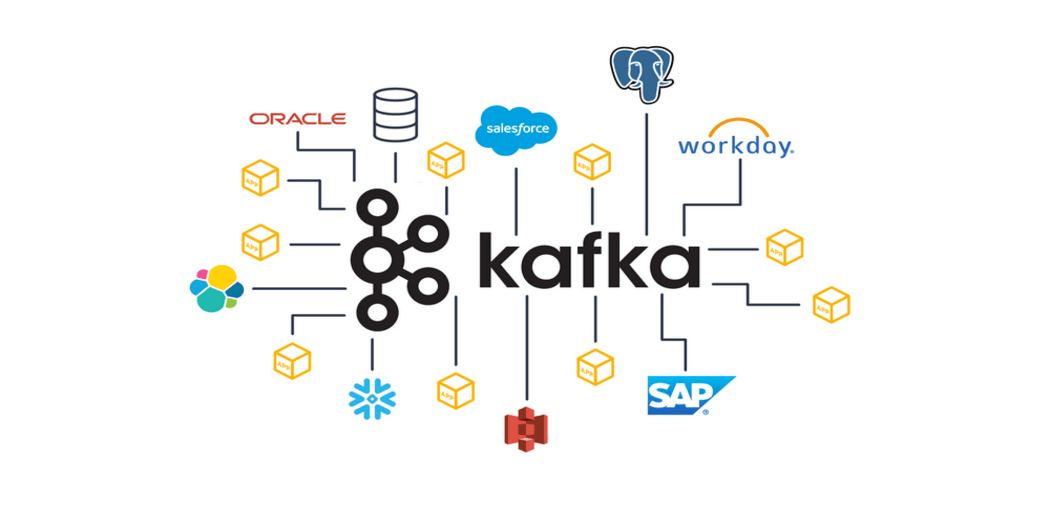
When deploying Apache Kafka in a cloud environment, organizations can use managed services to simplify operations, increase scalability, and reduce infrastructure management overhead. Kafka is a widely used, open-source platform for developing real-time data streaming pipelines and applications. This approach is popular for applications that require dependable, high-throughput data processing and integration.
Apache Kafka is an open-source stream processing software platform created by the Apache Software Foundation and written in Scala and Java. Kafka is intended to provide a single, high-throughput, low-latency framework for processing real-time data flows.
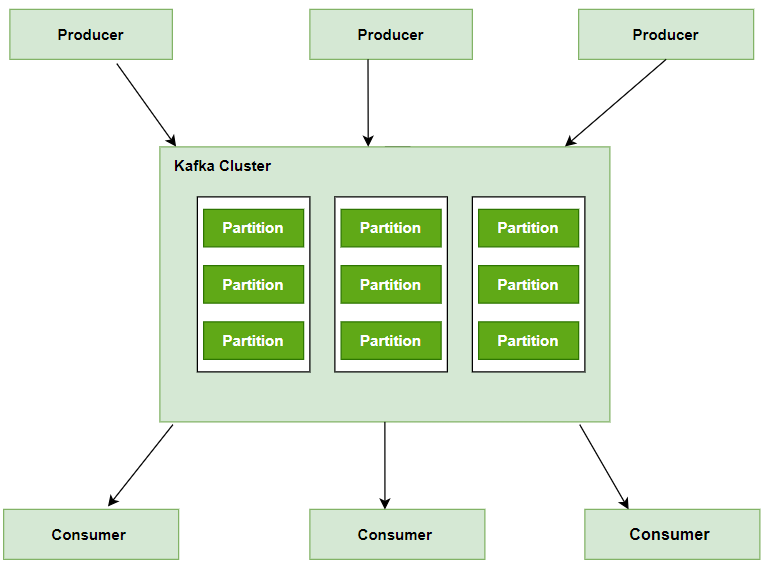
Because of its robustness, scalability, and efficiency, this has become a favorite among most businesses, particularly those dealing with large amounts of data. Kafka operates on a publisher-subscriber paradigm, which allows it to govern data streams from numerous sources and distribute them to specific consumers.
Cloud Deployment Options
Cloud providers offer fully managed Apache Kafka services, handling the complexities of setup, maintenance, and scaling:
- Amazon Web Services (AWS) – Amazon MSK (Managed Streaming for Apache Kafka): Provides a highly available and scalable Kafka service integrated with other AWS services for security, monitoring, and data processing.
- Confluent Cloud: A comprehensive, cloud-native service offered by the original creators of Kafka. It runs across all major cloud providers (AWS, Azure, Google Cloud) and includes enterprise-grade features and support. You can explore their offerings on the Confluent website.
- Google Cloud – Pub/Sub: While not a native Kafka service, Google Cloud Pub/Sub offers similar real-time messaging and streaming capabilities, often used as an alternative or alongside Kafka implementations within the Google Cloud ecosystem.
- Microsoft Azure – Azure Event Hubs: Another popular alternative to Kafka, Azure Event Hubs provides a highly scalable data streaming platform in the Azure environment. Azure also offers a dedicated Confluent Cloud on Azure service for native Kafka deployment.
Benefits of Using Apache Kafka
- Scalability: Kafka is designed to be distributed and can scale out without downtime.
- Performance: It ensures both publish and subscribe operations are high throughput, and the disk structures give uniform performance even when many terabytes of messages are in storage.
- Durability: Kafka uses an ordered, fault-t-tolerant, and distributed commit log; this means that messages are on disk as fast as they can be written without compromising performance.
- Kafka Integration: This system easily integrates with outer systems thanks to Kafka Connect (data import/export) and offers Kafka Streams—a stream processing library.
What is Real-Time Data Streaming?
Real-time data streaming is the process of acquiring, processing, and analyzing data as it is created and in real time. In batch processing, the data to be processed is often collected, saved, and then worked on at a later time. Real-time streaming processes data as it is created, preferably within milliseconds or even seconds.
This is especially important when the application needs to provide real-time insights and take appropriate real-time action, such as monitoring financial transactions for fraud detection, tracking user live interactions on websites, and so on.
Benefits of Real-Time Data Streaming
- Instant Insights: Real-time analysis of data streams allows businesses to make quicker decisions.
- Enhanced User Experience: Immediate processing of data helps in providing personalized user experiences.
- Operational Efficiency: This allows for response by automated dispatchers to critical business events within the organizational setup, hence reducing human intervention and, by extension, errors.
- Risk Management: Immediate data analysis helps in identifying and mitigating risks promptly.
How to Use Apache Kafka for Real-Time Data Streaming?
The steps and specific commands for successfully running real-time data streaming over Apache Kafka are provided below. This instruction will presume that you are in a Unix-like environment (Linux, MacOS, etc.) and have downloaded and extracted Kafka.
Read Also: Big Data Analytics on AWS: Tools and Use Cases
.
1. Install Apache Kafka and Zookeeper
After downloading Kafka, which includes Zookeeper, from the Apache website:
# Extract Kafka
tar -xzf kafka_2.13-2.8.0.tgz

# Navigate to Kafka directory
cd kafka_2.13-2.8.0
2. Start Kafka Server
You’ll start Zookeeper first, then the Kafka server:
# Start Zookeeper
./bin/zookeeper-server-start.sh config/zookeeper.properties

# In a new terminal window or tab, start Kafka Server
./bin/kafka-server-start.sh config/server.properties
3. Create Topics
Create a topic in Kafka to which you’ll publish and from which you’ll consume messages:
# Create a Topic
./bin/kafka-topics.sh --create --topic your_topic_name --bootstrap-server localhost:9092 --replication-factor 1 --partitions 1
4. Produce Data
Use Kafka’s producer to send data to your topic:
# Start Producer
./bin/kafka-console-producer.sh --topic your_topic_name --bootstrap-server localhost:9092
After running this command, you can type messages into the console to send to the topic.
5. Consume Data
Use Kafka’s consumer to read data from your topic:
# Start Consumer
./bin/kafka-console-consumer.sh --topic your_topic_name --from-beginning --bootstrap-server localhost:9092
This command consumes messages from the specified topic and prints them to the console.
6. Monitor and Manage
For basic monitoring and management, you can list and describe topics:
# List all topics
./bin/kafka-topics.sh --list --bootstrap-server localhost:9092
# Describe a specific topic
./bin/kafka-topics.sh --describe --topic your_topic_name --bootstrap-server localhost:
Using Kafka for Real-time Streaming Example
For example, it would be an e-commerce company tracking users’ activities in real-time and recommending products based on their activity on the site. Here is how Kafka can be put to use:
- User Activity Tracking: For this, the company uses Kafka Producers to send data about activities of users to a topic ‘user_activity‘.
- Real-Time Processing: This means that a Kafka consumer subscribed to the topic “user_activities” should process data—all events being consumed are those from real time. Each event can have patterns or preferences processed.
- Recommendation Generation: Based on this, the system should be in a position to generate personalized product recommendations for each user.
Best Practices for Apache Kafka Deployment
- Proper Capacity Planning: Understand your workload requirements and plan Kafka cluster capacity accordingly, considering factors such as message throughput, retention policies, and storage needs.
- High Availability Configuration: Configure Kafka clusters for high availability by deploying multiple brokers across different availability zones or data centers, enabling automatic failover and replication.
- Optimized Topic Design: Design topics with consideration for partitioning, replication factors, and retention policies to ensure optimal performance and durability.
- Effective Monitoring and Alerting: Implement comprehensive monitoring and alerting solutions to track Kafka cluster health, throughput, and latency, enabling proactive management and issue resolution.
- Security Hardening: Secure Kafka clusters using encryption, authentication, and authorization mechanisms to protect data confidentiality, integrity, and availability.
Finally
Apache Kafka is a transformational solution for real-time data streaming, allowing for scalable, fault-tolerant, and high-performance processes. Leveraging Kafka enables enterprises to build durable analytics pipelines, deploy event-driven microservices, and stimulate industry-wide innovation. By following best practices, enterprises may effectively use Kafka to create actionable insights, improve operational efficiency, and sustain competitiveness in a data-centric environment.










Comments