
 By
By 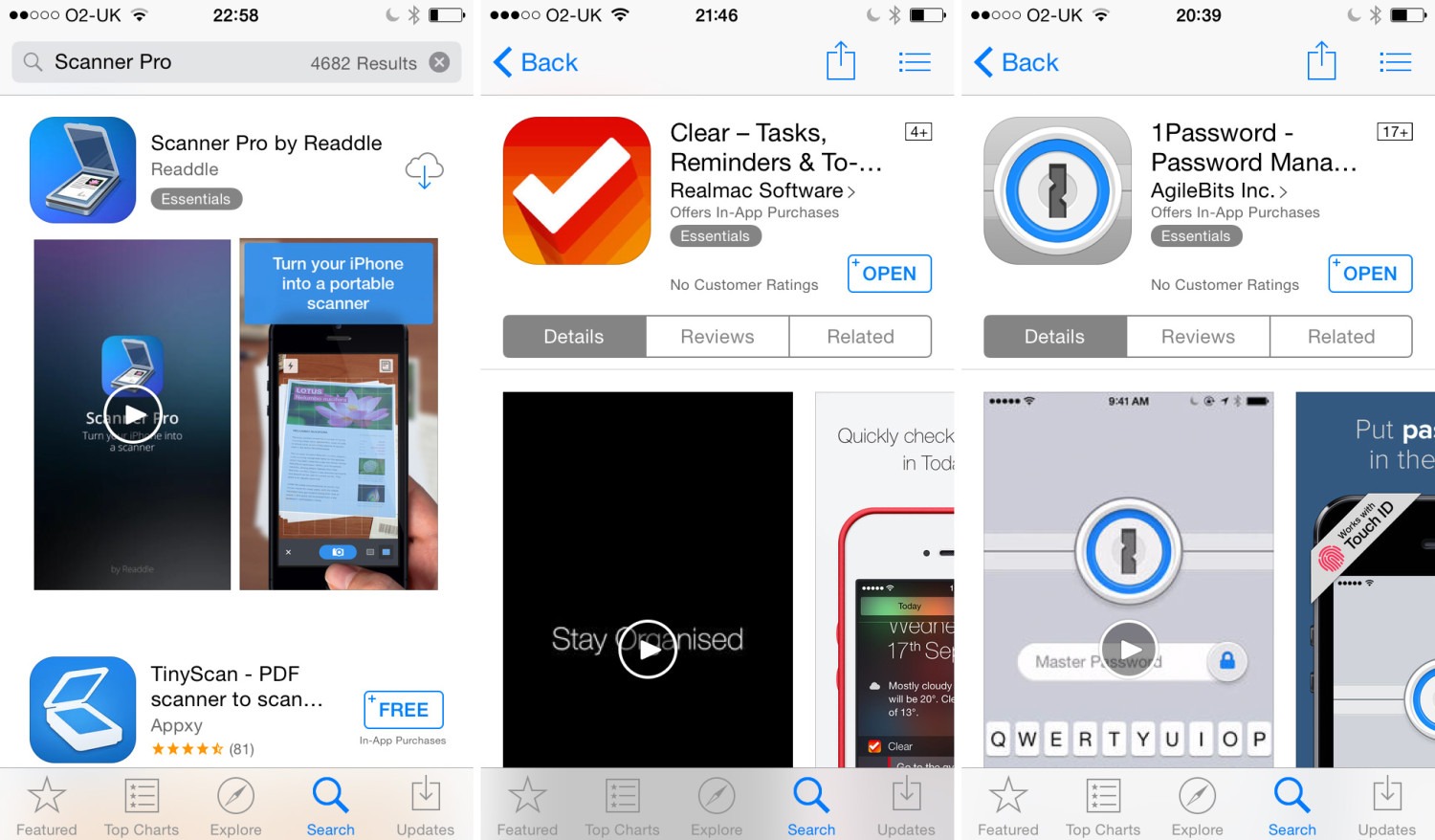
Video previews often drive more installs than screenshots alone, with some research indicating that using a high-quality video can enhance conversion rates by up to 40%. While both are necessary for a good app store optimization (ASO) strategy, they serve slightly distinct functions in enticing potential consumers to download your app:
Video Previews
Video previews are powerful because they demonstrate the app in action, reducing the user’s hesitation by providing a realistic expectation of the user experience and functionality.
- Higher Conversion Rates: Adding a compelling preview video can boost conversion rates significantly compared to listings with only static images.
- Demonstration of Experience: Videos effectively show real interactions like swipes, taps, and transitions, which static screenshots cannot convey.
- Setting Expectations: By showing exactly what the app does, videos help ensure user expectations match the reality of the app, potentially leading to better user retention and fewer early uninstalls.
- Best Practice: Both Apple and Google recommend using preview videos, especially for games or complex apps where a video can provide clarity that images cannot.
Screenshots
Screenshots remain a core component of an app listing, acting as “mini billboards” that communicate value instantly. Users often spend only seconds deciding whether to download an app, and screenshots are essential for that first impression.
- Immediate Information: The first few screenshots, which appear in search results, must clearly and quickly communicate the app’s core benefits and value proposition.
- Storytelling: Through sequencing, developers can guide users through a mini-journey of the app’s features and benefits.
- Visual Appeal: High-quality, well-designed screenshots help your app stand out in a crowded marketplace, establishing an emotional connection and brand identity.
The most effective technique is to combine the two, employing video previews to “seal the deal” by displaying the app’s dynamic experience and optimized screenshots to quickly communicate essential features and develop confidence. A/B testing various combinations of these visual assets on your App Store product page or Google Play listing is the most effective technique to find which creative aspects perform best for your target audience.
Why Screenshots and Videos Matter More Than Ever
When it comes to app marketing, most developers prioritize performance, ratings, and keywords. While these elements are important, one sometimes overlooked feature is the value of visual materials like as images and movies. In 2026, as app marketplaces become even more competitive, visuals are no longer merely supporting elements; they are fundamental to app store optimization (ASO Marketing) and can be the difference between an install and a wasted chance.
First Impressions Drive Installs
The average app user spends less than 7 seconds considering whether to download an app after arriving at its store page. That means your initial impression must count. Keywords and descriptions may persuade algorithms, but images and sample videos sway humans.
An interesting set of screenshots effectively communicates the app’s value, functionality, and user experience. A well-crafted video preview brings the program to life, demonstrating how it functions before consumers commit. This combination has a direct impact on conversion rates, which is why app store optimization currently focuses heavily on visual storytelling.
Why Screenshots Matter in ASO Marketing
Screenshots are no longer just static images; they are mini billboards for your app. The way they’re presented speaks volumes about your brand, features, and benefits. In 2025, app stores are prioritizing clarity, creativity, and user-centric design in screenshots.
Here’s why they matter for ASO Marketing:
- Highlight Key Features Each screenshot is a chance to show a unique value proposition—whether it’s speed, simplicity, or a standout feature. When aligned with user intent, these visuals directly encourage installs.
- Storytelling Through Sequencing A single image won’t do the job. Users expect a flow. By sequencing screenshots, you guide potential users through a mini-journey of your app—problem, solution, and benefits.
- Emotional Connection People connect with visuals faster than words. Using clean design, relatable characters, or engaging color schemes allows screenshots to resonate emotionally, making your app more memorable.
The Rising Impact of App Preview Videos
If screenshots set the stage, preview videos seal the deal. In 2026, videos are playing a bigger role in App Marketing because short-form video content is dominating digital consumption patterns. Users want to see, not just read.
Videos are powerful for three reasons:
- Demonstration of Experience A video demonstrates real interactions inside the app—swipes, taps, transitions. This level of clarity reduces hesitation and builds trust.
- Higher Conversion Rates Studies show apps with preview videos experience up to 25% higher install rates compared to those without. With users becoming more selective, videos often act as the final push to install.
- Retention Boost When expectations match reality, users stay longer. Videos set realistic expectations about the app’s experience, helping reduce early uninstalls—a critical metric in app store optimization.
Visual Assets as a Ranking Factor
What many developers don’t realize is that visuals indirectly influence rankings. Screenshots and videos don’t directly change search algorithms, but they influence conversion rate, which algorithms use as a signal for relevance and quality.
For example, if your app consistently converts more visitors into downloads than competitors, the store algorithm interprets that as “value” and pushes you higher in rankings. This makes visual optimization not just about design, but about strategy in ASO Marketing.
Trends Shaping Visual ASO in 2026
- Localized Visuals Audiences respond best when they feel seen. Screenshots that reflect local culture, language, and context outperform generic visuals. While keeping global consistency, brands need to adapt visuals to regional user expectations.
- Micro-Animations Static screenshots are evolving. Stores are beginning to allow subtle animations, adding dynamism and capturing user attention instantly.
- Short-Form Vertical Videos With platforms like TikTok and Instagram shaping digital behavior, app preview videos are adapting similar formats—short, vertical, and highly engaging.
- Dark Mode Previews Many users now browse in dark mode, so showcasing how your app looks in both light and dark themes enhances credibility and appeal.
Best Practices for Optimizing Visual Assets
- Keep It Simple: Don’t overload visuals with text. Focus on one benefit per screenshot.
- Add Context: Use captions, pointers, or overlays to guide attention.
- Test Everything: A/B test screenshots and videos regularly. What works in one region or audience segment may not perform in another.
- Stay Updated: App stores are constantly updating guidelines. Align your visuals with the latest requirements for maximum impact.
7 Tips to Create an App Preview Video that Converts
Launching an app can be a daunting task. There is a lot to think and prepare for in order to be ready. A preview video is one of these aspects; they are quite valuable for increasing your app’s conversion rates, but they can be difficult to navigate if you don’t know how to use them effectively.
High-quality preview videos can give customers a better knowledge of an app/game than images, and Apple and Google encourage them as a best practice. Compared to images, preview videos provide a far more detailed explanation of why people should add your app/game to their home screen. On both the App Store and the Play Store, video previews are particularly recommended for games.
Last but not least, it is important to remember that you can’t have the same video for the App Store and Google Play. Not only using Google Play creatives on the App Store can lead to a decrease in installs, but each platform has different expectations. The App Store is more strict with what is and isn’t allowed in preview video, so be careful with what you’re planning to show. On Google Play, promo videos are loaded into the app/game’s store listing page via a YouTube link and can be optimized in a similar way as on the App Store.
Read Also: App Icon Design Tips That Boost Click-Through Rates
The preview video will be one of the first things users notice when opening your listing page, and it will impact their decision-making process. If you want store visitors to download your app, you will need to convince them through your app’s visual assets. The preview video can increase your conversion rate by 40%.
Let’s look at these best practices that will help you build captivating preview videos for your app/game.
1. Understand your audience
The first step in creating an effective teaser video is to identify your target audience. Your video should be tailored to your intended audience. If your app is already live, you can leverage existing data to determine which parts of it users enjoy the most or how they found you. If your app has not yet launched, look at your direct competitors to determine who their target audience is and what they are displaying in their visual assets.
2. Leverage keywords in your preview video for increased visibility
If your app is associated with certain keywords that users frequently search for, incorporate those keywords into the captions of your videos. This approach serves two key purposes.
- Firstly, it aids in visual word recognition. When users see familiar or relevant words in the captions, they are more likely to feel connected to the content. This increases their interest and engagement with your video.
- Secondly, using popular keywords can significantly boost your app’s visibility in search results. The app stores often prioritize content that includes frequently-searched keywords, thus improving your app’s ranking. This means your app could appear higher in search results, leading to increased click-through rates, more downloads, and ultimately, a larger user base.
3. Use storytelling & visual elements for effective app preview videos
You only have 30 seconds to make an impression (at least on the App Store) with your preview video, so use it wisely. Use storytelling to highlight your app/game’s top features. Setting up a moodboard is a wonderful place to start since it will help you figure out what you want to say and how to convey it most effectively.
It’s also a good idea to combine elements (such as colors, fonts, and music) or use video templates to help you deliver your message in the most effective way possible. Simply employing textual clues to connect information and features can elevate your sample video to the next level.
4. Create engaging opening scenes in your preview video
The most significant sequence in your video is its opening. You need to keep users engaged for as long as feasible. Whatever you select to show first must be effective and fascinating. However, you must be honest and show what your app/game truly looks like. If it deviates much from the actual content, people will churn fairly quickly.
Also, ensure that your video’s pace is not too slow.
5. Choosing right: App preview video or screenshots?
App preview videos are popular in specific store categories, such as Games, Health & Fitness, and Photo & Video. However, it is not reasonable to assume that a preview video will always perform better than screenshots for all apps. Conduct rigorous investigation to determine whether or not to use a video. Use product page optimization (iOS 15) to determine the conversion rate of utilizing a video versus not using one, and examine if the apps/games at the top of your keyword/category list reflect the notion that people prefer videos over screenshots, as well as whether this preference varies by country.
6. Tailor your preview video for localization
When potential consumers visit your app listing page, they have preconceived beliefs and expectations. These could include your app’s functionality, usability, or distinctive features. Your app preview video is a vital component that can address these concerns and requirements head on. To do so effectively, you must first understand your target audience.
It’s critical to understand your target audience, including their preferences, pain areas, and what they want in an app. This information should then be utilized to design your video content, ensuring that it communicates directly to your target audience and meets their specific requirements.
Localization of your app teaser video is another critical consideration that should not be disregarded. Different markets have distinct tastes, cultural nuances, and linguistic subtleties that can have a major impact on how your app is perceived. By tailoring your video to a certain market and language, you can make your intended audience feel seen and understood.
This could include adopting local languages, employing culturally appropriate images, or addressing region-specific issues that your app can solve. Localization not only improves the user experience, but it also raises the likelihood that your app will be downloaded because it appears more personalized and relevant to users in that specific market.
7. Use captions & larger text sizes in your preview videos
When generating sample videos for your app, it is critical to consider all possible user scenarios. One such case is when a consumer watches a video without sound. To address this, always include captions in your videos. This ensures that even if a user is unable to hear the audio, they may understand the material via the subtitles.
However, simply including captions is not enough. The size of the text is important, especially when your movie appears in lower search results views. If the writing is too small, it becomes illegible, negating the purpose of having captions in the first place. So, utilize larger text sizes for your captions. This will guarantee that the text remains readable irrespective of the viewing size, enhancing the overall user experience.
7 App Store Screenshots Best Practices to Drive App Downloads
While app store screenshots do not effect your rankings, they can make or break a conversion decision for someone looking at your app. Here’s why.
- They send users to your product page. App screenshots appear in search results with your app title and subtitle. In a long list of competitors, they’re one of the best ways to entice a reader to even open your product page in the first place.
- They let users preview your product. Beyond app descriptions, users want to visualize what your product interface will look and feel like. App store screenshots let you preview this information in just a few seconds.
- They convey your brand. In the white space and conformity of app store listings, this is your primary space to display visual branding including color, typography, and images.
- They connect to users. When users can see themselves in the graphics through lifestyle photos, illustrations, or use cases — they’re more likely to try your product.
Follow these seven tried-and-true best practices to build app store images that your target audience will enjoy.
1. Perform competitive research
To get inspiration, check out what type of screenshots your competitors are using. While you can’t display app comparisons in your app listing, you can perform research to identify and highlight what makes your app unique and different.
Remember that users will look at several similar apps at a time. What will make yours stand out?
- Make a whiteboard to pin screenshots from at least three competitor apps side-by-side. First, analyze the design and ask yourself which one draws your eye and why?
- Look closer at the value propositions communicated in each screenshot and the accompanying text. Can you offer something different or better?
- Read app reviews to find out user frustrations with your competitor apps. Call attention to your differentiators in your screenshots.
2. Find the best screenshot order
Only 9% of app users navigate through screenshots, thus most users will only see the first three (or one for landscape). This is significantly greater for games, where 17% browse through. To make the most of this, express your core objective or advantage in the first image and leave new features to the conclusion.
Make sure the text is large enough for readers to see without having to enlarge their screenshots (which most don’t), and limit text to four or five words per line.
3. Tell a story
Your screenshots should be unified and give a clear story. Use your initial screen to state your app’s major advantage, followed by screens that explain how it does it.
If your software is a new concept for the user, storytelling is an excellent way to quickly demonstrate how it works. For example, the Wag! app begins with a fundamental feature (“Any day, any time pet care”) and then on to show the basic processes for scheduling a dog walker.
Designing cross-screenshots is one method to turn your app screenshots into a narrative. You do not have to use this method, however. You can also simply make sure that the graphics and messaging work together across individual screenshots.
4. Portrait vs. landscape
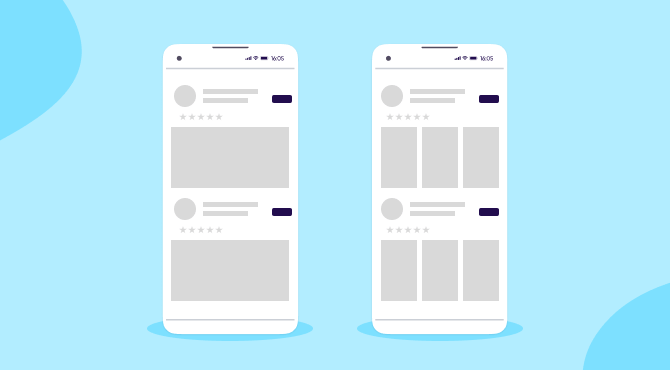
There is no correct or incorrect answer regarding whether to utilize portrait or landscape screenshots. Use the orientation that your software is primarily intended for. Portrait is the more popular option because many programs are meant for portrait use, however employing a landscape image can help you stand out (see Hulu).
Many games opt to use a landscape movie as their first screenshot image. If you do utilize landscape, keep in mind that it takes up more real estate in your preview space and therefore fewer users will see your second and third screens. So make sure that video counts.
5. Use A/B testing
Choosing the ideal app screenshot design is not a total guess. A/B testing in app stores can help you determine which images trigger more conversions.
Both Apple and Google offer the ability to A/B test multiple versions of app listings, including screenshots. We strongly advise testing alternative screenshots and orders of screenshots to evaluate which performs best.
6. Localize your app screenshots
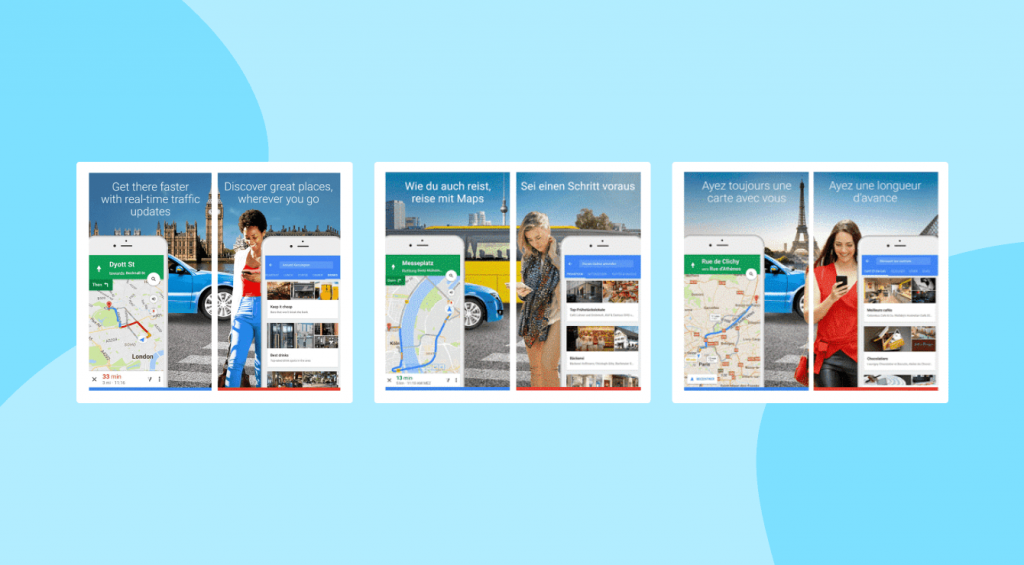
You should localize your app screenshots for different worldwide markets, just like you would with all other app metadata. If your program is accessible in many languages, or if you personalize your app listing for each language, include screenshots of those languages or dialects.
More importantly, you’ll want to test and analyze your visual designs because each market has unique tastes. If you include pictures or images, make sure they reflect and are appropriate for the culture of that region.
7. Customize your screenshots and dimensions for each store
It’s vital to understand that the users of the Apple App Store and Google Play Store are not the same. They have different preferences, and the same strategy may not be appropriate for both stores.
Conduct competitive and A/B research for each store, and be prepared to adapt your strategy based on your findings.
Summary
No matter how users landed on your app listing, an eye-catching app screenshot can set you apart and drive downloads. Keep these principles in mind:
- Remember, you only have seven seconds to make an impression. Don’t waste any time; put your core benefit in the first screenshot.
- Your app store visuals should balance beautiful design with information — showcase what you have to offer.
- App store listings use a lot of white space and conformity by design. Use visuals to make your app pop and convey your branding.
- App screenshots are very small on a mobile screen, so keep them clear of visual clutter and too much text.
- Analyze everything! Research competitors and test versions to find out what makes users take action.
A preview video for your app/game is a great tool that can boost your conversions if you play your cards well. Keep these tips & best practices in mind to create an effective preview video for your app:
- Identify your target market. The content of your app preview video should echo the preferences and needs of the demographic you’re aiming to reach.
- Incorporate keywords into the captions of your preview videos for visual word recognition and increased visibility in search results.
- Use storytelling to showcase your app/game’s best features.
- Engage users with a compelling opening scene that reflects your in-app experience.
- Perform in-depth research to evaluate the impact of using a video, for example, use PPO to assess the conversion rates of video usage, or check if top apps/games use more videos over screenshots.
- Localize your app preview video to target different markets.
- For app preview videos, always use large, readable captions to cater to users watching without sound and enhance their experience.





Comments