
 By
By 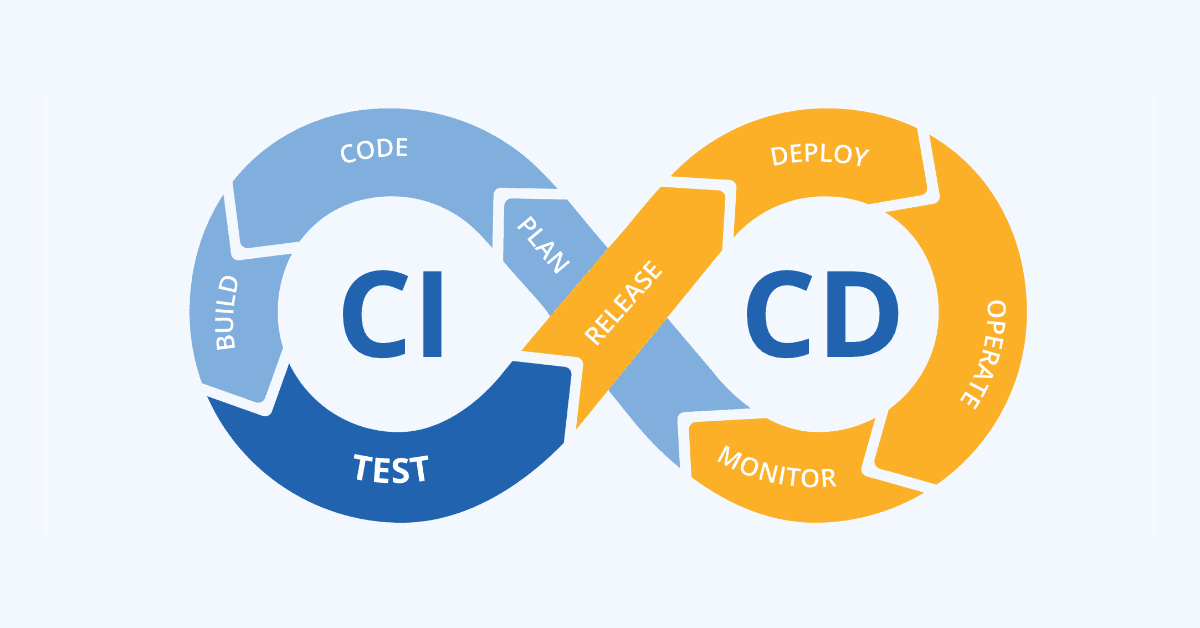
In order to automate the software release process, CI/CD pipelines on AWS are usually implemented utilizing a suite of AWS developer tools. This manual offers a useful summary of the essential elements and procedures involved:
1. Core AWS Services for CI/CD:
- AWS CodeCommit: A fully managed source control service that hosts secure Git repositories. This serves as the central repository for your application’s source code.
- AWS CodeBuild: A fully managed continuous integration service that compiles source code, runs tests, and produces deployable artifacts. You define build instructions in a
buildspec.yamlfile within your repository. - AWS CodeDeploy: A fully managed deployment service that automates software deployments to various compute services like Amazon EC2, AWS Fargate, AWS Lambda, and on-premises servers. It uses an
appspec.yamlfile for deployment instructions. - AWS CodePipeline: A fully managed continuous delivery service that automates the release pipelines for fast and reliable application and infrastructure updates. It orchestrates the flow between CodeCommit, CodeBuild, CodeDeploy, and other services.
2. Practical Steps for Building a CI/CD Pipeline:
- Store Code in CodeCommit: Create a new repository in AWS CodeCommit and push your application’s source code to it.
- Configure CodeBuild Project: Create a CodeBuild project, linking it to your CodeCommit repository. Define the build commands and artifact output in a
buildspec.yamlfile within your source code. - Set up CodeDeploy Application and Deployment Group: Create an application in CodeDeploy and define a deployment group, specifying the target compute environment (e.g., EC2 instances, ECS services). Include an
appspec.yamlfile in your repository for deployment instructions. - Create CodePipeline:
- Navigate to AWS CodePipeline and create a new pipeline.
- Source Stage: Select AWS CodeCommit as the source provider and choose your repository and branch.
- Build Stage: Select AWS CodeBuild as the build provider and choose your CodeBuild project.
- Deploy Stage: Select AWS CodeDeploy as the deploy provider and choose your CodeDeploy application and deployment group.
- IAM Roles and Permissions: Ensure that appropriate IAM roles with necessary permissions are created and attached to CodePipeline, CodeBuild, and CodeDeploy to allow them to interact with other AWS services (e.g., S3 for artifacts, EC2 for deployments).
- Monitor and Iterate: Once the pipeline is created, monitor its execution in the AWS console. Any new code commits to the specified branch in CodeCommit will automatically trigger the pipeline, leading to automated build, test, and deployment.
3. Enhancements and Best Practices:
- Testing: Integrate automated testing frameworks within your CodeBuild stage to ensure code quality before deployment.
- Approvals: For continuous delivery scenarios, add manual approval actions in CodePipeline before deploying to production environments.
- Infrastructure as Code (IaC): Use AWS CloudFormation or AWS CDK to define and manage your CI/CD pipeline and underlying infrastructure as code, enabling version control and reproducibility.
- Notifications: Configure Amazon SNS to receive notifications on pipeline status changes or failures.
SAAS development organizations must be nimble in the current digital era, when users anticipate a steady flow of new features and upgrades. AWS offers continuous integration and continuous delivery (CI/CD) solutions, which are now essential for software teams in the modern day who want to release updates quickly and effectively.
Consider a SaaS business developing an AWS web application. Developers want to automatically build, test, and validate code changes since they commit them frequently during the day in order to identify problems early. Additionally, they want to quickly and reliably roll out updates to production.
Reselling reserved instances has been prohibited by AWS as of late, thus businesses must find alternative ways to meet this need. They will optimize costs with the aid of best practices.
The business can establish automated CI/CD workflows to swiftly and consistently deploy their web application by utilizing AWS services like CodeCommit, CodeBuild, CodeDeploy, and CodePipeline. They may concentrate on quick innovation instead of tedious procedures by incorporating CI/CD best practices into their AWS architecture.
What is the CI/CD Pipeline?
A CI/CD pipeline, in its most basic form, is a workflow created to automate the development, testing, integration, and delivery of high-quality software. From the time code changes are committed to a source code repository until they reach a runtime environment, it is a sequential procedure that streamlines software release cycles.
Building a workflow that attempts to accomplish the same goals as a CI/CD pipeline, although manually, is laborious, time-consuming, and does not scale well, especially when modern software development involves the use of several environments (i.e., dev, stage, and prod).
We must take into account the key ideas that comprise continuous integration and continuous delivery (CI/CD) pipelines in order to gain a better understanding of them.
What is Continuous Integration?
One development technique that helps teams deploy software more quickly and with higher quality is continuous integration. Developers often upload their code updates to a shared repository, such as GitHub, while using continuous integration (CI). An automatic build and test procedure is started with every commit. Teams can identify problems and integration issues early on, when they are easier to fix, by integrating code and testing it frequently.
Developers for a startup mobile app, for instance, frequently upload code updates to GitHub throughout the day. Jenkins and other CI servers perform build scripts and unit tests in response to every GitHub commit. Developers are alerted right away if tests fail so they can address the problem before adding further code. CI helps developers deploy high-quality code more quickly by providing quick feedback.
What is Continuous Delivery?
The software release process to production is automated by continuous delivery, but manual intervention and approvals prior to deployment are still possible. With CD, code updates that pass automated testing can be published to clients fast, but a developer or operator will often still click a button to push changes live.
A CD pipeline, for instance, is used by e-commerce sites to enable developers to quickly push code changes to staging environments. New features and updates can be released to production with a single click after being manually approved by business owners. Software on CD is guaranteed to be releasable at any time while maintaining control prior to launch.
Continuous deployment
Continuous deployment takes automation one step further, validated code changes are automatically and immediately deployed to production without any manual approvals or intervention. With CD, tested code is automatically pushed from the repository to customers.
For instance, a SaaS startup relies on extensive test automation and confidence in its CD pipeline. Developers focus on writing code and tests rather than deployment mechanics. Any changes that pass tests are instantly released to users, enabling very rapid iteration and innovation.
With the right AWS services, you can automate these processes to accelerate your development lifecycle. DevOps experts can help you implement robust CI/CD pipelines leveraging AWS Code services, deployment tools, and more.
Continuous deployment is the process of releasing all committed changes to the runtime environment after they have successfully completed all pipeline stages or phases. The procedure is entirely automated and devoid of human involvement, in contrast to continuous delivery. With this method, software shipping proceeds even more quickly and does away with the notion of a specific day for software release.
Phases of CI/CD pipeline
In practice, CI/CD pipelines may vary depending on a number of factors, such as the nature of the application, source code repository setup, software architecture, and other important aspects of the software project.
That being said, some universal concepts are generally quite common in CI/CD pipelines which are detailed below:
1. Source stage
This is the first phase and involves pulling the source code that will be used in the pipeline. Typically, the source code is taken from a branch in a version control system like Git. This phase can be triggered through various events, such as pushing code directly to a specific repository branch, creating a pull request, or when a branch is merged.
2. Compile or Build stage
In this phase, the code from the source stage is used to compile or build the application. This reflects the same exercises developers typically undergo to build or compile an application locally.
However, this also means that the application dependencies need to be installed just as they would on a developer’s workstation to ensure that the build process runs smoothly.
In addition to this, other important runtime dependencies need to be specified. For example, if you are building a Docker application, you must ensure that the CI tool’s build runtime have Docker installed.
In most cases, CI tools have build stage templates that can be used to ensure that the build phase has the relevant dependencies and software tools for your application’s build process.
Also, this is usually the phase where the code is packaged for deployment or delivery. However, in some pipelines, there’s an additional phase where the code is packaged into an artifact for delivery.
Test stage
As the name implies, this is the phase in which you run various automated tests. Examples of these tests include static code analysis, unit testing, functional testing, integration testing, acceptance testing, and API testing. As mentioned earlier, the goal is to ensure that the committed code is of a certain quality and doesn’t introduce software faults through bad code.
Deploy or Deliver stage
This is the last phase of the CI/CD pipeline. After your source code has successfully been built and passed all the relevant tests, it will either be automatically deployed to a runtime environment or released upon clicking a button.
How to Ship Code Faster
As modern software systems have increased in complexity and distribution, visibility of the infrastructure layer has become more pertinent to the success of software that is shipped to your runtime environments.
Read Also: Microservices vs Monoliths in the Cloud
In the context of CI/CD pipelines, the software teams need to easily trace, detect and isolate particular areas of recently shipped code to remediate any issues quickly. This fits within the broader scope of monitoring infrastructure.
Infrastructure monitoring has become more critical for teams to keep their fingers on various components across the technical architecture. These components include containers, virtual machines, servers, and more.
By monitoring components of this nature, teams can respond faster, more accurately, and in some cases, proactively to infrastructure issues and incidents when they arise. Additionally, using a platform like Middleware can enhance your infrastructure monitoring strategy to better troubleshoot, optimize and forecast issues.
When it comes to shipping code, Middleware’s infrastructure monitoring zeroes in on poor-performing areas of your software for a more efficient approach to fixing bugs and issues in the development lifecycle, this complements the main goals of velocity and quality in CI/CD pipelines.
Benefits of the CI/CD Pipeline
CI/CD pipelines have become the de facto approach to building and shipping software. This is the case across the board, from small startups to large enterprises. Let’s explore some of the main benefits that have contributed to the growth of this practice.
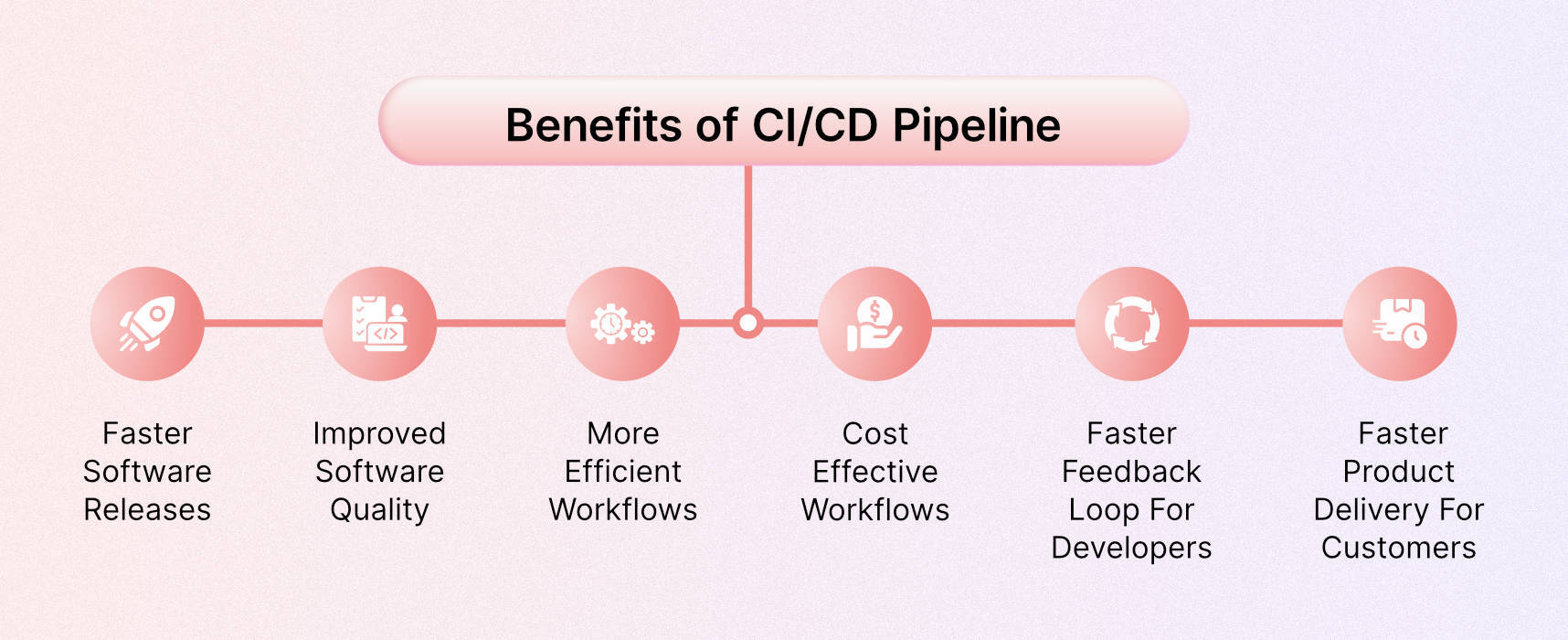
Faster software releases
Velocity is perhaps the primary issue that CI/CD pipelines aim to solve when it comes to delivering software. The flaws of the traditional approach are what contributed to the rise of DevOps as a whole.
The siloes between application developers and IT operations resulted in very poor turnaround times in the overall software shipping workflow.
This was due to the frequent communication and collaboration breakdowns that occurred as a result of the siloes. In contrast, CI/CD pipelines are built on the integration and collaboration of these two teams, developers, and operators, which automates the entire workflow and rapidly accelerates the entire process.
Improved software quality
To mitigate the risks of software faults and failures, you need to have quality gates that protect the main source code repositories. That’s where automated tests come in. Apart from expediting the process of getting software into the hands of the customer, this characteristic of CI/CD pipelines is right up there in its level of importance. As a result, software teams and companies benefit from setting a quality standard and maintaining it efficiently.
More efficient workflows
CI/CD pipelines enable teams to ship better code faster and create a more efficient workflow. The automation and optimization that CI/CD pipelines provide means that software teams no longer have to engage in the same repetitive tasks or go back and forth with external teams to ship code.
Once the pipeline is built, any further changes are minor compared to the initial creation process. As a result, the whole workflow is more efficient, and teams can spend more time on application optimization.
Cost effective workflows
Companies and software teams adopting CI/CD pipelines can also save on the costs of traditional approaches. This is because the manual way of doing things relies heavily on human intervention and has proven to be less effective.
When teams automate through pipelines, companies can save on the overhead of larger teams that don’t contribute towards the overall efficiency of the software shipping workflow.
Faster feedback loop for developers
Given the quick nature of CI/CD pipelines, software teams have a faster track to getting feedback for their recent committed changes. This allows teams to respond to issues that arise much faster.
Faster product delivery for customers
The quick feedback loop that CI/CD pipelines introduce benefits not only the development teams but also the end users. Certainly as relevant teams are made aware of the issues in their system, MTTT & MTTR are shortened.
Logging systems in CI/CD tools
CI/CD tools generate logs during the different phases of the pipeline, which serves as a leading indicator of issues. And DevOps and Development teams can use these logs to debug issues faster.
Notes : Instead of manually filtering logs by date, time and machines, you can leverage Middleware’s log monitoring capabilities by integrating it with your CI/CD tool to visualize logs with detailed time in your unified dashboard.
Setting up a CI/CD Pipeline in AWS
Application development, testing, and deployment can be automated by establishing a continuous integration and delivery pipeline on AWS. You may set up a workflow that receives code changes from a repository and does builds, automated testing, and deploys by integrating different AWS services. This establishes a dependable, repeatable procedure for regularly providing software upgrades.
To set up a full CI/CD pipeline on AWS with CodeCommit, CodeBuild, CodeDeploy, and CodePipeline, follow these steps:
1. Create a CodeCommit repository to store source code
- In the CodeCommit console, create a new repository to hold your application source code.
- Clone the repository locally and add your code.
- Commit and push code changes to sync with the CodeCommit repository.
2. Create a CodePipeline pipeline
- In CodePipeline, create a new pipeline.
- Add a source stage that connects to the CodeCommit repository.
- Add a build stage using CodeBuild to compile, test, and package code.
- Add a deployment stage using CodeDeploy to deploy updates.
- Optional: Add additional test stages between build and deployment.
3. Configure CodeBuild
- Create a CodeBuild project for compiling, testing, and packaging code.
- Add commands to install dependencies, run tests, and produce deployment artifacts.
- Configure CodeBuild to run on source changes triggered by CodePipeline.
4. Set up CodeDeploy
- Create a CodeDeploy application for the software application.
- Create a deployment group mapped to the EC2 instances.
- Install or update the CodeDeploy agent on the instances.
5. Make a code change
- Update code in the CodeCommit repository.
- Commit and push the change to trigger the pipeline automatically.
- Monitor pipeline progress in CodePipeline.
- Verify updates on EC2 instances after deployment.
6. Clean up resources
- Delete the pipeline in CodePipeline.
- Delete related resources like CodeBuild, CodeDeploy, and CodeCommit.
Best Practices for CI/CD in AWS
These are some of the best practices that will enable highly automated, secure, and reliable CI/CD pipelines on AWS:
1. Use infrastructure-as-code (CloudFormation) for repeatable deployments
Manage all infrastructure through code with AWS CloudFormation templates. This ensures consistent, repeatable deployments across environments. CloudFormation grants the least privilege permissions through service roles.
2. Implement automated testing at multiple levels (unit, integration, etc)
Rigorously validate code changes by running unit tests, integration tests, UI tests, performance tests, etc. Add test stages throughout the pipeline to catch issues early.
3. Use CodeDeploy deployment groups for staged rollouts
Incrementally deploy updates to instance groups using CodeDeploy. This allows for controlled, gradual rollouts to test changes before full production rollout.
4. Monitor deployments with AWS X-Ray and CloudWatch
Gain observability into deployments and monitor key metrics with X-Ray tracing and CloudWatch alarms and dashboards. Quickly detect and diagnose any issues.
5. Validate software before promoting it to production
Manually test and validate builds to meet requirements before releasing them to customers. Add approval gates before production deployment.
6. Automate post-deployment tests with AWS Lambda
Create Lambda functions to run smoke tests and integration tests to confirm the software is working as expected after deployments.
7. Leverage IAM and security groups for least privileged access
Restrict access to resources through IAM policies and security groups. Grant only the minimum permissions needed to complete tasks.
Top CI/CD Tools
Your team can automate development, deployment, and testing with the aid of CI/CD tools. Some tools specialize in continuous testing or related tasks, while some manage the development and deployment (CD) and others manage the integration (CI) side.
Below are some of the top CI/CD tools:
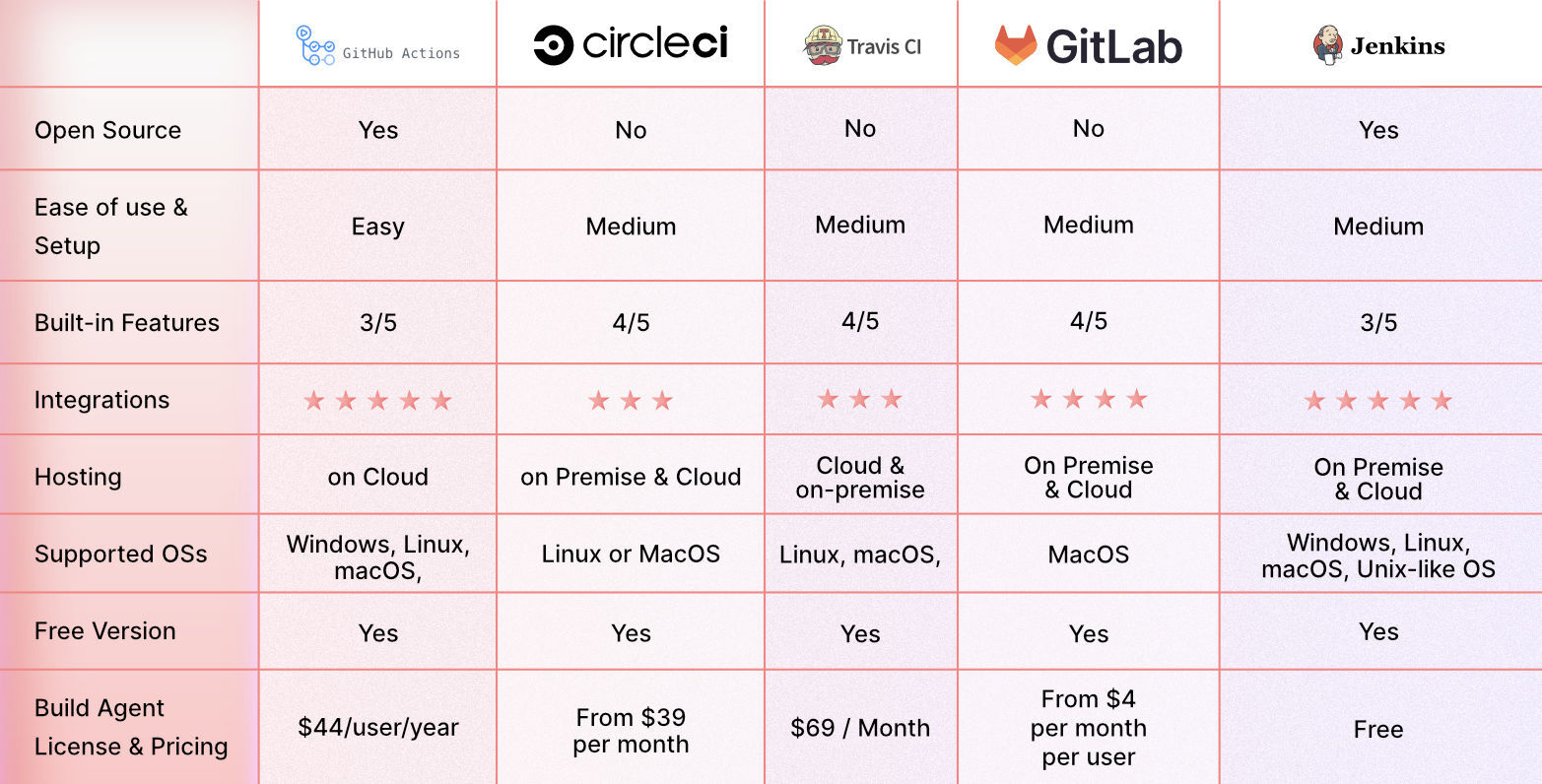
1. GitHub Actions
GitHub Actions is a great CI/CD platform that allows you to automate your build, test, and deployment pipeline. You can create custom workflows that build and test every pull request to your repository or deploy merged pull requests to production.
2. Circle CI
Circle CI is a cloud-based CI/CD platform that helps development teams release their code rapidly and automate the build, test, and deployment.
3. Travis CI
Travis CI is a hosted continuous integration tool that allows Development teams to test and deploy your projects with ease.
4. GitLab
Gitlab is an all-in-one DevOps platform that helps Devs automate their code’s builds, integration, and verification.
5. Jenkins
Jenkins is an open-source automation server that helps Development teams automate their build, testing, and deployment part of the software development lifecycle.
Bottomline
By using AWS for continuous integration and delivery, teams can quickly and reliably deploy high-quality software changes through a repeatable, automated workflow. From source control and build services to automated deployment choices, AWS provides all the resources required to create sophisticated CI/CD processes. Organizations can adapt development techniques to facilitate quick iteration on top of AWS by adhering to best practices regarding infrastructure, such as code, thorough testing, and access controls.







Comments