
 By
86% of creators used creative generative AI in Adobe's 2025 global survey of more than 16,000 creators, according to its Creators' Toolkit Report. Producing an asset is no longer the only challenge. For solo creators, the harder work is proving someone will pay, making the product usable, and explaining exactly what buyers are getting.
A dependable digital products creation process treats demand validation, accessibility, and transparent authorship as part of the product itself. Don't start with a polished course library. Start with a buyer, a costly problem, and evidence that your proposed solution deserves to exist.
Table of Contents
- The Five-Stage Path from Idea to Launch
- Choosing a Product Format and Idea
- How to Validate Demand Before You Build
- How to Build a Version Buyers Can Use
- Disclosing and Verifying AI-Assisted Work
- Pricing Models and How to Set Your Price
- Packaging, Delivery and First Sales
- Confirm Your Launch Plan Before You Publish
The Five-Stage Path from Idea to Launch
Digital products belong to a measurable economy, not merely a collection of side projects. That's a reason to treat creation as a business process, with clear decisions before you commit more time.
Think like a house builder. You'd check the land and understand the buyer before pouring the foundation. Changing a floor plan on paper is manageable; moving finished walls means undoing paid work.
The same sequence applies here. Demand validation comes before production, even when creating feels more comfortable than asking someone to pay.
Digital Product Creation Stages at a Glance
The time ranges below are hypothetical planning budgets for a part-time solo creator building a narrowly scoped product, not measured industry averages or delivery guarantees.
| Stage | Goal | Finished output | Typical time |
|---|---|---|---|
| Idea selection | Pick one problem and one format | One-sentence product promise | Budget 1–3 days |
| Demand validation | Find evidence buyers will pay | Buyer interview notes and a paid test or qualified waitlist | Budget 1–3 weeks |
| Creation | Build the smallest complete version | Tested draft or final file set | Budget 2–8 weeks |
| Pricing and packaging | Define the offer and buyer experience | Price, offer page, and delivery files | Budget 3–7 days |
| Launch and promotion | Reach buyers and learn from use | Sales records and actionable feedback | Ongoing |
For software, SubmitMySaas provides a practical launch roadmap for founders that can help turn the launch stage into an operational checklist rather than a publication date.
Practical rule: Finish the evidence for the current stage before expanding the work in the next one.
Write down your current stage and the specific output that would prove it's complete. A folder of unfinished drafts isn't a milestone; a tested, usable deliverable is.
Choosing a Product Format and Idea
A digital product can be a downloadable template, guide, recorded course, software tool, or paid membership. The format is the delivery mechanism. The buyer's desired result is the reason to purchase.
The U.S. Bureau of Economic Analysis estimated that the U.S. digital economy generated $2.41 trillion in value added, or 10.3% of GDP, in 2021. That broad category includes infrastructure and commerce, so it isn't a market-size estimate for independent creators. It does establish that digitally delivered work sits within a substantial economic system.
Digital Product Formats Compared by Effort and Upkeep
These build ranges are illustrative scheduling assumptions for a scoped first product, not researched averages.
| Format | Typical build effort | Ongoing upkeep | Best fit |
|---|---|---|---|
| Template or swipe file | Low, budget about 1–2 weeks | Low, with compatibility checks | Work you already do repeatedly |
| Ebook or guide | Low to medium, budget about 2–6 weeks | Low, unless the topic changes quickly | Expertise you can explain step by step |
| Online course | Medium to high, budget about 1–3 months | Medium, including learner support | A clear transformation for a defined audience |
| Software tool or app | High, budget about 2–6 months | High, including security and reliability | A recurring workflow problem with budget behind it |
| Membership or community | Moderate setup, continuous delivery afterward | High | An audience with an ongoing reason to return |
Choose the Problem Before the Format
Judge each candidate against these criteria:
- Existing expertise: Can you explain the exceptions and mistakes, not just the basic steps?
- Visible buyer cost: Does the problem waste time, delay payment, or cause avoidable rework?
- Repeatable delivery: Can another buyer use the solution without a custom rebuild?
- Sustainable upkeep: Can you maintain it alongside your other commitments?
Say a bookkeeper repeatedly explains invoicing to freelancers. An invoice pack with a completed example and troubleshooting checklist is a more contained first offer than an invoicing app with accounts, payments, and integrations.
Designers can use these examples of what graphic designers can sell on Etsy to narrow the format, then apply the same problem-first test. Before building, use Humantext.pro's guidance to turn product features into persuasive copy, translating editable fields into a concrete buyer benefit.
Score your candidate ideas against the criteria using a consistent scale. Choose the strongest combination of buyer urgency, personal competence, and manageable maintenance, not the most elaborate format.
How to Validate Demand Before You Build
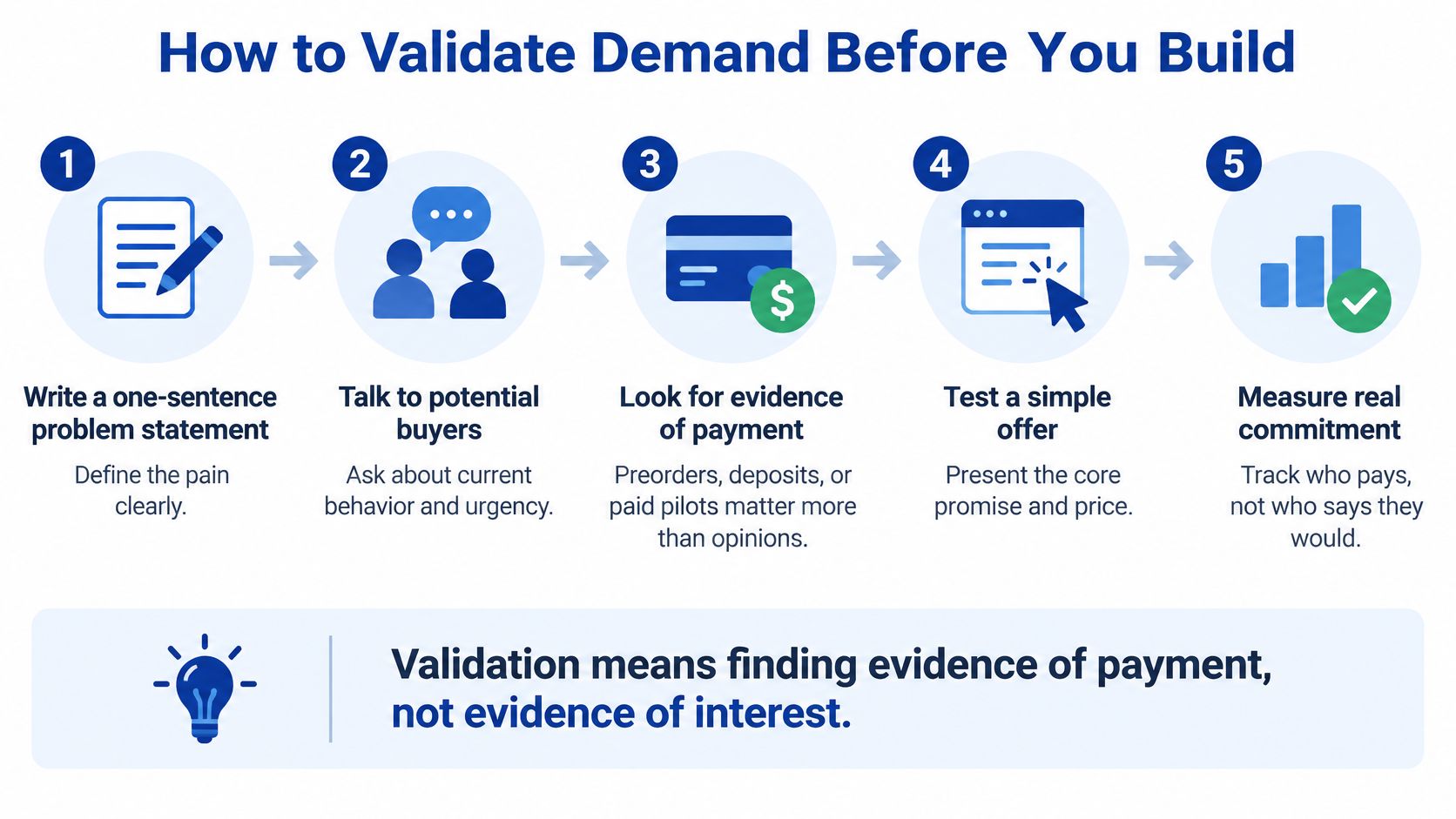
Validation means finding evidence of payment, not evidence of interest. Compliments can help you understand language, but they don't establish that someone will choose your product over doing nothing.
Keep the test small enough to change. A clear offer page and a relevant conversation are more useful at this point than branding, automation, or a finished content library.
Run a Payment-Focused Test
Write a specific promise. Name the buyer, the problem, and the result. A spreadsheet that helps freelance illustrators track overdue invoices is testable; a productivity toolkit for creatives is too broad.
Interview potential buyers about current behavior. Ask them to describe the last time the problem occurred, how they handled it, and what they already spend to solve it. Request examples of their workflow rather than asking whether your idea sounds useful.
Inspect market signals. Search for the problem, examine marketplace listings, and read competing products' reviews. Look for fixable gaps, such as missing worked examples, unclear compatibility, or instructions that assume too much prior knowledge.
Publish a simple offer with a visible price. Show the promised outcome, contents, preview, delivery expectations, and a pre-order or waitlist action. Share it with relevant contacts or a community that permits offers, and disclose clearly when the product isn't finished.
Set the decision rule before collecting responses. Decide what level of paid commitment would justify the build, based on your costs and available capacity. Record where prospects came from, whether they paid, and why others declined.
This visual summarizes the difference between opinions and commitment.
Avoid Friendly but Misleading Feedback
Friends and family may support you without needing the product. Hypothetical purchase questions also give respondents an easy way to be encouraging without making a decision.
Don't validate a topic such as bookkeeping. Validate a particular result for a particular buyer, with a price attached.
Use a simple idea log to preserve objections and competing requests. These approaches to managing product ideas can help you separate useful evidence from distracting feature suggestions.
A waitlist is weaker evidence than a payment. If your test only attracts sign-ups, make a priced offer before treating demand as established. Proceed when the decision rule is met; otherwise, revise the audience, promise, or scope rather than adding more content.
How to Build a Version Buyers Can Use
Build the smallest complete version, not the smallest fragment. A buyer should be able to reach the promised result without waiting for an essential missing lesson, formula, or instruction.
Find Startup Idea's explanation of using MVPs to validate startup ideas is useful for deciding what to remove. Cut secondary features, not the steps required for successful use.
Build Around the Buyer's Workflow
Outline the outcome in execution order. For an invoice toolkit, start with choosing the right template, then entering details, checking the total, sending the invoice, and tracking payment. Organize around actions rather than everything you know about invoicing.
Create a complete working path. Use Word or Google Docs for structured guidance, Excel or Google Sheets for calculations, and screen recordings where a demonstration is clearer than prose. Include a worked example and a clean copy buyers can edit.
Observe target users completing a task. Give them the product without a running explanation. Note where they hesitate, overwrite a formula, misunderstand a label, or search for help, then fix those obstacles before decorating the files.
Add accessibility during production. Use real heading styles, descriptive links, meaningful alt text, and contrast checks against WCAG guidance. Caption recordings, supply transcripts, and ensure interactive controls work with a keyboard without relying on color alone.
Test and document what works. Try keyboard-only navigation and a screen reader such as NVDA or VoiceOver. Record the product version, tested tasks, tools used, known limitations, and available alternative formats.
Make Accessibility Evidence Useful to Buyers
In Level Access's State of Digital Accessibility in B2B Tech report, 74% of B2B technology professionals said their organization requires proof of accessibility when purchasing digital products; 82% reported better retention from accessibility. Those are reported organizational experiences, not a guaranteed sales uplift for your template pack.
Consumer buyers need a usable product. Business buyers may also need documentation before procurement can approve a purchase. A plainly written accessibility statement helps them understand what you tested and what remains unresolved.
Start with built-in document checkers, keyboard tests, caption review, and screen-reader checks. These are a starting point, not certification. Seek specialist help when the product's complexity, buyer requirements, or unresolved barriers exceed what you can assess confidently.
Disclosing and Verifying AI-Assisted Work
Calling a product AI-powered tells buyers little about who created it or how anyone checked it. A useful disclosure describes the work performed and the human responsibility behind the final result.
Adobe's 2026 global creator research found that 85% of creators said audience expectations for AI disclosure were increasing or staying steady, while 75% believed audiences could already detect meaningful AI involvement. These are creators' perceptions, but they support a practical recommendation: don't rely on buyers overlooking substantial AI use.
Treat review as a production task, not a final glance.

Match Disclosure to the Work
| AI involvement | Recommended disclosure approach | Verification before sale |
|---|---|---|
| Brainstorming and editing | Usually optional as an editorial practice, answer accurately if asked | Check final facts, promises, and examples |
| Research and synthesis | Explain AI-assisted source discovery or summarization | Open original sources and confirm every cited claim |
| Customer-facing generation | State clearly on the sales page where buyers encounter generated outputs | Test realistic tasks, failure cases, and user expectations |
| Near-total generation | Explicitly describe substantial AI drafting before purchase | Complete a substantial human rewrite and qualified subject review |
These are editorial recommendations, not universal legal rules. Check the marketplace's requirements, your contractual obligations, and any applicable disclosure requirements separately.
For a substantially drafted guide, write a direct statement explaining that AI produced an initial draft and identifying the human editing, example development, and testing you completed. Don't claim expert review unless a qualified person performed it.
Use the accompanying video as an additional viewing resource, while keeping verification tied to the product you're selling.
Keep a Record of Human Decisions
Check the tool's commercial-use terms and the licenses for incorporated assets. Search distinctive passages, inspect suspiciously familiar images, and retain source notes; automated originality checks alone don't establish that a work is safe to sell.
Your contribution should be visible in the tested workflows, explanations, and editorial decisions. Assign an AI-use level to each product and write its disclosure before publishing the offer.
Pricing Models and How to Set Your Price
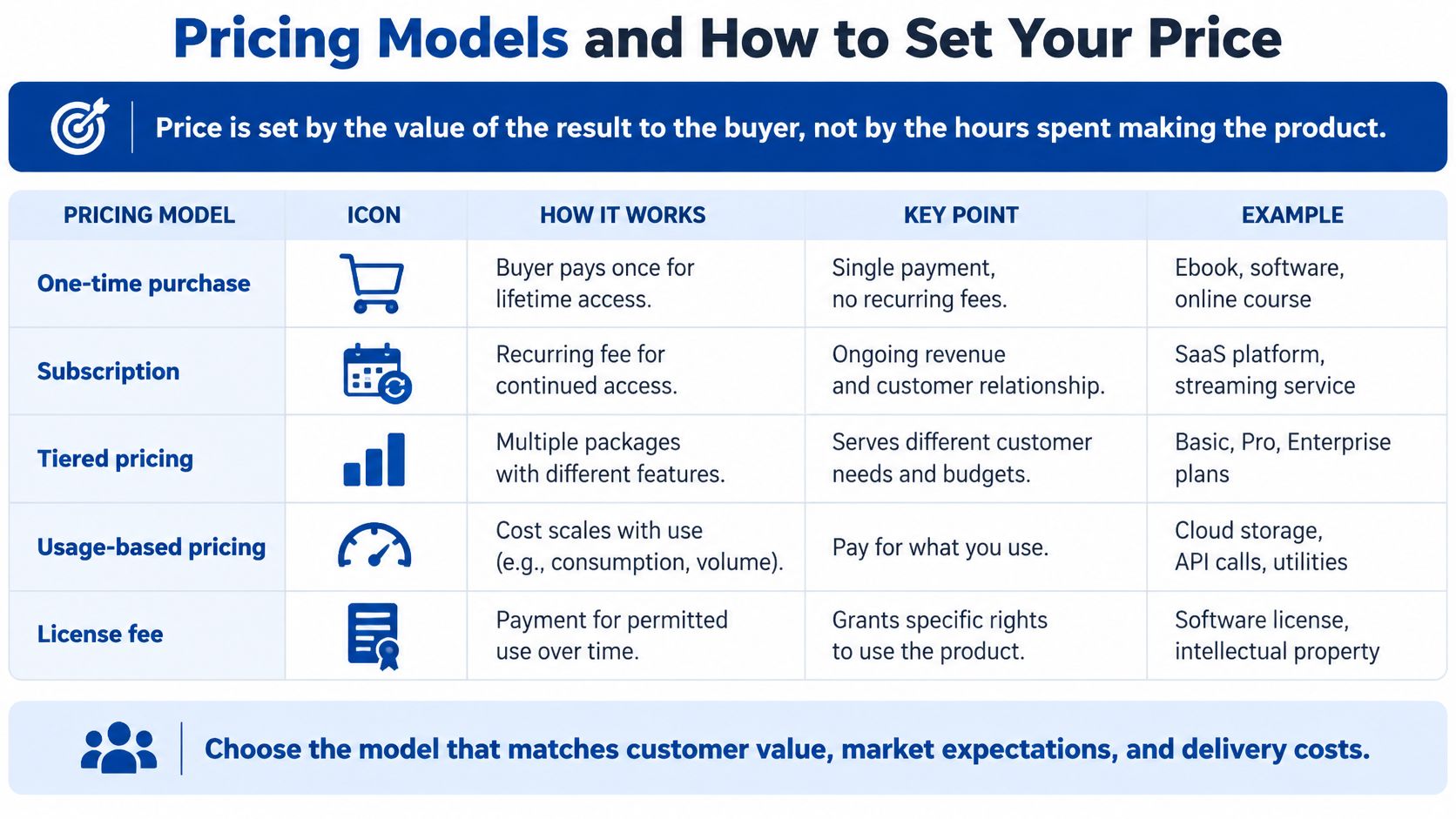
Price the value of the result, not the hours you spent creating it. Buyers don't owe you more because you struggled with formatting. They need to understand why the outcome is worth the charge.
Start with the cost of the problem, then compare the offer with realistic alternatives. A buyer may be choosing between your toolkit, a competing download, hiring someone, or continuing with a manual process.
Digital Product Pricing Models Compared
| Model | How it works | Best for | Main risk |
|---|---|---|---|
| One-time price | Buyer pays once for permanent access to the purchased version | Ebooks, templates, single courses | Continued revenue requires new sales |
| Tiered bundle | Basic, plus, and complete packages at rising prices | Products with useful extras or support | Similar tiers confuse buyers |
| Subscription or membership | Recurring payment for continued access | Communities and regularly updated material | Ongoing delivery and cancellation management |
| Pay-what-you-want | Buyer chooses an amount, optionally above a minimum | Early audience building or sampling | Buyers may pay less than your viable price |
| Launch pricing with bonus | Introductory price or extra benefit for early buyers | Testing a new offer | Unclear deadlines or terms can damage trust |
A template pack might be the entry offer. A higher-priced bundle could add completed examples and troubleshooting instructions. Offer recurring access only when you can name the continuing benefit, such as maintained integrations or regularly refreshed materials.
The visual below includes other models, such as usage-based charges and licensing, that may suit software or commercial-use assets.
Test Willingness to Pay Without Confusing Buyers
Compare a lower and a higher price in clearly defined offer periods or comparable test groups. Keep the product promise and traffic source consistent enough that you can interpret the response. A waitlist poll can inform the test, but completed purchases provide stronger evidence.
Include transaction costs, support, hosting, and promised updates when checking whether the price is sustainable. Don't use a subscription to disguise a product that offers no continuing value.
I'd use a clearly bounded introductory offer rather than promise a permanently cheap price. Neither raising nor lowering prices is automatically easy; clear terms and a defensible offer matter more than the direction of the change.
Choose a primary model and an alternative. Write down what buyer behavior would justify switching.
Packaging, Delivery and First Sales
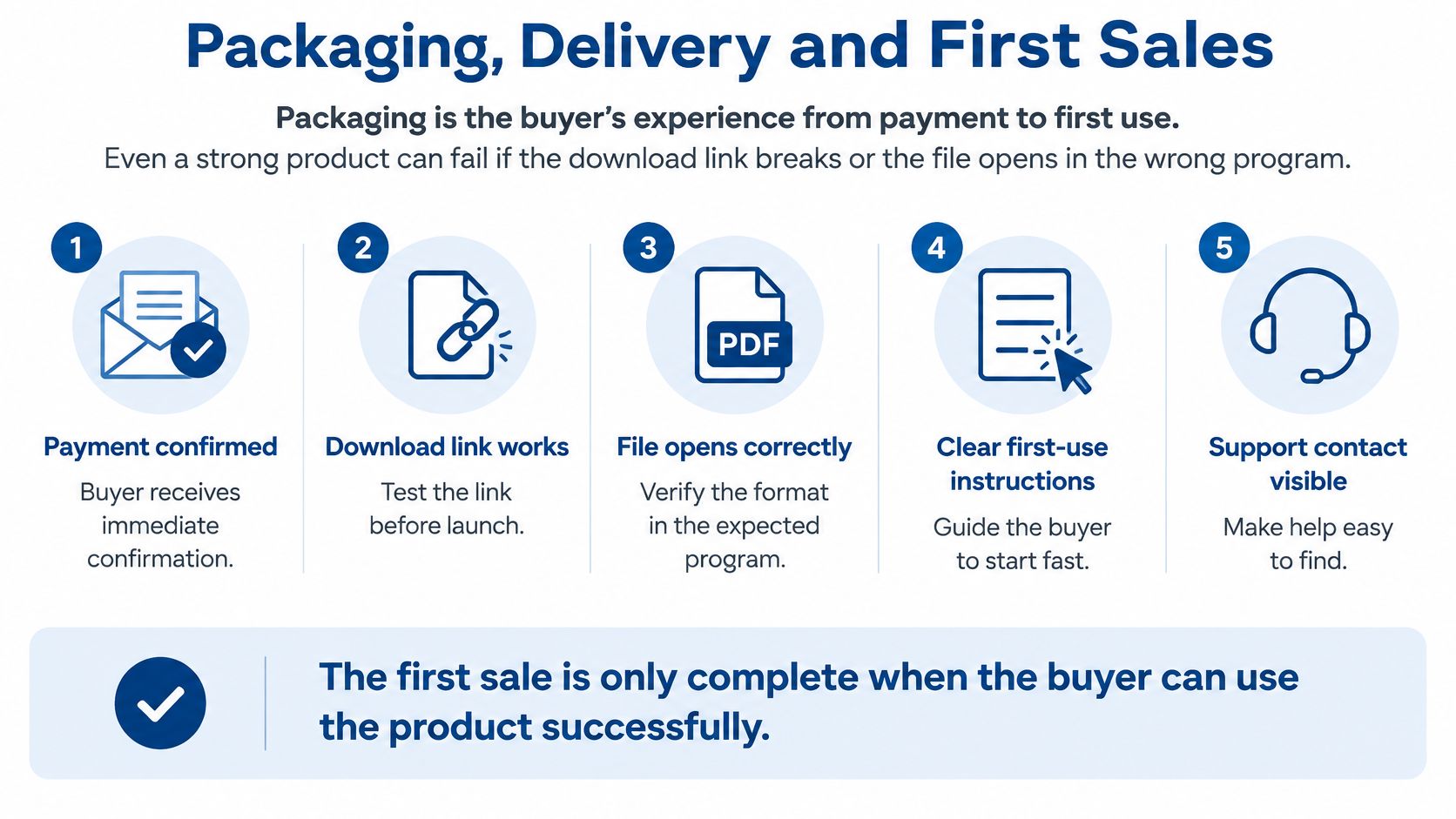
Packaging is the experience from payment to first use. A useful spreadsheet still disappoints when the buyer can't locate the editable version or opens it in an incompatible program.
Prepare the delivery package before inviting traffic:
- File set: Supply clearly named files, structured PDFs, editable originals where promised, and captioned recordings. State required software and account access.
- Delivery method: Automate confirmation and access after successful payment. Include recovery instructions if the email or download goes missing.
- License terms: Explain personal or commercial use, team access, sharing, and resale permissions.
- Refund policy: Use plain language consistent with applicable rules and platform terms. Explain how buyers contact you.
- Sales-page preview: Show representative pages or a real demonstration, with exclusions and prerequisites visible before checkout.
Use this checklist to inspect the buyer's first-use experience.
Choose a Channel You Can Learn From
An existing email list lets you explain the use case to people who already know your work. A short demonstration video lets prospects watch the product solve a task. A marketplace listing puts the offer alongside alternatives buyers are already comparing.
For marketplace promotion, apply these approaches to marketing an Etsy store to the product's specific use case. Don't copy the same generic description into every channel.
Say a creator asks early buyers what they expected, what confused them, and whether they completed the intended task. Those answers can improve the preview and instructions before wider promotion.
The sale isn't operationally complete until the buyer can access and use what you promised.
Start with a channel you can monitor rather than launching everywhere simultaneously. Before promotion, complete your own purchase through the live flow and check confirmation, access, file permissions, and support instructions.
Confirm Your Launch Plan Before You Publish
A launch is a set of checks, not a single moment. Set your decision rules before publishing so you don't reinterpret every disappointing result as a reason to wait longer.
Launch Metrics, Healthy Ranges and Actions
There's no supported universal benchmark for these measures here. Use product-specific operating rules rather than borrowed percentages.
| Metric | Healthy range | Action if off track |
|---|---|---|
| Visit-to-purchase conversion | Meets the minimum required by your acquisition costs and margin | Rewrite the promise and preview on the sales page |
| Refund rate | Within your planned allowance, with no recurring expectation mismatch | Clarify contents, prerequisites, and intended buyers |
| Repeated support questions | No unresolved pattern of buyers getting stuck | Add an FAQ answer or fix the file |
| Time to fix a critical defect | Within the severity-based response commitment you can meet | Assign an owner and block unsafe releases |
Review trends alongside the underlying counts and buyer comments. A refund caused by a broken file calls for a different response from a refund caused by a misleading preview.
Keep Software Shortcuts Visible
Research on industrial software projects found that technical debt's relationship with issue-resolution lead time wasn't uniform across components. Don't use a single code-quality score as your launch verdict; examine cycle time, defects, repeated testing effort, and component complexity together.
For each deliberate shortcut, record an owner, expected repayment effort, and trigger for addressing it in the feature backlog. Set release-blocking rules for critical vulnerabilities and failures that prevent the promised task.
Write a launch plan containing the validation decision, price test, delivery check, and monitoring rules. Commit to it and put a review date in your calendar before publishing.
Mega Income Stream publishes articles in the Earn Living Online category, alongside coverage of business operations and digital entrepreneurship. Visit Mega Income Stream to explore related guides, then use your product promise, buyer evidence, and launch checklist to choose the next concrete step.










Comments