
 By

You've got traffic. People land on your pages, read, maybe share a post, then leave, and the revenue dashboard barely moves. Or it moves on a good week, drops the next, and you can't tell whether the ads, the affiliate links, or nothing at all earned the money.
That's the gap most advice on how to monetize a website skips. It lists models without telling you which one fits your visitors, what you'll keep after fees, or what breaks when you add another ad slot. I'd judge every model the same way, by net revenue per 1,000 sessions, after payment fees, refunds, platform cuts, and the traffic you might lose to slow or cluttered pages.
That one number forces honest choices. A high headline CPM means little if viewability is poor, and a popular affiliate post means little if nobody can complete checkout with a keyboard. Page speed, accessibility, and realistic earnings aren't side tasks. They're prerequisites for income that survives the first month.
Table of Contents
- Website Monetization Models Compared
- Plan Income With Median Earnings, Not Averages
- Accessibility and Legal Risks to Check First
- Running Ads Without Slowing Your Pages
- Choose an Ad Network and Measure Net Revenue
- Affiliate, Sponsor and Product Tips That Pay
- Run a Five-Step Income Setup and 30-Day Test
Website Monetization Models Compared
No single model fits every site. The right starting point depends on what visitors came for, not which program you heard about first. Readers hunting for a product answer behave differently from readers who return weekly to learn a skill, and your monetization should match that intent.
| Model | Best fit | Income pattern | First income (typical) | Main cost |
|---|---|---|---|---|
| Display advertising | Large, broad content audiences | Paid per 1,000 page views, varies by niche | 3-6 months after traffic builds | Page speed and ad clutter |
| Affiliate marketing | Review and comparison content | Commission per sale or lead | 2-6 months | Content production and disclosure rules |
| Sponsored posts | Niche audiences that trust the site | Fixed fee per placement | 1-3 months after outreach | Editorial independence and disclosure |
| Digital products | Experts solving a specific problem | One-time or recurring sales | 1-3 months to build | Creation time and customer support |
| Email list and lead generation | Local services and B2B sites | Indirect, through offers and referrals | 6-12 months | Ongoing list growth effort |
| Memberships or subscriptions | Loyal, returning readers | Recurring monthly or annual revenue | 6-12 months | Retention work and content cadence |
| Owned e-commerce store | Product brands and sellers | Margin on each sale | 3-12 months | Inventory, fulfillment and returns |
Timeframes in the table are approximate and depend on traffic and niche. Treat them as planning ranges, not promises.
Display advertising rewards scale
Display advertising pays for views, so it rewards large, broad audiences who generate lots of page views. Setup through a network like Google AdSense is simple, and you don't need readers to buy anything. The trade-off is that you need volume before income matters, and every extra slot competes with readability and speed.
Scale helps explain both the opportunity and the trap. Global digital advertising revenue reached $294.6 billion in 2025, increasing 13.9% year over year, according to the Interactive Advertising Bureau and PwC announcement. That industry total says nothing about what your site keeps after network fees, invalid impressions, and non-viewable placements.
Affiliate marketing rewards purchase intent
Affiliate marketing pays per sale or lead, so fewer visitors can still produce useful income if they arrive ready to compare or buy. Review pages, comparison tables, alternatives posts, and buying guides convert because the reader's question is already commercial. A general explainer with an unrelated product link at the end rarely converts, and it can erode trust.
You also carry the production cost. Good affiliate content needs testing, screenshots or first-hand detail, dated pricing checks, and clear disclosures. If you can't maintain it, rankings and conversions decay together.
Digital products and memberships reward repeat trust
Digital products and memberships work when a focused audience returns for a specific skill or outcome. Templates, checklists, short courses, and paid communities let you set the price and keep a larger share than most ad or affiliate arrangements. The cost moves upfront into building the product, then into support, updates, and retention.
Memberships add a retention obligation. Readers cancel quickly when the publishing cadence slips or the promised help doesn't arrive. Don't launch recurring billing for content you only plan to make once.
Quick filter: If most visitors arrive with a question, start with affiliate links or ads. If they come back for a particular skill or problem, start with a product or membership.
Sponsored posts, lead generation, and an owned store sit between those poles. Sponsorships need a defined niche audience a brand wants to reach. Lead generation needs buyers who'll pay for qualified inquiries. A store gives you margin control but adds fulfillment, returns, tax, and support work that content alone never creates.
Pick one primary model and one backup now. Every later decision, from page layout to email capture, gets easier once you stop trying to run all seven at once.
Plan Income With Median Earnings, Not Averages
Averages make monetization look calmer than it is. Across direct-payment campaigns in 2025, the average creator earned $11,400, but the median earned only $3,000, while just 11% of surveyed creators reported six-figure annual income, according to CreatorIQ's State of Creator Compensation Report. Those figures aren't a website benchmark. They're a warning that a small group can pull an average far above what a typical earner sees.
Plan with the middle outcome, not the headline. If your forecast only works at the average, it probably doesn't work.
Use one formula for every model
Use this calculation for ads, affiliate income, products, or a blend.
Monthly income = (monthly sessions ÷ 1,000) × net revenue per 1,000 sessions
The scenarios below are illustrative, using 5,000 sessions for Starter, 50,000 for Growing, and 200,000 for Established. Replace the revenue figure with your own net number once you've run a test.
| Scenario | Revenue per 1,000 sessions | Monthly income |
|---|---|---|
| Starter | $4 | $20 |
| Growing | $10 | $500 |
| Established | $15 | $3,000 |
Before you call any result income, subtract refund rates, payment fees, and customer acquisition cost. For affiliate pages, subtract content updates and any paid traffic. For products, subtract support time and the tools you need to deliver access. Gross revenue is a sales report, not a budget.
Questions readers tend to skip
- When are ads rational: Ads make sense when your sessions are high enough that modest revenue per 1,000 sessions covers the speed and clutter cost, and when readers don't need a clean page to complete a higher-value action like joining your list.
- When to replace low-yield ads: If a page earns little from ads but captures emails or sells a relevant product, remove the weakest slot and test the owned offer in that space.
- How to forecast irregular income: Use a three-month average for reporting, but plan fixed expenses around your lowest recent month. Campaign and sponsor income lands in lumps, and treating a strong month as normal creates cash problems fast.
- How concentrated is too concentrated: If one sponsor, affiliate program, or platform supplies a large share of revenue, price the risk as well as the income. A policy or commission change can remove that revenue faster than traffic can replace it.
Maximizing revenue per visitor is often safer than chasing more page views, especially if you can't win large brand budgets. A smaller audience with clear intent, an email relationship, and a relevant product can out-earn broad traffic that never returns.
Do the math before you choose. Write your current sessions, insert a conservative net revenue per 1,000 sessions, and see which model could plausibly reach your target.
Accessibility and Legal Risks to Check First
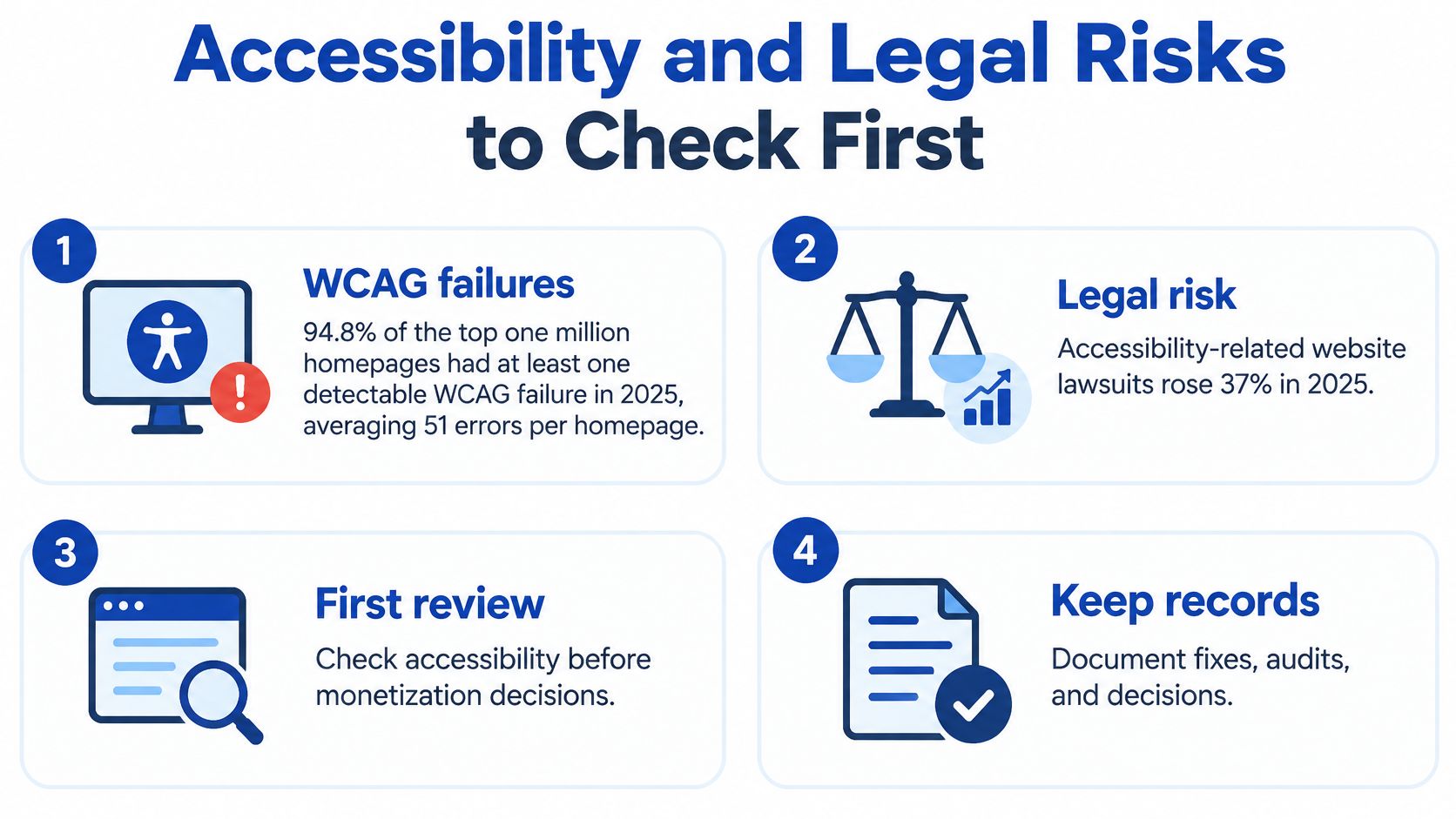
Accessibility isn't a polish task you schedule after monetization works. Independent audits of the web's most-visited homepages keep finding widespread WCAG failures, and plaintiffs continue filing large numbers of website accessibility lawsuits in the United States, with e-commerce retailers among the most frequent targets. Both risks land hardest on the pages that earn.
A broken checkout, paywall, or disclosure doesn't just create legal exposure. It stops disabled visitors from buying, subscribing, or understanding that a link is paid. A signup form a keyboard user can't complete lowers your net revenue per 1,000 sessions no matter which model you run. I rank accessibility alongside page speed as a monetization prerequisite for exactly that reason.
Here's a visual summary of the risks to check before you add more revenue features.
Audit revenue-critical interactions
- Checkout forms and error messages: Labels, instructions, and errors must be readable by assistive technology and not rely on color alone.
- Paywalls and subscription sign-up: Pricing, trial terms, renewal, and cancellation paths need keyboard access and visible focus states.
- Cookie and consent banners: Visitors should be able to reach, understand, accept, or reject choices without a mouse.
- Ad overlays and pop-ups: Close buttons must be reachable, and keyboard focus shouldn't get trapped behind an interstitial.
- Product images and video reviews: Use meaningful alt text, plus captions and transcripts where audio carries product information.
- Affiliate disclosures: Place them where screen readers announce them before or beside the paid link, not buried after it.
- Contrast and menus: Check text contrast, heading order, skip links, and whether every menu and button works by keyboard.
Automated accessibility overlays don't guarantee compliance. They can miss broken forms, bad focus order, missing captions, and disclosures placed where nobody encounters them in time.
Legal obligations differ by market, so check the rules that apply where you operate and sell, and get advice from a qualified professional for your situation. Don't copy another site's policy and assume it fits yours.
Start narrow this week. Audit your three highest-revenue pages, fix the barriers on the path to payment or sign-up first, and document what you changed and when. If a fix recovers even a small share of blocked transactions, it pays for itself before any new ad placement or affiliate program does.
Running Ads Without Slowing Your Pages
Ads can slow a site before they earn enough to justify the damage. The three thresholds below give you operating limits to protect before you add or expand placements.
| Metric | Good threshold | What it measures | Ad-related risk |
|---|---|---|---|
| Largest Contentful Paint (LCP) | 2.5 seconds or less | Time until the main content loads | Heavy ad scripts and large banners delay it |
| Interaction to Next Paint (INP) | Below 200 milliseconds | Response time to taps and clicks | Third-party ad tags block input |
| Cumulative Layout Shift (CLS) | Below 0.1 | Unexpected movement of content | Late-loading ad slots push text down |
Google's recommended thresholds are Largest Contentful Paint of 2.5 seconds or less, Interaction to Next Paint below 200 milliseconds, and Cumulative Layout Shift below 0.1, as set out in Google's Core Web Vitals guidance. Google also notes that good Core Web Vitals alone don't guarantee top search rankings, so treat these numbers as performance guardrails, not ranking promises.
How ad code breaks each metric
LCP suffers when ad scripts compete with your hero image, headline, fonts, or main content for bandwidth and browser time. A large banner above the article can delay the thing the reader came to see. Reserve the fastest path for content first.
INP suffers when third-party tags run long JavaScript tasks after a tap or click. The page looks loaded, but buttons, menus, and links feel stuck. On mid-range phones, that delay is often where readers abandon the page.
CLS is the most visible failure. Text jumps when an ad loads late without reserved space, and readers lose their place or tap the wrong link. Set fixed dimensions or aspect ratios for every slot, including responsive placements, and don't inject banners above content that's already on screen.
A safer ad workflow
- Measure real-user performance first: Check the Chrome User Experience Report and Search Console before you change placements, so you know your baseline by template and device.
- Optimize the page before the ads: Compress and size images correctly, trim JavaScript, preload critical fonts sensibly, and remove third-party scripts you no longer use.
- Deploy ads after the baseline exists: Add one layout at a time, with reserved space and lazy loading for below-fold units where your network allows it.
- Monitor income with engagement: Track revenue per session alongside Core Web Vitals, scroll depth, newsletter sign-ups, and returning users.
The common pitfall is maximizing ad slots before controlling ad weight and layout shift. More slots can lift short-term RPM while reducing usability, engagement, and the traffic you need next month. Avoid placements that distract from or interfere with the main content, and check real-user ad-density and ad-weight metrics where your tools provide them.
For a fuller discussion of that balance, see finding the right balance between website monetization and user experience.
End with a controlled split test, not a guess. Compare layouts while tracking viewability, sessions, newsletter sign-ups, scroll depth, RPM, and returning-user rate. Reject any variant that raises RPM while materially degrading engagement or performance, because you're trading a durable audience for a temporary rate.
Choose an Ad Network and Measure Net Revenue
Start by defining your eligible inventory. Decide which devices, geographies, formats, and content categories will carry ads, and which pages stay clean for email capture, checkout, or product sales. A pricing page or application form usually earns more without display ads competing for the click.
Consent and privacy controls belong in that same decision. Audience markets differ, so your setup must work for the places you serve, not just where your business is registered. Test the consent flow on mobile and desktop before you judge a network's revenue, because broken consent can suppress fill or create risk.
Standardize the scoreboard
Judge every demand source on the same fields.
- Impressions and viewability: Separate served impressions from viewable impressions.
- Fill rate and CPM: Record both, but don't rank partners on CPM alone.
- Gross revenue and fees: List network, platform, and supply-chain deductions explicitly.
- Net publisher revenue: Use the amount you keep as the deciding figure.
Compare three demand types on that scoreboard. Open-auction programmatic demand gives broad fill with less sales work. Direct-sold sponsorships give pricing and placement control but need outreach and account management. Private marketplaces sit between them, with invited buyers and negotiated terms but less scale than open auctions.
The channel is large enough to deserve that discipline. The IAB/PwC benchmark reported $114.2 billion in U.S. programmatic advertising revenue for 2023, up 4.4% year over year, in the IAB PwC Internet Ad Revenue Report 2024. Scale at industry level still doesn't guarantee your net yield, because fees can absorb part of advertiser spending before it reaches you.
Optimize on net revenue per thousand viewable impressions, not headline CPM. A modest CPM with clean placement and strong viewability can beat a high CPM diluted by fees and unseen impressions.
If you're starting with AdSense, these quick tips for making money online with Google AdSense can help you set expectations before you compare other networks. Test one demand change at a time, reconcile net revenue monthly, and discontinue partners that combine low net yield with poor viewability, privacy risk, or excessive page weight.
Affiliate, Sponsor and Product Tips That Pay
The most common affiliate mistake is dropping links into a post with no context and no clear disclosure. Readers don't know why you're recommending the product, search visitors can't judge your experience with it, and you may break program or advertising rules. The link earns only when the surrounding content does the comparison work for the reader.
This image shows the basic setup many sites start with, an affiliate link placed near content that explains the choice.

Tips in order of impact
1. Put the disclosure beside each affiliate link. A footer-only disclosure is easy to miss and hard for a reader to connect to a specific recommendation. Place a short, plain statement before the first paid link on the page and repeat it near comparison tables or buy buttons where the decision happens.
2. Favor recurring commissions and longer cookie windows. A one-time payout on a cheap product forces you to replace the sale every month. Recurring software commissions, or a cookie window that survives a reader's research period, reward content that keeps earning after publication. Check attribution rules carefully, because last-click programs can erase your credit when a coupon site intervenes at checkout.
For a deeper set of tactics, start with these tips for making money online with affiliate marketing.
3. Price sponsored posts by engagement, not raw traffic. A sponsor buying trust should care about email open rate, average time on page, comments, and click quality, not only sessions. Package those numbers with audience demographics you can document. You'll negotiate better and avoid brands that only want cheap links.
4. Label every sponsored placement and keep it separate from editorial judgment. Say who paid, what they paid for, and whether they reviewed the copy before publication. Don't let a sponsor rewrite your conclusion or remove a genuine limitation. One undisclosed placement can cost more in reader trust than the fee paid.
The video below walks through practical ways creators present offers without turning every page into an advertisement.
5. Start an email list from day one. Search and social platforms lend you reach. An email list, built with a useful lead magnet through a tool such as ConvertKit or MailerLite, gives you an audience you can contact when you publish a review, negotiate sponsorship inventory, or launch a product.
6. Cap dependence on any one sponsor or platform. I would keep no single sponsor or platform above about one-third of monthly income, and check that ratio monthly. If one source crosses it, your next task isn't more traffic. It's a second buyer, program, or product.
7. Pre-sell a digital product before you build it in full. Offer your list a paid workshop, template pack, or founding cohort with a clear delivery date and refund terms. Pre-sales tell you whether the problem is valuable enough to solve, and buyer questions give you the outline.
Apply the tip that matches what you already have. If you've got traffic but no list, start with tip five. If you've got an engaged list, pre-sell. If you've got neither, fix disclosures and pick one affiliate program your best page can support.
Run a Five-Step Income Setup and 30-Day Test
A focused 30-day test beats adding ads, affiliate links, and a product page across your whole site in one weekend. You'll learn which pages carry commercial intent, what each session is worth, and whether income costs you engagement.
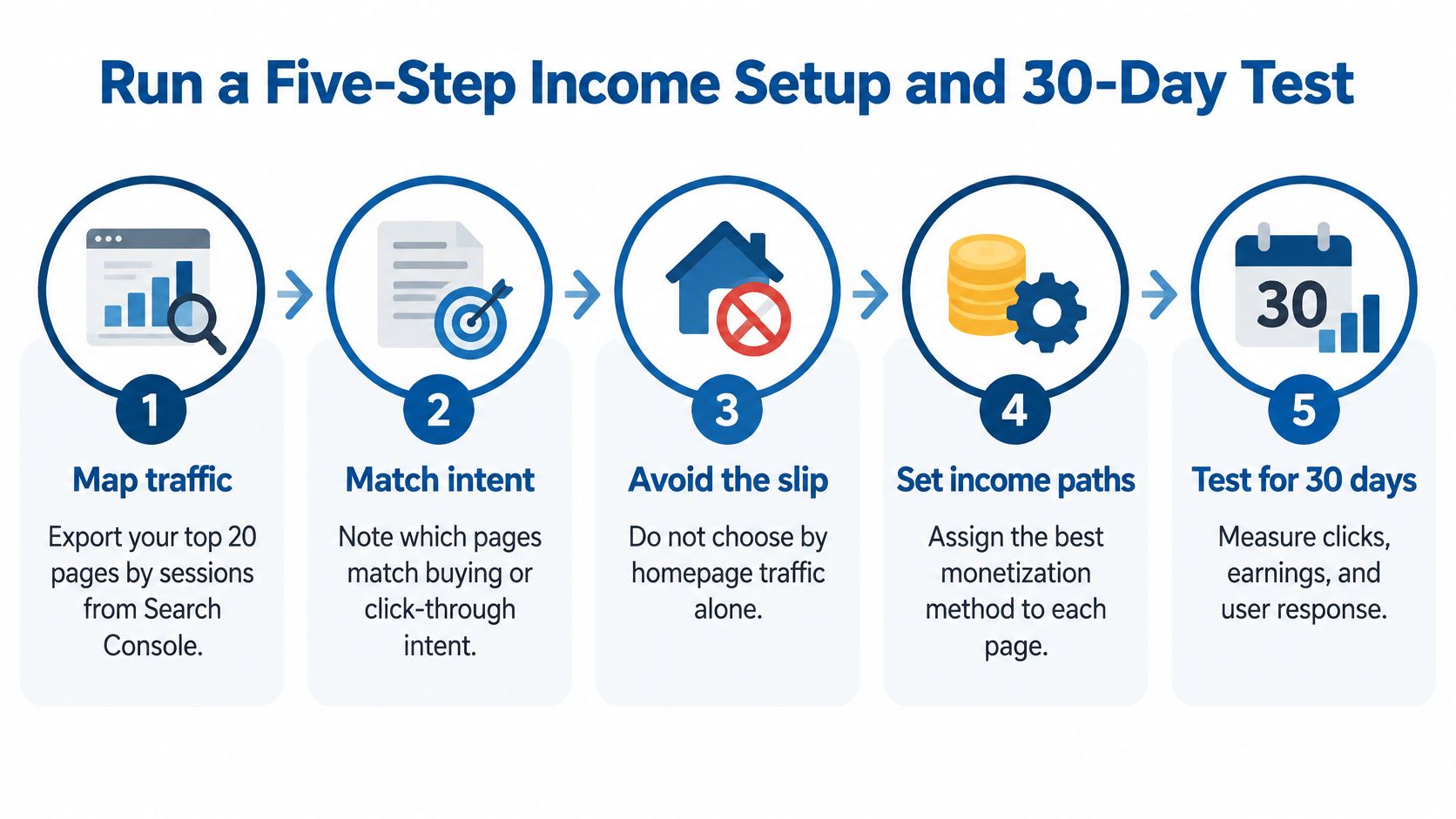
The diagram below summarizes the sequence before the detailed steps.
The five steps
Step 1. Map your traffic. Export your top 20 pages by sessions from Search Console and your analytics tool. Note device split, country, returning users, and the main query or referral for each page. The common slip is choosing by homepage traffic alone, even though articles and product pages usually hold the intent.
Step 2. Match pages to intent. Mark pages where readers compare, price, troubleshoot a purchase, or look for alternatives. A product-review page suits affiliate links. A how-to guide with loyal repeat readers suits an email sign-up or a small digital product. Broad news or explainer traffic may suit a restrained ad layout.
Step 3. Pick one primary model and one backup. Assign the primary model to your two highest-intent pages and keep the backup off those pages during the test. Mixing three offers everywhere makes the result unreadable. Write the hypothesis in one sentence, such as affiliate links on comparison pages will beat display ads on net revenue per 1,000 sessions.
Step 4. Fix basics in week one, then place in week two. Before placement, check page speed, mobile layout, privacy policy, visible disclosure page, working contact form, and the accessibility items on your revenue path. In week two, add one monetization method to two pages only. The common slip is adding ads to a slow site, then blaming the network when readers leave.
Step 5. Measure through week three and decide in week four. Don't change headlines, layouts, or offers mid-test unless something is broken. Track revenue per 1,000 sessions, conversion rate, page speed, engagement, and returning visitors for the full period.
Decide with a rule you wrote in advance
Keep the setup if income per 1,000 sessions rises without slowing your pages. Change the offer or placement if engagement holds but revenue stays flat. Drop it if RPM rises while engagement or returning visitors fall, because that variant is borrowing income from future traffic.
For another angle on comparing tools and models, read Mega Income Stream's June 29, 2026 guide, 'How You Can Make Money From Your Website or Blog'. Use it after your test, when you know which model deserves a better tool.
Your single action this week is simple. Write down your primary model, your backup, and the revenue number you'll measure on day thirty.
Mega Income Stream publishes practical guides on website monetization, affiliate marketing, digital products, and diversifying online income without relying on a single platform or sponsor. If you're ready to turn your 30-day test into a durable revenue plan, visit Mega Income Stream for step-by-step articles, comparisons, and tools you can apply to your own site.











Comments