
 By

The most popular advice on ai agents for customer support is still the wrong one. Buy a bot, turn it on, watch tickets vanish, then cut the team. That advice treats a missing ticket as a solved problem. It is not. A ticket that never reaches a person can still be wrong, and the customer comes back angrier, with a refund to reverse and a story they have to tell twice.
Treat the agent like a new hire with a narrow job, not like a headcount reduction. It should read the request, follow a written policy, act only inside systems you authorize, and stop when the case gets risky. Human handoff, rollback, and repeat contacts are operating controls. They belong on the same dashboard as speed. If you cannot explain when the agent must stop, you are not ready to measure whether it pays.
Table of Contents
- What AI Agents for Customer Support Really Are
- How an AI Support Agent Works on One Ticket
- Which Requests to Automate, Assist or Hand to People
- Measuring Real Resolution Instead of Deflection
- Where AI Support Agents Fail and Why
- Calculating Whether AI Support Actually Pays Off
- Confirm the Pilot Scope Before You Buy
What AI Agents for Customer Support Really Are
An AI agent for customer support reads a customer's request, looks up the matching policy or account record, and takes steps in connected systems to resolve it. A reply is a side effect. The job is a finished action: a tracking update, a return label, a password reset after identity checks, or a clean transfer to a person.
Plenty of products sold under that name are still scripted chatbots. They match keywords or walk a menu. Buyers who skip that distinction pay agent prices for a phone tree.

The front desk makes the difference concrete. A scripted bot is the phone menu. An agent-assist tool is a note passed to the receptionist. An AI agent is the receptionist who can walk a request to the back office and fix it.
| Tool type | How it decides a reply | Can it take action | Typical use |
|---|---|---|---|
| Scripted chatbot | Fixed menus and keyword matching | No | Store hours, links to help articles |
| Rule-based flow bot | Decision trees built by the support team | Limited, pre-set actions only | Order-status lookups, appointment booking |
| Agent-assist tool | Suggests replies and summaries to a human agent | Only through the human | Faster replies for live agents |
| AI agent | Interprets the request, retrieves knowledge and plans steps | Yes, through connected tools within set limits | Multistep cases such as rebooking or policy-based credits |
Adoption is intent, not autonomy
In an EY survey of 308 U.S. business executives conducted from April 22–28, 2025, 57% said their companies were using or planning to use AI agents in customer service within the following six months. Read that as executive intent across industries, not the share of inquiries already resolved without a person. The reported gains in that same adopter group, including productivity and customer experience, depend on how the system is built and whether the company can supervise it. Supervision is the cost buyers undercount: every action the agent takes needs a handoff path when confidence drops and a rollback option when a write goes wrong.
Buying test: If the vendor cannot name the systems the agent writes to, and the limits on those writes, you are looking at a chatbot with better sentences.
Apply that test before a demo. Can it act inside a connected system? What stops an irreversible action? Who sees the trace afterward? A fluent answer that cannot book, refund within a cap, or hand off with context is still a script.
How an AI Support Agent Works on One Ticket
Picture a new hire on day one. They get a binder of policies and a key card that opens the stockroom, not the safe. Ai agents for customer support should work the same way. The binder is your knowledge and policy set. The key card is a short list of typed tools. Anything outside those doors waits for a person.
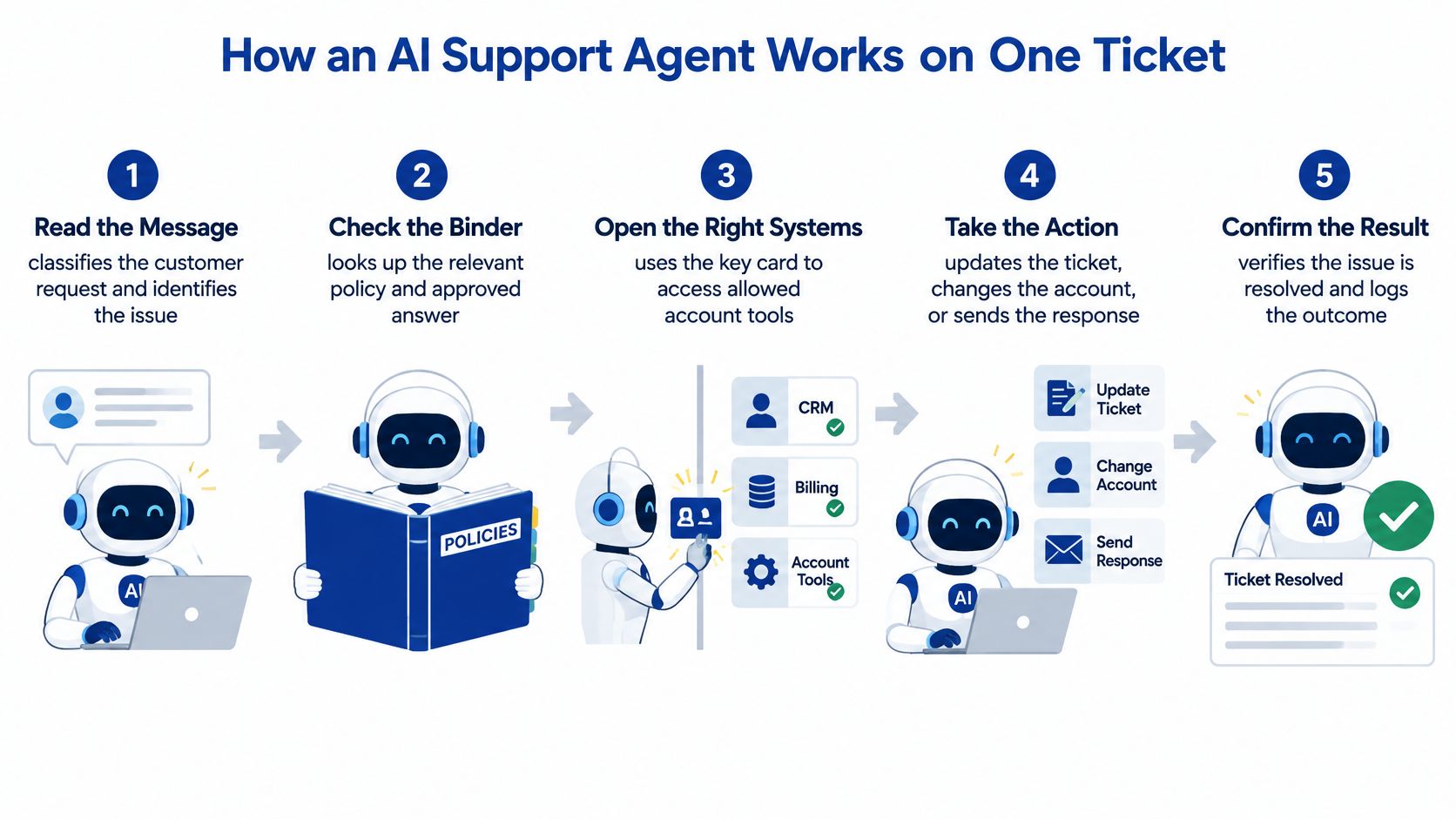
The field card above compresses the job into five checkpoints. On a live ticket, expand it into six controls so identity, confirmation, and the exit path stay explicit.
- Read the message. Classify intent, product, and urgency before any tool runs. A "where is my order" note and a "you charged me twice" note must not share a path. Misclassification is how a low-risk lookup becomes a payment argument.
- Verify the person and the account. Match the channel identity to the record, then check what that account is allowed to do. A correct policy applied to the wrong customer is still a breach of trust, and it creates a cleanup case your team did not budget for.
- Retrieve the policy and record the version. Pull the help article, policy clause, or prior case that fits, and store which version was used. When finance later asks why a credit was issued, "the model thought so" is not an answer. The binder entry is.
- Choose one typed action. The agent calls a fixed tool, such as an order-status lookup or a return-label API. It does not invent system commands. Typed tools are how you keep a fluent model from wandering into refunds, address changes, or cancellations you never approved.
- Confirm before anything you cannot undo. A refund above the amount you set, a plan change, or an account closure needs an explicit yes from the customer, or a person. Speed without that pause is how small errors become chargebacks.
- Answer, clarify, or hand off. If the evidence is enough, send the result. If a fact is missing, ask one clear question. If the case is out of bounds, transfer it with a short summary of what was tried and what the customer wants. Do not make them start over.
What you should be able to read later
Every ticket needs a trace: intent, evidence used, action taken, and outcome. Store the retrieved article, the tool call, and whether the case ended in an answer, a question, or a transfer. Sample those traces by issue type each week. A pretty transcript with no trace is a demo, not an operation.
Teams that already route and tag work in a help desk can extend that discipline rather than inventing a second queue. Our guide on how to automate ticket management covers the queue design that sits underneath any agent.
If you want to watch the path from intake to a confirmed action, this walkthrough shows the same controls in motion.
Build the trace before you chase a higher containment rate. Without it, you cannot tell a real resolution from a confident guess.
Which Requests to Automate, Assist or Hand to People
Set the route for each request type before you configure a single prompt. Automate means the agent finishes the case. Assist means it drafts or proposes and a person approves. Human-only means the agent does not attempt a resolution. Decide that split from risk. How easy a request sounds has little to do with it, and a polished answer to the wrong request still arrives with a cost: a repeat contact, a credit to reverse, a complaint.
| Request type | Default handling | Why | Handoff trigger |
|---|---|---|---|
| Order status and tracking | Automate | Low risk, read-only data | Carrier shows an exception |
| Password and account access | Automate with identity check | Security-sensitive | Verification fails twice |
| Refund or credit requests | Assist, person approves above threshold | Money leaves the business | Amount above your set limit |
| Billing disputes | Human-only | Needs judgment and records | Customer asks for a person |
| Product how-to questions | Automate | Answered by knowledge base | Two unresolved turns |
| Safety, injury, fraud or legal threat | Human-only, immediate | High stakes | Any mention of harm, fraud or legal action |
| Financial hardship or vulnerable customer | Human-only | Duty of care | Distress signals or repeated frustration |
Triggers you can actually count
Write handoff rules a supervisor can audit without debating tone.
- Two failed checks: Stop after two failed verification attempts. A third guess is an account-takeover risk.
- Money line: Anything above the refund or credit limit you set moves to assist or to a person. Put the number in the policy, not in a prompt aside.
- Distress: Frustration, hardship, or vulnerability language ends automation. A small team can use the same rule a large contact center uses. You do not need a sentiment suite to honor it.
- A direct ask: "I want a person" is a trigger, not a failure of the bot. Honor it on the next turn.
- Two dead turns: Two unresolved turns in a row means the knowledge did not land. Transfer instead of rephrasing the same article.
A correct route still fails if the case arrives cold. The employee who picks it up needs the transcript, the actions already attempted, and the customer's stated goal in front of them. If their first line is "how can I help you today," the customer pays for the handoff twice: once in the chat and again on the phone.
In a global Adobe and Oxford Economics study of 4,000 customers and 3,000 CX professionals in late 2025, customers ranked the ability to switch to a human at any time as the most important disclosure or trust feature, while organizations ranked clear AI disclosure at 68% and easy human escalation at 61% among leading trust factors. Customer surveys keep pointing the same direction: people accept generative AI in service conversations as long as a person stays reachable. Human availability is part of the product. Customers stay in the conversation because an exit exists, and they hang up when it does not.
Say it is an AI at the first message, and keep the human option visible on every turn. Hiding the handoff until the customer is stuck trains them to distrust the next chat.
Small teams still need hard walls around refunds, account access, billing disputes, and financial hardship. You will not staff a 24-hour floor, and you do not have to. You can refuse to let software negotiate a hardship plan or argue a bill. Every automated resolution carries a rollback price, and a request that resolves cheaply but bounces back costs more than a person answering it once. For the human side of a tense repair or product complaint, the tone guidance in handling frustrated repair customers belongs with the person who takes the transfer, not inside the agent's script.
Measuring Real Resolution Instead of Deflection
Deflection counts tickets that never reach a person. It does not count whether the problem stayed solved. A customer-service comparison of an agent workflow against a legacy retrieval workflow, 1,508 sessions in each arm, found reviewed accuracy of 89.52% versus 79.00%, a 10.52-point gain, in a customer-service study of grounded agent workflows. That agent could answer, ask a clarifying question, or hand off. Forcing an answer on every turn is how uncertainty turns into invented policy.
Accuracy is still not the production number. Pair it with what happens after the chat ends.
| Metric | What it captures | Healthy direction | Red flag |
|---|---|---|---|
| Repeat-contact rate (7 days) | Customer returns on the same issue | Falling | Rising after AI resolutions |
| Corrective actions after AI resolution | Reopens, credits, reversals | Near zero | Frequent manual fixes by staff |
| Escalation appropriateness | Handoffs that were needed, graded in samples | High grade in audits | Avoidable handoffs or missed handoffs |
| Post-transfer resolution rate | Problem solved after a human takes over | Higher than unassisted queue | Customer must restart the story |
| Abandonment before resolution | Customer gives up mid-conversation | Falling | Rising in specific issue types |
| Cost per resolved case | Total cost divided by durable resolutions | Falling over time | Falls only because cases reopen or are lost |
| Latency to first useful answer | Speed to usable help | Within your target | Slower than target at peak times |
Audit the trace, not the highlight reel
Keep retrieved evidence, tool calls, confidence signals, and escalation decisions on the ticket. Each week, pull a sample by issue type, not a random slice of easy wins. Grade three things. Did the policy match the case? Was the tool the right one? Was the handoff early enough?
Containment that rises while seven-day repeat contacts also rise is deflection, not resolution. Cost per case that falls only because reopens and lost chats leave the denominator is the same trick. Stop the rollout on that pattern even if the vendor dashboard looks strong.
If your weekly report leads with chats contained and average handle time, you are scoring the queue, not the customer. The argument in why vanity metrics mislead operators applies directly to support dashboards that celebrate a closed chat.
If containment rises and repeat contacts rise with it, the agent is pushing customers away. It is not finishing their cases.
Where AI Support Agents Fail and Why
Polished language is not a working agent. Customers hear a calm paragraph and assume the refund, the address change, or the policy citation behind it is real. In many deployments it is only fluent.
In the τ-bench environment, agents were tested on 53 customer-service tasks across four domains against held-out simulated users. The strongest reported configuration passed only 23.9% of evaluation simulations, against an 82.2% reference ceiling from expert-authored solutions, according to the τ-bench evaluation of customer-support agents. The test asked systems to finish the interaction, not to sound helpful.
How these failures show up on a real queue
The miss is rarely "bad grammar." It is an operation that looked finished.
- Wrong tool. The agent checks shipping when the customer asked for a billing adjustment, then reports success.
- Right policy, wrong case. A 30-day return rule gets applied to a final-sale item because the product attribute never entered the prompt.
- Lost state. Turn four forgets the order number confirmed on turn one, so the customer repeats it and then leaves.
- Missed escalation. A legal threat or a fraud claim stays in automation because the reply still sounds polite.
- Invented policy. A confident sentence states a credit, a warranty term, or a fee you do not offer.
Two fixes people reach for do not close that gap. Adding more help-center articles does not teach tool choice or state tracking. A clean demo on five happy paths does not earn the right to issue refunds or change accounts. Demos hide the branch where the tool returns an error or the customer changes intent mid-chat.
Constrain actions with typed APIs. Require confirmation before refunds, cancellations, and account changes. Test tool selection, policy compliance, state tracking, and escalation as separate checks. A single "pass rate" will hide which control is broken.
Run a scenario set built from your own closed tickets before any live customer sees the agent. Include the ugly ones: partial refunds, duplicate orders, and people who already tried self-service.
Score task completion, policy violations, and whether the transfer was appropriate. If the scenario set is thin, the 23.9% class of miss will show up as brand damage, not as a lab chart.
Calculating Whether AI Support Actually Pays Off
ROI for ai agents for customer support is a risk-adjusted operating model. It is not a labor-savings slide. A 2026 survey of 2,527 senior decision-makers across 10 countries found that 88% expected AI agents to handle some customer conversations by year-end, yet 22% of organizations already running live agents had rolled one back because of hallucinations or brand risk. Gartner reported that 85% of service leaders were expanding human responsibilities as AI reduced contact volume, and 80% faced pressure to reshape their workforce. Routine contacts can fall while people inherit the harder, more emotional, more consequential cases. You did not delete the work. You changed its shape.
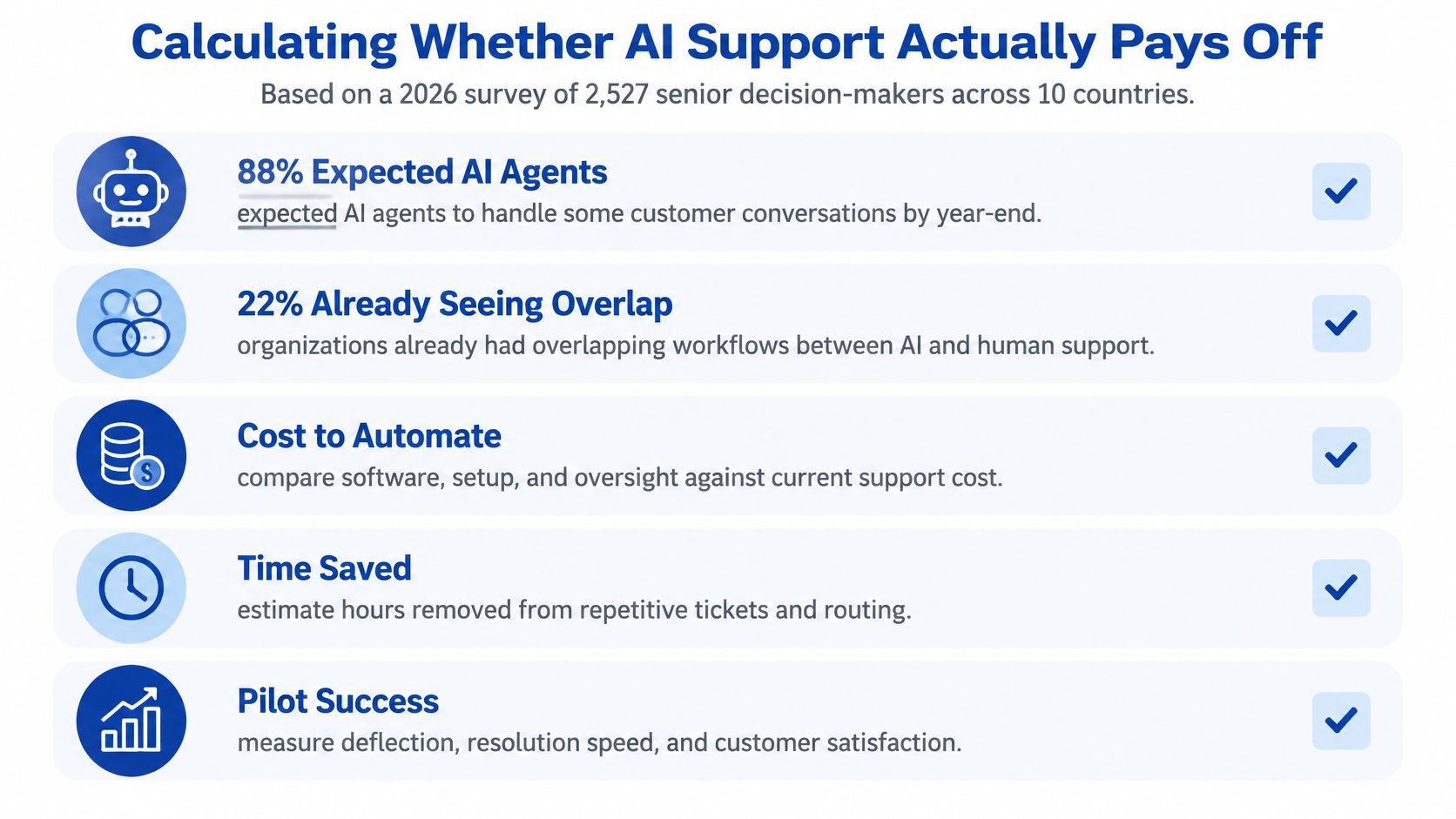
Put these costs on the same page as the license
- License and integration. Seats or per-resolution fees, plus the hours to connect ticketing, identity, and order data.
- Monitoring. Someone grades traces. That person is not free because the bot is "autonomous."
- Knowledge upkeep. Stale articles create confident wrong answers. Budget the edits.
- Escalation staffing. Handoffs still need skilled people, often on the cases that used to be rare.
- Repeat contacts and repairs. Reopens, apology credits, and refunds caused by bad actions.
- Compliance review and rollback. The cost to turn the agent off, notify customers if needed, and restaff the queue.
Say a team handles 4,000 tickets a month and the agent closes 1,400 of them. If 8% of those reopen, 112 cases return to people. Each return carries handle time plus any credit you issued to fix the miss. Replace 4,000, 1,400, and 8% with your own baseline. The arithmetic is the point. Vendor containment never subtracts the 112.
The break-even question is blunt. At what error rate and escalation burden does automation stop being profitable? A matched-cohort pilot with stop rules set in advance is how you answer it. A vendor's resolution rate is not.
Confirm the Pilot Scope Before You Buy
Deployment is not scale. A survey of 525 enterprise leaders conducted for Zapier between October 23 and 27, 2025, found that 49% of customer-support departments had deployed AI agents, the highest rate among the departments listed. Far fewer have pushed an agentic system past the pilot stage into steady production. Buying the license is the easy part. The advantage sits in knowledge, ticketing, customer records, escalation rules, and human review.

Run the pilot like a controlled release, not like a feature flag you forget.
- Pick three to five issue types from your routing table, and write the human-only list next to them. Order status can go live. Billing disputes and hardship stay off. A wide pilot hides which path is unsafe.
- Record the baseline for seven-day repeat contacts, cost per resolved case, and satisfaction before the first bot reply. Without that, every vendor chart will look like a win.
- Connect only the systems those issues need. Ticketing, the knowledge base, and order data are enough for a tracking pilot. Leave payment writes disconnected until assist mode has a clean month.
- Run 30 to 60 days against a matched cohort. Same issue mix, same hours, one group on the agent and one on the current process. Do not compare a quiet week to a launch week.
- Set go and no-go numbers before launch. Write them in your own units: repeat contacts must not rise, policy violations stay under the cap you set, and post-transfer resolution holds. If a guardrail breaks, you roll back. You do not tune it in production on refunds.
- Ask how traces are stored, how rollback works, and whether pricing is per resolution or per seat. Per-resolution pricing looks cheap until error credits and reopened cases erase the gap. Rollback that takes a developer sprint is not a rollback.
Write the decision before the demo
Put those go and no-go thresholds on one page and circulate it to the support team before the first vendor call. The decision then rests on your baseline, not on a slide of contained chats. Treat rollback as an operating control, the same way you treat the human-only wall. If switching the agent off requires a ticket queue and a sprint, your pilot has an exit problem baked into it.
When you compare platforms, read independent write-ups the way you would any other software buy. Our Reviews section covers business products and services, which is a practical place to pressure-test claims before you book a demo.
If the one-page brief cannot name the issue types, the human-only wall, the cohort, and the stop rules, you are not buying an agent yet. You are buying a pilot you cannot judge.
Mega Income Stream publishes practical guides on business operations, automation, and building income from real workflows, including how small teams handle customer inquiries without guessing at software. If you are weighing ai agents for customer support against the cost of a bad rollout, start with the operations articles and tool reviews on Mega Income Stream, then use the contact page when you want to ask about a specific guide.










Comments