
 By
By 
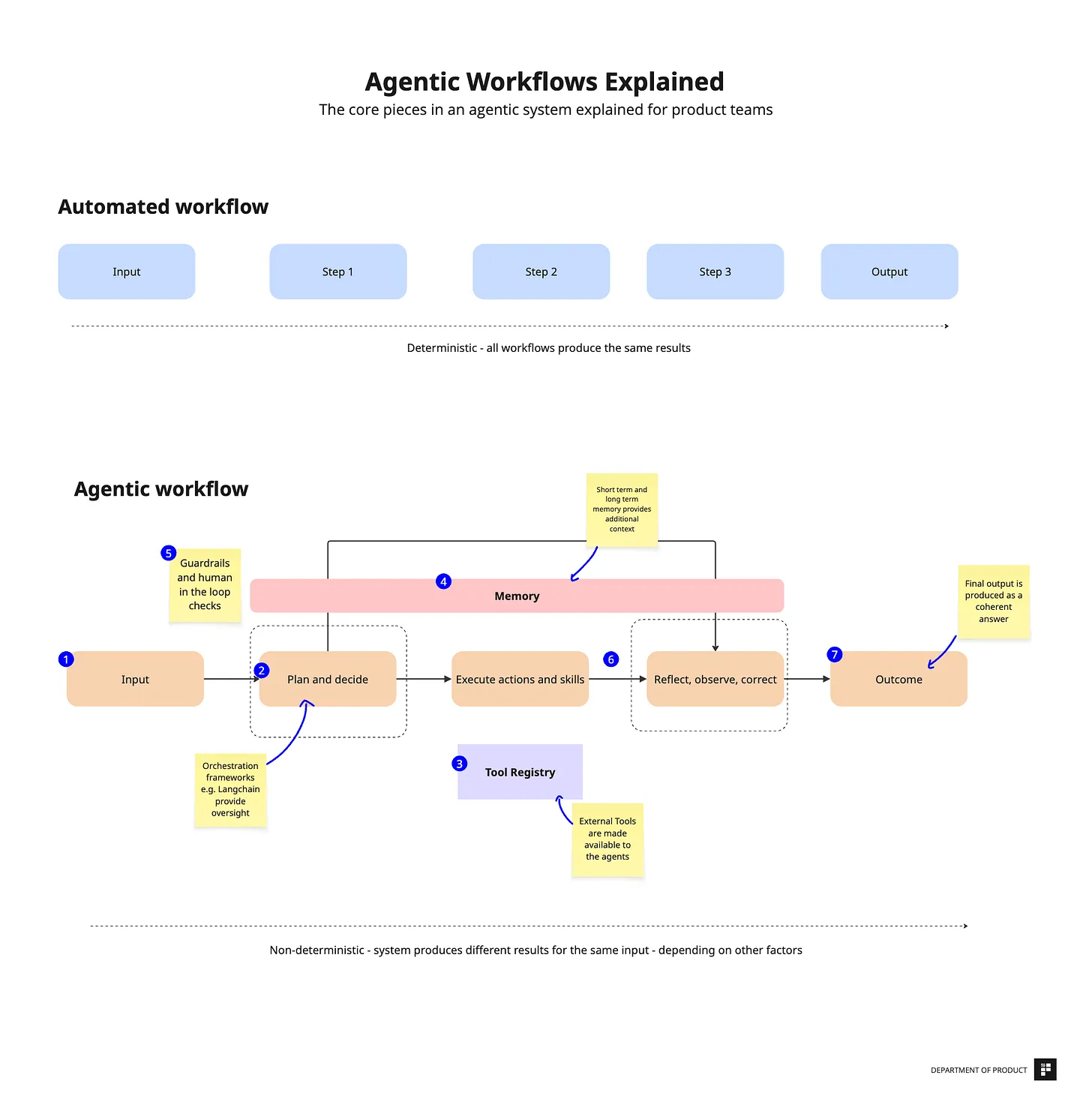
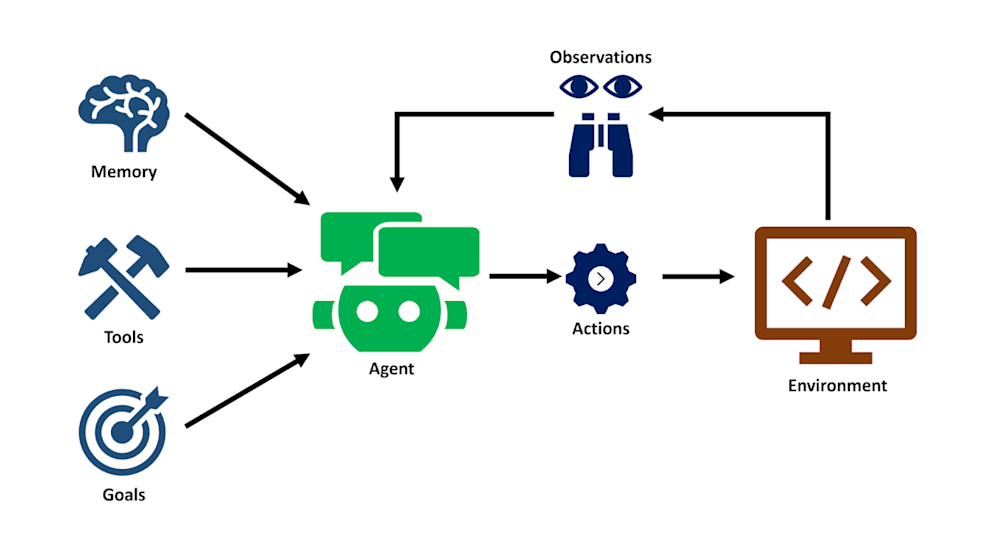
Agentic workflows in customer service go beyond simple chatbots by utilizing autonomous AI agents capable of reasoning, planning, and executing multi-step activities across several platforms without human interaction. While traditional automation relies on a fixed “if-this-then-that” script, agentic AI can adapt to changing information and “act” by accessing APIs to accomplish real-world tasks.
What is an Agentic AI Customer Service Workflow?
An AI-powered customer service workflow, also known as AI-agentic workflows, uses AI agents to automate a single or multi-turn sequence of actions by interacting with numerous technologies, making choices, and performing tasks with minimum human intervention.
Agentic AI customer service workflow automation minimizes manual procedures, speeds up resolution times, and allows agents to focus on a wider range of support inquiries.
Assume a customer service system receives a query regarding refund concerns. Using automated customer care workflows, your customer can receive an instant update via an ongoing Q&A conversation without having to go through many steps or exit the chat.
However, when done manually, your support agent either requests references or manually handles steps, such as checking the CRM, obtaining customer data, and retrieving the necessary information to provide to the customer. Without the standardized and consistent process, your agent can struggle and delay responses.
Designing an Effective Agentic AI Customer Service Workflows
Managing customer service workflows with agentic AI requires a strategic strategy. It entails rigorous preparation, execution, evaluation, and ongoing improvement. Let’s break down each step and discuss the components required to help you create AI agent customer support processes.
Start by evaluating your readiness
For AI agents to work seamlessly and accurately, ensure you have the right environment to support agentic AI workflows. If everything doesn’t work well together, your workflows will break down.
Key things to assess:
- Well-documented procedures: Ensure that your procedures are well-documented and ready. These documented procedures are essential elements for training your workflows.
- Data structure: Don’t forget to prepare your data. Clean and store them for your AI agents to pull easily.
- Technology stack: Verify that your existing tools—CRMs, ERPs, APIs, databases, and knowledge bases — feature seamless integrations to support AI agents.
- Team awareness: Change management will become smoother if your team understands Agentic AI and their roles in automating workflows. Train them for a smooth transition.
Before you jump in, take a look at your business procedures and bring people, processes, and technology together.
Review the best opportunities for agentic customer support workflows
The same formula applies here as well. AI workflows for customer support are most effective in processes that are repetitive, complex, and require decisive plans across multiple steps. So, review these areas in your customer support operations.
Map out your customer or internal workflow needs for AI agents:
- Repetitive tasks: Checking statuses, updating records, and resetting passwords are examples of repetitive tasks that can be automated with agentic AI workflows.
- Time-consuming tasks: Any complex queries that require a significant amount of time to resolve should be considered.
- High-volume interactions: Think of FAQs, onboarding sequences, and support tickets.
If you find that your support agent takes more than 70% the time resolving ‘subscription upgrade, it is the right use case. Delegate it to the AI agents who can handle them end-to-end.
Choose an AI agent builder
Critical features and functionalities are essential for your Agentic AI workflows to support your processes effectively. But not every AI agent builder is built the same way. Go for the one that aligns with your business goals.
Platform evaluation criteria, for AI agent builders like pagergpt, and others:
- Team collaboration: Can it allow all team members to connect in real-time for references and knowledge sharing? Look for a feature like a Shared Live Inbox for team collaboration.
- Seamless integrations: AI workflows for various processes, such as refunds, subscriptions, and ticket creation, require integrations with your tool stack, including CRM systems, email platforms, and more.
- Scalability: Can your AI agent platform handle volumes as you grow?
- NLU capabilities: Examine if the AI agent can understand local languages, typos, and the context of a query.
- Customizability: How easily can you integrate the AI agents into your branding specifications? Check the ease of use of customizations for tonality and branding.
- Compliance and security: Does the platform have built-in security and compliance standards that meet requirements such as HIPAA and GDPR?
Also, ask how fast you can achieve the fastest time to market. Or are there effective how-to guide materials for a customer success manager for seamless onboarding?
AI agents are a new addition to your customer support tooling stack and a big AI driver for your business. Check everything carefully.
Keep humans in the loop
Human-AI synergy scripts a success story for your agentic AI customer service workflows. Align your team with AI workflow objectives across the board and achieve your goals.
Read Also: Building Your First Agentic Workflow: Step‑by‑Step
How to manage AI-human collaboration:
- AI agent training: Train your AI agents to work with workflow triggers.
- Human agent training: AI agents are new, but not the workflows. Train your team to work with AI agents during handoffs.
- Communication development: For handling nuances and exceptions, human agents play a pivotal role. Train them with adequate customer support scenarios.
- Feedback loop: Make it easy for your team to share their experience with the agentic AI workflows. You can prepare a weekly survey and collect feedback.
Test, test, and test
This is the most crucial step in designing a successful agentic AI customer service workflow. Don’t prepare for all use cases at one go. Try to be strategic and start small.
How to examine agentic AI workflows:
- Start with small pilots: Take a very small use case. Test your workflows for a limited group of users.
- Check task execution: Does your AI agent sync well with tools and execute workflows effectively?
- Try unusual cases: Ask questions related to loyalty programs, billing, shipping, and other relevant topics.
- Branding alignment: Does your company logo look just right, and do those responses match your brand voice?
- Monitor metrics: Track success rates, including task completion, response accuracy, and customer satisfaction scores, to identify areas for improvement.
While testing your agentic AI workflows, ensure you address these key areas. If everything goes well, go one by one.
Types of Agentic AI Customer Service Workflows Real‑World Examples
Customer service operations encompass a wide range of user questions. Not only these, but new and unique questions can also arise. Here are a few examples of real-world agentic AI workflows that automate processes from end to end.
Password reset request flow
It is a very common customer query that your customer service receives frequently. Let’s say, there’s a query asking, ‘I forgot my Adobe password. How do I reset it?
A traditional chatbot will guide this way:-
- Search across the knowledge base
- Surface an article
- Ask the user to read through and find an answer
- Suggest creating a ticket if no answer is found
So, it is never quite a seamless experience in the first stage.
An automated agentic AI workflow will:
- Search across the company-wide knowledge bases
- Surface the right link to edit and reset the password
- Handle a follow-up if the link doesn’t work
- Look for a reference across the previous chat history
- Provide step-by-step guidance to work through the password reset process
- Update the identity and access management system
Instead of merely responding and lacking accountability, agentic AI workflows adapt to changing situations, make informed decisions, and complete tasks.
Subscription billing inquiry handling flow
“I cancelled my subscription before the new billing cycle could start, but the subscription is renewed and I am billed, and money got debited from my account”.
A traditional customer support workflow would surface only FAQs and then escalate the query.
With agentic AI workflows, your customers can get answers until they are satisfied.
The agentic AI workflow might:
- Check across Adobe CMS, Recurly, and Stripe via APIs
- Check the actions taken
- Understand what went wrong—is it a platform-related mistake or a user mistake
- Find subscription was canceled, but confirmation was not made
- Communicate with the user and brief the mistake
- Suggest if the user wants to cancel the next recurring billing
- Logged in to Recurly, canceled the next month’s subscription
- Update the ticket and notify the user
So, it is an end-to-end process that is executed autonomously by an agentic AI workflow you have set up.
Product quality issue handling flow
“I received a defective product, and it is not the same as I saw before placing the order ”.
The traditional workflow might need an invoice ID and product images. If the chatbot cannot sync with ongoing conversations, it will escalate it.
But when you have your workflows for customer support built with agentic AI, every step is managed autonomously.
An AI agent workflow will:
- Extract customer ID, product SKU, and issue description
- Check the CRM database for purchase records, warranty status, and product batch data
- Verify quality databases
- Generate return labels and initiate refunds via the Stripe API
- Send a confirmation email and auto-update customers
- Update the knowledge base LLM with new data
It is not just an automated response, but your AI agent workflow also prepares a stage for unique queries with a knowledge base update.
Lead capture and ICP creation flow
Now, let’s move on to a different workflow type, lead capture, which can be quite stressful when done manually.
Your human agent would handle it this way:
- Create a list of prospects using LinkedIn Sales Navigator, Zoominfo, etc
- Create prospect profiling
- Craft personalized communication materials
- Track replies in a spreadsheet
- Follow up
Imagine if the person responsible for the engagement is on leave; the entire process would be delayed by a few weeks or months.
However, an agentic AI workflow operates autonomously and executes tasks without interruption.
With AI agents, your workflow will:
- Observe visitor behavior
- Shoot up a pop-up chat window if found visitor’s engagement is found on the pricing page or to spend a long duration on the site
- Profile high-potential clients based on their intent
- Follow up with personalized messages (abandonment or demo request)
- Escalate to the human agent when a complex technical question arises
- Follow up to finalize the demo
- Enable handoffs
- Update CRMs
Your AI agents do the heavy lifting and allow you to capture a high prospect without missing a beat.
Customer profile update flow
Having updated customer profile data helps you complete tasks more efficiently. For example, a customer has a new address. If it is not updated in your CRM, logistical snarls will cause you trouble.
An old-school method relies on manual data entry, which can be dependent on the availability of the support executive. A lot of uncertainty awaits.
However, the process is seamless and automated with agentic AI workflows for your customer service.
An AI agent will:
- Ask what the things are that a customer wants to update
- Get information, i.e., account details of a new bank, and address
- Update the CRM system via APIs such as Salesforce, Odoo, etc
- Send updated information
- Provide a change summary
Your support team can stay away from repetitive, boring tasks, while your people love how agentic workflows prevent delays and boost efficiency.
These are some examples of agentic AI workflows for automating customer support processes. Select any case, such as cart abandonment or gift code issues, for example. You can customize your workflows and feel the freedom.
Final Thoughts
There is no longer any barrier to optimizing your operations and developing an engaging customer care team that listens, makes your customers feel appreciated, and helps you grow while outperforming the competition.
Customer support workflows driven by AI agents are far easier to create, adapt, deploy, and administer than traditional workflows. As a result, you are always in sync with your customers and can quickly handle their issues.





Comments