
 By

Half of U.S. online adults canceled a subscription in the previous 12 months, and 41% agreed that subscriptions are too hard to cancel, according to Forrester's 2025 research on consumer subscription behavior. The same survey found that two-thirds wished they could pause rather than cancel. Members don't arrive loyal. They arrive experienced at leaving.
That finding rearranges the build order. Most operators launch a site and then go hunting for retention tactics once churn appears. I'd rather put cancellation design, failed-payment recovery and the first-week experience into the construction plan itself. Retrofitting all three costs more than building them once. What follows is an eight-step build, four platform routes, defensible tier pricing, the access rules that connect payment to membership, and a 30-day launch plan. Each stage includes an example or a test you can use to decide what to do next. You should be able to test your offer with real buyers before paying for a single month of platform fees.
Table of Contents
- What a Membership Site Really Requires
- How to Build a Membership Site Step by Step
- Pricing Tiers Members Actually Accept
- Designing Retention Into the Site From Day One
- Setting Up Payments, Access and Security
- Launch Checklist and Your 30-Day Plan
What a Membership Site Really Requires
A membership site sells ongoing access, not files. The member pays for a bundle you keep useful: a course library, a private community, a template vault, a paid newsletter, or coaching delivered in cohorts. Before opening a builder, ask what the member will receive in month two and month five. If their problem does not return, or the solution does not change with time, a one-time product may be a better fit.
A library of tax-season checklists, for example, might make more sense as a one-time purchase if buyers need it once a year. A membership for independent bookkeepers could work differently: each month might bring a client-ready workflow, a deadline reminder and a live discussion of current client questions. A paid membership for freelance designers might supply a monthly prospecting exercise and feedback on outreach. In both membership examples, members return because the underlying work returns.
List the recurring job, the promised deliverable and your capacity side by side. If the job is "keep my client pipeline active," a monthly outreach playbook fits; twelve disconnected business videos do not necessarily fit. If the promise requires personal feedback, estimate how much feedback you can provide when membership doubles. The best recurring offer is one you can actually deliver repeatedly.
The practical version of that question looks like this on the front end:

Registration is a weak scoreboard. Research on online communities published through ICWSM found that in studies of Wikipedia participation, approximately 60% of registered users remained active for only one day (AAAI ICWSM research on online community participation). Wikipedia is not a paid membership, but the lesson is useful: an account is not evidence that someone found a reason to return.
The design response is a first success inside the first week. A freelancer member might choose one prospective client and send an adapted outreach email. A fitness member might complete a short baseline session and choose a weekly schedule. A bookkeeping member might download a client communication template and use it that afternoon. None has to finish a course before feeling progress.
Define that success as an observable action, not a vague feeling. "Viewed the welcome page" tells you little; "sent the first pitch using the template" tells you the member used the offer. Put the action on the start-here page, make the required resource easy to find and ask a new member whether they completed it. If the action routinely takes longer than expected, shorten it or remove a prerequisite.
Pick one audience with one recurring problem, promise one specific monthly outcome, and write down what members receive, how often it arrives and what you can reliably deliver. If your model is course plus community, the revenue mechanics deserve attention before you price anything, and our breakdown of how online course creators make money covers those trade-offs.
The test I use before building anything: finish the sentence "Every month, members get ___ and can ___ by ___." If filling that blank needs a paragraph, you have a category, not an offer.
Ask five potential members to repeat the promise in their own words. Then ask what they would expect to find after paying and what would make a second month worthwhile. If they describe different outcomes, tighten the offer before building the library.
How to Build a Membership Site Step by Step
The sequence below exists to kill specific failures before they cost money. Follow it in order the first time; after launch you'll loop back to the member experience and pricing regularly. Keep a one-page build brief as you go: audience, recurring problem, promise, price hypothesis, first-week win, delivery cadence and access rules. A written brief keeps feature requests from quietly changing the offer.
The build follows this shape, from audience choice through launch:
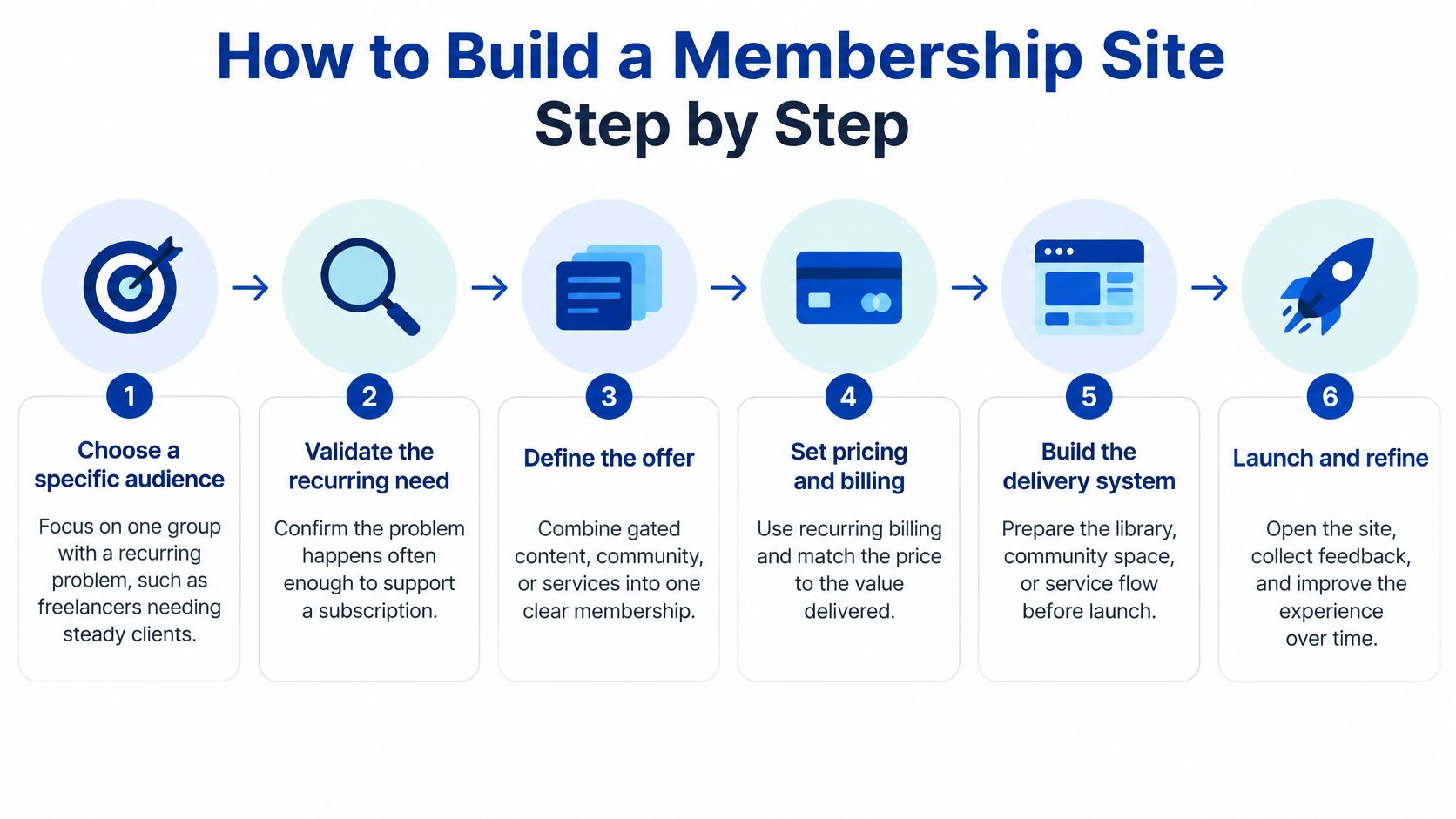
Choose a specific audience with a recurring problem. "Freelancers who need a steady pipeline of retainer clients" is workable. "People who want to earn online" is too broad to design for. Interview prospective members about the last time the problem occurred, what they tried, where they got stuck and what delay cost them. Ask for a recent example rather than "Would you join a community?" If most people say the problem happened once and they solved it permanently, reconsider the subscription model.
Write the membership promise in one sentence. Use "Every month, members get X, delivered as Y, so they can do Z." For example: "Every month, freelance designers get one client-acquisition playbook and a live working session so they can pitch better-fit retainer prospects." Then list the permissions each plan needs: library access, community areas, live calls, downloads and event seats. Mark which elements are essential to the outcome. A bonus you cannot reliably deliver is not a useful entitlement.
Validate before you build. Presell a discounted founding offer to 10 or 20 people from your list or network. Show a sample month, delivery schedule, founding price and a clear statement of what exists now versus what arrives later. Ask for payment or a refundable deposit, not only expressions of interest. Track how many relevant people saw the offer, how many asked questions and how many committed. If nobody pays, revisit the audience and promise before buying more software. A presale is a test, not permission to imply unfinished materials are ready.
Before choosing a platform, put the offer in front of prospective members. A simple sales page is enough to test whether the promise makes sense. Here is a sample for the hypothetical freelance designer membership in step two. Its price, schedule and benefits are examples, not recommendations for your own offer.
Sample membership sales page
Headline: Find better-fit retainer clients without rebuilding your pitch from scratch every month.
Who it is for: Freelance designers who want a more consistent pipeline of retainer prospects and are willing to set aside one focused hour each week for outreach.
What you get: One client-acquisition playbook each month, a reusable outreach template, a live group working session and a private space to ask questions about your pitches.
Your first week: Choose one prospective client, adapt the starter email and send a tailored pitch. The start-here guide walks you through each step in about 30 minutes.
What happens each month: A new playbook arrives in the first week of the month. The group working session follows the next week. The template library and discussion space remain available while your membership is active.
Sample founding offer: $39 per month for the first 20 members. This example assumes the first playbook and starter template are available at purchase; later playbooks arrive on the published schedule. State the actual founding deadline, available materials and any price-lock terms before accepting payment.
Call to action: Join the founding group and send your first tailored pitch this week.
Before you pay: Your subscription renews monthly at the displayed price until you cancel. You can cancel from your account; paid access continues through the end of your current billing period. If you offer refunds, pauses or a founding-rate guarantee, explain their exact terms here rather than leaving buyers to guess.
Frequently asked questions
Who is this membership for? This example is for freelance designers who want a steadier pipeline of retainer prospects and can spend about one focused hour a week on outreach. It may not be a good fit if you want someone else to find clients or send pitches for you. Replace these criteria with the audience, effort and support your actual membership requires.
What results can I expect? In this example, your first goal is to choose a suitable prospect and send one tailored pitch using the starter template. Each month gives you a new playbook and a working session to help you refine your outreach. Joining does not guarantee replies, signed retainers or a particular income. Results depend on your prospects, the quality and consistency of your outreach, and how you use the materials. Replace this answer with outcomes your actual membership can help members work toward, without promising results you cannot verify.
What can I use right after joining? In this example, the first playbook, starter outreach template and start-here guide are available at purchase. Later playbooks follow the published monthly schedule. List the materials that are actually ready before you accept payment.
How much time should I set aside? Plan for one focused hour a week for outreach. The first-week task, adapting and sending one tailored pitch, takes about 30 minutes with the start-here guide. You can use the library at your own pace.
When is the live working session? The example schedules it for the week after each new playbook arrives. Add the actual date, time zone, session length and replay policy before publishing this page.
What happens if I cancel? You can cancel from your account. Your paid access continues until the end of the current billing period, and your subscription does not renew after that. State separately whether members can download or retain any materials after access ends.
Is the $39 founding price locked in? Not unless the published offer explicitly says so. Before taking payment, state whether the rate continues, when it might change and whether canceling and rejoining affects it.
Can I get a refund or pause my subscription? Do not promise either without a policy you can honor. If you offer refunds or pauses, give the eligibility rules, request method and timing here. If you do not, say so plainly before checkout.
Use this as a structure, not copy to publish unchanged. Replace the audience, deliverables, first-week task and terms with what you can actually provide. For a presale, clearly mark anything unfinished and give its expected delivery date. If readers understand the page but hesitate to pay, ask which part of the outcome or delivery feels uncertain before adding features.
Pick the platform route. The comparison below weighs four options against cost, member behavior and operational burden. First make a must-have list based on your promise. A discussion-led membership needs dependable notifications and moderation tools; a resource vault needs search and clear organization. On each trial account, try the same workflow rather than relying on a feature checklist. If a platform offers calls but makes joining one confusing, that feature is not solved for your members.
Structure the experience around a first-week win. Build a start-here page, one initial task that takes under ten minutes and a library organized by outcome ("land your first retainer client") rather than file type ("videos" and "PDFs"). The first task can be choosing a prospect; completing and sending the pitch can be the week's larger win. After each action, give members one next step. A five-step pathway is easier to navigate than a homepage with 80 undifferentiated resources.
Connect payments to access on the server. Map each plan to explicit permissions and drive changes from verified billing events, not a browser success page. Rehearse purchase, failed renewal, upgrade, downgrade and cancellation before launch. For example, a core member upgrading to premium should gain call access under the policy you published, while a canceled member should keep paid access only until the promised end date. Hosted platforms may handle the mechanics, but you still need to test the outcomes.
Price in tiers. A narrow free layer, a core monthly plan, an annual billing option and an optional premium tier make a workable starting structure. Only one paid plan should look like the obvious default. Write one sentence explaining who each plan serves. If buyers need a spreadsheet to understand the difference, simplify the tiers before adding another benefit.
Launch in stages. Invite 10 to 20 beta members first, spend roughly two weeks fixing what blocks them, then open a public founding window with a real deadline. Ask beta members to complete the first task while you watch where they hesitate. Observe whether they can find the resource, understand the instructions and return for the next action. That behavior is more useful than a general "What do you think?" survey.
Four platform routes compared
Costs below are planning ranges, not quotes or promises about current vendor pricing. Check the features, transaction fees and limits of the specific plan you intend to buy before committing. Some useful capabilities, such as automation or extra administrators, may require a higher tier than the advertised entry price.
| Platform route | Typical starting cost | Best for | Watch out for |
|---|---|---|---|
| Hosted community platform (Circle, Mighty Networks) | $41 to $89 per month | Communities, cohorts and discussion-led memberships | Monthly platform fees and limited design control |
| All-in-one course platform (Kajabi, Podia, Teachable) | $39 to $199 per month | Course libraries, downloads and bundled email marketing | Community features often sit on higher tiers |
| WordPress plus membership plugin (MemberPress, Restrict Content Pro) | $30 to $80 per month once hosting, plugin and backups are counted | Content sites, blogs and flexible paywall rules | You own updates, backups, security and speed |
| Custom build with Stripe webhooks | Developer time plus Stripe processing fees | Unique entitlements, apps or marketplace-style access | Slowest to launch and hardest to maintain |
Choose by what members do most often, not by the longest feature list. If they return primarily for discussion and accountability, try a hosted community. If they follow lessons in sequence and rarely talk to one another, a course platform may feel clearer. If you already publish on WordPress and need different access rules for articles and downloads, a plugin may save migration work. Reserve custom development for a permission model you cannot express with standard tools.
Run the same trial task on each finalist: purchase a test plan, activate the account, locate the first resource, change plans and cancel. Time how long each task takes without your help. Check what the member sees on mobile and whether receipts, account emails and access dates agree. Also export a sample member record and a piece of content. An export option is much less valuable if the files or member fields are unusable when you need to move.
For the freelance designer example, the deciding workflow might be "join, download the pitch template, post a draft for feedback and book the monthly working session." A platform that performs that sequence smoothly is a better choice than one with more features but a confusing member journey.
What the build costs in time and money
Plan on four to ten weeks of part-time work, and budget $50 to $200 per month for tools at the start: a platform, an email tool, video hosting, a domain and payment processing on each charge. These are planning estimates; actual costs depend on your stack and volume. Write down startup expenses separately from recurring expenses so a one-time design job does not disguise an unsustainable monthly bill.
Startup work might include designing the sales page, recording an orientation and preparing the first month's materials. Recurring work includes software, processing fees, moderation, member support, content production and live sessions. Add your own hours to the model even if you do not pay yourself initially. A $39 plan with a promised 30-minute individual call every month has very different economics from a $39 plan with one shared group call.
For example, 20 members paying $39 per month generate $780 in gross monthly revenue before fees, refunds, taxes and labor. If the hypothetical tools cost $120 per month, $660 remains before those other costs. At 10 members, the same tools consume a much larger share of gross revenue. This simple sensitivity check tells you whether the first milestone is gaining members, lifting price or reducing fixed costs.
Here is a worked monthly budget for that hypothetical $39 membership. The payment fee is an illustrative assumption of 3% plus $0.30 per successful charge, not a quote from a provider. The labor estimate assumes eight hours a month at an assigned value of $25 per hour. Your actual rates, hours, taxes and refund costs will differ.
| Monthly budget item | 20 paying members | 40 paying members |
|---|---|---|
| Membership revenue at $39 each | $780.00 | $1,560.00 |
| Tools and hosting | -$120.00 | -$120.00 |
| Illustrative payment fees | -$29.40 | -$58.80 |
| Content and support labor, 8 hours at $25 | -$200.00 | -$200.00 |
| Remaining before taxes, refunds and other costs | $430.60 | $1,181.20 |
The 40-member column holds labor constant to show the math, not to claim support will stay flat as membership grows. If 40 members require 16 hours instead of eight, labor rises to $400 and the remaining amount falls to $981.20.
To calculate a break-even member count, divide your monthly fixed costs by the amount each paying member contributes after per-payment fees, then round up to a whole member:
Break-even members = monthly fixed costs ÷ (monthly price – per-member payment fees)
Using this example, fixed costs are $120 for tools plus $200 for eight hours of labor, or $320 per month. The illustrative fee on each $39 payment is ($39 × 3%) + $0.30 = $1.47, leaving $37.53 per paying member. Divide $320 by $37.53 to get 8.53, then round up: nine paying members cover the modeled costs. At nine members, $337.77 remains after payment fees, enough to cover the $320 in fixed costs with $17.77 left over.
This is a cost-coverage point, not a take-home pay target. It assumes every payment succeeds and eight hours of labor are enough; taxes, refunds, acquisition costs and additional work still need room in the budget. If support hours grow with membership, recalculate with the higher labor cost. Replace these assumptions with your own numbers before using the worksheet to set a price.
What a refund and failed payment do to the budget
Start with the 20-member example above: 20 successful $39 charges bring in $780, with $29.40 in illustrative payment fees, $120 in tools and $200 in labor. That leaves $430.60 before taxes and other costs. Now suppose one member receives a full $39 refund and a different member misses their next $39 payment. This example assumes the processor does not return the original $1.47 fee on the refunded charge, charges no fee on the failed attempt, and adds no dispute or refund fee. Check your provider's actual terms.
| Scenario for the month | Successful charges kept | Gross cash kept after refund | Illustrative payment fees | Amount remaining after $320 tools and labor |
|---|---|---|---|---|
| All 20 payments succeed | 20 | $780.00 | $29.40 | $430.60 |
| One successful charge is fully refunded | 19 | $741.00 | $29.40 | $391.60 |
| One payment fails and is not recovered | 19 | $741.00 | $27.93 | $393.07 |
| One refund plus a different unrecovered failed payment | 18 | $702.00 | $29.40 | $352.60 |
The refund reduces the amount remaining by the full $39 because its processing fee is assumed to stay in the cost column. The unrecovered failed payment reduces it by $37.53, the $39 charge less the $1.47 fee that was never incurred. Together, those two events reduce the modeled amount remaining by $76.53. If the failed charge succeeds on a later retry within the same month, add back its $39 revenue and subtract the applicable successful-payment fee; do not count it twice. If a refunded member or a past-due member requires extra support time, add that labor too.
The earlier nine-member break-even count means nine successful, non-refunded $39 payments under the stated assumptions, not nine people with accounts. If you expect one full refund whose original fee is not returned and one separate unrecovered failed payment in a month, you would need 11 members due to renew at the same price to end up with nine kept payments. That is an illustrative count, not a forecast: more refunds, different fee rules or a chargeback can change it. Reconcile the month's actual collected and refunded payments before deciding whether you reached break-even.
Fill-in membership budget template
Copy this table into a spreadsheet and replace each blank with your own estimate. Keep one-time launch costs separate from this monthly operating budget. If you have multiple paid plans, make a copy for each plan or calculate revenue and fees for each plan separately.
| Monthly input | Your number | How to calculate it |
|---|---|---|
| Paying members | ____ | Count members you expect to collect payment from this month |
| Monthly price per member | $____ | For annual plans, divide the annual price by 12 for a monthly planning estimate |
| Gross monthly revenue | $____ | Paying members × monthly price |
| Payment fee per successful charge | $____ | (Monthly price × percentage fee) + flat fee, if applicable |
| Total payment fees | $____ | Paying members × fee per charge; adjust for your actual billing mix |
| Tools, hosting and software | $____ | Add recurring platform, email, hosting and other tool costs |
| Content and support hours | ____ | Estimate hours needed to deliver the monthly promise |
| Value or cost per labor hour | $____ | Use what you pay someone or the amount you assign to your own time |
| Total content and support labor | $____ | Hours × cost per hour |
| Other monthly costs | $____ | Add recurring contractors, moderation or acquisition spending not listed above |
| Estimated amount remaining | $____ | Gross revenue – payment fees – tools – labor – other monthly costs |
For a quick break-even estimate, add tools, labor and other monthly fixed costs. Divide that total by monthly price minus the per-member payment fee, then round up. If a cost rises with each additional member, subtract that per-member cost in the denominator too. For example, a $5 per-member delivery cost changes the denominator to price – payment fee – $5. If the denominator is zero or negative, adding members at that price will not cover those variable costs.
Check the estimate against two member counts, such as your realistic first-month goal and twice that number. Increase the labor-hours row if a larger group needs more support. The remaining amount is before any taxes, refunds or costs you have not entered; it is not automatically your take-home pay.
The biggest saving is refusing to buy the top tier of anything before you have paying members. An entry-level hosted platform, a free email tier and simple video hosting may cover the essentials if their current limits fit the offer. Upgrade when a real limit blocks an important member action, not when a pricing page suggests it might.
For a visual walkthrough of the same sequence, this covers the build end to end:
Custom work earns its cost when access rules differ per member in ways no plugin models, such as usage credits or marketplace-style permissions. Before paying a developer, describe the unsupported rule, show the member action it enables and estimate its value. Include ongoing maintenance, not just the launch invoice. If you cannot identify a rule that changes the offer meaningfully, customization is probably premature.
Pricing Tiers Members Actually Accept
Price the outcome and the delivery obligation, not the number of files. A membership that saves a freelancer five billable hours a month may justify a different price from a vault of forty videos nobody finishes. Competitor prices are useful context, but your price has to cover the work you promise and feel reasonable for the problem you solve.
In practice, a niche community might be tested around $9 to $29 per month, a course-plus-community offer around $29 to $99, and a premium tier with coaching, audits or direct access around $99 to $299. Treat these as starting hypotheses, not market averages or guarantees. Test a price against a clearly described monthly deliverable. If a prospective member objects, ask what they expected to receive at that price before assuming the number itself is wrong.
Write down your delivery capacity before choosing a price. An asynchronous community answer and a personal review of every member's work are different commitments. Suppose a $149 premium plan includes a 30-minute review each month. Ten members create five hours of review time before preparation, follow-up and support. Twenty members double that obligation. If the workload becomes unsustainable, raise the price, cap seats or change the benefit rather than hoping the reviews somehow get faster.
Make a simple unit-economics worksheet for each plan: price, estimated processing cost, software allocation, average support time and promised delivery time. You do not need a perfect forecast. You need to spot a tier that loses money or relies on unpaid hours you cannot keep contributing.
Three tiers is the ceiling for a new site
- Free layer. Offer a small, useful slice that builds trust, such as one starter checklist and a public newsletter. Explain what it helps people do, then show where the ongoing paid offer begins. A free layer with the whole paid archive gives visitors little reason to upgrade.
- Core monthly plan. Put the main promise here. For the designer example, that might mean the monthly playbook, templates, group working session and discussion space. Set expectations for responses: group questions are not the same as unlimited private coaching.
- Premium tier. Add a clearly bounded benefit such as one monthly pitch review, a small-group audit or a seat-limited working session. State how to submit work, how long feedback takes and what happens if a member misses a call.
The annual option is usually a billing choice for core, not another set of permissions. At about ten times the monthly rate, members effectively get two months free while you receive cash upfront. A $39 monthly plan would be $390 annually under that rule. That cash is not free profit: you still owe a year of delivery. Check that the discount makes sense after processing costs, refunds and the work required throughout the term.
Show monthly and annual side by side, mark core as the recommended plan, and describe differences in terms members can picture. "One written pitch review per month" is clearer than "priority support." If premium includes an event, explain whether a missed event has a replay or replacement. Avoid lifetime deals while the offer is changing shape. The cash from one sale can disappear long before the delivery obligation does.
A useful pricing-page test is to ask someone unfamiliar with the offer to choose a plan aloud. If they cannot explain why they chose it, fix the descriptions before changing the prices.
Plan for the price rise now
Approximately 73% of subscription services surveyed by Chargebee and Centiment in 2024 planned to increase prices, according to Chargebee's 2024 subscription revenue research. You may revisit your own pricing eventually, so write the rules while no change is imminent: a published price-change policy, 30 to 60 days' notice if that is the policy you choose, and a grandfathering rule that members can read before they buy. Meet any notice or consent requirements that apply to your business.
Grandfathering beats apologizing. One possible policy lets existing members keep their old rate while they remain continuously subscribed, while new members pay the new price. You give up some immediate revenue in exchange for a promise members can evaluate.
Make the edge cases explicit. Does an old rate survive a pause? What if someone cancels and returns six months later? If a core member upgrades to premium and later downgrades, do they regain their original rate? For an annual member, when does a new price take effect? Write the answers before the first change so support is not improvising policy in public.
When you announce a change, show the member's current price, new price if applicable, first affected billing date and options to change or cancel. For example, "Your current $39 monthly rate stays in place while your subscription remains active" is clearer than "founders are protected." Do not call a rate locked for life unless you can honor exactly that promise.
One opening move worth considering: let founding members lock a lower rate under stated conditions in exchange for structured feedback during the first 90 days. Ask what they came to do, what they accomplished and where the site slowed them down. If you want to publish testimonials or case studies, obtain permission rather than assuming payment gives you that right.
Designing Retention Into the Site From Day One
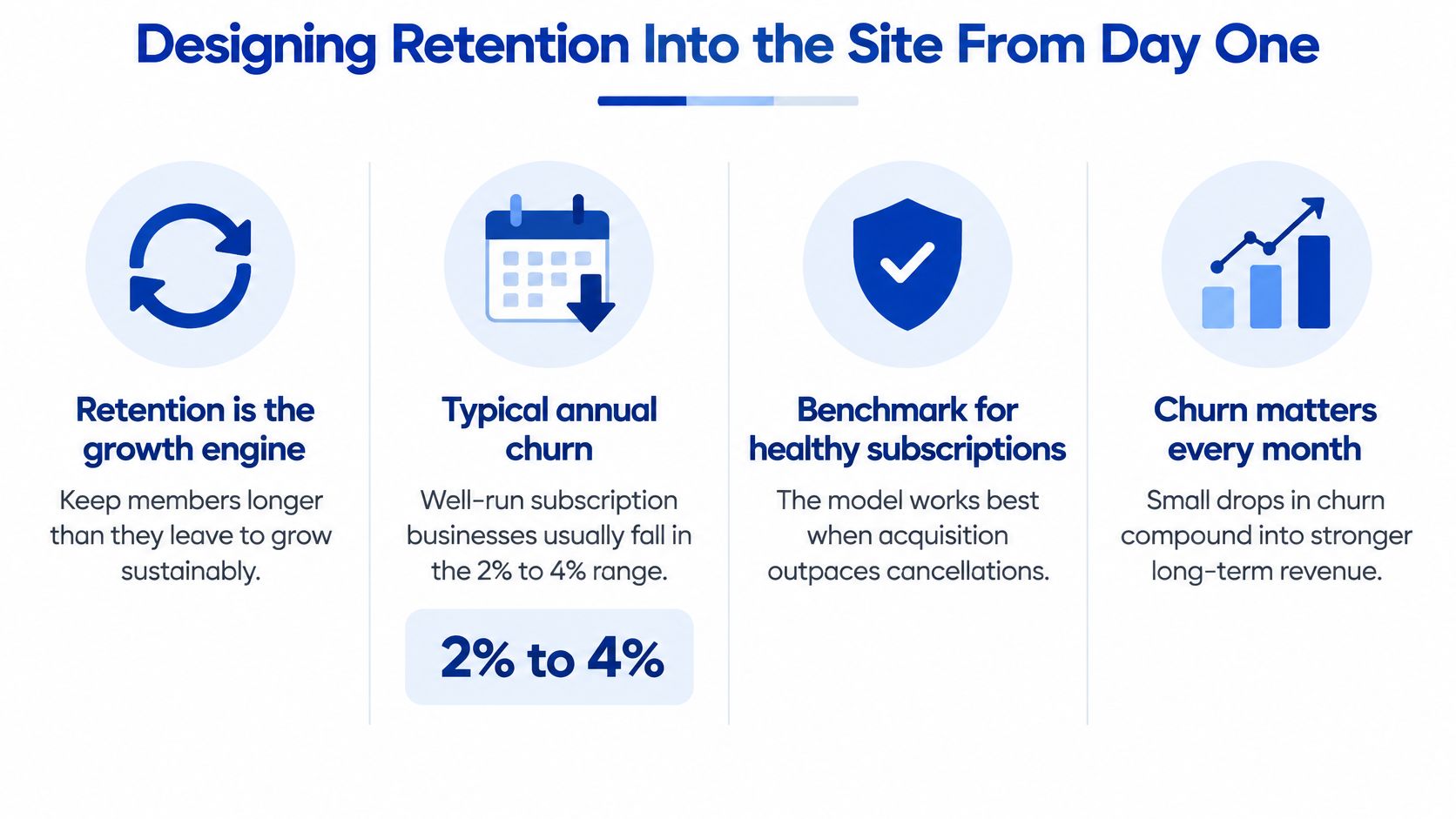
Recurly's benchmark research reports a median annual churn rate of 3.04% for software subscriptions and a top-quartile rate of 1.78% or lower (Recurly's churn rate benchmarks). At a 3.04% annual churn rate, a hypothetical 10,000-member site would lose about 304 members over a year before new sales; at a 5% annual rate, it would lose 500. These software figures are not membership-site targets. Use them to understand the arithmetic, then compare your own cohorts on a consistent time period.
Churn alone does not capture upgrades, downgrades or reactivations. A site can hold its member count steady while recurring revenue falls as members move to cheaper plans. Track both paying members and recurring revenue, and label whether a rate is monthly or annual. For a small site, review actual cancellations alongside percentages: one cancellation among ten members looks dramatic as a rate but still calls for a conversation, not a sweeping conclusion.
The reasons members leave are more actionable than the overall rate. Churnkey's 2025 state of retention report, drawn from more than 1,000 companies worldwide, found overall churn near 10%. Among voluntary cancellations, budget limitations accounted for 32.97% and infrequent usage for 30.6%, while technical issues accounted for 4.69%. Treat those figures as clues, not your site's diagnosis. A member who never found the first resource needs a different response from one whose card failed.
| Cancellation reason | Share of voluntary cancellations | Design fix |
|---|---|---|
| Budget limitations | 32.97% | Pause option, downgrade tier and annual discount |
| Infrequent usage | 30.6% | Onboarding milestones, usage prompts and habit-forming rituals |
| Technical issues | 4.69% | Faster support, clearer access flows and a status page |
| All other reasons | 31.74% | Exit survey to surface your own specific causes |
For example, a member facing a temporary budget squeeze may welcome a defined pause. A member who never used the site probably needs a clearer starting task, not a discount. Ask a single optional cancellation question, allow an open-text answer and check whether the member's activity supports your interpretation. Do not force a survey response before cancellation.
The four parts of the retention system
- A defined first-week outcome. Time-to-first-value is the interval between joining and doing something useful. For the designer example, track whether a new member selects a prospect, adapts the starter template and sends a pitch within seven days. If many download the template but few use it, the missing step may be guidance on choosing a prospect rather than more templates.
- Onboarding reminders. Send three emails in the first seven days, each with one action: day zero links to the first task, day three helps with a likely obstacle, and day seven points to the next step. Make the email useful even if someone missed the previous one. A digest full of unrelated resources makes the path harder to follow.
- Progress milestones. Show meaningful movement, such as templates used, drafts submitted or calls attended. Let members skip steps that do not apply to them. A progress indicator should guide members toward the outcome, not reward clicking through material for its own sake.
- A predictable monthly drop with weekly prompts. Release one substantial resource each month and offer a small weekly prompt or challenge. For example, the first week brings a playbook, the second a working session, and later weeks a prompt to apply or refine it. Publish the schedule so members know what is coming, and avoid promising a cadence you cannot sustain.
Then measure what predicts renewal: day-7 and day-30 return rates, monthly active members, first-task completion, cohort retention by acquisition source and exit-survey reasons. A cohort groups members who joined in the same period. Instead of comparing everyone currently subscribed, you can ask whether January's members were still paying three months after joining. Cohort thinking works the same way in retail, and our guide to retaining ecommerce customers walks through the grouping logic.
Keep reporting simple. A spreadsheet with join month, plan, first-task completion, last activity date and cancellation reason can reveal a pattern. Suppose recent members rarely complete the first task even though they open the welcome email. Watch a few people attempt the task, then change one instruction or link and see whether the next group does better. Changing the welcome email, resource library and pricing at the same time makes the result harder to interpret.
A useful monthly review asks three questions: What did new members do in week one? What brought returning members back? What did departing members say was missing? Assign one improvement to each answer rather than treating "increase retention" as a single task.
Cancellation design is retention design
Give members a self-service cancel button, a pause option if you offer one, and a downgrade path in the same account area. Tell them what happens immediately, at the end of the paid period and after a pause. A member who can pause through a lean month has a way to return. A member who must email support to escape may leave with a worse impression than the product deserved.
Build the pause button before the sales page. A painful exit can turn a temporary budget problem into a permanent trust problem.
Design a pause with a defined duration and restart date. For example, under a one-month pause policy, specify when access stops, whether progress remains saved and when billing resumes. Send a confirmation containing the same details. If your platform cannot support pausing reliably, do not advertise it; offer a clearly explained cancellation and rejoining path instead.
A cancellation screen can offer relevant alternatives without trapping the member. Someone choosing "too expensive" might see a lower tier; someone choosing "not using it" might see a short start-here guide. Keep "Confirm cancellation" obvious, and send a final email with the access end date. Check that a canceled account does not receive renewal reminders that imply it is still active.
The contrarian point most guides skip: more content is not a retention strategy. A library that grows faster than members can explore it can feel harder to use. A short "start here if you need X" collection and a dependable weekly habit may be more useful than another 50 videos. Findability and habit beat volume.
Setting Up Payments, Access and Security
Access control belongs in a permission table on the server, where a single authorization layer answers a question on every protected request: does this member's current state grant this resource? Hiding a page in navigation does not protect its URL or downloadable file. Every plan change and retention feature depends on the underlying subscription state being accurate.
Think through the complete journey before wiring checkout: purchase, account activation, renewal, failed payment, upgrade, downgrade, pause, cancellation and refund. For each event, specify the access change, the effective date and the message a member receives. For instance, "cancel at period end" should not revoke a member's library today if the sales page promises access through the paid period. If a hosted platform handles these transitions, test its behavior against your policy.
Keep a short event matrix next to the build brief. It can say "successful payment: grant core access," "first failed renewal: retain access during the stated grace period" and "paid period ends after cancellation: revert to free access." This turns an abstract billing setup into testable outcomes.
Map entitlements before you map pages
Write out every plan and its permissions for article categories, downloadable assets, community areas and events. A simple starting map might look like this:
| Member state | Resource library | Core community | Premium calls |
|---|---|---|---|
| Free account | Starter resources | Public area only | No |
| Active core | Full access | Yes | No |
| Active premium | Full access | Yes | Yes |
| Past due, within grace period | Temporarily retained | Temporarily retained | Follow published policy |
| Canceled after paid access ends | Starter resources | Public area only | No |
Add a row if you offer pauses, trials or a plan with different content access. For each protected resource, choose a permission rather than hard-coding plan names into many pages. That way, a new plan can inherit the intended permissions without an accidental gap. Remember to protect the actual file or video delivery path as well as the page containing its link.
Connect billing-provider subscription states to that layer through signed webhooks. Access is granted on a verified successful payment, changes when the plan changes, survives a documented grace period if a subscription goes past due, and is revoked when the paid period ends. Make handlers idempotent, meaning a retried webhook produces the same final state without a duplicate grant or refund loop. Also handle events arriving in an unexpected order by checking the provider's current subscription state before making a consequential change.
Never grant access from a browser redirect. A customer landing on a success page has not necessarily paid. Only a verified provider event should authorize a paid entitlement.
Test awkward transitions with two accounts. Upgrade one mid-cycle and cancel the other after a failed renewal. Check the billing record, the protected resource, the account page and the emails. If the platform prorates an upgrade or schedules a downgrade for the next billing cycle, the member-facing date must match what actually happens. A correct plan label alone does not prove that the protected download is protected.
Reduce checkout friction
Baymard's checkout research reports that 17% of online shoppers have abandoned an order solely because checkout was difficult, while 24% abandoned when forced to create an account during checkout (Baymard Institute checkout UX statistics). Those figures concern online shopping broadly, not membership checkouts specifically, but they make friction worth testing. Where supported, let people buy first and activate their account during a post-purchase step.
Show plan terms before checkout, ask only for necessary information, and display the renewal price, billing interval, taxes and cancellation terms before authorization. A yearly price should not hide the amount due today, and a trial should state the date and amount of the first charge. On mobile, test with a real device, a long email address and a payment error. Check whether the buyer can recover without re-entering everything.
Instrument the funnel: pricing-page view, checkout start, payment success, account activation, first-task completion, failed payment, cancellation and reactivation. If checkout starts but payments rarely finish, inspect errors and confusing terms before rewriting the whole offer. If people pay but do not activate accounts, check the activation email, link expiration and the page it opens. If they activate but never use a resource, the issue may be onboarding rather than checkout.
Use a test purchase to read every customer-facing email. The receipt, welcome message and account page should agree on what the buyer purchased and when renewal occurs. A typo in a receipt may seem minor, but conflicting billing information creates avoidable support work.
Harden identity before you scale marketing
The OWASP password storage guidance is explicit: never store plaintext passwords; use slow adaptive hashing such as Argon2id, bcrypt or PBKDF2 with a unique salt per credential. Its Argon2id baseline is at least 19 MiB of memory, two iterations and one degree of parallelism. If you build authentication yourself, follow current guidance rather than implementing password handling from memory. If you use a hosted platform, find out who manages authentication, what security controls are available and who can access member data.
Allow long passphrases rather than imposing a short password maximum. Turn on MFA wherever you can, since OWASP cites Microsoft analysis indicating MFA could have prevented 99.9% of account compromises. Require it for administrator accounts first. Review who has admin permissions before adding contractors, and revoke access when work ends.
Keep card data out of your database by using the payment provider's hosted checkout or fields. You lose some styling control and avoid handling raw card numbers. For a custom authentication system, use HttpOnly, Secure, SameSite session cookies, rotate sessions after login and privilege changes, and rate-limit login, password-reset and coupon endpoints. Protect the billing-update page from impersonation attempts, too.
Security also includes recovery. Test password reset, expired activation links, loss of access after a plan change and a member who switches email addresses. Set a support procedure for verifying account ownership without asking anyone to send a password or card number. Recurring billing is the engine of the model, so it deserves the same care as the content, a point we make at more length in our piece on the benefits of recurring payments for your online business.
Recover failed payments
Involuntary churn is the quiet leak. Detect failed renewals, send clear billing-update notices, retry on the provider's schedule, and retain access through any grace period you have published. Automated retries and reminders can recover payments, but your results depend on timing, card mix and whether members receive the update message. Measure your own recovery rate instead of planning around a generic benchmark.
A first-failure email should identify the plan, explain that payment did not complete, link to a secure billing-update page and say whether access is currently affected. A final-failure email should state the next access change and its date. Never request card numbers by email. If a successful retry occurs, stop failure notices and restore or preserve access without staff intervention.
Grace period length is a trade-off. Too short and you may lose members whose cards would clear on the next retry; too long and you may provide extended unpaid access. Pick a window, put it in your policy and enforce it through the authorization layer. Test both recovery within the window and expiration after it.
Track first-attempt failure rate, recovery rate, involuntary churn, chargebacks and related support tickets. Before launch, publish refund, terms and privacy pages, and document how you handle data access, export and deletion requests applicable to your business. If you serve people covered by GDPR or CCPA, check the requirements for your situation rather than assuming a template policy completes the work.
Launch Checklist and Your 30-Day Plan
A launch tests the entire member journey, not only whether a sales page converts. Give each acceptance task an owner and a pass or fail result. If payment works but access does not, the site is not ready for a larger audience. If the first resource is live but new members cannot find it, the product is not ready either.
Choose a small set of launch measures before announcing: relevant visitors, paid sign-ups, first-task completion, support issues and failed payments. Recording the starting numbers makes later changes easier to evaluate. Do not wait for a polished analytics dashboard if a spreadsheet can capture the events accurately.
Before you open the doors
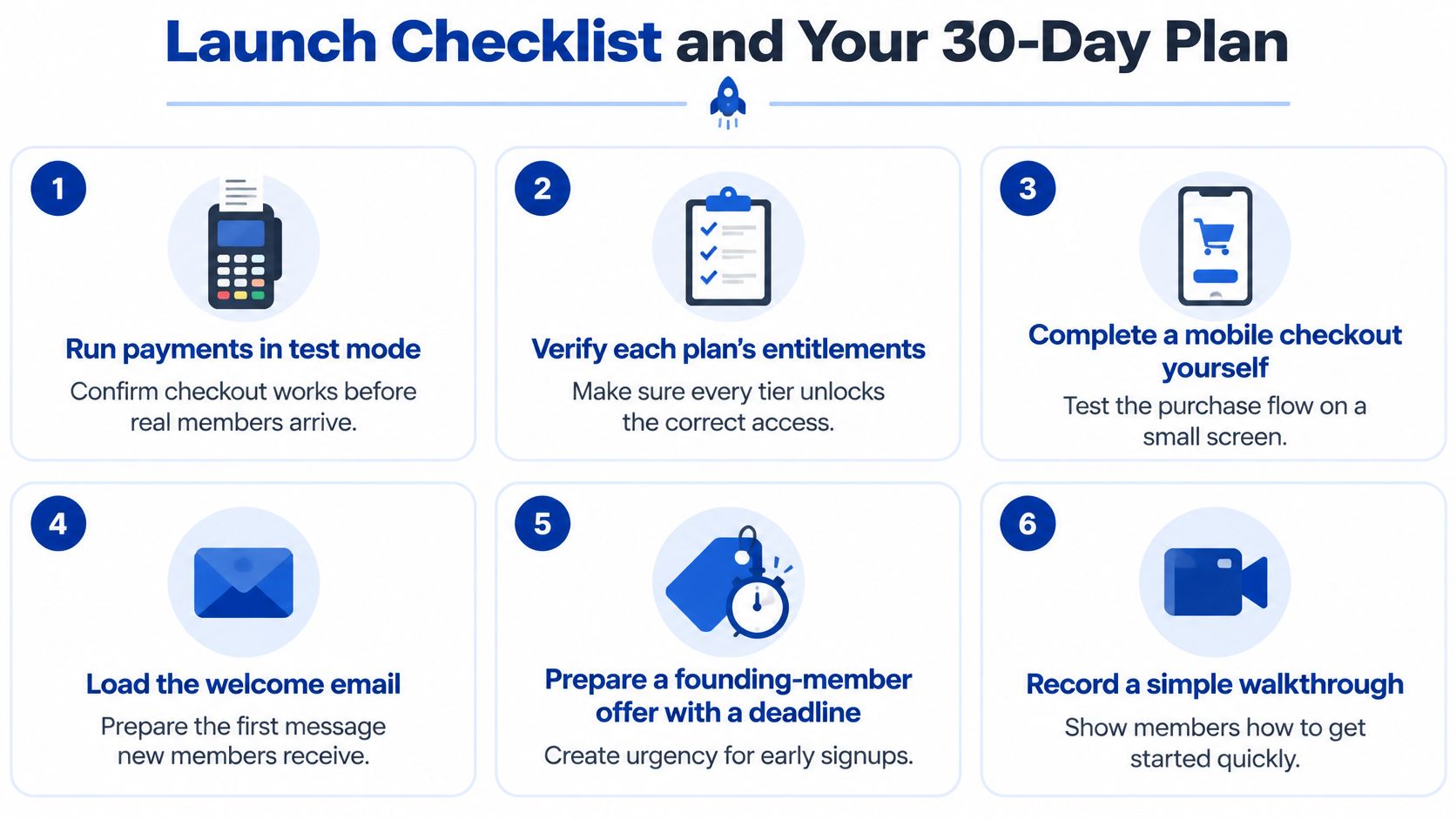
- Run payments in test mode from pricing page to receipt, including a declined card and a refund. Check plan, amount, interval and the resulting access state.
- Verify every plan's entitlements by subscribing test accounts to each tier. Open protected resources while signed in and while signed out, including direct download URLs.
- Complete a mobile checkout on a real phone with autofill off. Confirm that error messages tell buyers what to fix and that renewal terms remain visible.
- Open every welcome and activation email. Follow the links, let one expire and request a fresh one. A member who pays and hears nothing is a refund in progress.
- Prepare the founding offer and orientation. State which materials exist now, when later benefits arrive and when the founding window closes. Make the first useful action obvious.
- Test the exit path by pausing if offered, downgrading and canceling. Confirm the account page, email and actual access end date agree.
- Assign support coverage for the first two weeks. Give members one obvious place to report billing, login or content-access problems and publish a response window you can meet.
These tasks decide whether launch week feels like a business or a fire drill:
Have someone unfamiliar with the site run the purchase and first task without instructions from you. Watch where they pause, but do not explain the interface until they finish. If two people make the same wrong turn, change the interface or copy rather than adding another line to a support document.
Launch week
Announce to your warmest audience first: your email list, an existing community or your personal network. Explain who the membership serves, what is available on day one, what happens during month one and when the founding window closes. Limit founding spots only if capacity really is limited, such as when you offer personal onboarding or live reviews.
Answer support tickets within the response window you published. Watch paid sign-ups, first-action completion and failed payments daily. Review revenue too, but do not let a strong first sales day conceal a broken activation flow. Keep a list of prospect questions; if several people ask when calls happen or whether they can cancel, put those answers on the sales page.
When beta members report friction, sort issues into three groups: blocks payment or access, blocks first value, and nice to have. Fix them in that order. A new badge can wait if members cannot find their first task. Recheck a fix with a new member rather than assuming it worked because the person who reported it can now get through.
For a small founding cohort, a short personal message can uncover problems analytics misses. Ask, "What did you join to do first, and were you able to do it?" That question connects the promise to actual use without requesting a broad review of the whole site.
When the numbers come in soft
| Symptom | What it might mean | What to check or change |
|---|---|---|
| No sales at all | The promise, audience or traffic may be wrong | Hold 10 conversations, check who saw the offer and rewrite the promise if buyers cannot explain its value |
| Checkout starts, few payments | Friction or unclear terms | Test mobile checkout, payment errors, renewal terms and account requirements |
| Sign-ups, no activity | The first-week win may be missing | Publish a start-here path, check activation emails and add a day-3 nudge |
| Cancellations after month one | The monthly promise may not match delivery | Survey leavers, compare usage and schedule the next relevant release |
| Failed payments climbing | Billing recovery may be weak | Check provider retries, reminders, billing-update links and the grace period |
Diagnose by symptom rather than mood. No sales does not automatically mean your price is too high. First check whether enough relevant people saw and understood the offer. If ten interested prospects can explain the promise but still will not buy, ask what feels unproven. If they buy but do not return, changing the headline will not fix the experience after purchase.
Compare small launch groups cautiously. Two cancellations among ten founding members are worth investigating, but the percentage alone cannot tell you why people left. Read their responses, look at what they used and check whether your promised monthly delivery arrived. Make one targeted change, then look for the same symptom in the next group.
The 30-day plan
- Week 1, write and presell. Draft the promise sentence, hold 10 validation conversations and publish a founding presell page with a deadline. Record who saw it, the objections they raised and whether they paid. Finish with a written list of what is ready now and what you owe next.
- Week 2, wire it up. Choose the simplest platform that supports the core journey. Configure payment plans, entitlement rules and account emails. Test purchase, upgrade, cancellation and failed renewal yourself, and document the access state for each event.
- Week 3, build the path in. Publish the start-here page, first content drop, onboarding emails and orientation video. Ask someone unfamiliar with the site to complete the first task without instructions. Shorten or clarify any step that blocks progress.
- Week 4, onboard and open. Bring in beta members, fix payment and first-value problems, then open the public founding window. Review activation and support requests each day. Set the next monthly delivery date before launch week ends so members can see what they are renewing for.
If you are still choosing what to sell alongside the membership, our Earn Living Online section covers models that pair well with recurring access, from digital products to freelance retainers. Keep the first offer focused anyway. A membership is easier to improve when members can say exactly what they joined to accomplish.
Publish the promise sentence and the presell page this week. Nothing else on this list teaches you as much. Every build decision gets easier once real people have either paid or explained why they will not.
Mega Income Stream publishes practical guidance for creators and small operators who want income they don't have to rebuild from scratch every quarter, and membership businesses sit squarely inside that coverage. If you're weighing a subscription against courses, freelancing or digital products, start with the guides and the free best selling ebooks before you commit to a platform and a price. Visit Mega Income Stream to map your first paid offer and the monthly promise behind it.











Comments