
 By

Yes, you can build a mobile app without coding, using no-code tools for non-technical founders to create a working prototype and test demand. You’ll still need to define the product, map the user journey, and check that the finished app works reliably. The tools reduce the technical barrier; they don’t replace product decisions or quality checks.
It’s reasonable to compare no-code with hiring developers. No-code can keep early experiments lean, while custom development may make more sense when an app needs specialized features, tighter control, or a more complex technical foundation. The right choice depends on what you need to test now and what the product must support as it grows.
This guide explains how to build and validate an app without code, compare no-code costs with developer hiring, and choose startup tasks to automate. You’ll also learn how to select a practical tool stack and recognize when a prototype is ready for custom development.
Key Takeaways
- Map the user journey: Use an AI app builder to turn the workflow into a testable prototype.
- Compare development paths: Weigh build needs, ongoing changes, and technical complexity before choosing no-code or developer hiring.
- Target repeatable tasks: Identify startup processes suited to automation, such as capturing leads and routing updates.
- Match the tool to the product: Choose between visual no-code builders and AI coding tools based on control and technical oversight needs.
- Run a focused experiment: Track user feedback and use the results to decide what to build next.
1. Can I build a mobile app without coding?
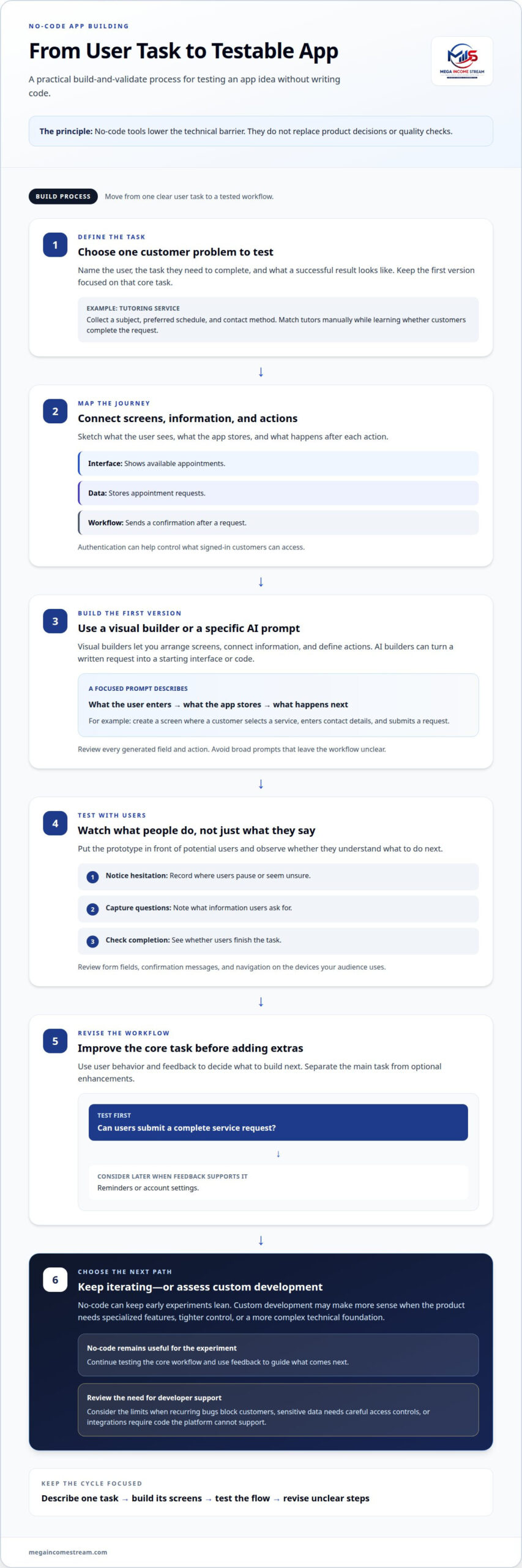
Yes, you can build a mobile app without writing code. Visual app builders let you arrange screens, connect information, and define what happens after a user action. AI app builders can also turn a written request into a starting interface or code. Neither approach makes product decisions for you. You still need to define the user, the task, and what a successful result looks like.
Understand a few basic software concepts before opening a builder. An app displays information, stores data, and applies rules to user actions. In a booking app, for example, the interface shows available appointments, the database stores requests, and the workflow sends a confirmation. Authentication can help control what signed-in customers can access. Sketching these relationships helps you describe the product clearly.
Give an AI builder a specific task, not a broad idea. For example, ask it to create a screen where a customer selects a service, enters contact details, and submits a request. Then review each generated field and action. Replace vague prompts like “make a booking app” with instructions explaining what the user enters, what the app stores, and what happens next.
Keep the first version focused on one customer problem. If you’re testing a tutoring service, the initial prototype could collect a subject, preferred schedule, and contact method. You can match tutors manually while learning whether customers complete the request. This tests demand without building scheduling, messaging, and account-management features before they’re needed.
Portability depends on the builder and the parts of the app. Customer records may be easier to export than layouts, workflows, or platform-specific logic. Before building extensively, identify the data fields and actions your product relies on, then document them in a format your team can reuse.
A common mistake is treating a prototype as proof that an idea will work. A polished screen can make a weak workflow look convincing. Put the prototype in front of potential users and observe whether they understand what to do next. Record where they hesitate, what information they ask for, and whether they complete the task.
Another mistake is building every requested feature straight away. Separate the core task from optional enhancements. For a service-request app, first test whether users submit complete requests. Add reminders or account settings only when feedback shows they support that task. This keeps the app focused on what users actually need.
Use a short cycle: describe one user task, build its screens, test the flow, and revise unclear steps. Review the app on the devices your audience uses, including its form fields, confirmation messages, and navigation. No-code tools for non-technical founders can help you create a testable first version, while customer behavior helps determine what to develop next.
2. How much can I save by using no-code instead of hiring developers?
No-code can reduce upfront build costs, but your savings depend on scope, usage, and the work needed to maintain the product. A no-code stack can be a relatively low-cost way to test a product idea. By comparison, a typical early-stage startup developer hire costs £50,000-£100,000 or more per year in salary. These figures use different currencies and cover different things, so treat them as separate budget benchmarks, not a direct conversion.
Popular no-code tools charge for subscriptions, hosting, usage, or add-ons. Your total cost depends on the number of users, stored data, workflow runs, and connected services. Payment processing can also add transaction charges. Compare the full operating stack, not just the builder’s entry plan. A lightweight prototype may need fewer paid components than a SaaS product with customer accounts and recurring workflows.
What tools connect payments, databases, email, and analytics? No-code platforms often use built-in connectors, extensions, or APIs to pass information between services. Make.com and Zapier can connect workflows, while the app builder handles screens and data. Map each event first: a payment triggers an account update, an email confirms the transaction, and analytics records the action.
Limits emerge when a product needs custom logic, complex permissions, or precise performance control. A no-code SaaS can validate a business model, but platform-specific workflows may become difficult to maintain as features expand. Hire a developer when recurring bugs block customers, sensitive data needs careful access controls, or integrations require code the platform cannot support.
Debugging adds a separate cost. A broken payment flow, duplicate records, or failed authentication can undermine trust. Reproduce the issue, record the steps, and capture the expected result before asking a developer to investigate. Clear questions save time: “Can the database prevent duplicate bookings?” gives a developer a concrete requirement. “Can you make the app better?” does not.
AI changes coding workflows, but it doesn’t guarantee faster delivery. Microsoft said 30% of its code was written by AI, and Google made the same claim. In a measured comparison described by the Financial Times, developers using AI tools were 20% slower than developers who weren’t using them. The lesson: evaluate output quality and review time, not just generated code.
What security, privacy, and vendor lock-in risks should founders consider? Review who can access customer data, how permissions work, and what happens when an account or integration changes. Include data exports and workflow documentation in your plan. Platform-specific logic may not transfer cleanly, so record key rules before expanding your app.
For a lean decision, list required features, expected usage patterns, and failure points. Build with no-code while those requirements fit the platform. Bring in a developer when technical limits create customer, security, or reliability problems.
3. No-code startup automation use cases
Automate repeatable handoffs, not every business decision. A useful startup workflow moves information between tools after a clear trigger. For example, a new form submission can create a lead record, notify the founder, and send the prospect a confirmation email. Make.com or Zapier can connect those steps, while the founder checks that each action happened as expected.
The described category of no-code automation covers 80% of what most non-technical founders want to automate. That can include lead capture, customer onboarding, internal alerts, and routine reporting. Start with one workflow that currently requires copying information between apps. Write down its trigger, the data it needs, the action it should take, and the person who handles exceptions.
Lead management is a practical first use case. When someone submits an interest form, a workflow can add their details to a spreadsheet or customer database, assign a status, and notify the sales owner. A follow-up message can confirm receipt. Keep a human review step for unusual requests, incomplete records, or prospects who need a tailored response.
Other startup workflows can reduce manual administration:
- Customer onboarding: After a signup, create a customer record, send setup instructions, and alert the team if a required field is missing.
- Payment notifications: When a payment event is received, update the customer’s order status and send an internal alert for exceptions.
- Support routing: Sort incoming requests by topic, direct account issues to the right owner, and flag messages that need a personal response.
- Content operations: When a draft moves to an approved status, notify the publisher and create a task to schedule its release.
Use actual customer behavior to improve these workflows. If real users abandon onboarding at the same step, record where it happens and review the instructions or form fields. Track outcomes such as completed signups, unresolved support requests, or duplicate records. This learning loop helps founders distinguish a workflow problem from a product problem.
Automation also needs a plan for failures. A disconnected app, missing email address, or changed field name can interrupt a workflow. Add an error alert where the platform supports it, and decide who will review failed runs. Keep a manual fallback, such as processing a signup from the source form, so one broken connection doesn’t stop customer service.
Build in stages: automate one handoff, test it with sample records, then observe the results with real users. Keep the workflow map up to date as tools or business rules change. If a startup cannot explain what triggers an automation or who handles exceptions, simplify the process before adding another connection.
4. Traditional no-code tools versus AI coding tools
Traditional no-code tools let you assemble an app visually, while AI coding tools generate or modify code from instructions. A visual builder suits founders who want to arrange screens, connect a database, and adjust a feature through menus. An AI coding tool suits founders who can describe a change clearly and review the result, or work with someone who can.
Let the workflow guide your choice. For a marketplace, you might need seller profiles, listings, search, and buyer actions. A traditional builder makes those components visible as interface elements and configured rules. AI coding tools can draft custom logic, but generated code still needs testing. The practical difference is how you shape and maintain the product, not whether either approach removes product decisions.
Which tools are best for websites, marketplaces, and online stores? Webflow is commonly used for visual websites, while Bubble can support interactive web products such as marketplaces. For an online store, choose a platform built for product catalogs and checkout, then assess whether its visual controls meet the store’s actual needs.
How do Bubble, Webflow, Softr, Glide, and FlutterFlow compare? Bubble focuses on interactive web applications; Webflow on website design; Softr and Glide on data-driven apps; and FlutterFlow on mobile app development. Match the tool to the product’s main interface and workflow, rather than choosing one for having the longest feature list.
| Tool | Typical fit | Decision to make |
|---|---|---|
| Bubble | Interactive web apps and marketplaces | Do you need configurable workflows and data relationships? |
| Webflow | Marketing websites and content pages | Is presentation the main build requirement? |
| Softr | Portals and data-led web apps | Does the product center on structured records? |
| Glide | Data-driven apps and internal tools | Can the core experience follow a clear data model? |
| FlutterFlow | Mobile app interfaces | Does the product need a mobile-first experience? |
Before committing, map one complete user journey. Describe the entry point, each screen, the database records involved, and the final action. Then build a small version and test it with sample data. This can reveal missing permissions, awkward navigation, or workflow gaps before they spread across the product.
Traditional no-code works best when the app’s requirements fit the builder’s visual model. AI coding can help with custom behavior, but reading and testing generated code takes technical knowledge. Microsoft and Google have each said AI wrote 30% of their code, while a Financial Times comparison found developers using AI tools were 20% slower. Treat AI as one development method, not an automatic speed boost.
Choose based on the level of control you need: use a visual tool for standard screens and workflows, and consider code when a required feature or platform constraint blocks progress. Reassess as the product changes, because the best first version may not be the best foundation for every later release.
5. Experimenting with no-code tools
Validate the problem before building the product. Start with customer conversations, define one outcome, then assemble the smallest workflow that tests demand. A recommended validation-to-early-revenue tool stack costs approximately $64 per month. Treat that as a stack estimate, not a universal subscription price, because the tools depend on what the experiment needs.
How can a nontechnical founder validate an idea and build a no-code MVP step by step? Define the customer problem, test the offer, build only the necessary workflow, then review real responses. Set a measurable target before launch, such as completed requests or paid orders, and use the results to decide what to improve.
- Write the hypothesis. Describe who has the problem, what they do now, and what result they want. For example, test whether local tutors need a simpler way to collect lesson requests.
- Test the offer. Create a short landing page or form that explains the proposed service. Use Google Sheets to record responses, questions, and requests for follow-up.
- Map the workflow. Write each step from submission to delivery. For a tutoring request, capture the subject, preferred time, and contact details, then define who responds.
- Build the MVP. Use a no-code form, database, and notification workflow to handle that single path. Avoid adding scheduling, payments, or account features until the test needs them.
- Review the evidence. Compare actual signups, completed requests, and customer feedback with the original hypothesis. Decide whether to refine the offer, change the workflow, or stop the experiment.
For AI builders, prompt quality shapes the first draft. Describe the user, task, required fields, and expected result. For example: “Create a request form for a tutor. Collect subject, preferred time, and email. Show a confirmation after submission.” Then test each field yourself with sample entries. Clear instructions give the tool concrete requirements instead of an open-ended request.
Keep the experiment narrow. If users request a feature, record the use case before building it. Separate repeated needs from one-off preferences. A startup can then prioritize improvements that support the core workflow, rather than expanding the product based on the loudest comment.
Track the experiment in one place, such as a Google Sheet with columns for source, response, outcome, and next action. Review the entries after each customer interaction. This creates a simple learning loop and helps connect product decisions to user behavior.
Use the results to shape your next validation move with strategic guidance for your MVP experiment.
Mega Income Stream
Mega Income Stream helps founders connect no-code experiments with practical business decisions. When a prototype attracts interest, the next challenge is deciding what to improve, how to support revenue, and which workflows to scale. Its Business Strategies, Making Money Insights, and Consulting Business offerings can help founders assess those choices and chart a clearer path from validation toward sustainable income.
Turn to this support when tool selection is no longer the main bottleneck and you need to align product development with customer demand and monetization. Bring the experiment’s goal, workflow, and user feedback into the discussion so the next steps focus on evidence, not feature growth for its own sake.
Contact Mega Income Stream to discuss your startup’s next step.
Turn Your First Experiment Into a Business Asset
Treat the product as a learning system, not a finished deliverable. Set a clear decision point: continue developing when customer behavior supports the core use case, revise when people encounter friction, and pause when the problem proves less urgent than expected. This keeps no-code tools for non-technical founders focused on building evidence, not accumulating features.
As the business develops, connect product choices to revenue logic. Decide which customer problem deserves investment, what outcome the workflow should produce, and how the model can support sustainable income. Use the experiment’s results to identify the next product change and test it with customers.
Contact Mega Income Stream to discuss how to apply your experiment’s results to your next business step.
Frequently Asked Questions
Can I build a mobile app without coding?
Yes. A visual builder can help you create screens, connect data, and define user actions without writing code. For example, a service-booking app could let customers submit requests and view confirmations. Start with one user path, then test it on the devices your audience uses. Add features only when they support the app’s main task.
How much can I save by using no-code instead of hiring developers?
Your savings depend on what you’re building and maintaining. Compare the full no-code stack, including hosting and usage, with the developer work needed to build and update the same product. Include your own time for setup, testing, and troubleshooting. A spreadsheet separating setup, recurring platform expenses, and future changes gives a more useful comparison than comparing a tool subscription with salary alone.
What is the most beginner-friendly no-code tool?
There isn’t one best starting tool for every founder. For a simple app organized around structured records, Glide or Softr may provide a clear visual starting point. For a website focused on layout and publishing, Webflow may be a closer fit. Choose based on the first user task you need to support, then build a small test before moving customer operations onto it.
What are the best no-code tools for nontechnical founders in 2026?
The best fit depends on the product format. Consider Webflow for a designed website, Bubble for a more interactive web product, Glide or Softr for data-led apps, and FlutterFlow for mobile-focused interfaces. Treat this as a starting shortlist, not a universal ranking. Compare how each handles your essential workflow, data structure, user access, and future export needs.
Which no-code platforms are best for building an MVP or web app?
Bubble is a practical candidate for an MVP that needs interactive web workflows and connected data. Webflow fits a site where presentation and content lead. For no-code tools for non-technical founders, the key test is whether the platform supports the core customer action without complex workarounds. Build one end-to-end journey and test it before adding secondary features.
What are the limits of no-code tools for scalability, customization, and performance?
No-code platforms can limit how deeply you customize logic, infrastructure, or data handling. Performance also depends on the app’s design, integrations, and usage patterns. As the product grows, monitor slow screens, failed workflows, and rising support issues. If a required capability depends on brittle workarounds or the platform blocks needed control, assess a migration or custom development before those limits affect customers.











Comments