
 By

To detect bot clicks, combine behavioral patterns with IP intelligence, email signals, and user-agent checks instead of trusting click volume alone. A sudden spike can make a campaign look like it’s converting, even when automated activity is inflating the numbers. And a click isn’t always a person showing interest: email security systems may visit links to inspect them.
That makes one signal a weak basis for action. Look for patterns across timing, repeated clicks, IP addresses, email behavior, and user agents, then compare suspicious activity with downstream engagement and conversions. This guide explains what bot clicks are, how to assess those clues, and how marketers can respond to invalid ad activity in Google Ads without confusing attribution changes with deleted sales. You’ll get a practical framework for separating likely automation from human activity and protecting your budget with decisions grounded in campaign data.
Key Takeaways
- Assess IP reputation, email activity, and user-agent patterns together rather than treating one clue as proof.
- Use hidden links cautiously, since they can misclassify legitimate visitors and create tracking risks.
- Combine analytics filters with behavioral signals to separate suspicious activity from meaningful engagement.
- Use digital fingerprints and IP intelligence to add context, not as standalone evidence of automated traffic.
- Turn cleaner campaign data into stronger revenue decisions with a structured business strategy.
IP addresses, email addresses, and user agents as detection clues
Email security scanners may click links to check their safety or generate previews. Some visit every link in a message, including logos and unsubscribe buttons. This automated activity can look like recipient engagement even when nobody has read the email. Treat a click as a clue, not proof of human interest.
Compare email activity with website analytics. A click spike immediately after delivery, followed by no page activity, may indicate scanning. An email opened or clicked less than a second after delivery is likely machine-driven. A 15% click-through rate can include bot clicks, so compare it with sessions, meaningful actions, and conversions.
Learning how to detect bot clicks means checking IP addresses and user agents alongside timing. Repeated, identical clicks from one IP address within a few seconds strongly suggest automation. A user agent identifies the browser or software making a request, but an unfamiliar value alone does not prove a bot is involved. Look for matching patterns across campaigns.
To distinguish bots from legitimate users and privacy-focused browsers, combine server logs, timing, user agents, and subsequent page behavior. Privacy tools can limit tracking signals, so missing browser events alone do not establish bot activity. Clusters of matching indicators provide stronger evidence than any single signal.
Clean email lists based on engagement patterns, not a single scanner click. Segment contacts with repeated instant clicks and no corresponding site activity, then review them separately. Knowing how to detect bot clicks also means preserving genuine opt-outs: never automatically suppress an unsubscribe event. For higher-risk segments, replace daily marketing emails with weekly digests, then compare subsequent activity.
In the United States, privacy and marketing requirements depend on the data and campaign. Explain tracking practices where required, limit collection to what the campaign needs, and honor applicable consent and opt-out choices. Bot filtering does not justify collecting extra data.
You can report suspected invalid ad clicks through Google Ads or Meta Ads support and request a traffic review. Include campaign details, timestamps, IP patterns, and analytics showing discrepancies. Any refund or ad credit depends on the platform’s review.
The same definition applies to SMS: a bot click is an email or SMS link request made by a machine, often to check safety or display a preview. An automated check differs from a person choosing to engage with a message, so the channel alone cannot show whether a click reflects human interest.
Risks of using hidden links to identify bots
A hidden link can reveal automated activity, but it cannot prove who clicked it. Email and SMS security scanners may inspect links recipients never see. A scanner following a concealed URL could therefore look like a bot, while a human using a privacy tool might also produce incomplete tracking. Treat the result as one clue, not a reason to block a contact.
Hidden-link tests can also add measurement noise. If a campaign has a visible product link and an invisible tracking link, analytics may record both requests as engagement. This can inflate click totals and distort comparisons between subject lines or audience segments. Before testing, label the hidden URL distinctly in campaign reports, then compare its hits with visible-link activity and meaningful website actions.
Look for suspicious patterns across the full journey. For example, a contact may trigger a hidden URL but show no visible-link visit, page session, or later conversion. Repeated, identical events across recipients can point to automated scanning. A single isolated event may have another explanation, so do not suppress contacts based on that event alone.
Time to open can add context. Record the interval between delivery and the first open or click, then compare patterns across campaigns instead of treating one fast event as decisive. An instant burst across many recipients suggests automated checking; staggered activity followed by page interaction points to a different pattern. Use both email and web analytics to see whether reported engagement leads to actual visits.
SMS links can also face automated checks. A phone’s messaging app, carrier, or security layer may request a URL to assess safety or generate a preview. If every SMS recipient appears to click immediately, compare request timing, user agents, and landing-page sessions before counting those events as customer interest. Separate preview requests from visits when the data supports that distinction.
Use hidden links only in controlled tests, and keep the visible experience honest. Do not use concealed URLs to trigger an unsubscribe, alter a recipient’s status, or block access without corroborating evidence. A safer workflow is to tag the test link, monitor its requests, compare them with visible-link sessions, and review the results alongside other engagement patterns. This limits false positives and keeps marketing analytics useful.
What steps can marketers take to address bot clicks?
Use analytics filters to flag suspicious activity, then compare the filtered view with the original. Behavioral signals, rate limits, CAPTCHA, and bot management can help marketers assess and control automated traffic.
Filtering Suspicious Clicks with Analytics
Analytics filters can separate requests without meaningful interaction from visits showing relevant activity. Create a segment for clicks without a matching landing-page session, conversion, or expected event. Compare that segment across campaigns and traffic sources before excluding anything. Keep filtered and unfiltered metrics visible to see how each rule changes reported performance.
To understand how to detect bot clicks in analytics, compare traffic patterns with conversion and interaction data. Record the filter criteria and review whether the rule removes only suspicious activity. This gives you a clearer basis for adjusting measurement without hiding legitimate visits.
Analyzing Click Patterns
Behavioral analysis looks for repeated actions that do not fit ordinary browsing. Dozens of clicks within minutes of an email send may indicate automation, particularly when sessions show no further interaction. Multiple identical clicks from one IP address within a few seconds offer another signal. Compare these patterns with campaign delivery timing and subsequent events.
Check several indicators together. A rapid click can have a legitimate explanation, while repeated, identical activity across sessions provides stronger evidence. Use consistent criteria when reviewing campaigns, and document why a pattern was flagged.
Scroll Behavior Analysis
Scroll analysis compares recorded movement with page content and other events. Scroll events less than 50 milliseconds apart indicate unusually fast movement. More than 100 recorded mouse movements at identical coordinates can also signal scripted activity. Neither pattern proves automation by itself, so compare it with clicks, time on page, and form behavior.
Review these signals alongside other interaction metrics. A session with rapid scrolling but no related clicks or conversions warrants further analysis before exclusion.
Rate Limits, CAPTCHA, and Bot Management
Rate limits restrict repeated requests from a source, while CAPTCHA challenges test whether a visitor can complete an interactive check. Bot management can combine these controls with IP reputation checks and behavioral analysis. These measures help address suspicious traffic before it distorts campaign reporting.
Knowing how to detect bot clicks also means choosing prevention controls carefully. Apply them where repeated requests create a clear problem, such as rapid, identical form submissions. Overly aggressive blocking can interrupt legitimate visits. After changing a rule, review flagged traffic and campaign results, then refine the settings based on observed activity.
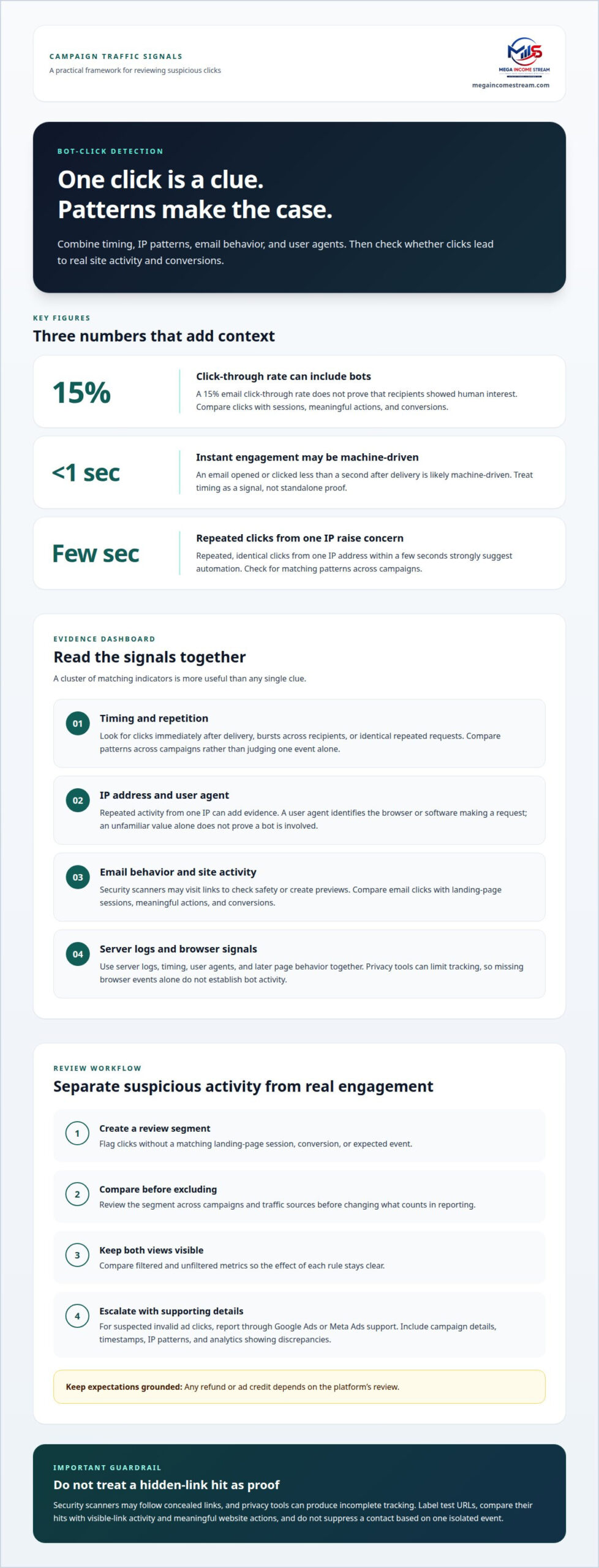
Behavioral signals that may indicate bot activity
Website analytics can reveal bot activity through timing, repeated actions, and engagement metrics that do not fit a human visit. Common signs include a sudden click spike, identical actions across sessions, and clicks without subsequent page interaction. Review these signals together, then compare the pattern with campaign delivery times and conversion events.
Timing is a useful first filter. An email opened or clicked less than a second after delivery was likely handled by a machine. Dozens of clicks within minutes of sending can also signal automated checking, especially when landing-page analytics show no meaningful follow-up. Compare timestamps across recipients before treating the spike as malicious activity.
Action sequences add context. A real subscriber might click one or two links in an email, then browse a related page. A script may instead request several links in rapid succession, repeat the same event, and leave no record of ordinary navigation. Check whether clicks lead to page views, product interactions, or completed forms.
- Compare sessions: Match campaign clicks with landing-page sessions and later actions.
- Review timing: Group events by delivery time to spot sudden bursts.
- Check repetition: Look for identical actions recurring across recipients or sessions.
Patterns matter more than isolated actions. For example, a sharp rise in clicks without a corresponding increase in engaged sessions suggests the click metric may be inflated. Compare the campaign’s click data with conversions and subsequent page activity. A mismatch helps prioritize investigation without automatically blocking every affected visitor.
Also compare behavior across campaigns and audience segments. If one segment repeatedly produces instant opens but little site activity, separate it for closer review. Do not treat privacy-related gaps or a single rapid action as proof of malicious intent. Use multiple indicators to decide whether filtering is justified.
Common signs in website analytics include abrupt traffic spikes, repeated identical events, unusually fast interactions, and high click counts without corresponding sessions or conversions. Review event timestamps and sequences, then compare them with campaign delivery and subsequent engagement. This gives marketers a practical way to distinguish suspicious activity from visits that lead to meaningful actions.
A form submission in less than 1000 milliseconds may also look bot-like; a real subscriber might click 1-2 links, while dozens of clicks can arrive within minutes.
Digital fingerprinting and IP intelligence
Digital fingerprinting groups visits using browser and device characteristics, while IP intelligence adds network context. Neither signal proves a click came from a bot. Use both to assess whether campaign traffic looks consistent, then compare the results with landing-page activity and conversions. This adds context when click rates rise but engagement does not.
A fingerprint may combine a user agent with browser settings, JavaScript behavior, and other request details. For example, repeated visits with matching characteristics and identical page actions may point to automation. But a shared device profile can also represent legitimate visitors. Treat a fingerprint as a pattern to investigate, not a person’s identity or a standalone reason to block traffic.
IP intelligence helps assess the network behind a request. Review the address, its reputation, and how activity from it compares with other sessions. An address generating repeated requests across unrelated landing pages warrants closer analysis. At the same time, IP addresses can represent shared networks or change over time, so an address alone can lead to misclassifying genuine visitors.
- Join signals: Compare IP, user agent, browser behavior, and session events.
- Inspect exceptions: Review high-volume addresses alongside actual page interactions.
- Keep records: Document the signal, filter setting, and reason for each rule.
JavaScript tagging can add browser-side events to server request records, but it has limits. Some bots disable JavaScript or execute scripts without normal interaction, bypassing JavaScript-based tagging. Compare tagged events with server logs and campaign reports. A missing tag should prompt a review, not automatic exclusion.
For example, an ad platform may report a click while analytics records no corresponding page interaction. Match timestamps and campaign identifiers, then check whether related requests share an IP or fingerprint pattern. Excluding a bot click from attribution changes how a conversion is credited, but does not remove a recorded purchase. Keep filtered and unfiltered reports available to assess how settings affect click counts and campaign decisions.
The practical takeaway is to use fingerprinting and IP intelligence as complementary evidence. Apply a filter only after comparing multiple signals and checking for legitimate traffic patterns. This helps keep reports useful without treating a suspicious network or browser configuration as automatic proof of bot activity.
Mega Income Stream
Mega Income Stream helps entrepreneurs connect campaign measurement with practical business decisions through Business Strategies, Making Money Insights, and Consulting Business. These services can be a useful next step when click reports suggest automation but its impact on revenue, attribution, or marketing priorities remains unclear.
Bot filtering is not just a traffic-quality task. Marketers also need to decide how suspicious activity affects campaign comparisons, conversion reporting, and budget allocation. For example, a campaign may show high click counts but weak engagement after landing. The strategic question is whether to adjust measurement, review traffic controls, or reconsider how performance is evaluated.
Mega Income Stream’s Business Strategies can help frame those choices around growth and revenue optimization. The focus is on translating campaign observations into business priorities, rather than treating a single analytics metric as the whole answer. That distinction matters when filtering changes attributed conversions but leaves recorded purchases intact.
Making Money Insights can help clarify how marketing activity connects with income workflows. A useful discussion might distinguish reported clicks from meaningful sessions, then consider what that difference means for campaign decisions. This keeps measurement connected to commercial outcomes rather than optimizing for a dashboard number alone.
When the problem spans traffic quality, analytics, and broader revenue planning, Mega Income Stream’s Consulting Business is a relevant next step. The work can focus on the business decision behind the data: which reporting signals matter, where uncertainty affects planning, and how campaign performance fits wider growth priorities. The scope is practical strategy, not a promise that every suspicious click can be identified or removed.
To make a discussion productive, identify the decision you need to make and the evidence informing it. Explain which campaign reports conflict, how the discrepancy affects your evaluation, and what business outcome you want to protect. Keep the focus on the connection between traffic signals and revenue decisions. A structured conversation can clarify which strategic questions deserve attention and how they fit your wider operating plan.
If you want to discuss how campaign signals fit your business strategy, contact Mega Income Stream.
Frequently Asked Questions
What are bot clicks?
Bot clicks are link requests made by software rather than deliberate taps from people. Email security scanners may inspect a destination, while messaging apps can request a page to create a preview. The request can register as a click even if the recipient never opens the page. For campaign analysis, distinguish a logged request from a visitor who actually reads or interacts with the destination.
Why are bot clicks important for marketers to know about?
Bot clicks matter because they can make campaign engagement appear stronger or weaker than it is. If marketers compare messages using raw click totals, automated requests may influence decisions about audience targeting or creative. For example, high reported clicks with few qualified leads may signal a measurement problem. Separating request volume from business outcomes helps teams evaluate campaigns using evidence tied to actual customer actions.
How can I detect click bots using IP addresses, user agents, and click timing?
Compare network, browser, timing, and follow-up activity instead of relying on one indicator. For example, repeated requests from an IP address using the same unusual user agent may warrant review if they also arrive immediately after delivery. Then compare those requests with page events and conversions. Shared networks, browser privacy settings, or missing tracking events can affect the data, so use several signals before filtering.
What tools can detect and block bot clicks on websites and ads?
Web analytics, server logs, firewalls, and bot-management systems each provide different signals. Analytics can show whether a campaign click led to an on-site event; server logs reveal request details; firewall or bot-management controls can limit suspicious requests. Ad platforms may offer invalid-traffic review processes. Use tools suited to the traffic source, and compare filtered reports with the original data to understand each control’s effect.
What steps should I take after detecting bot clicks?
First, preserve relevant campaign and analytics records, including timestamps, traffic source, and the indicators that prompted review. Compare suspected requests with site sessions and conversion events, then adjust filters or traffic controls in a documented way. Keep the original report for comparison. If paid advertising appears affected, submit supporting details through the platform’s invalid-traffic review channel and track any response separately.
How do bot clicks affect ad spend, conversion rates, and SEO?
In paid advertising, invalid clicks can consume budget without representing potential customers, while extra clicks without conversions can lower the measured conversion rate. Filtering may also change which source receives attribution, though it does not erase a recorded purchase. For SEO, bot requests can complicate traffic analysis, but click counts alone do not establish a change in search rankings. Assess each channel using its own reporting and outcomes.
What are the privacy and legal rules for tracking and blocking bot traffic in the United States?
In the United States, privacy and marketing requirements depend on the data and campaign. Explain tracking practices where required, collect only what the campaign needs, and honor applicable consent and opt-out choices. Use corroborating evidence before blocking contacts, and preserve genuine unsubscribe requests.











Comments