
 By
In 2024, 56% of fully remote leaders reported spending at least three hours per day on email, while 52% reported spending at least three hours per day in virtual meetings, according to a Morning Consult survey commissioned by Zoom across 16 countries. That's the trap. If you're learning how to manage a remote team by adding messages and calls, you're building a busier team, not a better one. Manage the operating system instead, with written norms, decision logs, and outcome metrics that let people work without being watched.
Table of Contents
- Why Remote Teams Break Down Without Written Norms
- Set Response Times and Working Hours in Writing
- Run Decisions Asynchronously Before Scheduling Meetings
- Measure Outcomes Instead of Online Activity
- Onboard New Hires with a Remote Buddy and a Checklist
- Practical Habits That Keep Quiet Remote Workers Visible
- Choose Three Changes to Make This Week
Why Remote Teams Break Down Without Written Norms
Distance rarely breaks a remote team. Missing shared rules do.
People fill gaps with their own assumptions, and those assumptions don't match. Say a six person team hears that a client file is due Friday. Two people treat Friday as a hard delivery deadline, two treat it as a draft day, one waits for review comments that nobody was assigned to give, and the manager learns about the mismatch on Friday afternoon. The lost week wasn't caused by location. Nobody had written down what Friday meant.
What the Engagement Evidence Actually Says
Gallup's 2017 research found that employee engagement was strongest when people worked remotely for 60% to less than 80% of the week, roughly three or four days. Those employees were 31% more likely than people working remotely 40% to less than 60% of the week to strongly agree that they made more progress during their workday.
Don't turn that into a universal formula for every industry. It's a benchmark from one study, and the useful lesson is the design principle behind it. Flexibility pays off when managers also supply coordination, accountability, and connection. Without those systems, autonomy becomes guesswork.
You're not managing presence. You're managing whether good work moves from person to person without friction.
The Four Gaps You Have to Close
A workable remote setup answers four questions in writing. When and how do we respond to each other. Who owns each decision and by when. What working hours mean across time zones and outside them. How output is measured, so nobody has to perform busyness to look productive.
If any answer lives only in the manager's head, the team will invent its own version. Each version will seem reasonable to the person using it. The conflict shows up late, usually as a missed handoff, a duplicated task, or a resentful message about responsiveness. Write the norms before you judge people for breaking rules they never saw.
Set Response Times and Working Hours in Writing
Start with one table and put it where everyone can find it, in a team handbook, a Notion page, or a shared Google Doc. Don't bury it in a Slack thread. A chat announcement is easy to make and almost impossible to retrieve three weeks later when someone needs it.
| Channel | Expected response | Use it for | Keep it out of |
|---|---|---|---|
| Chat (Slack or Teams) | Within 2 working hours | Quick questions and status pings | Decisions and performance feedback |
| Within 1 working day | External contacts and formal notices | Urgent blockers | |
| Project tracker comments | Within 1 working day | Questions tied to a specific task | New topics unrelated to the task |
| Urgent alert (flagged chat or phone) | Within 30 minutes during working hours | Outages and client emergencies | Routine updates |
| Video meeting | Book at least 1 working day ahead | Conflict, coaching and planning | Status reports that could be written |
How Each Row Protects the Team
Chat gets a two working hour window because it's for quick unblocking, not instant replies. If everyone treats Slack as immediate, nobody gets a solid block for focused work. If nobody answers for a day, small questions stall whole tasks. Two working hours is a compromise you can defend, and you should expect answers only inside a person's working hours.
Email and project tracker comments get one working day. Email suits external contacts and formal notices that need a record. Tracker comments in Asana, Trello, or ClickUp keep a question attached to the task it belongs to, so the next person sees the context without searching chat history. Don't start new topics in an old task thread, and don't put urgent blockers in email where they can sit unread.
The urgent alert row exists to make urgency rare. A flagged message or phone call means an outage or client emergency, and it earns a response within 30 minutes during working hours. If routine updates use that channel, people stop treating it as urgent. That's a fast way to miss the one alert that matters.
Practical rule: If a channel can be used for everything, it will be trusted for nothing.
Set a Core Overlap Window
Name a two hour block shared by everyone, such as 14:00 to 16:00 in the manager's time zone, adjusted so it's inside normal hours for each person where possible. Use that window for meetings that need everyone live. Outside it, default to written updates and tracker comments that people answer in their own working day.
State the boundary plainly. Messages sent outside someone's hours are read when that person starts work, not before. Schedule sends when you can. I would rather a manager delay a non urgent Slack message than train a team to monitor their phones at night.
The cost of skipping this work is visible in Microsoft's 2022 Work Trend Index, which surveyed 31,000 people across 31 countries. It found that 38% of hybrid employees considered uncertainty about when and why to come into the office their biggest challenge, while only 28% of leaders had created new team agreements for hybrid work. It also found that 43% of remote workers said they did not feel included in meetings, yet only 27% of leaders reported that their organizations had established hybrid meeting etiquette. Average weekly meeting time for Microsoft Teams users had risen 252% since March 2020, and after-hours and weekend work increased by 28% and 14%, respectively.
That pattern is predictable. Volume rises, clarity doesn't. More calls don't fix missing agreements.
After two weeks, ask each person to rate every row of your table and name the row causing the most friction. Fix that single row first. Don't rewrite the whole handbook because email response times feel slow, and don't ignore a row everyone hates because the rest works. Small, visible corrections teach the team that the written norms are real and adjustable, not a policy announcement to endure.
Run Decisions Asynchronously Before Scheduling Meetings
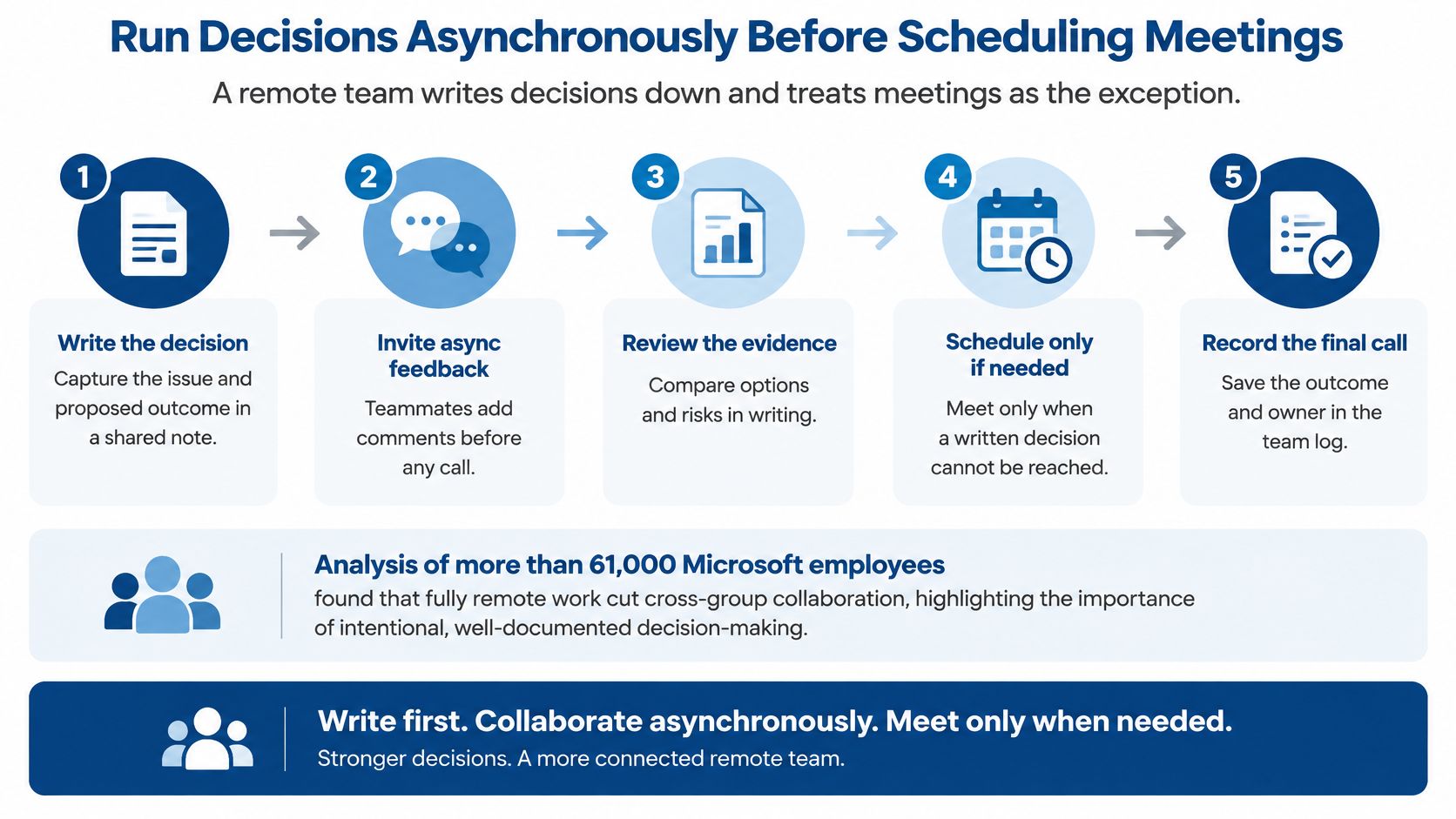
Your default should be simple. Write the decision down first. Treat the meeting as the exception.
That's not a preference for quieter calendars. According to the Haas School summary of an analysis of more than 61,000 Microsoft employees, fully remote work reduced cross-group collaboration time by approximately 25%, slowed the creation of new collaborators, increased communication within existing inner networks, and shifted activity toward asynchronous channels. The same study found meeting hours fell by about 5%. People communicated plenty. They just communicated inside narrower circles.
So the risk isn't silence. It's silos that look busy from the outside.
The Four Step Rollout
Map recurring decisions and assign a written owner. List the decisions your team makes every week or month, such as pricing exceptions, support schedules, content approvals, and contractor assignments. Put one named owner beside each one. If two names appear, you haven't assigned an owner yet.
Require a complete proposal. Every proposal in Notion, Confluence, or a shared document includes context, options, a recommendation, a deadline, and a decision log entry. A message saying "thoughts?" with no recommendation forces everyone else to do the thinking the owner skipped.
Create cross-team sharing rituals. Run a monthly demo, rotating office hours, or a short written demo thread where teams show work outside their inner circle. Keep it predictable and lightweight. The point is exposure to other groups, not another status ceremony.
Audit collaboration breadth quarterly. Don't just count messages. Check who worked with whom, which teams never appear in each other's documents, and whether new people formed connections outside their immediate group. Message volume can climb while the network shrinks.
If your team already works inside Microsoft 365, our guide to empowering hybrid work with Microsoft 365 and collaborative apps shows how shared workspaces can support this kind of written, searchable routine.
The process below shows the order to follow before anyone books a call.
When a Meeting Earns Its Place
Book a meeting for ambiguity, conflict, coaching, or a decision that needs real-time back-and-forth. Don't book one to read updates aloud. If the written proposal has clear options and people agree in comments, the owner decides and logs it. The meeting would only slow the result.
The main pitfall is optimizing for responsiveness. Fast replies and packed calendars feel like collaboration, so managers reward them. Meanwhile teams stop talking across group lines, new hires meet nobody outside their project, and decisions stay trapped in threads nobody can search. Targeted cross-functional forums and durable documentation fix that problem better than extra calls, because they create a record and widen who sees it.
A Worked Decision Log Entry
Copy these five fields into a simple table or spreadsheet.
- Decision: Launch-week support hours
- Owner: Support lead
- Options considered: Extended evening cover by the core team, or a rotating on call pair with next day time back
- Deadline: Friday, before the launch plan is shared with clients
- Status: Rotating pair chosen, rota published in the handbook, review after launch week
That entry takes minutes to write. Six weeks later, when someone asks why the rota works that way, the answer exists without a meeting, a memory test, or a search through hundreds of chat messages. That's what a decision log buys you. It also gives people in other time zones the same context as people who happened to be online when the discussion happened. Equal access to context is a management output, not a nice cultural extra.
Measure Outcomes Instead of Online Activity
Measure deliverables, not presence. A green status dot tells you a laptop is awake. It tells you nothing about whether the client file is correct, the article is publishable, or the support queue is shrinking.
The review setup below gives a manager and a remote worker the same visible board to judge progress from.

Set quarterly outcomes, weekly measurable milestones, one accountable owner per deliverable, acceptance criteria, and a written escalation path. Then review output using measures that connect to accepted work.
| Metric | What it reveals | Main risk |
|---|---|---|
| Accepted on first review rate | Output quality against agreed criteria | Drops if acceptance criteria are vague |
| Cycle time from start to acceptance | Speed of work flow | Penalizes complex tasks unless tasks are sized |
| Blocked days per deliverable | Where the work system stalls | People hide blockers if blame follows them |
| Rework rate | Cost of unclear briefs and weak reviews | Can push people to avoid asking questions |
| Milestone hit rate | Reliability of weekly plans | Invites padded estimates |
| Keystrokes or active hours | Presence only, with no result attached | Measures presence and invites surveillance |
| Messages sent per day | Nothing reliable about results | Rewards noise over progress |
Read the Table as a Set of Trade Offs
Accepted on first review rate is useful only if acceptance criteria are concrete before work starts. "Good quality" isn't a criterion. "Matches the brief, includes the client figures, and passes the checklist" is. If the rate falls, check the brief and review standard before blaming the person who produced the work.
Cycle time shows how work flows, but it punishes complex tasks unless you size tasks first. A research report and a routine update shouldn't carry the same speed expectation. Blocked days are even more revealing, because they show where your system stalls. People will hide blockers if raising one leads to blame, so the manager's response to the first honest blocker sets the tone for every later one.
Rework rate exposes unclear briefs and weak reviews. Use it carefully or people will stop asking questions to keep their numbers clean. Milestone hit rate tests whether weekly plans are reliable, though it invites padded estimates if missing a milestone is treated as a personal failure rather than planning information.
The last two rows are different in kind. Keystrokes, active hours, and messages sent per day don't measure results at all. They measure visible motion. Reward motion and you'll get more of it, including performative replies, unnecessary updates, and people keeping apps open to look busy. None of that helps a client.
The short video below is a useful companion when you're setting up this kind of outcome based review with your team.
The Monitoring Question Managers Avoid
A Tech Mahindra analysis of remote team management and workforce intelligence reports that nearly 59% of employees believe excessive monitoring harms workplace trust, while activity based systems measure presence rather than meaningful outcomes. The same source reports that 88% of monitored workers feel pressure to prove productivity and that 59% experience stress or anxiety related to surveillance.
Treat monitoring as a trust and performance design problem, not a software purchase. Screenshots and activity logs can create the feeling of control while damaging the cooperation you need from freelancers, virtual assistants, and contractors. For context on how people price that work, our freelance rate guide includes Upwork marketplace benchmarks for virtual assistants at $20 to $35/hour and writers at $30 to $40/hour, so losing a good contractor over intrusive tracking has a real replacement cost. I would start with less measurement, not more.
If any tool collects data, apply three rules without exception.
- Make the data visible to employees. Nobody should be measured by numbers they can't see.
- State the outcome each metric is meant to improve. If you can't name it, stop collecting it.
- Never use incidental activity signals in disciplinary decisions. A quiet afternoon in chat isn't evidence of poor work.
Run a Four Week Trial
Choose two outcome metrics from the table, such as accepted on first review rate and blocked days. Review them at week four with the team. Drop any metric that rewards noise, drives hiding, or hasn't changed a single management decision.
For underperformance, use one clear rule. When a deliverable misses its acceptance criteria, the single accountable owner reviews blocked days and rework with the person through the written escalation path before any formal step. Activity data is never the evidence. That sequence forces you to check whether the brief, tools, dependencies, or workload caused the miss, and it gives the person a fair record of what went wrong.
Onboard New Hires with a Remote Buddy and a Checklist
A remote hire can't lean over and ask the person beside them how things work. Your checklist and buddy system have to replace that missing desk.
| Item | Owner | Done when |
|---|---|---|
| Equipment shipped and tested | IT lead | Laptop boots and passes a test call before day one |
| Standard software accounts | IT lead | Logins work and tools are granted by role |
| Tested remote access | IT lead | VPN or single sign-on works from the hire's own network |
| Documented tool fallbacks | Manager | Each tool has a written backup method in the team handbook |
| Named incident owner | Manager | One person is named in the first-day email |
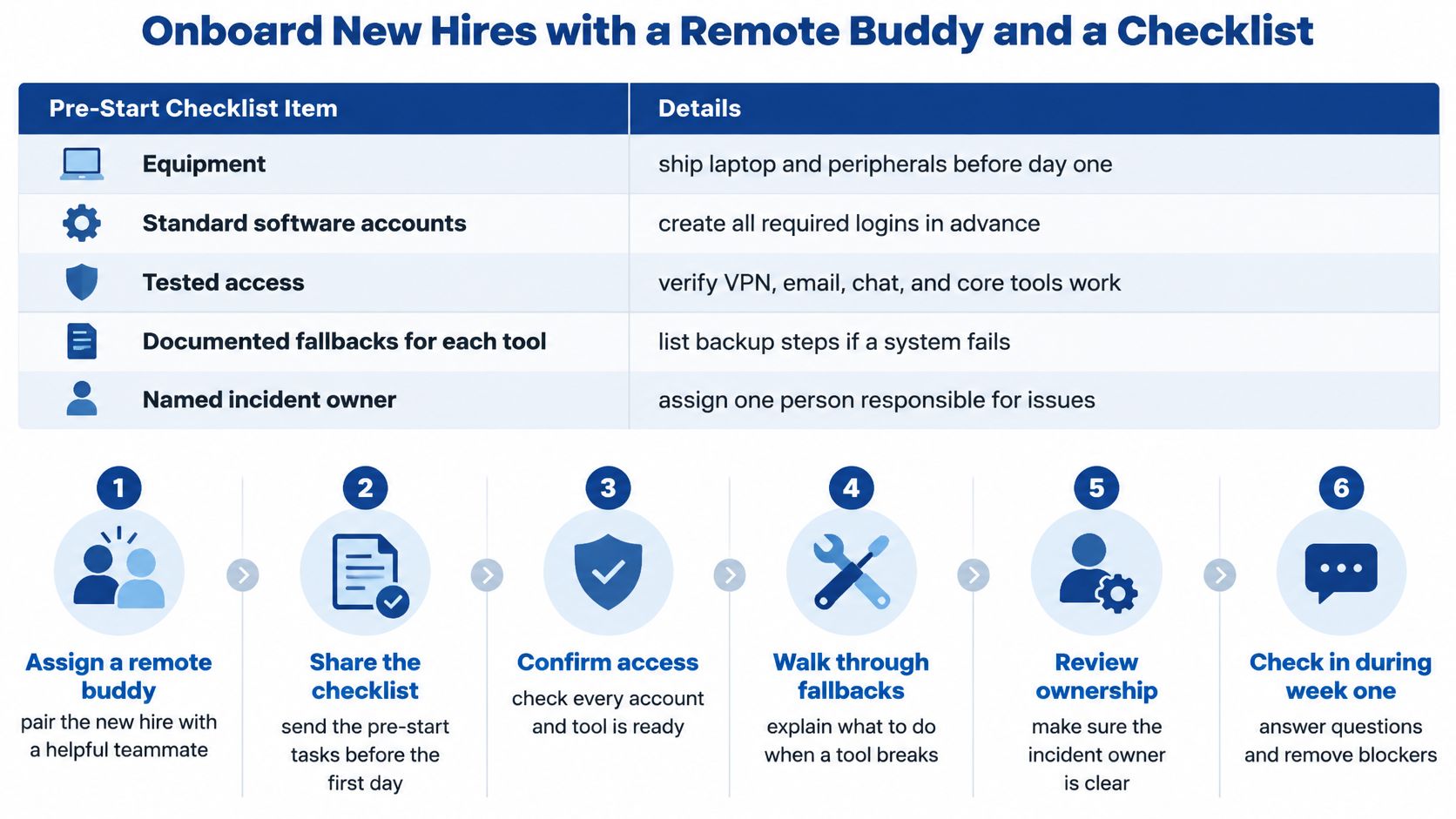
The checklist below turns those pre-start items into a sequence a manager can hand to IT and the buddy before day one.
The First Thirty Days in Five Steps
Confirm equipment and access before the start date. Ship the laptop and peripherals early enough for a test call. Verify VPN or single sign-on from the hire's own network, not from your office. A first day spent locked out of email teaches the new hire that asking for help is the job.
Pair the new hire with an experienced remote teammate. Pick someone who knows how the team works remotely, including where documents live and how decisions get logged. Experience with the system matters more than being the highest performer.
Record walkthroughs of the main workflows. Use Loom or a similar screen recorder for the tasks the hire will repeat, then store the videos where they can be found again. If you're building a wider training setup, our overview of LMS integrations that streamline your training program explains how learning tools connect with the rest of your stack.
Assign supervised early tasks with clear acceptance criteria. Start with real but bounded work. Say a new support hire drafts replies for review before sending, or a new writer submits an outline before drafting. Early feedback on small tasks prevents large rework later.
Schedule check-ins on days 7, 14, and 30. Review blocked days and rework, not hours logged. Ask what they couldn't find, which tool failed, and which instruction was unclear. Fix the system gaps they expose, because the next hire will hit the same ones.
Why the Buddy Matters More Than More Messages
Research from a study published in PMC on remote work and team effectiveness found that in a fully remote Japanese company, experienced teammates significantly increased individual productivity, while higher-performing teammates and greater communication volume did not produce comparable benefits. For some experienced workers, lower communication intensity was more conducive to productivity. A complementary leader study in the same source found that technical limitations and communication issues predicted weaker team and external-collaboration effectiveness.
So don't judge a new hire's first week while their access is broken. Provide standardized equipment, tested access procedures, documented tool fallbacks, and an incident owner first. If Zoom fails, the fallback might be a phone call and a shared document. If the tracker is down, the fallback might be a named spreadsheet and an update to the incident owner. Write it down before it happens.
Fix access and tool problems before you evaluate the person using them.
Keep the roles separate. The buddy answers how questions, such as where a template lives or how a handoff works. The manager owns performance questions and judges progress with outcome metrics. Mixing those roles makes the new hire afraid to ask the buddy basic questions, which defeats the whole arrangement.
Practical Habits That Keep Quiet Remote Workers Visible
Some of your best remote workers will say the least in meetings. If visibility depends on speaking time, your review process will reward confidence and time zone luck instead of contribution.
A 2026 survey of 767 remote-first professionals across 87 countries found that too many meetings were cited by 35% of respondents, lack of documentation by 31%, and time-zone differences and micromanagement by 30% each. In that same survey, 42% considered clear, empathetic communication the most important managerial quality. The source also cites Randstad's 2026 Workmonitor finding that 81% of employers globally find remote or hybrid work makes collaboration more challenging.
Fewer meetings alone won't solve that. You need written decisions, equitable access to context, and explicit availability boundaries, so asynchronous work doesn't turn into always on work.
Habits That Give Quiet Workers a Fair Record
- Publish a meeting summary within 24 hours. Include the decisions made, who owns each action, and what remains open. Anyone who missed the call gets the same record as everyone who attended.
- Rotate who speaks first. The first voice often anchors the discussion. Rotating it stops the same confident person from setting the frame every time.
- Ask for written input before the call. Give quieter people the agenda and questions early, and invite comments in the document. You'll get better thinking than a cold request for opinions on camera.
- Count documented asynchronous contributions in reviews. A sharp written comment that changes a decision is real contribution. Record it where promotion and pay discussions can see it.
- Set a daily cutoff for handoffs. After the cutoff, non urgent handoffs wait until the next working day. Async work without a cutoff becomes an evening shift nobody agreed to.
- Hold one weekly one-to-one with a fixed agenda. Cover blockers, growth, and feedback every time. A predictable structure makes it easier for a quiet person to raise a problem without feeling they're making a special request.
These habits also support morale, and our guide to simple steps you could take today to improve employee morale covers small management actions that pair well with them.
The person who speaks least in your meetings still needs feedback, context, and a fair chance at advancement.
Watch your own behavior for a week. Who gets interrupted. Whose written comments get read aloud and credited. Who receives the interesting stretch task. If the same names keep appearing, your visibility system is the problem, not the quiet worker's attitude. Change the record you review, and the fairness of the decision improves with it.
Choose Three Changes to Make This Week
Don't try to rebuild your whole remote operation at once. Pick three changes this week and give each one a named owner.
The Three Changes
- Write the response-time table into a one-page team agreement. Keep it short enough that a new hire can read it on day one. One page forces you to choose the rules that matter.
- Start the decision log. Seed it with the recurring decisions from your mapping exercise, each with a named owner and deadline. An empty template nobody populates won't help.
- Track two outcome metrics. I would start with accepted on first review rate and blocked days per deliverable, because together they show quality and system stalls. Pick different ones if your team's pain sits elsewhere, but pick only two.
Present the agreement in a short meeting. Share the written copy in advance, walk through each change briefly, and ask one question per person so silence doesn't get mistaken for agreement. Then set a 30-day review date before you discuss anything else. A review date agreed later usually means a review that never happens.
The 30 Day Success Checklist
- Fewer unplanned meetings are being booked to chase updates.
- Decisions have named owners in the log, with deadlines and outcomes recorded.
- Blocked days are falling, or at least the reasons for them are visible early.
- No new complaints about response expectations have appeared since the agreement launched.
If a change fails the checklist, don't scrap it. Keep the change and fix only the row or metric causing the complaint. Say the decision log works but deadlines keep slipping because owners are unclear. Fix the owner field. Say response times work except for tracker comments. Fix that row. Targeted repairs preserve what's working and show the team their feedback changes something specific.
That's how to manage a remote team without surveillance or meeting overload. You design the system, test it in a short cycle, and repair the weakest part. Put the 30-day review in your calendar now, before you close this page, and write the owner's name beside each of the three changes. If those names aren't in the calendar invite, you don't have a plan yet. You have a good intention, and remote teams run on written commitments, not intentions.
If you're building a business with freelancers, virtual assistants, or a small distributed team, Mega Income Stream publishes practical guides on business operations, income diversification, digital tools, and managing remote work that connect directly to the systems in this article. Visit us to explore step by step frameworks on hiring, pricing freelance work, automation, and growing revenue, and pick the next operating upgrade your team needs this month.











Comments