
 By
By 
Since a large portion of online buying takes place on smartphones, optimizing a digital storefront for mobile is essential for boosting conversions. Using responsive design, improving website speed, optimizing the checkout process, and simplifying navigation are important tactics.
Here are the essential steps to optimize your digital storefront for mobile:
1. Adopt a Mobile-First Design
- Responsive Themes: Use a mobile-responsive theme that automatically adjusts to fit any screen size.
- Touch-Friendly Elements: Make buttons, links, and navigation elements large enough to be easily tapped with a finger.
- Readable Text: Ensure font sizes are large enough to be read without zooming, utilizing sans-serif fonts for better readability on small screens.
2. Boost Mobile Page Speed
- Compress Images: Use formats like WebP and compress image files to speed up loading times.
- Minimize Code: Reduce heavy JavaScript and CSS to minimize load times.
- Lazy Loading: Implement lazy loading so images only load as they appear on the screen.
- Enable Caching: Use browser caching to speed up load times for returning visitors.
3. Simplify Navigation and Search
- Streamlined Menus: Use collapsible “hamburger” menus and limit menu items to the most crucial categories.
- Prominent Search Bar: Place a search bar at the top of the screen with auto-suggest and filtering capabilities.
- Clear CTAs: Ensure calls-to-action (CTAs) are clear, concise, and easy to find.
4. Optimize the Checkout Process
- Guest Checkout: Offer a guest checkout option to eliminate the need for account creation.
- Minimal Fields: Reduce required fields to only the essentials.
- Autofill Support: Implement autofill for address and payment information to speed up form completion.
- Digital Wallets: Enable one-click payment methods like Google Pay, Apple Pay, and PayPal.
5. Utilize Mobile-Specific Features
- Push Notifications: Use push notifications to engage users and encourage repeat visits.
- Click-to-Call: Add clickable phone numbers and easy-to-find contact information.
- Avoid Intrusive Pop-ups: Avoid pop-ups that block the screen, as they are disruptive and hard to close on mobile devices.
6. Test and Monitor
- Regular Testing: Test your store’s speed and user experience on actual smartphones and tablets.
- Analytics: Use mobile analytics to identify bottlenecks and areas for improvement.
By focusing on these areas, you can provide a seamless shopping experience that encourages mobile users to complete their purchases.
Before diving into the steps for optimization, let’s first understand why mobile shopping is so important.
- Mobile Shopping is Growing Rapidly: According to Statista, over 70% of online shopping traffic comes from mobile devices. People are using their phones to browse, compare products, and make purchases on the go. If your store isn’t optimized for mobile shoppers, you’re missing out on a huge market.
- Google Prioritizes Mobile-Friendly Websites: Google ranks mobile-friendly websites higher in search results. If your online store isn’t optimized, it won’t perform well on search engines, meaning fewer visitors and lower sales.
- Poor Mobile Experience = Lost Sales: If your website is slow, difficult to navigate, or doesn’t display properly on mobile devices, customers will leave and shop elsewhere. A frustrating mobile shopping experience leads to high bounce rates and low conversions.
8 Powerful Ways to Optimize Your Online Store for Mobile Shoppers
Now that you understand the importance of mobile optimization, let’s explore the best practices to ensure your online store is mobile-friendly and designed for success.
1. Use a Mobile-Responsive Design
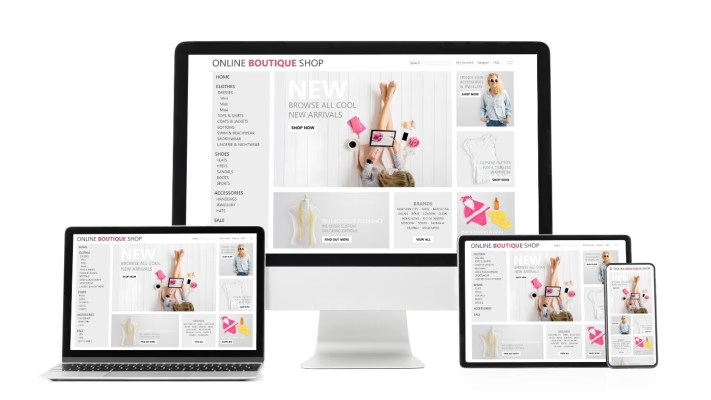
A mobile-responsive website automatically adjusts to fit different screen sizes, whether it’s a smartphone, tablet, or desktop. This ensures that your site looks great and functions smoothly on any device. To implement this, follow these steps:
- Choose a mobile-friendly e-commerce theme (Shopify, WooCommerce, and Magento offer mobile-optimized templates).
- Test your website on different screen sizes to ensure a consistent experience.
- Use a clean and simple website layout that adjusts dynamically based on screen resolution.
For example, if a customer visits your store from an iPhone or an Android phone, they should be able to browse effortlessly without zooming in or scrolling horizontally.
Read Also: Best Practices for Digital Storefront UX/UI
2. Improve Mobile Page Speed
Speed is everything for mobile shoppers. If your website takes too long to load, potential customers will leave and go to a competitor’s store. Here is how you can increase mobile page speed:
- Use fast and reliable hosting (like telaHosting) to ensure a smooth browsing experience.
- Compress images to reduce file sizes without losing quality.
- Enable browser caching so repeat visitors experience faster loading times.
- Minimize unnecessary code (CSS, JavaScript, and heavy plugins).
Studies show that 53% of mobile users abandon a site that takes more than 3 seconds to load. Speed optimization is crucial for retaining customers.
3. Simplify Navigation for Mobile Shoppers
Mobile shoppers need to find what they’re looking for quickly and easily. Complicated navigation can frustrate users and lead to lost sales. Therefore, it is very important to simplify navigation in order to retain customers.
- Use a hamburger menu (☰) to keep the design clean while offering easy access to categories.
- Add a search bar with auto-suggestions to help users find products quickly.
- Use large, tappable buttons for easy navigation.
For example, instead of long drop-down menus, keep navigation simple with categories like:
- “Men’s Fashion”
- “Women’s Fashion”
- “Electronics”
- “Beauty & Skincare”
4. Optimize Checkout for Mobile Shoppers

A complicated checkout process is one of the biggest reasons for cart abandonment on mobile devices. Make the checkout process as quick and hassle-free as possible by:
- Enabling guest checkout to allow purchases without forcing account creation.
- Offering one-click payment options like Google Pay, Apple Pay, and Paystack.
- Using auto-fill features to speed up form entries (e.g., saved addresses and payment details).
- Displaying a progress bar to show customers how close they are to completing the purchase.
Studies show that 28% of shoppers abandon carts due to a complicated checkout process. So you should optimize mobile checkout properly, as a smooth mobile checkout can significantly boost conversions.
5. Optimize Images & Videos for Mobile
High-quality images and videos enhance the shopping experience, but large files can slow down mobile loading times. Here is how you can optimize images and videos for mobile shoppers:
- Compress images using tools like TinyPNG or ShortPixel.
- Use WebP format instead of JPEG/PNG for better quality with smaller file sizes.
- Ensure videos are mobile-optimized and don’t autoplay (this drains data and battery).
For example, a well-optimized product page for a fashion store should have clear, zoomable images and short, informative product videos.
6. Make Your Content Easy to Read
Mobile users scroll quickly, so your content should be easy to scan and digest. In order to make your content easy to scan and digest, use these tips:
- Use short paragraphs and bullet points to break up text.
- Choose a legible font (Sans-serif fonts like Arial or Roboto work best).
- Ensure font sizes are large enough to read without zooming (at least 16px).
- Use contrasting colors for better readability.
For instance, instead of long paragraphs, write product descriptions like:
- Fabric:100% Cotton
- Fit: Slim Fit
- Color Options: Black, White, Blue
7. Enable Push Notifications for Mobile Shoppers
Push notifications are a great way to re-engage customers and remind them of promotions or abandoned carts. Here is how to use push notifications effectively:
- Send limited-time offers and exclusive discounts to encourage purchases.
- Notify customers of flash sales and product restocks.
- Remind users about abandoned carts to bring them back to checkout.
Example: A notification saying “50% off today only! Grab your favorite shoes before the deal ends” can increase urgency and sales.
8. Use Mobile-Friendly Payment Methods
Nigerian shoppers prefer fast and secure mobile payment options. Offer payment methods that are easy to use on mobile devices. The best mobile payment options include Paystack, Flutterwave, Google Pay, Apple Pay, USSD Payments, Mobile Bank Transfers, etc. The more payment options you offer, the easier it is for customers to complete their purchases.
Finally
To boost sales, enhance user experience, and maintain a competitive edge, your online store must be mobile-friendly. By ensuring a responsive design, fast loading times, simple navigation, smooth checkout, and mobile-friendly content, you can attract more customers and boost conversions.







Comments