
 By
By 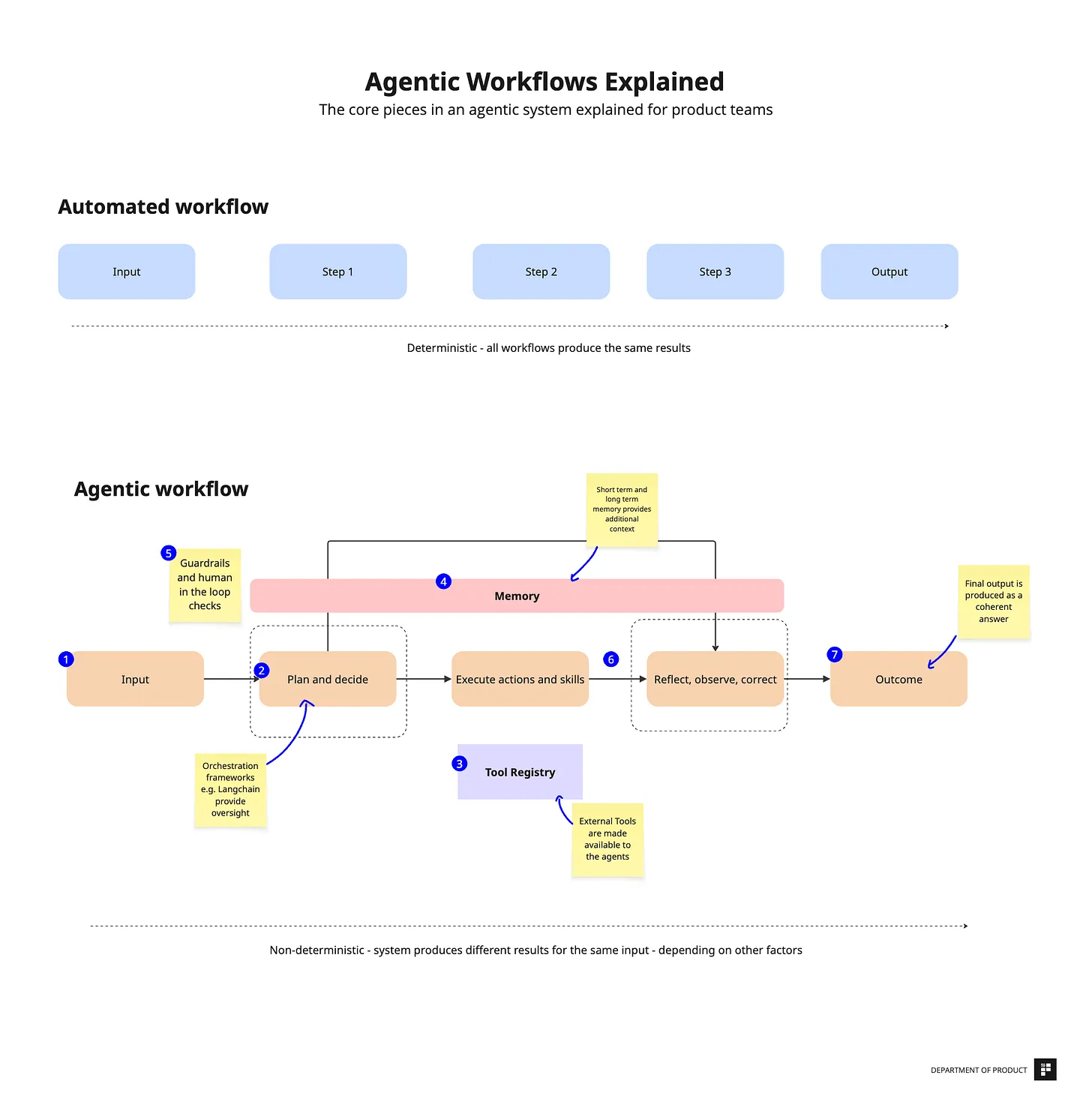
Step-by-Step Implementation Approach
- Step 1: Start With a Narrow, High-Impact Use Case. …
- Step 2: Deploy Read-Only or Recommendation Agents First. …
- Step 3: Introduce Controlled Action Execution. …
- Step 4: Monitor, Measure, and Refine Agent Behavior. …
- Step 5: Scale to Multi-Agent Workflows.
Businesses generally make $8.71 for every dollar invested on CRM, with some seeing a return of up to 245% when completely optimized. CRM systems are providing a good return on investment. However, the majority of CRMs continue to rely on static automation, which includes manual triggers, predefined rules, and informational dashboards.
This is when the game is altered by agentic AI. Agentic AI can reason toward goals, interact with tools, plan multi-step tasks, and conduct autonomous activities inside your CRM, in contrast to standard CRM AI features like basic forecasts, alerts, or chatbots.
As CRM workflows become more complex, businesses need systems that go beyond automation and actively drive outcomes. By the end, you’ll know how to leverage agentic AI to transform your CRM into an autonomous engine for growth and efficiency.
What Is Agentic AI in a CRM Context?
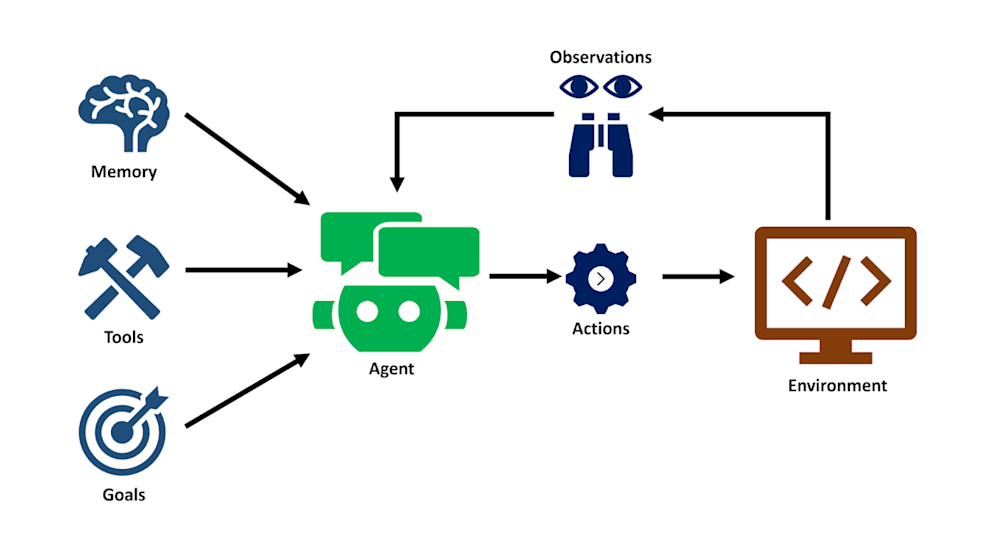
AI systems that are goal-driven, self-sufficient, and able to use technologies like CRM APIs, email systems, calendars, and ticketing platforms to do tasks from start to finish are referred to as agentic AI. An agentic system may plan, make judgments, act, and adjust based on results rather than reacting to a single command or initiating a predetermined routine.
This implies that the AI in a CRM setting is doing more than just examining client data and revealing insights. It actively works within the CRM to accomplish corporate goals including lowering churn, increasing conversion rates, and expediting the resolution of support issues.
A typical agentic workflow follows a continuous loop:
- Observe: The agent monitors CRM signals, new leads, stalled deals, support tickets, customer behavior, or data changes.
- Decide: It evaluates priorities, applies business rules and policies, and determines the best next action aligned with its goal.
- Act: The agent executes actions such as updating records, sending follow-ups, scheduling meetings, escalating tickets, or triggering workflows.
- Learn: It tracks outcomes (e.g., reply rates, deal progress, resolution success) and incorporates feedback to improve future decisions.
This loop allows the CRM to shift from a passive system of record to an active system of execution.
4 Core Components of an Agentic CRM Architecture
A solid agentic CRM architecture makes one thing non-negotiable: the CRM remains the system of record, while agents become a controlled execution layer that can plan and act across tools, under clear permissions and auditability. The goal isn’t “more AI,” it’s reliable, safe automation that actually ships outcomes.
1. Agent Orchestration Layer
This is the brain and traffic controller.
What it does:
- Breaks high-level goals into steps (plan → execute → verify)
- Manages agent state (what it’s doing, what it tried, what failed)
- Routes tasks to specialized agents (sales agent, support agent, onboarding agent)
- Handles retries, timeouts, and fallbacks
Keep orchestration separate from the CRM so you can evolve agents without reworking core business systems.
2. CRM and Third-Party Tool Connectors
Agents are only useful if they can do things. Connectors turn intent into action.
Common connectors:
- CRM APIs: create/update leads, contacts, opportunities, cases, tasks
- Communication tools: email, chat, voice, SMS
- Scheduling: calendar + meeting tools
- Support stack: ticketing, knowledge base, incident tools
- Revenue stack: billing, renewals, contracts, CPQ
Build a tool interface layer (a “connector gateway”) so every action is logged, permissioned, and consistent, rather than letting agents call tools directly in an uncontrolled way.
3. Context and Memory Management
This is what stops an agent from acting like it has amnesia.
You typically need two kinds of context:
- Short-term context: what’s relevant right now (latest emails, last ticket updates, current opportunity stage, SLA timers)
- Long-term memory: stable information and learned preferences (account history, previous objections, relationship map, brand tone, escalation rules)
4. Policy, Permissions, and Guardrails
This is the safety layer that makes agent autonomy enterprise-ready.
It should define:
- Who/what the agent is allowed to act on (scope by region, segment, customer tier)
- Which actions require approval (discounts, refunds, contract changes, outbound messaging)
- Rate limits and throttles (avoid spamming customers or hammering APIs)
- Compliance constraints (PII handling, retention rules, audit logs)
- Brand constraints for customer-facing communication
Policies should be enforced outside the model (in middleware), not “hoped for” via prompts.
Step-by-Step Implementation Approach
The fastest way to succeed with agentic AI in CRM is to earn autonomy, not assume it. Start small, prove value, build trust with controls and measurement, then expand scope and power over time.
Read Also: Automating Lead Qualification with Agentic AI Agents
Step 1: Start With a Narrow, High-Impact Use Case
Pick one workflow that’s painful, frequent, and measurable, without being mission-critical on day one.
Good starting criteria:
- High volume + repetitive decisions (lots of reps or agents doing similar steps)
- Clear success metric (time saved, conversion lift, faster resolution)
- Contained blast radius (limited customer segment, one region, one team)
Strong “first use cases”:
- Lead enrichment + routing recommendations
- Deal “next best action” suggestions for stalled opportunities
- Support ticket triage recommendations (priority + category + routing)
Deliverable for this step: a crisp one-pager defining goal, scope, tools needed, risks, and success metrics.
Step 2: Deploy Read-Only or Recommendation Agents First
Before an agent starts writing to your CRM, it should prove it can understand context and make good decisions.
What read-only agents do well:
- Summarize account history, conversations, and case timelines
- Flag risks (stalled deals, churn signals, SLA breaches)
- Recommend next actions (follow-up, escalation, offer, content)
Make recommendations structured (e.g., action + reason + confidence + required inputs), not just free text.
Step 3: Introduce Controlled Action Execution
Once recommendations are consistently useful, add limited, permissioned actions.
Start with “safe writes,” such as:
- Creating tasks, notes, and call summaries
- Updating low-risk fields (tags, categories, dispositions)
- Drafting customer emails for approval (still human-sent)
- Logging interactions automatically
Then expand to higher leverage actions with guardrails:
- Sending follow-ups within strict templates and frequency caps
- Routing leads/tickets within policy rules
- Scheduling meetings within predefined constraints
Step 4: Monitor, Measure, and Refine Agent Behavior
Agentic systems need operational monitoring, not just model evaluation.
Track three categories of metrics:
Business impact
- Lead-to-meeting conversion, win rate, cycle time
- Ticket resolution time, SLA compliance, CSAT
- Churn reduction, expansion uplift
Decision quality
- Acceptance rate of recommendations
- Human override frequency
- Error types (wrong customer, wrong action, wrong timing)
Use performance data to continuously iterate by improving retrieval and context quality, often the biggest driver of better outcomes. At the same time, tighten policies where risk emerges and add clear “when to abstain” logic so agents know when not to act.
Step 5: Scale to Multi-Agent Workflows
When one agent works, scaling isn’t just “more of the same.” It’s coordination.
Multi-agent setups typically evolve like this:
- Specialist agents per function (sales agent, support agent, CS agent)
- A coordinator/orchestrator agent that assigns tasks and resolves conflicts
- Shared policies, shared memory, shared logging standards
Examples of multi-agent workflows:
- Marketing agent qualifies intent → sales agent books meeting → CS agent monitors onboarding risk
- Support agent resolves ticket → success agent updates health score → renewal agent triggers outreach
Conclusion
The capabilities of CRM systems are being redefined by agentic AI. CRMs can now evaluate actual signals, direct choices, and spur action across the customer lifecycle by going beyond static automation and reports. Starting with targeted use cases, upholding trust through governance and transparency, and increasing autonomy as effect is demonstrated are the true benefits.






Comments