
 By
By 
To create your first agentic workflow, define a goal, select a framework (e.g. CrewAI or LangGraph), and allow AI agents to plan, use tools, and iterate results. The key phases are to set up the environment, write unambiguous agent instructions, integrate external tools (APIs/databases), and test the loop.
Step-by-Step Guide to Building Your First Agentic Workflow
- 1. Define the Objective: Clearly define what the agent should accomplish (e.g., “research a topic, write a report, and save it to Google Drive”).
- 2. Select the Framework and Models: Choose a framework such as LangGraph, CrewAI, or Amazon Bedrock. Select a powerful LLM (like GPT-4o).
- 3. Set Up the Environment: Initialize your project folder, create a virtual environment, and securely manage API keys (e.g.,
.envfile for OpenRouter or OpenAI keys). - 4. Define Agents and Roles: Create specific agents (e.g., a “Researcher” and a “Writer”). Assign them clear personas, goals, and limitations in natural language.
- 5. Equip Agents with Tools: Define the tools the agents can use, such as search engines, web scrapers, or database connections (SQL/Vector DBs).
- 6. Design the Workflow (Graph/Logic): Structure how the agents collaborate. For example, the user input goes to a “Supervisor,” which triggers the “Researcher,” then the “Writer,” and finally a “Reviewer”.
- 7. Implement Memory and Context: Enable the system to remember previous steps to inform future decisions, allowing for multi-step tasks rather than single-shot prompts.
- 8. Test and Iterate: Run the workflow, debug errors, and refine the prompts or tool definitions based on performance.
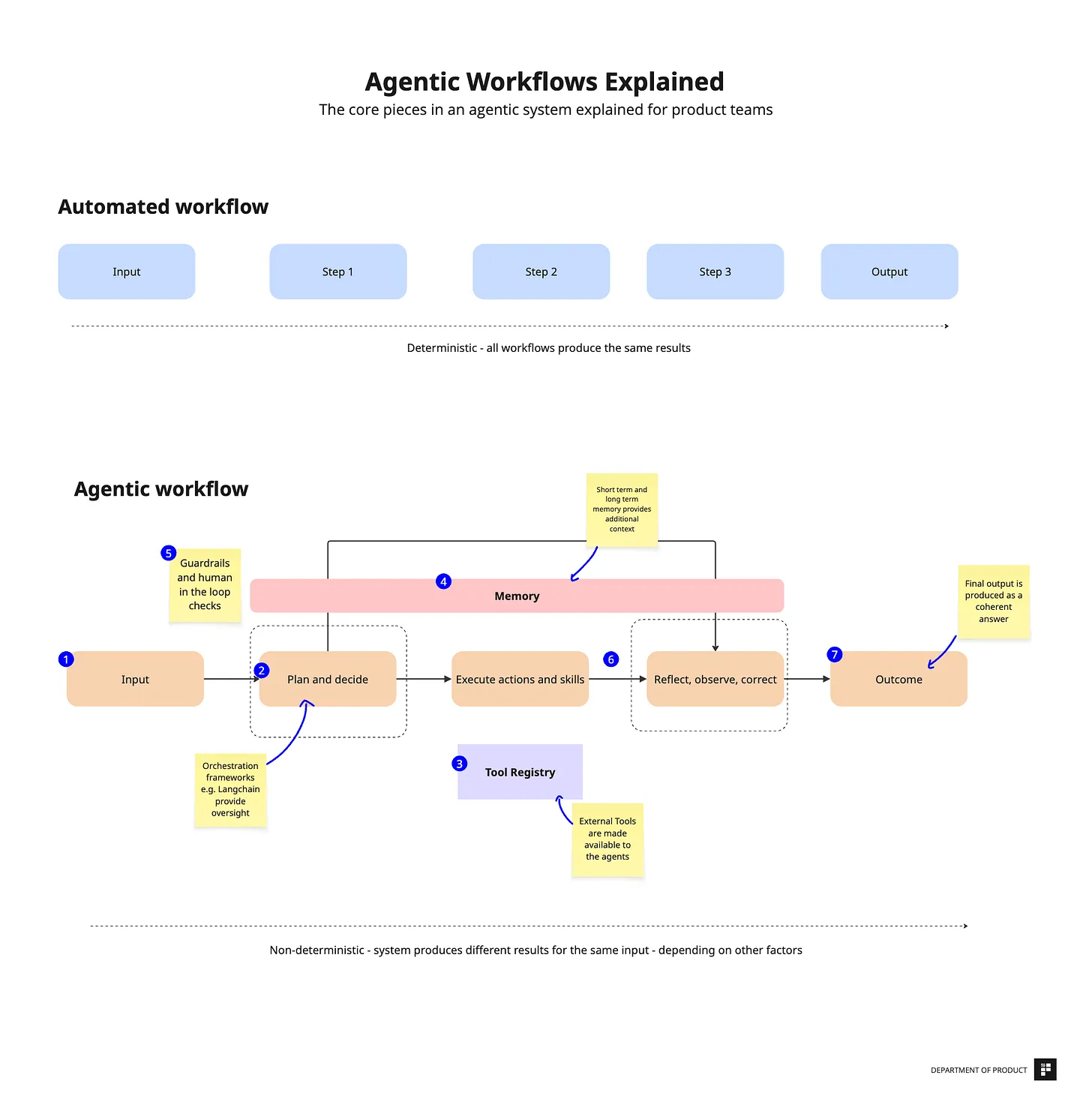
We are witnessing a fundamental shift in the way AI works. While traditional AI systems, such as ChatGPT, require users to manually chain each step—ask a question, receive a response, then ask another question—Agentic AI marks a paradigm shift toward real automation. Instead of doing each step manually, you provide a goal, and the AI agent executes the entire workflow autonomously.
In this extensive guide you’ll create an automatic AI news monitoring system that exemplifies this progression. Once established, your workflow will read RSS feeds, use AI to analyze content, filter pertinent information, and generate personalized email summaries—all without the need for human participation.
Understanding the Fundamental Difference
Traditional AI Workflow:
- User: “Check my email for interview invites”
- AI: [Provides general advice about checking email]
- User: “Add them to my calendar”
- AI: [Explains how to add calendar events]
- User: “Send confirmations”
- AI: [Suggests email templates]
Result: You manually execute each step.
Agentic AI Workflow:
- User: “Manage my interview scheduling”
- Agent automatically:
- Monitors email continuously
- Identifies interview invites
- Checks calendar for conflicts
- Schedules appointments
- Sends professional confirmations
- Alerts you to conflicts
Result: Complete automation with intelligent decision-making.
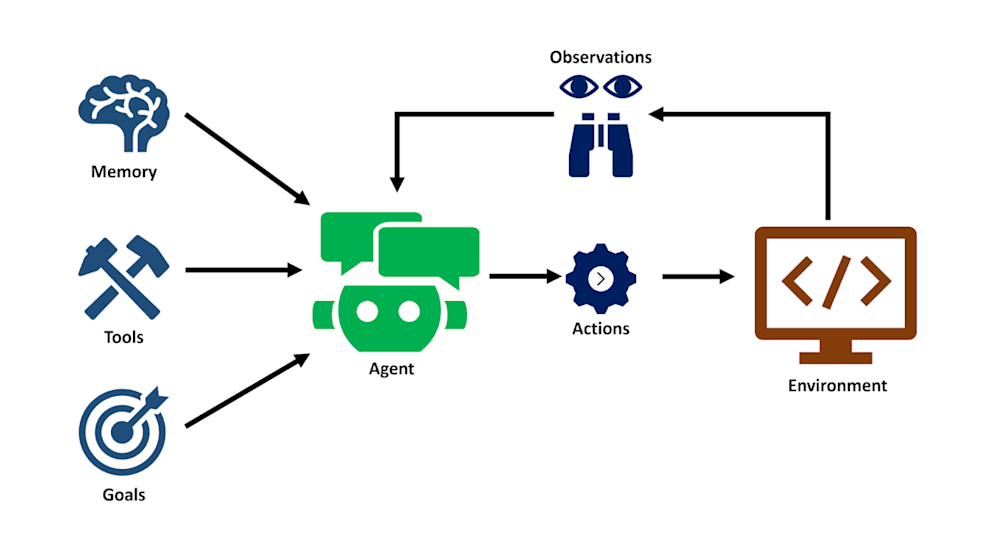
The key characteristics that define Agentic AI are:
- Autonomy: Makes decisions without human input
- Goal-Oriented: Works toward defined objectives
- Tool Usage: Interacts with external services
- Memory: Maintains context across interactions
- Adaptive: Adjusts approach based on results

Setting Up Your Development Environment
Before building your workflow, you’ll need accounts on several platforms. All offer free tiers sufficient for learning:
Required Accounts
Claude.ai
- Navigate to claude.ai
- Create a free account with your email
- Purpose: AI assistant for workflow planning and development
N8N.io
- Go to n8n.io
- Sign up for a 14-day free trial
- Purpose: Main workflow builder platform where you’ll create your automation
OpenAI Platform
- Visit platform.openai.com
- Create an account (uses the same login as ChatGPT)
- Purpose: AI model API for content analysis
Additional Tools (Optional)
- Lovable.dev: App building platform for creating user interfaces
- Figma: Design tool integration for prototyping
Building Your AI News Monitoring Workflow
Step 1: Creating Your N8N Workspace
Log into your N8N account and create a new workflow. You’ll start with an empty canvas that includes a Schedule Trigger node by default.
Setting Up the Manual Trigger:
- Click the “+” button to add a node
- Search for and select “Manual Trigger”
- This allows you to test your workflow by clicking “Execute”
For production use, you can later replace this with a Schedule Trigger to run automatically at defined intervals—hourly for breaking news monitoring or daily for morning news summaries.
Step 2: Adding the RSS Reader
The RSS Reader node will fetch news content from your chosen sources. RSS feeds are structured data formats that most news organizations provide, updating automatically as new articles are published.
Configuration Steps:
- Click “+” after the Manual Trigger
- Search for and select “RSS Read”
- Connect the nodes by dragging from the Manual Trigger output to RSS Read input
- Double-click the RSS Read node to configure it
RSS Feed URLs (tested in the workshop):
For Saudi-focused news:
https://www.saudigazette.com.sa/rss.xmlFor Lebanese/regional news:
https://www.lbcgroup.tv/rssPaste one of these URLs into the RSS Read configuration, press Enter, then click “Execute Step” to test. You should see 20-50 news items loaded successfully.
Step 3: Implementing Cost Control with Data Limits
RSS feeds often return 50+ articles, which would be expensive to process through AI models. The Limit node restricts the number of items processed while maintaining workflow functionality.
Adding the Limit Node:
- Click “+” after the RSS Read node
- Search for and add “Limit”
- The node auto-connects to RSS Read
- Set the default limit to 10 items
- Click “Execute Step” to verify
The result should show 10 items instead of the original 50+, significantly reducing processing costs while maintaining representative coverage.
Step 4: Configuring AI Analysis
This step transforms your workflow from simple data collection to intelligent content analysis. You’ll need two connected nodes: a Basic LLM Chain and an OpenAI Chat Model.
Adding the AI Processing Nodes:
- Click “+” after the Limit node
- Search for and add “Basic LLM Chain”
- Click “+” again and add “OpenAI Chat Model”
- The OpenAI model connects to provide the AI capabilities for the LLM Chain
Step 5: Setting Up OpenAI API Access
This is a critical step that enables your workflow to access AI capabilities. The process requires careful attention to security since API keys provide access to paid services.
Obtaining Your API Key:
- Navigate to platform.openai.com
- Click your profile icon in the top right
- Select “API keys” from the dropdown
- Click “+ Create new secret key”
- Name it “N8N Workshop” or similar
- Critical: Copy the key immediately—it’s shown only once
- Store it securely until you paste it into N8N
Connecting the API Key in N8N:
- In the OpenAI Chat Model node, click “Create new credentials”
- Paste your API key in the credentials field
- Click “Save”
- Select your preferred model (GPT-3.5-turbo for cost efficiency, GPT-4 for higher quality)
Step 6: Crafting Effective AI Analysis Prompts
The quality of your AI analysis depends heavily on prompt construction. A well-designed prompt provides clear instructions, expected output format, and specific analysis criteria.
Configure the Basic LLM Chain:
- Double-click the Basic LLM Chain node
- Set “Prompt Source” to “Define below”
- Enter this analysis prompt:
Analyze the following news articles and provide structured summaries:

{{$json}}

For each article, provide:
1. Main Topic: One sentence describing the primary subject
2. Key Facts: Specific developments, numbers, or announcements
3. Relevance Score: 1-10 rating for general business/tech interest
4. Impact Assessment: Why this matters for readers
5. One-Line Summary: Concise takeaway for busy professionals

Format the output as clean, scannable text with clear separations between articles.
Click “Execute Step” to test the AI analysis. You should receive structured summaries of your news items.
Step 7: Adding Content Formatting and Filtering
Before sending results via email, you’ll want to format the data and potentially filter based on relevance scores.
Add Edit Fields Node:
- Click “+” after the Basic LLM Chain
- Search for and add “Edit Fields”
- Configure it to add metadata:
summary:{{$json.response}}timestamp:{{$now}}source: “AI News Monitor”
Optional Conditional Logic: For more advanced filtering, add an “IF” node that checks relevance scores:
- IF relevance score >= 7, proceed to email
- ELSE skip this article
Step 8: Email Notification Setup
The final step transforms your analysis into actionable communication. You have two primary options for email integration.
Gmail Integration (Recommended):
- Click “+” after your formatting node
- Search for and add “Gmail”
- Select “Send Email”
- Follow the Google OAuth authentication process
- Grant N8N permission to send emails from your account
Email Configuration:
To: your-email@domain.com
Subject: AI News Summary - {{$now.format('YYYY-MM-DD')}}
Body:
Your daily AI-curated news summary:

{{$json.summary}}

Generated automatically by your AI agent
Timestamp: {{$now}}
Source: {{$json.source}}
Alternative SMTP Setup: If OAuth proves complex, use the “Send Email (SMTP)” node with your email provider’s SMTP settings. This approach is often more reliable for automated workflows.
Step 9: Complete Workflow Testing
Execute your entire workflow by clicking “Execute Workflow” at the top of the N8N interface. Watch each node execute in sequence:
- Manual Trigger activates the workflow
- RSS Feed loads current news items
- Limit reduces dataset to manageable size
- AI analyzes and summarizes content
- Fields are formatted with metadata
- Email summary is sent to your inbox
Troubleshooting Common Issues:
RSS Error: Verify URL format and network accessibility. Test URLs directly in your browser.
AI Error: Check OpenAI API key validity and account credit balance. Verify the connection between Basic LLM Chain and OpenAI Chat Model nodes.
Email Error: Confirm authentication permissions and recipient address validity.
Node Connection Issues: Ensure all nodes are properly linked with visible connection lines.
Read Also: The Core Principles Behind Effective Agentic Systems
Advanced Integrations and Extensions
Multi-Channel Notifications
Expand your workflow’s reach by adding multiple notification channels:
Discord Integration:
- Add a “Discord” node after AI analysis
- Create a Discord webhook in your server settings
- Configure the node with your webhook URL and message content
Slack Integration:
- Add a “Slack” node
- Connect your Slack workspace
- Choose target channels for different types of news
Processing Multiple RSS Sources
Scale your monitoring by processing multiple news sources simultaneously:
Split Workflow Configuration:
- Add a “Split Out” node after Manual Trigger
- Configure multiple RSS sources:
json
[
  {"url": "https://www.saudigazette.com.sa/rss.xml", "source": "Saudi Gazette"},
  {"url": "https://www.lbcgroup.tv/rss", "source": "LBC News"},
  {"url": "https://feeds.bbci.co.uk/news/rss.xml", "source": "BBC News"}
]
Each source processes independently, providing comprehensive coverage.
Intelligent Content Filtering
Enhance your AI analysis with sophisticated filtering criteria:
Analyze these news articles and identify only those related to:
- Technology and AI developments
- Regional business and economic news
- Innovation and startup activities
- Government policy affecting business

Assign relevance scores 1-10 for each category.
Return only articles scoring 7+ in any category.
Ignore: Sports, entertainment, routine political coverage.

Articles: {{$json}}
Data Storage and Historical Analysis
Add persistence to your workflow for trend analysis:
Google Sheets Integration:
- Add a “Google Sheets” node
- Create a spreadsheet with columns: Date, Source, Title, Summary, Relevance Score
- Auto-populate with each workflow execution
Database Storage: For larger-scale operations, integrate MySQL or PostgreSQL nodes to store processed articles, enabling historical analysis and trend identification.
Advanced Integrations and Extensions
Multi-Channel Notifications
Expand your workflow’s reach by adding multiple notification channels:
Discord Integration:
- Add a “Discord” node after AI analysis
- Create a Discord webhook in your server settings
- Configure the node with your webhook URL and message content
Slack Integration:
- Add a “Slack” node
- Connect your Slack workspace
- Choose target channels for different types of news
Processing Multiple RSS Sources
Scale your monitoring by processing multiple news sources simultaneously:
Split Workflow Configuration:
- Add a “Split Out” node after Manual Trigger
- Configure multiple RSS sources:
json
[
  {"url": "https://www.saudigazette.com.sa/rss.xml", "source": "Saudi Gazette"},
  {"url": "https://www.lbcgroup.tv/rss", "source": "LBC News"},
  {"url": "https://feeds.bbci.co.uk/news/rss.xml", "source": "BBC News"}
]
Each source processes independently, providing comprehensive coverage.
Intelligent Content Filtering
Enhance your AI analysis with sophisticated filtering criteria:
Analyze these news articles and identify only those related to:
- Technology and AI developments
- Regional business and economic news
- Innovation and startup activities
- Government policy affecting business

Assign relevance scores 1-10 for each category.
Return only articles scoring 7+ in any category.
Ignore: Sports, entertainment, routine political coverage.

Articles: {{$json}}
Data Storage and Historical Analysis
Add persistence to your workflow for trend analysis:
Google Sheets Integration:
- Add a “Google Sheets” node
- Create a spreadsheet with columns: Date, Source, Title, Summary, Relevance Score
- Auto-populate with each workflow execution
Database Storage: For larger-scale operations, integrate MySQL or PostgreSQL nodes to store processed articles, enabling historical analysis and trend identification.
Real-World Applications: HR and Recruiting Automation
The principles demonstrated in the news monitoring workflow apply to numerous business scenarios. Here are practical examples from the workshop:
AI Resume Screener and Ranker
This workflow automates the time-intensive process of initial resume screening:
Workflow Structure:
Email Trigger → File Extraction → Multiple AI Analysis → Score Aggregation → Database UpdateImplementation Details:
- Email Trigger: Monitor jobs@company.com for new applications
- File Extraction: Convert PDF/DOCX resumes to text
- Multiple AI Analysis: Deploy three specialized AI agents:
- Technical Skills Assessor
- Cultural Fit Evaluator
- Experience Validator
- Score Aggregation: Combine ratings using weighted averages
- Output: Ranked candidate list with detailed analysis
Technical Screener Prompt Example:
Analyze this resume for technical qualifications:
- Programming languages and frameworks mentioned
- Years of relevant experience in each technology
- Project complexity indicators and measurable impact
- Professional certifications and their relevance

Resume: {{$json.content}}

Provide a technical competency score 1-10 with specific reasoning for the rating.
Automated Reference Check System
Streamline reference checking with intelligent analysis:
Process Flow:
Webhook Trigger → Email Template → Response Collection → AI Sentiment Analysis → Report GenerationAI Analysis Component:
Analyze these reference responses for:

1. Overall sentiment (strongly positive/positive/neutral/concerning)
2. Specific red flags or areas of concern
3. Consistent strengths mentioned across references
4. Recommendation strength and enthusiasm level
5. Any inconsistencies requiring follow-up

References: {{$json.responses}}

Generate a structured analysis with supporting quotes and an overall recommendation confidence score.
Smart Onboarding Companion
Combine app building with workflow automation for comprehensive onboarding:
Lovable App Interface:
Create an onboarding application featuring:
- Personalized 30-60-90 day milestone tracking
- Interactive company culture guide with multimedia
- Team directory with role descriptions and contact info
- Document upload area for required paperwork
- Progress dashboard with completion percentages
- Direct messaging with HR and assigned mentors
N8N Background Automation:
- Day 1: Welcome email sequence and Slack channel invitations
- Day 3: Automated coffee chat scheduling with team members
- Weekly: Progress check-in surveys with AI analysis
- Day 30: Manager review meeting scheduling
- Day 90: Career development discussion preparation
Production Deployment and Scaling
Infrastructure Considerations
N8N Hosting Options:
- N8N Cloud: Managed service ideal for beginners, handles maintenance and updates
- Self-Hosted: Docker or VPS deployment for cost control and customization
- Enterprise: On-premise solutions for security-sensitive organizations
Security Best Practices
API Key Management:
- Store sensitive credentials in environment variables
- Implement key rotation policies
- Use least-privilege access principles
- Monitor usage for unusual patterns
Webhook Security:
- Implement authentication tokens for incoming webhooks
- Validate data sources before processing
- Use HTTPS for all external communications
- Log security events for audit trails
Cost Optimization Strategies
AI Model Selection:
- Use GPT-3.5-turbo for initial processing (cost-effective)
- Reserve GPT-4 for final analysis requiring higher accuracy
- Implement intelligent model switching based on content complexity
Processing Efficiency:
javascript
// Token counting for cost control
const usage_tracking = {
  daily_tokens: $json.total_tokens || 0,
  estimated_cost: ($json.total_tokens * 0.0015) / 1000,
  daily_limit: 100 // dollars
};

if (usage_tracking.estimated_cost > usage_tracking.daily_limit) {
  throw new Error(`Daily cost limit exceeded: $${usage_tracking.estimated_cost}`);
}
Monitoring and Maintenance
Health Checks: Create monitoring workflows that verify:
- RSS feed accessibility and update frequency
- AI model response times and accuracy
- Email delivery success rates
- Overall workflow execution times
Error Recovery Systems:
javascript
// Retry logic with exponential backoff
const max_retries = 3;
const base_delay = 1000; // 1 second

for (let attempt = 1; attempt <= max_retries; attempt++) {
  try {
    // Attempt operation
    return await processContent();
  } catch (error) {
    if (attempt === max_retries) throw error;

    const delay = base_delay * Math.pow(2, attempt - 1);
    await new Promise(resolve => setTimeout(resolve, delay));
  }
}
Troubleshooting Common Issues
Connection and Authentication Problems
“Node must be connected and enabled” Error: This typically indicates missing connections between your Basic LLM Chain and OpenAI model nodes. Verify that:
- Both nodes exist in your workflow
- Connection lines are visible between nodes
- OpenAI credentials are properly configured
- API key has sufficient credits and permissions
RSS Feed Loading Failures:
- Test RSS URLs directly in your browser
- Verify URL format includes https:// protocol
- Check for RSS feed availability and format compliance
- Consider rate limiting from news sources
API Integration Challenges
OpenAI Rate Limits: When encountering 429 errors, implement delays between requests or upgrade to higher API tiers. Monitor your usage dashboard to understand consumption patterns.
Token Limit Exceeded: Reduce input text length by summarizing content before AI processing or splitting large articles into smaller chunks.
Email Delivery Issues:
- Verify SMTP settings and authentication
- Check spam folders for initial test emails
- Ensure sender reputation for automated emails
- Test with simple text messages before complex templates
Performance Optimization
Slow Execution Times:
- Implement parallel processing for multiple RSS feeds
- Cache frequently accessed data
- Optimize prompt length and complexity
- Use faster AI models for preliminary filtering
Memory and Resource Management:
javascript
// Clean up large data objects
const processed_articles = articles.map(article => ({
  title: article.title,
  summary: article.ai_summary,
  relevance: article.relevance_score
}));

// Remove original content to free memory
delete articles;
return processed_articles;
Bottomline
The leap from traditional AI to Agentic AI is more than just a technology update; it marks a fundamental shift in how we approach repetitive tasks. Learning to create intelligent workflows equips you with skills that will become increasingly valuable as firms strive to automate mundane processes while preserving human oversight for critical decisions.
The news monitoring routine you created serves as the foundation for numerous other applications. The principles of data gathering, AI analysis, intelligent filtering, and automated action are applicable to almost every business activity that requires organized decision-making.
As you improve your automation skills, focus on identifying procedures where human judgment may be duplicated using explicit rules and AI support. The most effective implementations combine automation’s efficiency with the nuances of human control, resulting in technologies that enhance rather than replace human talents.
Your journey into Agentic AI creation places you at the vanguard of workplace transformation, with practical skills for creating the automated systems that will shape the future of work.





Comments