
 By

You post a job for a virtual assistant because your inbox is full, invoices are waiting, and customer follow-ups keep slipping. Applications arrive, but you can't tell whether you need an administrator, a customer-service specialist, or someone who can untangle the work before taking it over.
That uncertainty is the first hiring problem to solve. Learning how to hire a virtual assistant starts with deciding what someone should own, then testing whether they can handle it without turning you into a full-time reviewer.
Table of Contents
- Seven Steps From Task List to First Week
- Sorting Tasks Before You Post a Job
- Writing the Role Brief and Setting a Rate
- Sourcing and Vetting Candidates With a Paid Trial
- Sign Written Terms Before Any Paid Work
- Onboarding Your Assistant Week by Week
Seven Steps From Task List to First Week
A job post attracts applicants. It doesn't define the job, establish a sensible budget, or show you how someone handles incomplete instructions. Treat hiring as connected decisions, with a usable output from each stage.
Remote support is an established operating model, but lower overhead doesn't automatically mean better value. In 2025, businesses reported average cost savings of 52% when hiring a virtual assistant instead of a full-time employee, according to SQ Magazine. That comparison makes a careful process worthwhile, not optional.
Give each stage a finish line
Use the following as an illustrative small-business hiring calendar, not a promise about recruitment speed. The working sessions are planning allowances; references, legal advice, and candidate availability may extend the calendar.
Hiring steps, outputs and typical timing
| Step | Output | Typical time |
|---|---|---|
| 1. Map repeated tasks | Task list sorted into automate, delegate or keep | Allow 2–3 hours |
| 2. Write the role brief | One-page brief with hours, overlap and deliverables | Allow 1–2 hours |
| 3. Set a rate band | Hourly and monthly budget you can sustain | Allow 30 minutes |
| 4. Source and shortlist | Five to ten candidates, with references checked before selection | Reserve 3–7 days |
| 5. Paid trial task | Scored sample of real work from each finalist | Reserve about 1 week |
| 6. Agreement and classification | Signed written agreement and tax responsibilities | Allow 1–2 days after any necessary professional review |
| 7. Onboarding | Working access, written procedures and first review | Plan an initial 2-week onboarding period |
These stages overlap. Prepare trial terms and investigate classification while recruiting, rather than waiting until a candidate has already completed paid work.
Use this process map to keep the decisions connected.
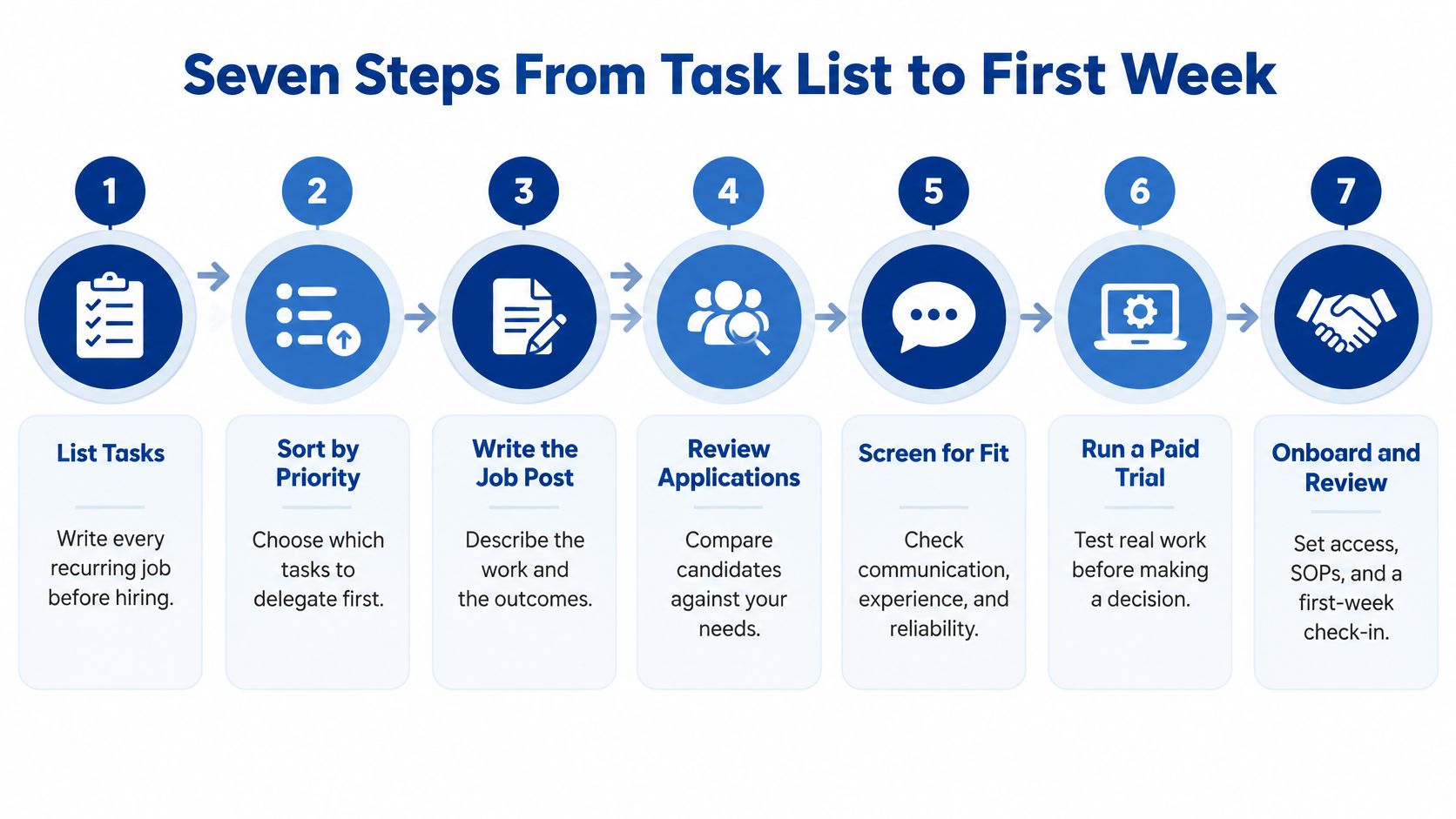
Don't skip the decisions that expose a weak fit
The task map and paid trial deserve the most attention. Without the map, you recruit against a vague idea of being less busy. Without the trial, you choose someone largely on how convincingly they describe their abilities.
A common hiring failure starts with one of those omissions: the owner delegates an unstable process, or the candidate can't produce the required work. More interviews won't fix an undefined role.
When comparing routes to hire a virtual assistant, Virtustant's role page can serve as a starting point for exploring support options. Bring your own task list to that comparison so you evaluate the work you need, rather than adopting a provider's broad role description.
Today's action is simple: list everything you handled during the past week and mark what repeats. Don't edit the list to make the work sound important. Include chasing missing information, moving appointments, correcting records, and answering the same customer question again.
Sorting Tasks Before You Post a Job
Hiring someone to manually move information between systems can preserve a bad process at an hourly cost. Before assigning that work to a person, check whether a template, integration, or scheduled rule would remove it.
In its 2025 survey, Verizon found that 38% of small and midsize businesses were using AI, while 24% were using AI-powered digital personal assistants for customer service. Your decision isn't human versus software. It's which parts need rules, which need judgment, and which need your authority.
Map the work by consequences
Use a representative logging period, such as a fortnight, to capture recurring work and exceptions. Record the trigger, frequency, source system, expected output, judgment required, data sensitivity, and consequence of an error.
Don't record only task names. “Manage email” hides several jobs: identifying urgent messages, drafting replies, updating records, and making promises to customers. Those activities need different permissions and different standards.
Who should handle each type of task
| Task | Best handled by | Why |
|---|---|---|
| Appointment reminders | Automation | Identical every time, no judgment needed |
| Social post scheduling | Automation | Repeats once templates exist |
| Bookkeeping data entry | Automation, then VA review | Rules-based, but errors need checking |
| Inbox triage and reply drafts | VA using approved AI drafts | Tone and priority need a human |
| Research and list building | Virtual assistant | Changes with each assignment and rewards judgment |
| Customer escalations | Virtual assistant with owner sign-off | Context and exceptions drive the outcome |
| Vendor and client relationships | Owner, with VA support | Trust and final decisions stay with you |
The automation rows assume the inputs and rules are stable. Appointment reminders still need a person when a customer disputes the booking or requests an exception.
Similarly, bookkeeping automation can populate records, but someone must investigate duplicates, missing documentation, and unusual transactions. Don't confuse successful data transfer with correct accounting.
Delegate a bounded workflow
Say you run an online shop and spend your mornings checking delivery questions. Sending tracking information can follow a template; investigating a missing parcel needs judgment; authorizing an exceptional refund needs a defined approval boundary.
A useful assignment gives the assistant ownership of the investigation and draft response. It also tells them when to stop and request approval. That's more workable than either approving every sentence yourself or allowing unrestricted customer promises.
Practical rule: Automate stable repetition, delegate bounded judgment, and retain decisions whose consequences you're not ready to transfer.
Set an explicit policy for AI tools. Name the approved application, identify information that must stay out of it, and require verification before a draft reaches a customer. An assistant shouldn't paste private customer correspondence into a personal AI account because it saves time.
A useful starting heuristic is to template or automate identical tasks that take only a few minutes before recruiting someone to perform them manually. Don't automate a process whose exceptions you haven't understood.
Finish the map by defining a starter queue the assistant can own from intake to completion. Inbox triage plus follow-up tracking is a coherent scope; inbox management, web development, tax preparation, and sales closing aren't interchangeable skills.
The interview question that follows is more revealing than asking whether someone knows your software: Can this person improve the workflow, not just run it?
Writing the Role Brief and Setting a Rate
A 15-hour weekly role can mean focused inbox and invoice support, or a loose collection of tasks that keeps expanding. Define the responsibilities, schedule, and approval boundaries before inviting candidates to quote. A clear brief makes the expected output easier to price and the work easier to review.
Write a brief someone can work from
For a part-time inbox and invoicing role, state the weekly hours, daily overlap window, and expected response time during agreed working hours. Name the time zone and how you'll handle seasonal clock changes.
For example, a brief might allocate 15 hours per week, require a three-hour overlap, and set an internal response expectation of four working hours. These are design choices, not universal requirements or legal definitions of part-time work.
Include:
- Purpose: Keep customer correspondence and invoice preparation moving without missed handoffs.
- Tools: Gmail or Outlook, Google Drive, your accounting application, and an Asana or Trello queue.
- Deliverables: Triage the inbox at agreed intervals, prepare invoices after approval, and keep unresolved requests visible.
- Completion standard: Each item has the correct recipient, supporting record, status, and next action.
- Boundaries: No bank-detail changes, unusual refunds, contract commitments, or unapproved software purchases.
- Communication: Use the task tracker for work, chat for urgent coordination, and a named escalation route for blocked items.
Check the task map before proposing full-time hours. If it doesn't contain enough sustained work, don't pad the role with unrelated specialist duties.
Compare rates without confusing benchmarks with quotes
Virtual assistant hourly rates by model
| Model | Hourly rate | Best fit |
|---|---|---|
| Offshore assistant | Stealth Agents gives a typical 2025 range of $8–$20 | Repetitive admin, data entry, scheduling |
| Philippines survey average, 2024 | Project Untethered reports $11.33 | Offshore benchmark from its survey of 147 VAs across six continents |
| United States survey average, 2024 | $35.61 in the same survey | Domestic survey benchmark, not a guaranteed quote |
| Domestic or managed service | Typically priced above offshore rates, depending on skills and controls | Client-facing work and sensitive data |
These aren't equivalent packages. A freelancer's quote may exclude backup coverage and management, while a managed service may include coordination and require a package commitment. Geography alone doesn't establish competence or security.
Compare written quotes for the same scope, and use Fluidwave's guide to assistant pricing to structure the comparison. Look at included responsibilities as well as the hourly figure.
Mega Income Stream's freelance rate guide lists Upwork marketplace benchmarks of $20–$35/hour for virtual assistants, $30–$40/hour for writers, $35–$50/hour for digital marketers, $40–$45/hour for graphic designers, $50–$60/hour for web developers, and $55–$65/hour for data analysts. Use the distinctions to identify specialist production hidden inside an administrative role.
For merchandise artwork, typical graphic designer charges for a shirt design can help separate a specialist assignment from general assistant duties.
Budget your attention separately
Estimate the total cost using the quoted rate, planned hours, software, payment charges, and training time. Add your own review time as a separate cost. It can change which proposal offers better value.
For the same sample workload, compare how much correction each proposal requires. A higher hourly rate may cost less overall if the work needs fewer revisions.
Compare the cost of accepted work, including your review time, rather than the hourly rate alone.
Sourcing and Vetting Candidates With a Paid Trial
Design the paid trial before you start collecting applications. It forces you to decide what evidence would make a candidate hireable and prevents you from inventing a different standard for someone you happen to like.
Use a real backlog task that resembles the intended role, but remove unnecessary personal or confidential information. Define the deliverable, allowed tools, time cap, deadline, and payment before the candidate begins.
Keep the role brief, candidate evidence, and trial scorecard together during selection.
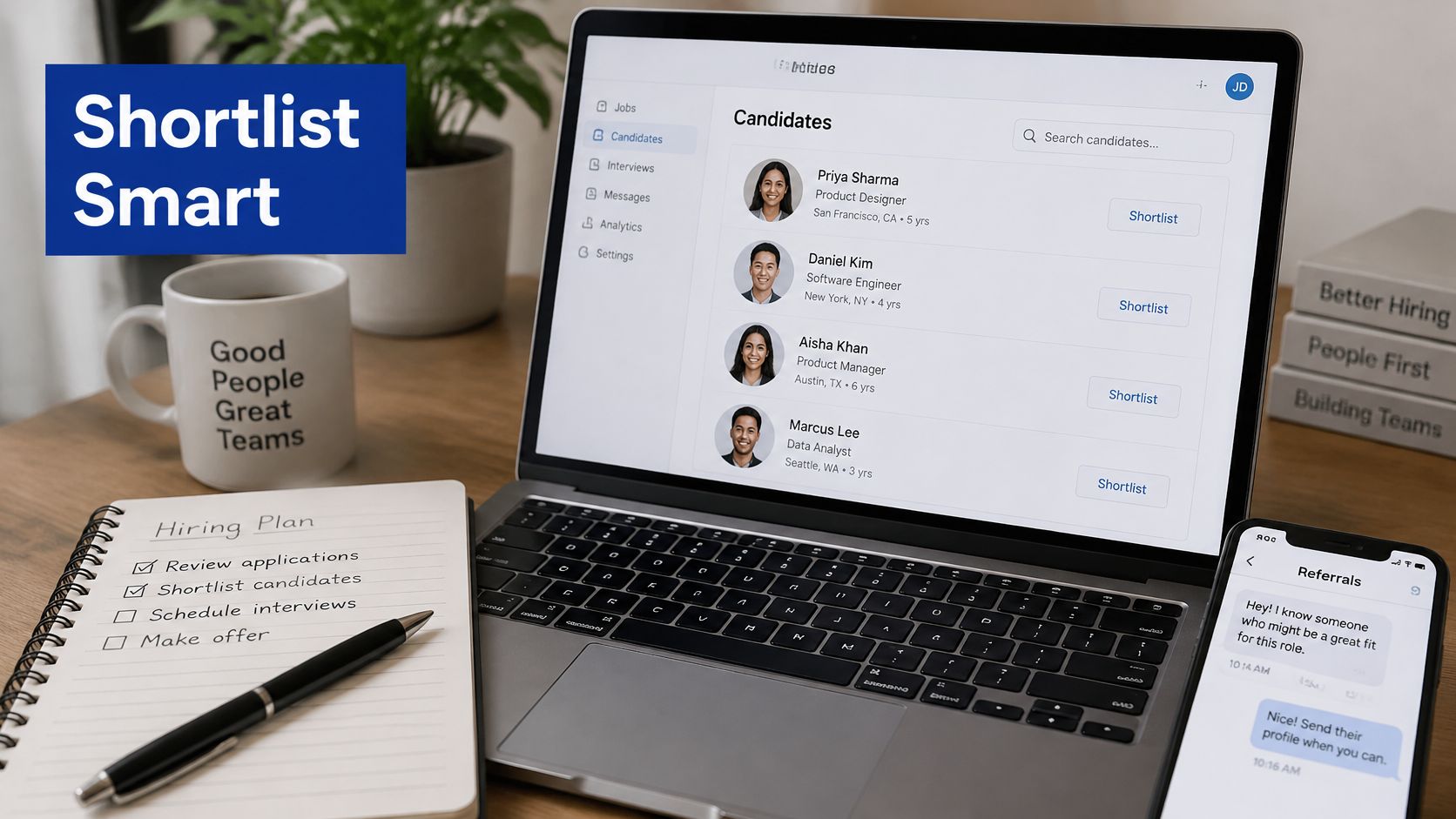
Make the trial resemble the job
For an inbox role, provide anonymized messages, a short customer policy, and a required output sheet. Ask the candidate to identify priorities, draft responses, flag approval needs, and record unresolved questions.
Include a bounded ambiguity, such as a missing preference that should prompt a question. Don't hide essential information as a trick or penalize candidates for refusing to invent a policy. You're testing judgment, not mind-reading.
Use a short assignment with a clearly agreed time cap and pay the rate you intend to offer. If the scope changes, agree on the change rather than expecting additional unpaid work.
Score each finalist against the same checklist:
- Accuracy: Facts match the source material, with no invented details or unauthorized promises.
- Efficiency: The candidate completes useful work within the agreed scope and explains unfinished items.
- Questions: They identify consequential uncertainty without asking you to make every minor decision.
- Format: Files, labels, fields, and handoff notes match the instructions.
- Review burden: Your corrections concern preferences you hadn't documented, not repeated failures to follow clear directions.
Keep your own notes while reviewing. Record whether a mistake came from the candidate, your instructions, or an inconsistent source document. Otherwise, you may reject someone for discovering a weakness in your process.
Choose sourcing channels by the work they leave you
Freelance marketplaces offer a broad pool but leave screening and management with you. Referrals provide context, though someone who worked well for another owner may not fit your queue. Specialist agencies can reduce recruitment effort, while your professional network may surface candidates with relevant industry knowledge.
Remote hiring deserves evidence-based assessment: Gallup reported that in 2025, 55% of remote-capable employees were hybrid and 26% were exclusively remote. Availability online is therefore a weak differentiator compared with demonstrated output and communication.
If working-day overlap points you toward Latin America, use LatHire's page on the best place to hire latin american virtual assistants as a sourcing option to evaluate against your requirements, not a substitute for verification. Our guide to freelance sources for starting and running an online business provides broader context for choosing recruitment channels.
For a supplementary hiring walkthrough, use the video alongside your written evaluation criteria.
Verify the claims that matter
Ask candidates to explain a process they improved: what failed, what they changed, and how the next person could follow it. Request relevant work samples with permission, then verify references through a credible professional channel.
Ask references about reliability, correction handling, and actual responsibilities. Missing references may require alternative evidence, particularly for a newcomer; refusal to provide any verifiable evidence is a different problem.
Watch for unexplained silence after an agreed deadline, generic answers to specific scenarios, and pressure to bypass evaluation entirely. Keep a backup finalist until the results are in, and send signed trial terms before any paid work starts.
Sign Written Terms Before Any Paid Work
A low hourly rate isn't cheap if the working arrangement creates employment, privacy, or ownership problems. Paying someone abroad through an invoice doesn't, by itself, make them an independent contractor.
The State of Freelance Work 2025, based on a survey of 1,900 employers, reported that 36% of companies admitted they sometimes or always misclassified workers, while 37% hire freelancers internationally, including in countries where they have no office, according to the survey document. These findings aren't a ruling on your arrangement, but they illustrate why classification belongs in the hiring decision.
Separate the trial agreement from the ongoing arrangement
Before a paid trial, sign short written terms covering the task, compensation, deadline, confidentiality, permitted data use, and ownership or permitted use of the deliverable. State how payment will be handled if you decide not to continue.
Don't ask a candidate to access live financial accounts or export customer records merely to prove they can do the job. A representative, sanitized task can test the necessary skills without creating avoidable exposure.
Before ongoing work begins, complete the full agreement and check that it reflects how you'll work together. A contractor label won't resolve a mismatch between the document and the practical level of control.
Cost check: Include classification advice, secure access, and enforceable ownership terms in your hiring budget. Don't treat them as problems to solve after something fails.
Use qualified local advice where the arrangement or jurisdiction requires it. This is especially important when you expect tightly controlled hours, an ongoing exclusive relationship, or responsibilities embedded in your ordinary operations.
Complete the pre-hire checks
The checklist should produce answers and documents, not merely a folder containing a generic contract.
- Worker status: Assess the proposed relationship under the relevant rules where the assistant works and where your business operates. Identify who employs the worker if an agency is involved.
- Scope and control: Define deliverables, availability commitments, review arrangements, and who decides how the work is performed. Keep the wording consistent with the intended legal relationship.
- Payment and taxes: Agree on currency, invoicing, payment timing, transaction charges, and each party's obligations. A contract can record responsibilities but can't override statutory duties.
- Confidentiality and privacy: Identify protected information, permitted uses, approved systems, and reporting procedures for suspected exposure.
- Work-product ownership: Specify rights to documents, research, templates, creative work, and other deliverables, with appropriate treatment of pre-existing materials.
- Ending the arrangement: Cover notice, outstanding payments, handover, access removal, and return or deletion of business information.
Ownership deserves particular care when the assistant creates content or uses subcontractors. You need clarity about what they can assign to you and whether outside materials come with restrictions.
Privacy also requires operational detail. A confidentiality clause doesn't tell someone whether they may download customer records to a personal device or forward files to a private email account. Write those rules into the working instructions.
Don't assume an intermediary removes every risk
An agency can handle parts of recruitment, payment, and supervision, but your agreement still needs to identify who does what. Establish who handles replacements, security incidents, work-product rights, and any employment obligations that apply.
Likewise, paying in your own currency doesn't settle cross-border compliance. The worker's location, the actual relationship, and the information they access remain relevant.
The practical trade-off is control versus administrative responsibility. If you need employee-like direction, investigate a suitable employment structure rather than forcing the arrangement into a contractor template because the invoice is simpler.
Avoid turning this into an indefinite legal project. Resolve the material questions for the actual role, keep a record of the advice you obtain, and make sure the signed documents match the offer.
Finalize the agreement template before sending that offer. Then sign the applicable terms and book the first working week.
Onboarding Your Assistant Week by Week
Giving a new assistant full administrative access and expecting them to infer your standards is a poor start. It exposes the business while leaving the person unsure which decisions they can make.
Onboarding should transfer knowledge and responsibility in controlled increments. The objective isn't to explain everything your business does; it's to make the initial workload reliable enough that you can stop monitoring each movement.
Use this timeline to organize access, practice, review, and the continuation decision.
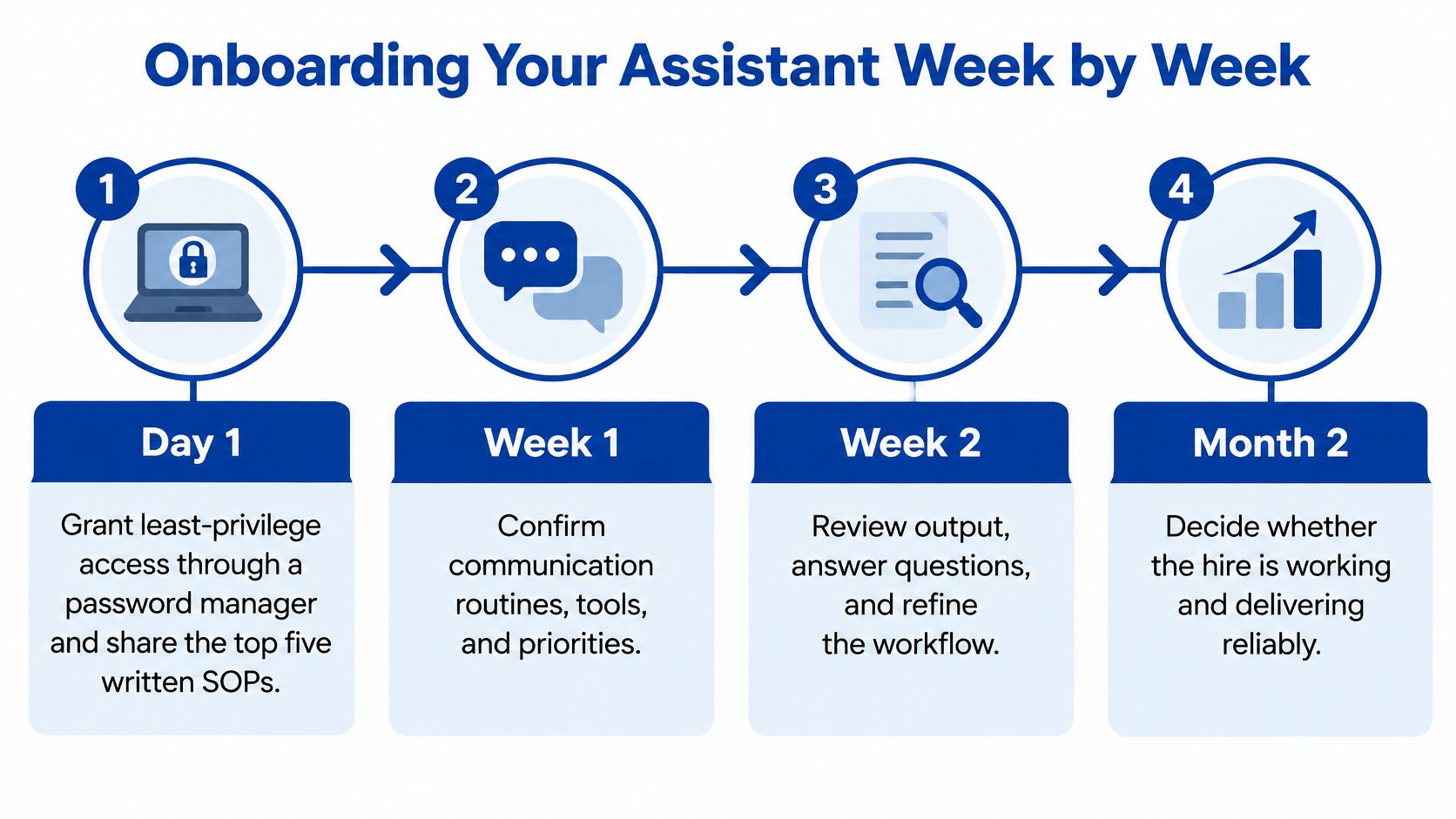
Day one makes the working rules visible
Create individual accounts and grant only the permissions needed for the initial queue. Use a business password manager such as 1Password or Bitwarden where appropriate, enable multifactor authentication, and avoid sharing your own account credentials.
Provide the priority procedures as written standard operating procedures, or SOPs. Each should explain the trigger, required inputs, sequence, completion check, and escalation point. Screenshots help when labels or menus are easy to confuse.
Don't dump a large document folder into chat and call that training. Mark the procedures needed immediately and archive obsolete versions so the assistant doesn't follow conflicting instructions.
A practical launch checklist keeps the essentials visible:
- Access tested: The assistant can open required systems without receiving unnecessary privileges.
- Communication confirmed: Both parties know where urgent issues, routine questions, and completed work belong.
- Examples available: An acceptable finished item sits beside the procedure.
- Decision limits understood: The assistant can explain which situations require approval.
- Work queue ready: Each assigned item has an owner, due date, and clear completion condition.
The opening week is guided practice
Demonstrate a recurring task while explaining the decisions that aren't obvious from the clicks. Then let the assistant perform a similar task while you review the result.
Record the demonstration with Loom or a comparable screen-recording tool, but pair it with a concise written checklist. Video is useful for showing a sequence; text is easier to search when someone needs a specific rule.
Keep check-ins brief and focused on completed work, blocked items, and upcoming priorities. For example, you could reserve a short daily meeting during the initial learning period, then reduce meetings when the queue runs reliably.
Give feedback while the task is still fresh. Explain the standard, show the correction, and ask the assistant to update the procedure where appropriate.
Review the system as well as the person
During the following week, compare accepted outputs with the role's deliverables. Look for missing handoffs, repeated questions, preventable corrections, and items that remain open without a named next action.
A repeated question may indicate an unclear SOP rather than poor attention. Fix the instruction if it leaves room for incompatible interpretations; address performance directly when the instruction is clear and consistently ignored.
The same handoff discipline applies to specialist contributors. Our guide to onboarding a graphic designer is useful when your assistant coordinates creative work and needs to pass along assets, requirements, and approvals.
If it isn't written down, you'll end up repeating it.
Decide whether the arrangement earns its place
Set a continuation review before the hire settles into routine. An illustrative checkpoint is the end of the opening month, when you can decide whether to retain the scope, adjust hours, provide targeted training, or end the arrangement under the agreed terms.
Judge the relationship on usable output and the attention it requires. Track your own time spent clarifying, correcting, and following up so you can distinguish temporary learning from an ongoing management burden.
Don't give feedback only when something fails. Identify work that met the standard so the assistant knows what to repeat, and expand responsibility only when the existing queue is dependable.
The successful hire isn't necessarily the person who accepts the most tasks. It's the person who can own a defined workload, surface exceptions early, and leave you with fewer unresolved decisions.
Mega Income Stream publishes practical guides on freelancing, business operations, automation, and remote-team management. Visit Mega Income Stream to compare hiring approaches, sharpen your delegation process, and build a support role your business can sustain.











Comments