
 By
By 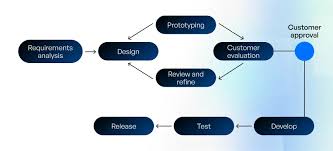
A software process model is a systematic, abstract representation of the software development life cycle (SDLC) that specifies the stages, tasks, and order of activities needed to create software, such as planning, design, coding, testing, and maintenance. These models help teams maintain quality and manage complexity.
A software development model is a process for defining, designing, implementing, and testing software applications. Each model has different ways to tackle these goals, but all models share the same set of phases in their processes, which is known as the software development life cycle (SDLC). So, what are those phases?
Requirement analysis. In this stage, the application’s business goals and system requirements are analyzed and then finalized in a document called Software Requirement Specification (SRS). This document also contains key agreements between all parties involved, and it helps keep everyone on the same page regarding the goals of the project.
Prototype design. Next, the delivery team will identify how to go about the project and then document that in the Design Document Specification (DDS). This paper specifies information about frameworks, platform specifications, limitations, and delivery estimates. Everyone involved in the development process (developers, testers, managers, and the client) should have access to this document so they can have a complete overview of the project.
Development. This is the most important phase of a software development model in which the application is developed based on the agreed-upon requirements. This is where the coding takes place.
Testing. This phase consists of code reviewing and module assessment handled by the testing team. In software development, testing often refers to unit testing and integration testing. Unit testing involves verifying that certain modules of the application work as designed, while integration testing is for ensuring that all modules work in sync as one system. Mature software development models integrate testing into all stages of the development process to achieve higher-quality software. We’ll address the different ways of approaching the testing of different software development models in the next section.
Delivery. After the developers and testers have completed their work, the project manager and client need to approve the outcome before the application can hit the market.
Maintenance. Most applications need regular maintenance to operate properly for long periods of time. This phase includes tasks such as compatibility upgrading, performance optimization, and bug fixing.
1. The Waterfall model

The Waterfall model, as the name indicates, approaches software development by moving down the SDLC in a linear manner, and every phase is clearly defined with deliverables and milestones.
In this model, the next phase won’t start until the previous one is finished. Each phase is considered complete when the deliverables are satisfied and a person in charge signs off for the project to proceed to the next phase.
What factors contribute to choosing the Waterfall approach?
- Short-term projects
- Clear, fixed, and well-documented requirements
- Static technology that is understood
- Stable product definition
- A variety of resources for product support
- Low Product Owner Involvement
- Strictly-set timeline
- Fixed budget that cannot be changed
In all the other situations choose the other model to approach your project development.
The main advantage of Waterfall is that the model is in strict order with regards to the tasks carried out and their timelines. Due to being fixed, the tasks can be easily divided between software departments and monitored as to task completion. Clients may find the Waterfall Model a reliable approach as they will be aware of the whole process from the start till finish beforehand. As for the disadvantages of the Waterfall Model, there are some as well. For instance, Waterfall has no revision of a task. The farther the application development goes forward into the other stage the harder it is to go back and change its conceptual basics or documentation.
Pros:
- Simple and can be quickly arranged, so the Waterfall model is suitable for small projects with few requirements and short timelines.
Cons:
- You can’t fast forward, backtrack, or overlap the phases. This lack of flexibility makes it difficult to adapt to unexpected requirements. Errors found in the middle of the development also can’t be fixed until the maintenance phase. So this model is mostly not suitable for long and complex projects.
| Advantages | Limitations |
| Simple and easy to understand | Inflexible to changes |
| Clear structure and milestones | Late testing phase |
| Well-documented process | Difficult to accommodate client feedback |
| Ideal for small, well-defined projects | Not suitable for complex or long-term projects |
Due to its lack of flexibility, the Waterfall model has long been going down in usage as software development becomes increasingly complicated.
2. The V-model

The V-model, also known as the Validation and Verification model, is an improved version of the Waterfall model with the addition of testing earlier in the development cycle. In this model, each stage has an accompanying testing activity, which allows you to detect errors in requirement specs, code, and architecture early.
Although this intensive addition of testing makes exceptional quality control possible, it also makes the V-model one of the most expensive and strenuous models. Also, similar to the Waterfall model, all requirements in the V-model are gathered at the beginning of the project and cannot be changed, so updates during the development, even vital, are still difficult to implement.
When to implement the V-Shaped Model?
- There are clearly defined, documented, and stable requirements
- The technology used is also stable and the project team has a full understanding of it
- All of the requirements are extra clear
- The project is short-term and not complex
The best advantage of the V-shaped Model is that you can both understand, apply to, and manage it in an SDLC easily. However, on the contrary, the model lacks flexibility when changes are on the horizon and it is quite expensive for the customer to implement those changes as they trigger additional development costs.
The V-Model’s testing-centric methodology is its main advantage. It parallels development activities with corresponding testing activities, which sets it apart from other models. This implies that in addition to developing, you are also making plans for verification at every turn. Here is a breakdown of it:
| Development Phase | Corresponding Testing Phase |
| Requirements | Acceptance Testing |
| High-Level Design | System Testing |
| Low-Level Design | Integration Testing |
| Coding | Unit Testing |
The V-Model gets its name from the fact that its structure resembles a “V.” Development phases are indicated by the progression along the left side of the ‘V’. On the right side, you are concurrently planning the corresponding testing phases. This parallel strategy guarantees the following:
- You start with a well-defined testing plan.
- Every stage of development is directly related to the testing stage.
- Potential problems can be identified early in the development cycle.
Therefore, by detecting defects early, improving the traceability between requirements and tests, providing clear validation criteria for each stage of development, and lowering project risks through thorough testing, the model assists you in maintaining high quality standards throughout the development process. When you use the V-Model, you are not just making software; you are creating a solid, well-tested product that satisfies user needs at every stage.
Pros:
- Better quality control
- Early detection of errors
Cons:
- Expensive and strenuous
The V-model works best for short projects with fixed requirements, and it’s also a great choice for projects that require rigorous testing to prevent failures.
3. The Iterative and Incremental model:

The iterative and incremental model is another model designed to overcome some of the shortcomings of the Waterfall model. Although it, too, starts with planning and ends with deployment, this model involves repeated cycles throughout the development.
In the iterative and incremental model, a project begins with a small set of requirements, and then a new cycle will add another small set of requirements (incremental). The iterative (repeated) nature of this model allows the application to evolve with the possible addition of updates throughout the process.
Read Also: Top 10 Mobile App Development Trends 2026
This level of flexibility doesn’t require all specifications laid out at the beginning of the project, so work can begin quickly, and developers can make improvements based on learnings in previous cycles. However, the more cycles happen, the more resources will be consumed, and the more complex the management will become.
The iterative and incremental model can pose more risks when changes are made too often, which can also lead to unknown costs and uncertain deadlines.
Where is the Iterative Model applicable in software development?
- System requirements are clearly defined and fully understood
- Additional requirements can occur with time
- When the team learns new technology and works on the project simultaneously
- Specific resources are to be used only when they are required for specific iterations according to the contract
- When the business goals might change in the future due to high-risk features
The biggest advantage of the Iterative model is that it allows finding feature and design flaws at the beginning of development. Working in iterations and validating every development cycle will result in a risk-free product with the ability to add or remove features as well as alter the costs and timeline of the final product. Besides advantages, we should talk about some of the minuses that are also present.
Pros:
- Work can start quickly
- Changes can be made in the middle of the project
- Learnings from each cycle help refine the product.
Cons:
- Frequent changes increase risk.
- Uncertainties due to the scope of work are less likely to be clearly defined at the beginning.
This model is a great choice for complex projects whose requirement specifications are difficult to define thoroughly at the beginning.
4. The Prototyping model:

The Prototyping model is not another improved version of the Waterfall model but was created for the purpose of increasing the development team’s understanding of the client’s needs via prototypes.
The idea is a prototype of the desired software application can help resolve misunderstandings or miscommunications during the requirement analysis phase. In this model, a prototype is developed, tested, and refined based on the client’s feedback, and not until the prototype is approved can the full-scale development take place.
The Prototype model can drastically decrease the number of iterations compared with the Iterative and Incremental models due to early agreement on what the desired outcome will be like while still keeping room for improvements.
However, the time spent on creating prototypes needs to be taken into account, as well as the number of changes the client can make. If the client changes their mind too often or makes unrealistic requests, the volume of work and cost will add up quickly. For this reason, the Prototype often comes with a cap on how the number of alterations allowed, and no further changes can be made after the prototype has been approved.
Where and when is the Prototyping Model applicable?
Prototyping is applicable to online software system development where there is a high level of user interaction. For example,
- Systems that require users to fill out forms
- Software that requires lots of data processing
The Prototyping Model also has its advantages and disadvantages. Of course, they depend on the organization’s needs and are considered before choosing this model.
Pros:
- Minimize misunderstandings and miscommunications.
- There’s room for late requests.
Cons:
- Time spent on creating prototypes can compound quickly if not restricted.
5. The Spiral model

The Spiral model is a combination of the Waterfall model and the Prototyping model; it approaches software development in a linear manner the Waterfall model while bringing in prototypes from the Prototyping model.
In this model, the SDLC is made into 4 quadrants, Planning, Risk Analysis, Engineering, and Evaluation, which operate together as a spiral loop. The number of loops required depends on the complexity of the project.
These loops of development activities allow developers to make changes and add new features. The Risk Analysis quadrant makes it possible to identify and resolve risks associated with each change.
Similar to the Prototyping model, one downside of the Spiral model is too many alterations from the client can cause the project to slow down or exceed its original budget. The upside is you can create a highly customized process for clients with unique requirements.
When is it best to use the Spiral Model?
The Spiral Model is applied when there is a need to “learn with the product’s maturity” and:
- There’s a budget limit and you need to foresee risks
- You have a medium or high-risk project to carry out
- There is a long-term project, and changes might occur
- The requirements are vague to the customer
- Requirements need more clarity due to their complexity
- The primary product has to be released in several stages to get valuable customer feedback
- You expect major changes to the product during the SDLC
Based on the applicability of the Spiral Model, let’s view its benefits and drawbacks. The main advantage of the model is that you can add elements to the product in case they become available or known. Also, the Spiral Model involves users at the early stages of product development, which allows receiving constructive feedback.
This combination results in a software development methodology that is both adaptable and structured. The typical stages of each spiral are broken down as follows:
| Phases | Description |
| Planning | Define objectives and constraints |
| Risk Analysis | Identify and assess potential risks |
| Development | Create the software product |
| Evaluation | Review progress and plan next cycle |
Pros:
- Risks can be dealt with early.
- New features or late requirements can be added in the middle of the project.
Cons:
- Risks of exceeding budget and failing to meet deadlines.
The Spiral model is often used for long projects that have high risk as the model highly focuses on risk management. For that reason, the development team who handles such a project needs to have skills and knowledge in risk management.
6. The Scrum Model

The Scrum model is the most popular model in Agile, a software development methodology. Agile is not a model but rather a mindset whose values and principles are written down in the Manifesto for Agile Software Development and the 12 Principles behind it.
The one thing that separates Agile models from others in software development is that Agile doesn’t place the focus on getting the plan and requirements right at the beginning. Instead, it creates a high level of flexibility for new ideas as a project progresses by breaking it into smaller pieces. To make such flexibility happen, Agile brings all teams in to work together instead of having teams working together in a linear manner.
In the Scrum model, these smaller pieces are known as sprints. In a sprint that often lasts from one to four weeks, teams assess the features that need to be built, then code, test, and finalize them, and then plan the next sprint. Such a sprint iterates until the desired outcome is delivered. When a sprint is finalized, no more changes can be added, which means late alterations have to wait until the next sprint.
The collaboration between teams reduces guesswork and errors that come from insufficient communication. Sprints also allow the development team to build a minimum viable product (MVP) to test the market before moving on to more advanced features. This helps decrease time to market and reduce risk in testing a new idea.
Due to these advantages, Agile models are becoming increasingly popular in software development, replacing old models that hinder flexibility and productivity.
Pros:
- Highly flexible
- Reduce time to market
Cons:
- Hard to implement
7. DevOps

DevOps is another Agile model, but it has a key difference that separates it from other Agile models. Although DevOps adopts all Agile principles, this model brings both the development side and the operations side of software development in to work together as one team, whereas in traditional Agile models, there’s no participation of the operations team.
Such lack of collaboration creates a problem where the operations team, who deploys applications and manages the infrastructure where they run, has to operate the software handed over by the development team without knowing how it was developed. In a DevOps environment, both teams work side-by-side throughout the whole process of developing, testing, deploying, and managing applications. This collaboration increases the quality of the application and reduces the likelihood of failures when it comes to operation.
DevOps is the latest model born out of the Agile methodology. It is said to be the missing piece of Agile as its inclusion of the operations team extends the focus in software development to the side of deployment and maintenance.
When can we apply the DevOps Model?
- In complex projects
- Projects that require QA and testing
- Projects that include large teams from multiple departments
Being quite popular, the DevOps Model also has some pros and cons. It depends on what projects you are planning to adopt this model and whether you are prepared for the quite hard adoption curve. Let’s see what the model has to offer with regards to productivity from both sides.
You can decrease errors, enhance product quality, and shorten time-to-market by putting CI/CD into practice.
- The core of DevOps is automation. By automating build procedures, putting automated testing into practice, using infrastructure as code, and establishing automated deployment pipelines, you can optimise your workflow.
- You can improve overall efficiency and reduce manual errors by implementing these automation techniques.
- DevOps also eliminates the separation between the development and operations teams. This can be accomplished by promoting candid communication, delegating tasks, and utilising teamwork tools.
- This cooperation makes it possible to solve problems more quickly and creatively.
| DevOps Benefits | Impact |
| Faster delivery | Reduced time-to-market |
| Improved quality | Fewer bugs and issues |
| Enhanced collaboration | Better team dynamics |
| Increased efficiency | Optimised resource utilisation |
You can make software development more responsive and agile by implementing the DevOps model, which will ultimately result in better products and satisfied clients.
Final Thoughts
Software process models are critical frameworks that direct the development of software projects. You gained insight into various approaches to software development by exploring seven key models: Waterfall, Agile, Spiral, V-Model, Incremental, Rapid Application Development (RAD), and DevOps. Every model has special benefits and works well with various project kinds and team configurations. Whether you value risk management, flexibility, organised planning, or the smooth transition between development and operations, there is a model that fits your requirements.
When starting your next software project, take into account the features of these models and select the one that best suits your team’s capabilities, organisational objectives, and project requirements. Keep in mind that the success, effectiveness, and general quality of your project can all be greatly impacted by the process model you choose.






Comments