
 By
By 
Software development models give formal frameworks, ranging from strict, linear approaches to flexible, iterative ones, to help engineering teams plan, design, construct, and test software more effectively. Waterfall, Agile, Scrum, V-Model, Prototype, Spiral, and RAD are the seven most important models to grasp for managing project risks, costs, and timeframes.
Here are the 7 key software development models:
- Waterfall Model: A linear, sequential approach where each phase (requirements, design, implementation, testing) must be completed before the next begins, ideal for projects with stable requirements.
- Agile Model: A flexible, iterative approach focusing on collaboration, customer feedback, and small, frequent releases, ideal for projects with changing requirements.
- Scrum Model: A popular, flexible Agile framework that breaks work into fixed-length iterations called “sprints” (usually 2–4 weeks) to deliver incremental, high-value functionality.
- V-Model (V-shaped): An extension of the Waterfall model that pairs every development phase with a corresponding testing phase, emphasizing early test planning and validation.
- Prototype Model: Focuses on creating working, often simplified, versions of the software early in the cycle to gather user feedback and refine requirements.
- Spiral Model: A risk-driven, iterative model combining prototyping and waterfall elements, focusing heavily on risk analysis in each cycle, best for large, complex projects.
- Rapid Application Development (RAD) Model: Focuses on rapid prototyping and iterative development with less emphasis on planning, aiming for fast development and high user involvement.
The Software Development Life Cycle (SDLC) is the efficient process of planning, designing, constructing, testing, and delivering software while keeping costs and schedules to a minimum. Choosing the correct software development model is critical for satisfying your organization’s requirements, stakeholder expectations, and project objectives.
Each model has advantages and disadvantages, and the one you choose should be appropriate for the scope, timeframe, and budget of your project. Choosing the wrong model might result in delays, expense overruns, low-quality software, or even project failure.
Let’s look at seven major software development models and how they influence project success.
1. Waterfall Model
The Waterfall model is one of the oldest and simplest approaches to software development. It follows a linear, step-by-step process: analysis, design, development, testing, deployment, and maintenance. Each phase must be completed before moving on to the next.
Pros & Cons of the Waterfall Model
The Waterfall model is straightforward and easy to follow. Every stage has clear deliverables and milestones, ensuring progress is measurable.
However, it lacks flexibility. Once a phase is complete, there’s no going back or overlapping stages. If you identify errors later in the process, you’ll need to wait until the maintenance stage to address them. This rigidity makes adjustments difficult and costly.
This model is risky if project requirements are unclear or prone to change. It’s also not suitable for long-term, complex projects that demand adaptability.
That said, the Waterfall model can be useful for small, one-time projects with well-defined and fixed requirements. For such cases, its simplicity can lead to faster results. However, as the software industry shifts towards more agile and flexible approaches, the Waterfall model has declined in popularity.
2. V-Model (Validation & Verification Model)
The V-Model is an extension of the Waterfall model that incorporates early testing into the development process. It follows a similar linear structure but takes a “V” shape, with development stages descending on one side and corresponding testing stages ascending on the other.
Pros & Cons of the V-Model
The main advantage of the V-Model is that testing begins early. Every development stage has a paired testing activity, helping teams catch errors in requirements, architecture, and code before moving forward. This increases the chances of project success compared to the Waterfall model.
Despite this improvement, the V-Model is still rigid and linear. Like the Waterfall model, teams must complete each stage before starting the next, making it difficult and expensive to make adjustments once the project is underway.
The V-Model works best for short projects with well-documented, fixed requirements. However, it’s not ideal for long-term, evolving, or complex projects where flexibility is essential.
3. Iterative (and Incremental) Model
The Iterative (and Incremental) model was created to address the limitations of the Waterfall model. Like Waterfall, it starts with planning and ends with deployment. However, the key difference is that this model includes repeated cycles throughout the development process.
As the name implies, the cycles are iterative (repeated) and incremental (happening in short bursts).
Development begins with a small set of requirements, and with each new cycle, new requirements are added.
Pros & Cons of the Iterative Model
The iterative nature allows the software to evolve over time. Small adjustments can be made based on feedback from previous cycles. This means developers can refine the product continuously, improving it after each iteration.
Read Also: Reasons Why Python Frameworks Are Important for Web App Development
Since all requirements aren’t fixed at the beginning, work can begin quickly. However, because the process is repeated frequently, resources may be drained faster, and managing the process can become more complex.
Although the model allows for some changes, it still operates within a set framework. This can result in some inflexibility. Even though changes are less costly than in the Waterfall or V-Model, this approach is still not ideal for projects where requirements change frequently during iterations.
The Iterative model can introduce risks with frequent changes, uncertain costs, unpredictable resource needs, and unclear deadlines.
4. Prototyping Model
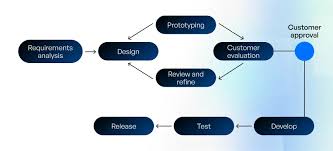
The Prototyping model focuses on improving the development team’s understanding of customer needs by creating prototypes. Instead of jumping straight into the final product, a small-scale version of the software is built first, allowing the team to refine the design based on feedback before development starts.
Once the prototype is built, it is tested and refined until the customer approves it. After this, the team begins working on the final product.
Pros & Cons of the Prototyping Model
The Prototyping model can greatly reduce the number of iterations needed in the SDLC due to the early feedback from the customer. This feedback helps ensure the final product is more aligned with customer expectations, increasing satisfaction and saving time.
However, the time spent developing prototypes can add up. If the customer frequently changes their mind or makes unrealistic requests, it can lead to excessive iterations, causing delays. To avoid this, it’s best to limit the number of iterations allowed before the prototype is accepted.
Once the final prototype is being developed, no further changes to the requirements can be made. This inflexibility is a significant drawback of the Prototyping model.
5. Spiral Model
The Spiral Model emphasizes risk management and is best suited for teams with expertise in risk assessment. It consists of four phases: planning, risk analysis, engineering, and evaluation. The number of loops or iterations in the spiral depends on the specific project and the project manager’s discretion.
This model blends features of the Waterfall and Prototyping models, focusing on design and incorporating prototyping in the engineering phase. It follows similar phases to Waterfall while also allowing for more flexibility.
Pros & Cons of the Spiral Model
The Spiral model’s continuous development allows for changes and the addition of new features while carefully managing risks. The process is systematic, making development more streamlined.
However, customer involvement at each stage can slow down the development process, especially if feedback is delayed. Customer changes are not permitted during the engineering phase, which can lead to frustration if the customer wants modifications after that point.
Since the number of loops is not fixed, there is a risk of going over budget or missing deadlines. Achieving the final product can be costly and time-consuming.
Moreover, the Spiral model is highly customized for each project, meaning the work cannot be reused for future projects.
Agile Methodology Development Models
Agile is a mindset, not just a set of strict protocols, based on the 12 principles outlined in the Agile Manifesto. It was developed to improve software delivery by focusing on collaboration, communication, and continuous change, making it more effective and efficient than traditional methodologies like Waterfall.
Agile has gained widespread adoption. According to the Project Management Institute, 71% of organizations report using Agile approaches either sometimes, often, or always in their projects.
Agile methodologies emphasize teamwork, cross-functional collaboration, iterative development, and early customer feedback. By testing, gathering feedback, and making adjustments throughout the development cycle, Agile teams aim to deliver the best software.
Let’s dive into two of the most popular Agile development models.
6. Scrum Model
The Scrum model is the most widely used Agile model. It organizes development into iterations known as sprints, typically lasting between 1 and 4 weeks. During each sprint, the team reviews the previous sprint, adds new features, and plans for the next sprint. Once a sprint’s activities are defined, no changes are allowed until the next sprint.
After each sprint, new features are added, tested, and refined in subsequent sprints until all features are completed and the project is ready for release.
Scrum Model Advantages & Disadvantages
Advantages:
- Increased collaboration between cross-functional teams and with customers helps reduce errors that arise from poor communication.
- The incremental nature of Scrum reduces the time to market for the software, delivering value faster.
- Enhanced communication minimizes the time spent on error resolution and increases customer satisfaction with the product.
Disadvantages:
- Scrum requires a significant input of time and effort from customers throughout the process, which can be demanding.
- Adding too many features or making frequent changes during sprints can push deadlines back, delaying the final product.
7. Kanban Model
The Kanban model is another Agile methodology but is quite different from others due to its lack of pronounced iterations. If any iterations occur, they tend to be very short, sometimes lasting only a single day.
Teams using Kanban typically rely on a Kanban board to visually represent the project’s progress. The board includes sticky notes that represent tasks, with details like project owners and the current status of each task. This visualization helps the team focus on the most important feature at any given time and see opportunities for continual improvement.
Kanban Model Advantages & Disadvantages
Advantages:
- The Kanban board encourages focus on the task at hand, helping the team refine features effectively.
- The flexibility of the model allows changes to be made at any time, which can be beneficial when adapting to evolving requirements.
Disadvantages:
- Without defined timeframes, planning long-term projects can be challenging. The visual representation on the board is useful for task focus but doesn’t provide the structure needed for comprehensive time management.
- The constant potential for changes without defined planning stages can lead to inefficiencies and make it difficult to meet deadlines.
Choosing the right model might be compared to navigating a complex maze in software development. All three delivery methods—Waterfall, Agile, and Spiral—promise speedy completion, but taking the wrong turn can lead to delays and frustration. Taking these critical factors into account, you may select the best model to help your project succeed.
Finally
Waterfall: Clear, well-organized documents that are inflexible. (Optimal for projects with stability)
Agile: Adaptable, needs good communication, and provides early feedback. (Optimal for changing requirements)
Spiral: Handles risk, requires skilled management, and manages complicated projects. (Optimal in high-risk undertakings)
V-Shaped: Less flexible, higher testing. (Best for needs of the highest caliber)
Prototype: Time-consuming, unclear needs, lower risk. (Optimal for requirements that are not obvious)
Iterative/Incremental: Adaptable, lowers risk, needs careful handling. (Optimal for flexible projects)
Rapid:Quick prototypes at a high risk (uncertain needs, urgency)
Remember that the ideal model is based on understanding the unique requirements, risk tolerance, and team dynamics of your project rather than a strict formula. Investigate further, weigh the advantages and disadvantages, and be open to adjusting as your idea develops.
The ever-evolving landscape of technology requires constant updating. Your knowledge must keep up with the potential emergence of new models and the improvement of current ones.
- Waterfall: Establishing a sizable, precisely defined banking network.
- Agile: Developing an interactive mobile application with regular user input. Develop a sophisticated e-commerce website incrementally.
- V-Model: Assuring a medical software’s quality that is essential to its mission.
- Spiral: Controlling risk in a crucial government initiative. Streamlining communication between teams working on development and operations is known as DevOps.
- RAD: Rapidly launching a social networking platform with lots of features.
Selecting an appropriate software development model is merely the initial stage. You need an experienced partner, a custom software development business that can translate your vision into lines of code and success stories, to turn your idea into a remarkable reality.






Comments