
 By
By 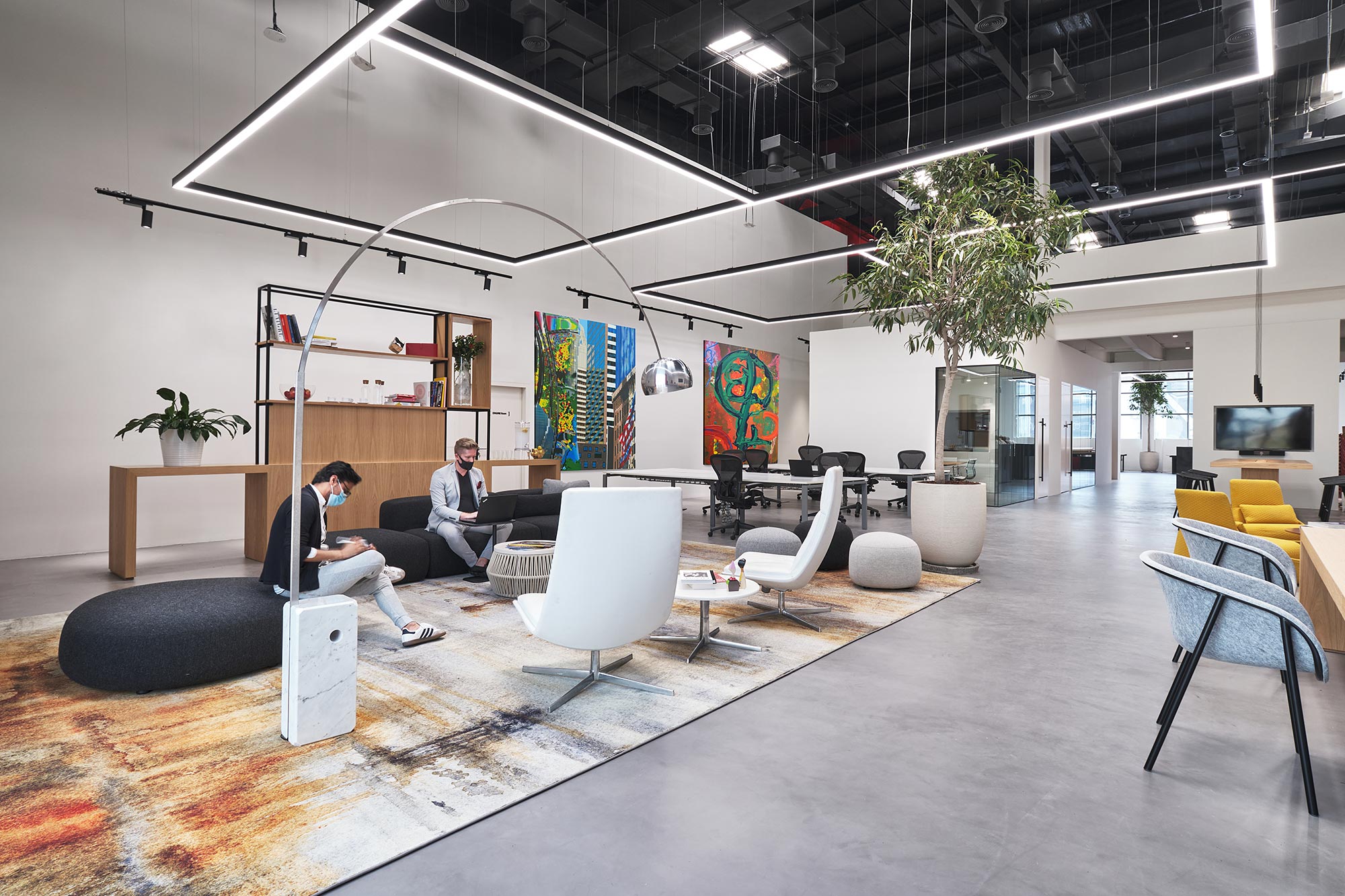
The rise of hybrid work models, where professionals alternate between working remotely and onsite has profoundly shifted how we view office spaces. Traditional cubicles and rigid layouts no longer cut it. Hybrid workspaces must balance collaboration, focus, wellness, and flexibility. This comprehensive guide explores the principles, design strategies, case studies, and practical recommendations for crafting modern offices that support hybrid work. Whether you’re an office manager, interior designer, HR leader, or business decision-maker, this post provides actionable insights to reimagine your workplace for the future.
1. The Hybrid Work Revolution
1.1 Defining Hybrid Work
Hybrid work refers to a flexible model where employees split their time between remote and onsite environments. Post‑COVID-19, many organizations have adopted hybrid schedules typically 2–3 days in office per week, with remote connectivity the rest.
1.2 Why Hybrid Matters
- Employee demand: Surveys show that over 70% of employees prefer hybrid arrangements as they balance flexibility and in‑office collaboration.
- Business outcomes: Organizations offering hybrid options report higher employee satisfaction, retention, and recruiting success—some see up to a 25% increase in productivity.
- Office utilization: With only a portion of staff onsite at any one time, unused desks proliferate prompting reevaluation of space strategy.
2. User Needs in Hybrid Environments
To design effective hybrid workspaces, it’s critical to understand the diverse activities people perform:
- Deep Work Zone: Quiet, undisturbed areas for focused tasks. These can be phone-booth style pods or enclosed rooms.
- Collaboration Zone: Open, flexible spaces with tables, whiteboards, and dynamic seating for teamwork and brainstorming.
- Social & Hub Areas: Comfortable lounges, café zones, and communal amenities that foster casual interaction and connection.
- Meeting Rooms: Bookable rooms of varying sizes equipped for hybrid meetings with quality A/V tech.
- Wellness & Recharge Areas: Spaces for rest, phone calls, informal meetings, or stretching flexible to suit personal needs.
3. Core Design Principles
3.1 Flexibility and Adaptability
- Modular Furniture: Use mobile desks, tables, and partitions to adapt to shifting team sizes and layouts.
- Hot Desking: Encourage flexible desk usage; integrate a simple reservation system (e.g., an app or desk calendar).
- Multi‑Purpose Rooms: A meeting room with operable walls can double as event space or quiet zones depending on need.
3.2 Technology Integration
- Unified Communication Tools: Use platforms like Zoom, Teams, or Slack for seamless hybrid collaboration.
- Room Booking Systems: Install touch‑panel room displays and desk reservation tools with real‑time availability.
- AV Standards: Ensure meeting rooms include high‑quality cameras, speakers, mics, and lighting suitable for hybrid interaction.
- Wi‑Fi & Power: Reliable fast Wi‑Fi across spaces and abundant power outlets consider integrated in‑table or floor‑port solutions.
3.3 Human‑Centric & Wellness‑First Design
- Biophilic Elements: Add plants, natural materials, and daylight that enhance mood and productivity.
- Ergonomic Furniture: Offer adjustable chairs, sit‑stand desks, and monitor arms to support diverse body types and work styles.
- Acoustics: Include sound‑absorbing materials like acoustic panels, carpets, and ceiling baffles to reduce noise in open spaces.
3.4 Equity for All Workers
Hybrid design must ensure fairness:
- Inclusive Meeting Setups: Dual screens/cameras so remote attendees aren’t sidelined in meetings.
- Equal Amenities: Desks, amenities, and refreshments shouldn’t privilege in-office days support both remote and on-site staff.
- Clear Communication Norms: Establish guidelines so everyone remote or onsite feels seen and informed.
4. Spatial Layout Models
4.1 Zoning the Floor Plan
Divide the space into zones based on function and required interaction:
| Zone Type | Description |
|---|---|
| Entry & Reception | Welcomes visitors, houses locker systems, hygienic stations. |
| Focused Work Zone | Silent pods, private offices, library‑style areas with sound control. |
| Collaboration Zone | Moveable tables, writable walls, modular seating for group work. |
| Social & Café Zone | Lounge chairs, bar-height tables for informal chats, snacks, and coffee. |
| Meeting Suite | Multiple rooms with hybrid tech, sizes ranging from 2-person to boardroom setups. |
| Wellness & Quiet Rooms | Relaxing spaces for calls, reflection, or quick breaks. |
4.2 Transition Zones
Hallways and “collab corridors” can support spontaneous exchange foster creativity with writable surfaces or display local team updates.
4.3 Desk Allocation
Design a mix:
- 90% flexible/desk-hotel with available spots via booking.
- 10% assigned spaces for employees requiring permanent setups due to equipment or disability needs.
5. Furniture & Finishes Across Zones
5.1 Flexible Seating & Work Surfaces
- Stackable, movable chairs & tables.
- Height-adjustable desks for sit‑stand transitions.
- Bookable focus cabins with comfy acoustics.
5.2 Surfaces & Privacy
- Acoustic baffles and partitions to reduce sound.
- Break-out walls with writable whiteboard surfaces invites ideation.
- Blend open ceilings with integrated acoustic panels.
5.3 Finishes
- Natural woods, soft textiles, indoor greenery.
- Integrate plants and murals for a biophilic feel.
- Maintain visual layout clarity with consistent flooring and color zoning.
6. Meeting Rooms for Hybrid Collaboration
6.1 Tech-Equipped Rooms
- High-resolution cameras with wide-angle views.
- Conference-quality microphones and speaker systems.
- Dual screens—one for remote participants, one for shared content.
- In-room microphones and optional beamformer arrays to pick up remote voices clearly.
6.2 Variety in Size & Style
- Touchdown Rooms: For quick 1-on-1 hybrid check-ins.
- Team Rooms: Boardroom style for groups of 6–8.
- Huddle Pods: Semi-private pods integrated into open zones for collaboration.
- AV Standards: VTC (video teleconferencing) integration, screen-sharing, and booking panels.
7. Technology & Infrastructure
7.1 Network & Power
- Enterprise-grade Wi‑Fi with coverage map and density planning.
- Shared plug-in tables, floor boxes, and USB chargers embedded in furniture.
7.2 Analytics & Optimization
- Desk- & room‑sensors track utilization.
- Utilize insights to design more accurately and reduce real-estate costs.
7.3 Digital Wayfinding & Booking
- Mobile app for booking desks, rooms, and amenities.
- Room displays at entrances updating schedule in real time.
8. Culture, Policy & Behavior
Design alone won’t shift hybrid success—company culture and policy must align:
8.1 Book-in, Don’t Just Show-in
Encourage pre‑booking of desks & rooms. This avoids crowding and ensures equity.
8.2 “Camera‑On” Norms
For hybrid meetings, create guidelines that encourage cameras helps connection and engagement.
8.3 Collaboration Protocols
Balance remote and onsite voices. Consider hybrid etiquette: call a remote colleague if nearby conversation relates to them, summarize, rotate onsite facilitator roles, etc.
8.4 Support & Training
Desk‑booking tutorials, AV equipment training, and BCD (best-use facility design) guides help employees make the most of spaces.
9. Environmental & Wellness Considerations
9.1 Healthy Building Certifications
Prioritize certifications like WELL, BREEAM, or LEED. They emphasize:
- Air quality & daylight
- Thermal comfort
- Water access & movement-ready spaces
9.2 Active Design
Include treadmill desks, sit-stand workstations, central staircases to encourage movement.
9.3 Mental Health Spaces
Quiet rooms with soft lighting, noise masking, and shelters from stimulation.
10. Cost, ROI & Real‑Estate Impact
10.1 Reduced Real-Estate Footprint
Hybrid models typically allow 20–30% reduction in office square footage. Reserve higher value for shared, collaborative, and wellness spaces.
10.2 Utilization Analytics
Don’t guess—use real-time utilization data to forecast real estate adjustments or resources needed.
10.3 Productivity & Retention
Studies show hybrid‑friendly offices:
- Increase employee retention by ~30%
- Improve recruiting power—prime in competitive job markets
11. Case Studies & Examples
11.1 Global Tech Firm – Reducing HQ Footprint
A multinational reduced desk count 25%, added 20% more phone booths, and opened collaboration cafes. Employee engagement rose 10% and space savings offset renovation in under 2 years.
11.2 Financial Services Regional Hub
Converted typical office floors to zoning maps, boosted shared amenities, used sensors to reduce facility staff expenses by 15%, and saw hybrid meeting satisfaction rise 40%.
11.3 Startup Incubator
Blended open hot-desking with 50% small team “garage” rooms. Entrepreneurs get flexibility with brand identity reinforced in their permanent pods.
12. Designing for Different Scenarios
12.1 Small Offices (50–100 People)
- Hybrid desk ratio: 6:1
- Two focus pods, one café lounge, multi‑size hybrid rooms
12.2 Mid‑Sized Firms (100–500 Employees)
- Mixed workspace towers with dedicated neighborhoods
- Flexible booking of whole neighborhoods for department‑wide collaboration
12.3 Large Enterprise Campuses
- Divided by function or team; offer neighborhood bookable zones
- Include town‑square cafes, parent rooms, wellness clinics, fitness amenities
13. Roll-Out and Change Management
13.1 Stakeholder Engagement
Use surveys, focus groups, and interviews to inform planning. Pilot zones before the main rollout.
13.2 Testing & Pilots
Start small—outfit one floor with hybrid design. Gather feedback on flow, noise, comfort, tech.
13.3 Phased Roll‑Out
Scale based on learning. Continue analytics, surveys, and refine.
13.4 Ongoing Support
Facility and IT staff trained to resolve AV, booking, or ergonomic concerns. Provide tech help desks.
14. Common Pitfalls & Solutions
| Challenge | Solution |
|---|---|
| Misaligned expectations | Run discovery sessions; use overshare documentation |
| Low utilization of space | Monitor usage and adapt desk/room quantities |
| Tech failures | Standardize AV setups and provide spares |
| Focus vs. collaboration conflict | Use acoustic zones and policy guidelines |
| Resistance to change | Communicate benefits and run experiential tours |
| Inequity between workers | Ensure policies support both remote and onsite employees equally |
15. Measuring Success
Key metrics to track post-implementation:
- Space Utilization Rates: target 60–80% daytime occupancy
- Booking Efficiency: Are desks & rooms used as intended?
- Employee Experience: Surveys around satisfaction, perceived fairness.
- Wellness Outcomes: Track usage of quiet & recharge zones, self-reported stress levels.
- Business Impact: Recruitment, retention, productivity, and cost per square foot improvements.
16. Looking Ahead: The Future of Hybrid Workspaces
16.1 Smart Spaces
IoT sensors for personalized lighting, temperature, seat allocation, and productivity suggestions.
16.2 AI‑Powered Resource Management
Predictive analytics to automatically release unused bookings and anticipate space requirements.
16.3 Community‑Focused Spaces
The rise of coworking‑style hubs open to multiple companies, offering multi‑tenant flexibility.
16.4 Meaningful Human‑Centered Design
Spaces that reflect the company’s purpose, culture, and employee values rather than sterile interiors.
Conclusion
Designing for hybrid work is less about gadgets and more about humanity. It’s the intersection of robust technology, flexibility, wellbeing, and fairness. By zoning effectively, incorporating adaptable furniture, investing in hybrid‑ready meeting experiences, training users, and committing to data‑driven iterative improvements, you’ll create a workplace that empowers every individual whether remote or onsite to do their best work.
Hybrid office design isn’t a one-off project; it’s an ongoing journey that adapts with your team. With thoughtful, user‑centred design and the right mix of space, policy, culture, and tech you can build an office that isn’t just a place people go but a place people want to be.
Next Steps
- Stakeholder Alignment: Survey employees; identify pain points.
- Pilot Program: Choose a zone to experiment with modular furniture, hybrid AV setups, and booking tools.
- Gather Feedback & Analytics: Use room/desk sensors and surveys to refine designs.
- Scale Thoughtfully: Apply lessons learned when rolling out across the organization.
Needs help visualizing designs, selecting furniture brands, or choosing AV systems? I’m happy to recommend vendors, share floorplan templates, or walk through booking app implementation just say the word.










Comments