
 By
By 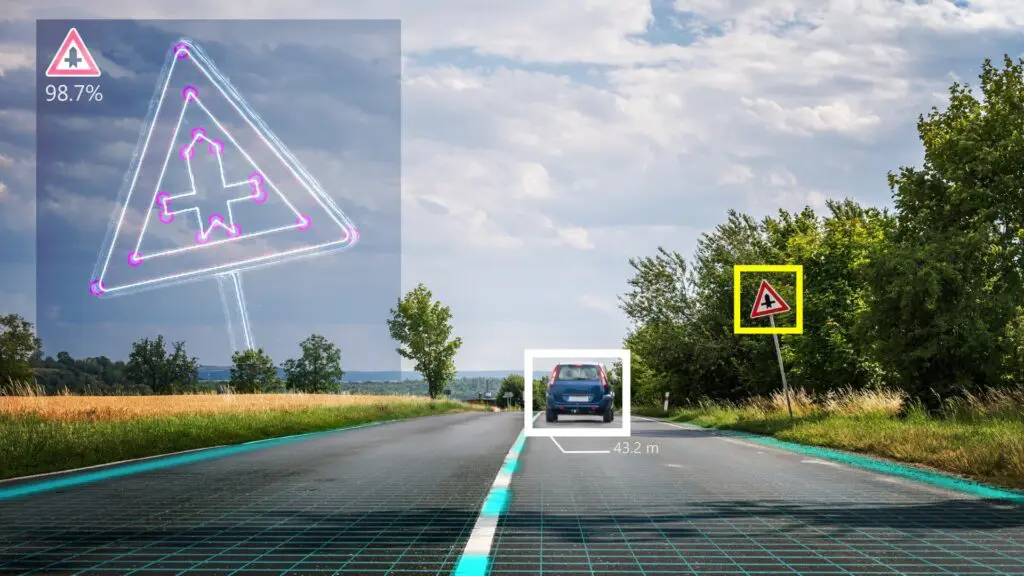
Computer Vision (CV) revolutionizes industries such as manufacturing (quality control, robotics), healthcare (diagnostics, surgery assistance), retail (inventory, checkout automation), agriculture (crop monitoring, precision farming), and security (facial recognition, surveillance) by allowing machines to “see” and interpret visual data for automation, efficiency, and safety, lowering errors and costs across the board.
Computer vision is a new technology that enables robots to observe, analyze, and interpret their surroundings in the same way that people do. Computers can use artificial intelligence (AI) and machine learning to evaluate photos, videos, and visual data in order to make judgments or actions.
From medical diagnostics to industrial automation, computer vision is altering industries and enhancing people’s daily lives.
Did you know that the global computer vision market is estimated to reach over $41 billion by 2030? This rapid rise is fueled by a diverse set of applications, including facial recognition, object identification, and automated quality control in manufacturing.
Computer vision is changing the way we interact with technology, whether it’s helping doctors identify diseases faster or allowing retailers to provide personalized shopping experiences.
In this article, we’ll look at what computer vision is, which industries it’s transforming, and some of the most fascinating application cases that are altering the world.
What Is Computer Vision?
Computer vision is a branch of artificial intelligence (AI) that allows machines to interpret, analyze, and comprehend visual information from their surroundings, similar to how humans use their eyes and brains to process images.
Computer vision systems can recognize patterns, detect objects, and even make judgments based on visual data by combining machine learning and deep learning algorithms.
At its heart, computer vision relies on algorithms to process and analyze images or movies. These algorithms can recognize objects, categorize photos, follow movements, and extract useful information from visual inputs.
For example, it can help a self-driving car “see” and traverse roadways, as well as doctors diagnose ailments using medical scans.
Human Vision vs. Computer Vision
Human vision and computer vision are both ways of understanding the world, but they work very differently. Humans rely on their eyes and brains to process visual information.
Our eyes capture light, and our brain interprets it, helping us recognize objects, colors, and movements instantly. For example, when you see a dog, your brain quickly identifies it based on past experiences and knowledge.
On the other hand, computer vision uses cameras, sensors, and algorithms to mimic human vision. Instead of a brain, computers use artificial intelligence (AI) and machine learning models to analyze images or videos.
For instance, a computer vision system can detect a dog in a photo by analyzing patterns and features it has learned from thousands of dog images.
While human vision is incredibly fast and adaptable, computer vision excels in tasks that require precision, speed, and the ability to process large amounts of data.
For example, computers can analyze thousands of medical images in seconds to detect diseases, something that would take humans much longer.
However, human vision is still better at understanding complex scenes, emotions, and contexts. Computers are improving, but they often struggle with tasks that humans find easy, like recognizing objects in poor lighting or understanding abstract art.
Here’s a clear comparison between Human Vision and Computer Vision:
| Aspect | Human Vision | Computer Vision |
| How it Works | Uses the eyes to capture light and the brain to process and interpret visual information. | Uses cameras, sensors, and algorithms (AI/ML) to analyze and interpret images or videos. |
| Speed | Extremely fast for recognizing familiar objects and scenes. | It can process and analyze thousands of images or videos in seconds, often faster than humans. |
| Accuracy | Highly accurate in recognizing objects, emotions, and context. | Highly accurate for specific tasks (e.g., detecting defects in manufacturing) but can struggle with complex or ambiguous scenes. |
| Adaptability | Can easily adapt to new environments, lighting conditions, and unfamiliar objects. | Requires training on large datasets to adapt to new scenarios; struggles with unexpected changes. |
| Learning | Learns through experience and context over time. | Learns from labeled datasets and improves through machine learning models and algorithms. |
| Strengths | Excellent at understanding emotions, abstract concepts, and complex scenes. | Excelled at repetitive tasks, analyzing large datasets, and working in environments unsafe for humans. |
| Weaknesses | It can be affected by fatigue, emotions, or biases. | Struggles with poor lighting, low-quality images, or tasks requiring human-like intuition. |
| Applications | Used in everyday life for navigation, communication, and decision-making. | Used in industries like healthcare (medical imaging), retail (facial recognition), and autonomous vehicles (object detection). |
| Energy Efficiency | Requires minimal energy (biological process). | Requires significant computational power and energy, especially for complex tasks. |
How does Computer Vision Work?
Computer Vision combines cameras, sensors, and artificial intelligence (AI) to assist machines in comprehending visual information. It use algorithms to examine photos or movies, recognize patterns, and make choices.
It can recognize faces, detect objects, and even read text. This technology is based on machine learning (ML), which allows computers to learn from enormous datasets and improve their accuracy over time. From industrial robots to medical imaging, computer vision alters how machines perceive and interact with their surroundings.
Let’s explore how it works step by step:
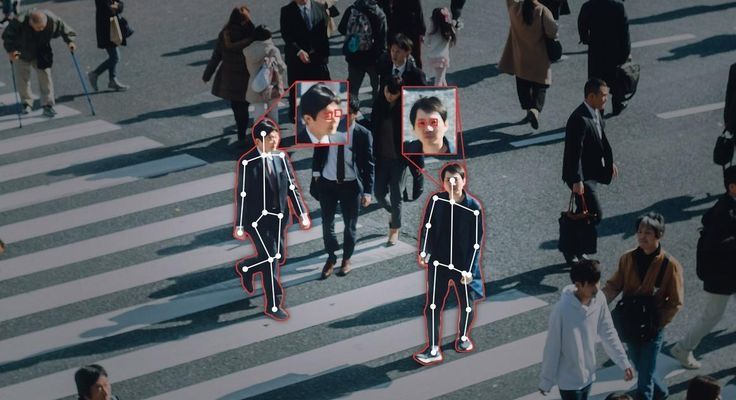
- Image Acquisition and Preprocessing
The first step in any computer vision system is image acquisition, where visual data is captured using cameras, sensors, or other imaging devices. These raw images or video frames often contain noise, distortions, or inconsistencies that can affect analysis.
To address this, the images undergo pre-processing, a critical stage where techniques like noise reduction, brightness adjustment, and contrast enhancement are applied. Preprocessing ensures that the visual data is clean, standardized, and ready for further analysis.
- Feature Extraction and Analysis
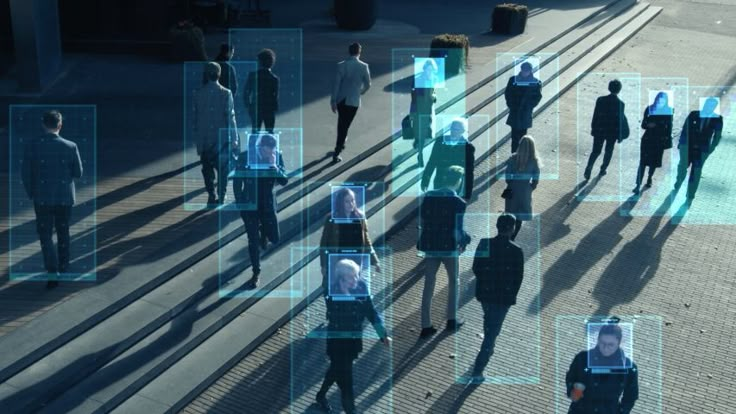
Once the images are preprocessed, the next step is feature extraction. This involves identifying and isolating key features within the image, such as edges, textures, shapes, and colors.
Techniques like edge detection, histogram analysis, and contour mapping are used to highlight these features. Feature extraction is crucial because it simplifies the image data, making it easier for algorithms to recognize patterns and objects.
For example, in facial recognition, features like the distance between the eyes or the shape of the jawline are extracted to identify individuals.
- Machine Learning and Deep Learning in Computer Vision
Traditional image processing techniques were limited in accuracy. With the rise of AI, machine learning and deep learning algorithms now power modern computer vision systems.
Read Also: Natural Language Processing in Global Enterprises
Neural networks, particularly Convolutional Neural Networks (CNNs), enable deep learning models to identify objects, faces, and actions with high precision.
- Image Segmentation
Image segmentation is the process of breaking down an image into smaller sections to make it easier to analyze. Instead of treating an image as a whole, a computer separates it into different regions based on color, texture, or boundaries.
Example: Imagine a photo of a landscape with trees, mountains, and a river. Image segmentation helps identify each element separately—one part for trees, another for mountains, and another for water.
- Object Detection
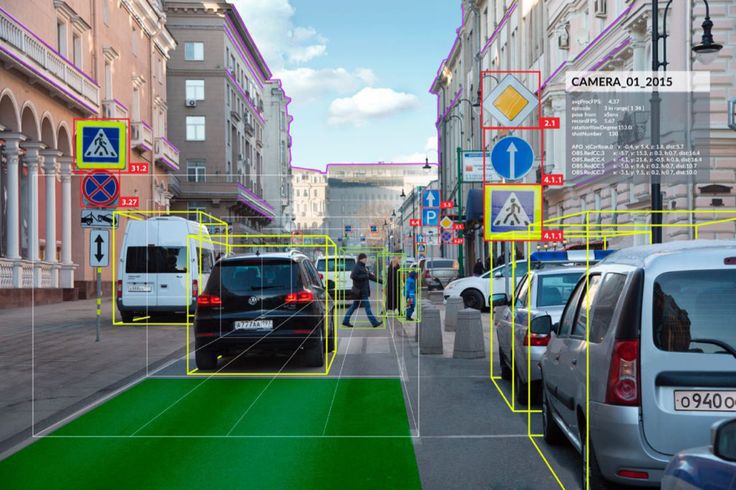
Object detection goes beyond segmentation by not only identifying different parts of an image but also recognizing specific objects. It helps a computer locate and classify objects such as people, cars, animals, or everyday items.
Example: When you upload a photo on social media, AI can detect faces and suggest tags for friends. Similarly, self-driving cars use object detection to recognize traffic lights, pedestrians, and other vehicles.
- Facial Recognition
Facial recognition is a specialized type of object detection that focuses on identifying human faces. It analyzes facial features like eyes, nose, and mouth, then compares them with a database to recognize individuals.
Example: When you unlock your smartphone using face unlock, the system scans and matches your facial features with the stored data.
- Optical Character Recognition (OCR)
OCR is a technology that allows computers to read and extract text from images, scanned documents, or handwritten notes. It converts printed or handwritten text into digital text that can be edited or searched.
Example: If you take a picture of a book page, OCR can recognize the words and turn them into editable text. This is useful for digitizing documents, reading license plates, and translating text from images.
Computer Vision Use Cases Across Industries
Scientists have applied computer vision to a variety of areas, including health care, e-commerce, public safety, and city planning. Discover some practical computer vision applications.
1. Computer vision applications in daily life
You may already have more experience with computer vision than you realize. Some of the uses for computer vision in your day-to-day life include:
- Converting physical documents to digital files: You can use computer vision to scan a piece of paper and create a digital file such as a PDF.
- Unlocking your smartphone: If your phone has a face lock, it uses computer vision to recognize your face and allow you to access the rest of the phone.
- Automatic translation: Using Google Translate, you can point your smartphone camera at nearly any type of writing you encounter in the real world and automatically receive a translation.
2. Self-driving vehicles
Self-driving vehicles—a hotly anticipated advancement in artificial intelligence—require computer vision to accomplish many different aspects of driving. Some of the ways self-driving vehicles use computer vision include:
- Obstacle avoidance: Computer vision enables self-driving cars to see and respond to obstacles. One recent study proposed taking inspiration from insects to improve obstacle avoidance in dark or complex environments [1]. Locusts and other insects have a special neuron in their visual system that rapidly responds when objects are approaching, allowing them to change course quickly and avoid the object reflexively. Using this neuron as inspiration, AI scientists are developing similar artificial intelligence for self-driving cars.
- Predicting driver behavior: Computer vision technology can be paired with AI models that recognize unsafe traffic situations and predict driving behavior, which can help reduce the risk of accidents.
3. Health care and pharmaceuticals
In health care, computer vision can help medical professionals work faster and more efficiently with increased accuracy. Some of the ways that doctors and other health care professionals use computer vision include:
- Medicine delivery: As a doctor, nurse, or pharmacist, you might use computer vision to scan a medication label to confirm you are giving the correct dose to the correct patient, reducing the likelihood of human error.
- Medical imaging: In areas of health care like radiology, pathology, and dermatology, computer vision can help you analyze medical images for faster and more accurate diagnostics.
- Blood loss measurement: Computer vision can help you accurately measure blood loss during medical procedures, improving patient care and reducing the time you spend measuring this data manually.
4. Manufacturing
Computer vision streamlines manufacturing processes, enhances quality control, and improves safety protocols. Some of the applications for computer vision in manufacturing include:
- Defect inspection: You can use computer vision systems to inspect products on assembly lines for defects or irregularities, ensuring quality control and reducing human error.
- Safety compliance monitoring: Computer vision can help you monitor safety protocol compliance by detecting workers who need to take proper safety precautions.
5. Agriculture
Farmers and other agricultural professionals can use computer vision to provide insight into the factors that impact their work, such as the health of their crops or livestock. Some uses for computer vision in agriculture include:
- Monitoring the health of livestock or crops: You can use computer vision to monitor the health of your crops, using drone images to assess potential threats like insects or diseases.
- Better decision-making: Using computer vision might provide you with better data to decide the best harvest time or post-harvest storage and retail needs.
6. Entertainment
Computer vision is helping professionals in the entertainment industry create new forms of content and experiences that aren’t possible without this technology. Examples of computer vision applications in entertainment include:
- Sports analysis: You might use computer vision technology to analyze sports footage, provide insights into player performance or game strategy, and even generate automated highlights for fans.
- Event safety: As aprofessional in charge of providing public safety and security at sporting events or stadium concerts you can use computer vision to monitor the crowd for potential disruptions and to monitor traffic flow.
7. Public safety and security
Both public safety officers and private citizens might also benefit from how computer vision helps strengthen public safety and security. Examples of public safety uses of computer vision include:
- Identifying threats: Computer vision can identify potential threats, such as the faces of dangerous individuals, to give public safety officers the information they need to respond proactively to threats.
- Search and rescue: Search and rescue professionals can use robot vision to look for survivors after a natural disaster or other event that changes the landscape in unpredictable ways.
8. City planning
Computer vision can also aid urban planners and other city officials. Explore the following computer vision use cases:
- Sewer maintenance: Computer vision might help you monitor sewers for leaks and other faulty equipment.
- Collecting data: As a city planner you can use street-view images as a non-invasive way to gather data about your community.
- Increase public participation: Computer vision can help communities foster more public participation in projects and proposals. For example, you might use virtual reality to engage with the community.
9. Retail and e-commerce
Computer vision can enhance e-commerce experiences and make shopping easier and more intuitive for consumers. Examples of computer vision uses in retail and e-commerce include:
- Automated checkout: Computer vision could power automated shopping carts that allow you to add items to a cart while cameras or other sensors automatically track how much you’ll owe. Retailers can then charge the card on file for the items you leave the store with.
- Inventory management: In the retail industry, you might use computer vision to track the items on your store’s shelves or to monitor customer behavior to optimize merchandising and operational efficiency.
Best Computer Vision AI Deep Learning Models Today
Here are five real-world examples of computer vision that show how this AI-powered technology is changing industries:
- Google Translate
Google Translate is a widely used, free, multilingual machine translation service developed by Google. It translates text, speech, images, and even real-time video from one language to another.
Launched in 2006, it has become one of the most popular translation tools globally, supporting over 100 languages.
How Google Translate Works:
Google Translate uses advanced machine learning and neural machine translation (NMT) technology. Instead of translating word by word, it analyzes entire sentences or phrases to provide more contextually accurate translations.
The system is trained on vast amounts of multilingual text data, improving its accuracy over time and even works offline, making it a game-changer for travelers and businesses.
Google also uses computer vision in its Lens service, helping users explore the world around them with visual search and translation.
Limitations:
- Accuracy: While Google Translate is highly advanced, it may struggle with complex sentences, idiomatic expressions, or languages with limited data.
- Cultural Nuances: It may not always capture cultural or regional nuances in language.
- Formal vs. Informal Tone: Translations may not always distinguish between formal and informal contexts.
- Facebook 3D Photo
Facebook 3D Photo is a feature introduced by Facebook that allows users to create and share photos with a three-dimensional effect. This feature adds depth to standard 2D images, making them appear more immersive and interactive when viewed on compatible devices.
How Facebook 3D Photo Works:
Depth Information:
- 3D Photos rely on depth information captured by dual-camera smartphones (e.g., iPhones with Portrait Mode) or generated using AI for single-camera devices.
- The depth map separates the foreground (e.g., a person) from the background, creating a sense of depth.
Parallax Effect:
When users tilt their phone or scroll past a photo on Facebook, the foreground and background move at different speeds, creating a 3D-like parallax effect.
AI and Machine Learning:
For devices without dual cameras, Facebook uses AI to estimate depth and generate a 3D effect from regular 2D photos.
Key Features of Facebook 3D Photos:
- Immersive Experience: Adds depth and interactivity to standard photos.
- Easy to Create: Works seamlessly with Portrait Mode photos or AI-generated depth maps.
- Compatibility: Available on most modern smartphones and Facebook platforms.
- Engagement: 3D Photos tend to stand out in the news feed, increasing user engagement.
- YOLO (You Only Look Once)
YOLO (You Only Look Once) is a state-of-the-art, real-time object detection system that has revolutionized the field of computer vision. Unlike traditional object detection methods that require multiple passes over an image, YOLO processes the entire image in a single forward pass through a neural network, making it extremely fast and efficient.
One practical use of YOLO was during the COVID-19 pandemic:
- It tracked people in public spaces to ensure social distancing.
- The system used bounding boxes to monitor movements and calculate distances between people.
- If someone got too close, the system flagged it, helping authorities enforce safety rules.
YOLO’s ability to learn and adapt quickly makes it a powerful tool for real-time object detection.
- FaceApp
FaceApp is a popular mobile application that uses artificial intelligence (AI) to apply various filters and transformations to photos, particularly focusing on faces. It was developed by Wireless Lab, a Russian company, and gained widespread attention for its ability to realistically alter facial features, age, gender, and expressions.
Key Features of FaceApp:
- Age Transformation: Users can see how they might look older or younger.
- Gender Swap: The app can change a person’s appearance to the opposite gender.
- Facial Expressions: It can modify expressions, such as adding a smile or making someone look more serious.
- Hairstyle and Color: Users can experiment with different hairstyles and hair colors.
How It Works:
FaceApp uses deep learning algorithms, particularly neural networks, to analyze and manipulate facial features in photos. The AI can generate highly realistic results, making it one of the most advanced photo-editing apps in its category.
- SentioScope
SentioScope is a tool or platform designed for sentiment analysis and emotion detection in text data. It leverages natural language processing (NLP) and machine learning techniques to analyze and interpret the emotional tone, opinions, and attitudes expressed in written content.
SentioScope is commonly used in areas like market research, customer feedback analysis, social media monitoring, and brand reputation management.
Key Features of SentioScope:
- Sentiment Analysis: Classifies text as positive, negative, or neutral based on the tone and context. Provides a sentiment score to quantify the intensity of the emotion.
- Emotion Detection: Identifies specific emotions such as joy, anger, sadness, fear, and surprise. Goes beyond simple sentiment to provide deeper insights into emotional states.
- Real-Time Analysis: Processes data in real time, making it ideal for monitoring live social media feeds, customer reviews, or chat interactions.
- Trend Analysis: Tracks sentiment trends over time, helping businesses identify shifts in public opinion or customer satisfaction.
- Data Source Integration: Works with multiple data sources, including social media platforms, review sites, surveys, and customer support logs.
Future of Computer Vision
The future of computer vision looks extremely promising, with advances in AI, deep learning, and Edge AI pushing the limits of what machines can accomplish. From real-time object identification to improved healthcare diagnostics, this technology is poised to transform industries and everyday lives.
- Real-Time Video Analytics: AI-powered cameras will provide real-time monitoring and predictive analytics in industries such as security, healthcare, and retail.
- Integration with Augmented Reality (AR) and Virtual Reality (VR): Future applications will combine AR/VR with computer vision for immersive experiences in gaming, shopping, and education.
- 5G and IoT-Powered Vision Systems: Faster connectivity will enable real-time AI vision processing on IoT devices, enhancing smart city infrastructure.
- AI-Driven Healthcare Innovations: Computer vision will improve diagnostics, robotic surgeries, and telemedicine capabilities.
- More Ethical and Explainable AI: Researchers are working on reducing bias in AI models and improving transparency in decision-making.
Conclusion
Computer vision is a new technique that allows machines to precisely and accurately interpret visual data. It has numerous and disruptive uses, ranging from healthcare and retail to automotive, security, and app development.
With significant advances in AI and deep learning, computer vision will continue to improve, enabling industry-wide innovation. However, issues like as data privacy, prejudice, and security risks must be addressed in order to ensure ethical and responsible use.
As we transition to an AI-powered future, computer vision will play an important part in defining smart cities, automated workplaces, and intelligent healthcare systems, as well as improving mobile app development.










Comments