
 By

How do you build a mega income stream with Make.com and Zapier? The answer is simple, sell corporate clients a managed automation service: identify an expensive workflow, implement a reliable solution, and charge for maintenance, monitoring, and improvements. Clients buy operational results, not a collection of connected apps.
Can the operations become self-sustaining? Routine work can run automatically, but dependable systems still need ownership, exception handling, and periodic review. “Self-sustaining” should mean fewer manual interventions—not nobody checking whether the business process still works.
The opportunity is to build workflows that keep delivering value after launch. Your income grows when customers trust the service enough to renew, expand, and recommend it.
Why Are Corporate Clients Investing in Automation?
Corporate teams need reliable coordination across departments and software systems. Repeated data entry, delayed approvals, and disconnected records consume staff time and frustrate customers.
Recent U.S. Census Bureau analysis illustrates the wider technology shift. Its May 2026 report found:
| U.S. business group | Reported AI usage | Period |
|---|---|---|
| Businesses overall | 17%–20% | December 2025–May 2026 |
| Firms with at least 250 employees | 37% | The report’s reviewed period |
| Firms with 100–249 employees | 32% | Period ending May 3, 2026 |
These are AI adoption statistics, not Make or Zapier market shares. Automation can create value without AI, especially when tasks follow stable rules.
The practical opportunity is to connect existing systems and improve a measurable process. Start with a department willing to share its current workflow and establish a baseline.
What Do Real U.S. Examples Show?
Published customer stories show gains from integration, routing, and faster execution. They provide useful examples, although vendor-reported results are not earnings guarantees.
FranklinCovey and Make
Make’s September 2025 case study describes FranklinCovey, headquartered in Salt Lake City, replacing a legacy integration system. The company removed a $60,000 annual software expense and reduced certain HR workflows from 30 days to two hours.
Its CIO, Blaine Carter, explained:
“Not only did we need an integration platform, we needed an automation platform to go with it. With Make, we got both.”
Erewhon and Zapier
Zapier’s customer story describes a Los Angeles retailer connecting customer support, AI, institutional knowledge, and customer information. It reports 1,500 labour hours saved annually, about $40,000 in equivalent labour costs, and 70% of AI-drafted responses sent without human modification.
That last figure does not mean unsupervised sending. The story says drafts go to customer service staff. The lesson is to improve the handoff while preserving accountability.
Step 1: Which Corporate Workflow Should You Sell?
Choose a frequent, costly process with clear inputs and an identifiable owner. Avoid starting with an entire department overhaul.
| Corporate function | Workflow to explore | Success measure |
|---|---|---|
| Sales operations | Route enquiries and update customer records | Response time and assignment accuracy |
| Finance | Collect invoices and prepare approval requests | Processing time and exception rate |
| Human resources | Coordinate approved onboarding tasks | Completion time and missing steps |
| Customer support | Classify tickets and prepare replies | Handling time and reviewed response quality |
These are illustrative offers, not reported outcomes. Interview the process owner, finance sponsor, and IT representative before proposing implementation.
Ask where work stalls, which records are authoritative, and what happens when information is missing. Fixing a poorly understood process automatically can spread its mistakes faster.
Step 2: How Do You Choose Between Make and Zapier?
Choose through a proof of concept using the client’s actual applications and controls. Both can support corporate workflows; connector availability, data handling, and recovery requirements should guide the decision.
Make’s Enterprise offering includes single sign-on, audit logs, and domain controls. Zapier’s documentation, updated October 5, 2026, lists audit logs for Team and Enterprise plans, with real-time log streams reserved for Enterprise.
Compare these practical requirements:
- Can the integration perform the exact action required?
- How are branching, transformations, and large batches handled?
- Can authorised staff inspect failures and recover safely?
- Which plan provides the required access controls?
- What will realistic volumes cost, including AI usage?
Do not split one workflow across both platforms without a clear reason. Extra handoffs can make support and troubleshooting harder.
Step 3: How Do You Build a Self-Sustaining Workflow?
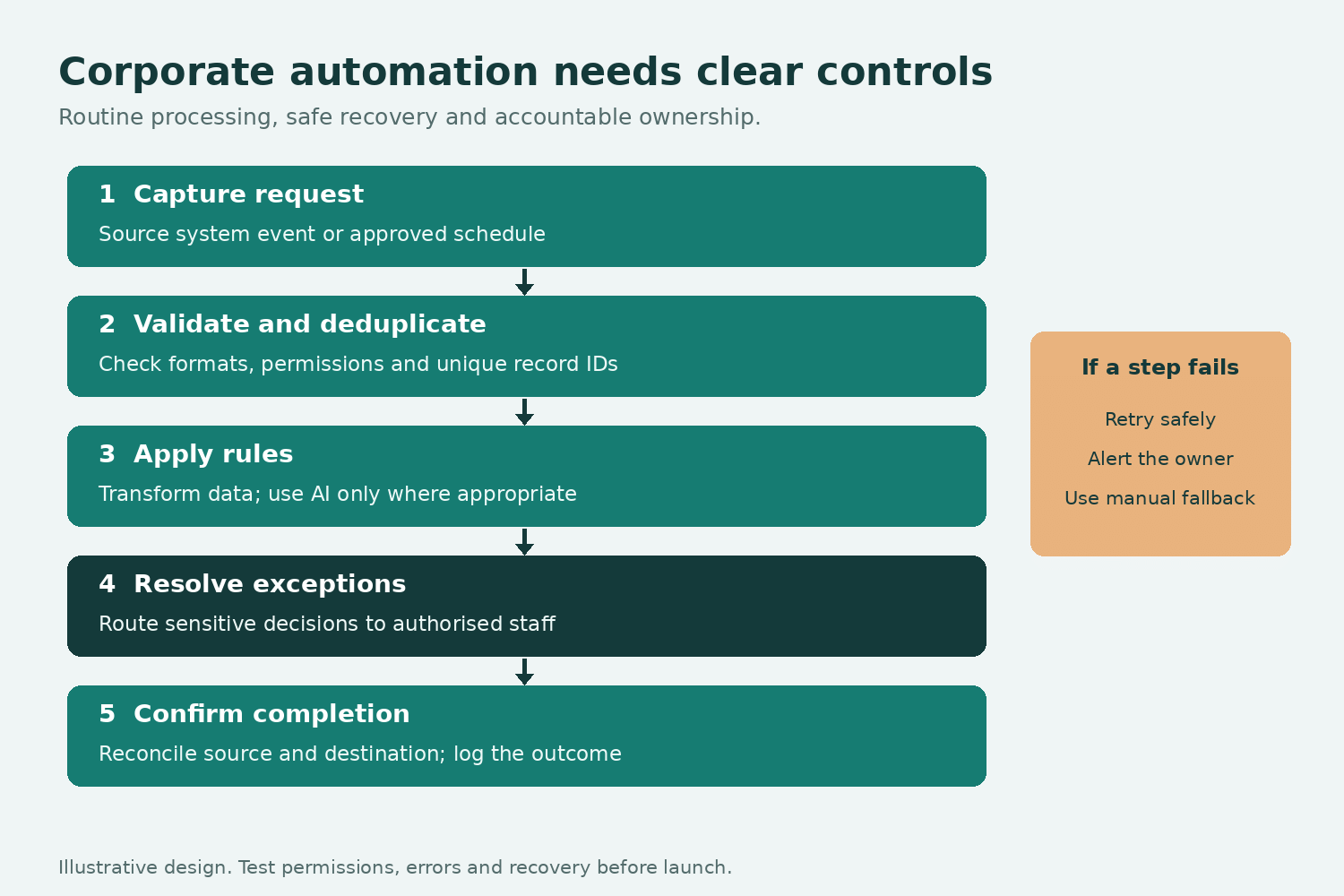
Design the operating rules before connecting applications. A dependable workflow needs more than a successful test run.
Include these foundations:
- A clear trigger: Define what starts the process and how often it runs.
- Validated inputs: Check required fields, formats, and permissions.
- Duplicate protection: Use a unique record identifier before creating another invoice or ticket.
- Approval boundaries: Require human decisions for sensitive actions.
- Recovery paths: Route failures to a queue with a named owner.
- Completion checks: Confirm the intended record reached its destination.
For example, an invoice workflow might extract details, match a purchase order, and prepare an approval task. Payment remains with authorised finance staff.
Use AI for interpreting messy information or drafting content. Use explicit rules for calculations, permissions, and predictable routing.
Step 4: How Do You Keep Failures From Becoming Business Problems?
Build detection and recovery into the service from the start. Connections expire, software changes, and external systems become unavailable. Make supports storing incomplete executions, but this setting is disabled by default. Supported errors can be retried or resolved manually. Zapier offers autoreplay on Professional plans and above, with limitations.
Retries need duplicate protection. An interrupted request may have created a record even if its confirmation never arrived.
Monitor failed runs, unusual volume drops, queue age, and spending. Compare source records with destination records to catch silent omissions. Provide a documented manual fallback and test it with the client.
Ryan Gough, principal solutions architect at Smith.ai, told Zapier:
“It allows us to move fast, adapt fast, and keep our clients happy.”
That flexibility becomes valuable when someone is responsible for keeping the workflow dependable.
Step 5: How Do You Sell to Corporate Buyers?
Sell a bounded improvement with evidence and a clear implementation plan. Corporate buying often involves operations, IT, procurement, and finance—not just one enthusiastic manager.
Build a proposal covering the current problem, baseline, expected improvement, integrations, access requirements, delivery stages, and acceptance criteria.
Begin with a paid discovery or pilot. Demonstrate normal cases and failures using approved test data. Agree on how success will be measured before asking for a wider rollout.
If 200 monthly requests take ten minutes each, they consume 33 staff hours. Reducing handling to four minutes could release 20 hours of capacity. Treat that as an illustrative estimate until measured; saved capacity is not automatically reduced payroll.
Step 6: How Should You Price Corporate Automation?
Separate implementation from ongoing operational responsibility. Illustrative service offers could look like this:
| Service | Illustrative fee | Included work |
|---|---|---|
| Discovery and pilot | $1,500–$3,000 | Mapping, baseline, bounded prototype |
| Department implementation | $5,000–$15,000 | Integrations, testing, training, documentation |
| Managed operations | $1,000–$3,000 monthly | Monitoring, maintenance, reporting, defined changes |
These are proposed pricing examples, not industry averages. Actual fees depend on value, complexity, volume, support coverage, and procurement requirements.
Specify software ownership, usage allowances, response targets, change limits, and exit arrangements. Put client workflows in client-owned accounts wherever practical. Budget platform subscriptions separately from your professional services.
Step 7: How Do You Protect Margin and Build Recurring Revenue?
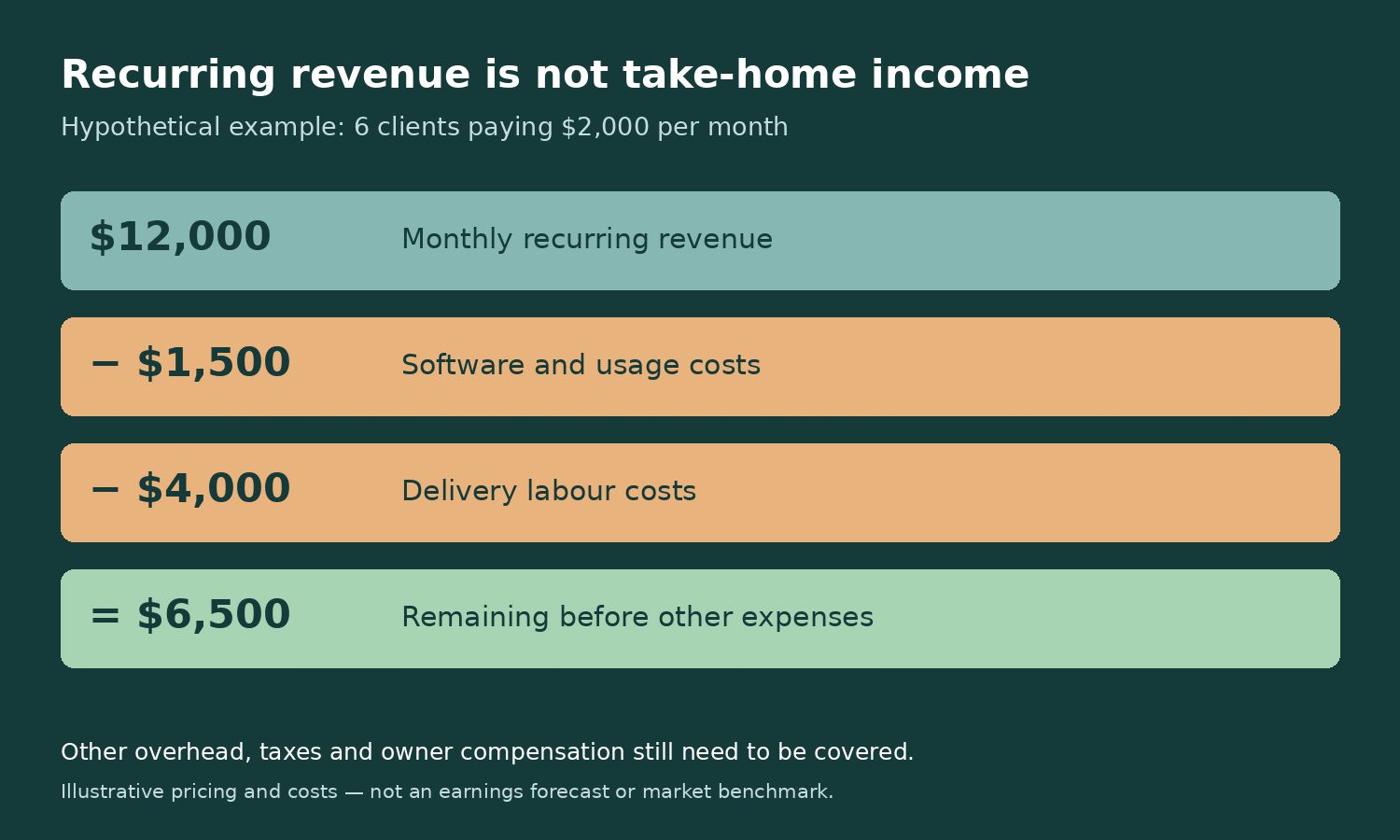
Standardise delivery and measure support costs alongside sales. A repeatable service is easier to sustain than unlimited custom work. Suppose six clients pay $2,000 monthly. That is $12,000 recurring revenue. If delivery labour costs $4,000 and software costs $1,500, $6,500 remains before other overhead, taxes, and owner compensation.
This is a hypothetical calculation, not a forecast. Setup fees are separate, and cancellations can quickly change the numbers. Track support hours per client, workflow reliability, direct costs, renewal dates, and customer concentration. Use templates, but keep each client’s data and access separate.
Expand through adjacent workflows only after the first process delivers verified value. A satisfied finance team may introduce you to sales operations; dependable results make that conversation easier.
Final Thoughts
Make.com and Zapier can support a substantial automation service when you combine useful workflows with monitoring, ownership, and measurable outcomes. Corporate clients need dependable operations, not promises of effortless automation.
Start with one process, prove the improvement, and price the responsibility honestly. A mega income stream follows recurring value—and the discipline to keep delivering it.
FAQs
1. Can corporate automation run without human involvement?
Routine steps can, but exceptions need ownership. Keep approvals, recovery, and oversight appropriate to the business risk.
2. Should I use Make and Zapier together?
Only when there is a clear benefit. Prefer the simplest architecture that meets integration, governance, and recovery requirements.
3. Is monthly automation revenue passive income?
Usually not. Retainers fund monitoring, maintenance, and support. Standardisation reduces effort but does not remove responsibility.
4. How many clients generate $20,000 monthly?
Ten clients at $2,000 each. That is revenue before expenses, not personal income, and assumes every client remains paying.
Source: Make.com and Zapier.com





Comments